


 Video Converter Ultimate
 Snimač zaslona
 Video popravak
Kako u konačnici ukloniti vodeni žig s videozapisa izvezenih u Renderforest
Renderforest je kompletan pakt izvrsnih animiranih predložaka za uvode, oglase, naslove, reklame ili slično. Možete početi od nule ili upotrijebiti predloške koji su dostupni ovdje. Iako niste stručnjak za video montažu, svejedno možete to prevladati korištenjem ove web platforme. Zbog njezine upotrebe i optimalne prednosti, mnogi su korisnici odabrali ovu platformu za stvaranje visokokvalitetnog, učinkovitog, kompatibilnog i pouzdanog dizajna ako iskoristite pretplatu.
Dakle, možete besplatno preuzeti video koji ovdje uredite ako se registrirate, ali s vodenim žigom. Vodenim žigom nastaje problem za mnoge od nas koji već izvozimo video ovdje i za one koji si ne mogu priuštiti pretplatu na ovaj alat. U nastavku ćemo navesti vodiče o tome kako ukloniti vodeni žig s Renderforesta koristeći najkorisnije alate koje smo prikupili tijekom našeg istraživanja. Možemo ih podijeliti s vama ako nastavite čitati sljedeći dio ovog članka.

Dio 1. 3 učinkovita načina za uklanjanje vodenog žiga iz Renderforest videa
FVC Video Converter Ultimate
FVC Video Converter Ultimate je izvanredan alat za uklanjanje vodenih žigova koji vam može pokazati kako ukloniti Renderforestov vodeni žig. Na ovaj se alat možete osloniti da bez muke ukloni vodeni žig s vašeg videa. Ako bismo ovaj vrhunski alat usporedili s drugima, on ima snagu ukloniti vodeni žig s vašeg videa uz podršku AI tehnologije. Ipak, to je najbolji alat za uklanjanje vodenog žiga u vašem videu, neovisno o formatu koji učitate. Što ovaj alat čini izvrsnim? Ne trebate biti stručnjak za tehnologiju da biste ga koristili; uz jednostavne upute i korake u nastavku možete ukloniti vodeni žig koji Renderforest dodaje videu.
Korak 1. Preuzmite softver na svoje računalo klikom na odgovarajuću tipku za preuzimanje. Kliknite datoteku za preuzimanje, instalirajte je i odaberite Start Now kako biste odmah pokrenuli softver.
Besplatno preuzimanjeZa Windows 7 ili novijiSigurno preuzimanje
Besplatno preuzimanjeZa MacOS 10.7 ili novijiSigurno preuzimanje
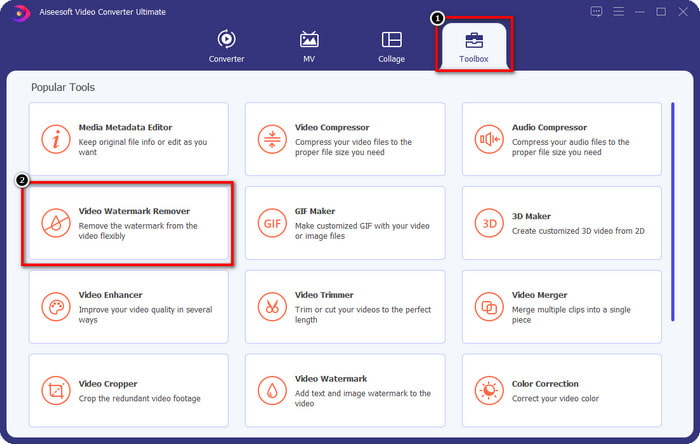
Korak 2. Nakon pokretanja softvera, otvorite Toolbox, a zatim kliknite Video Watermark Remover unutar njega.
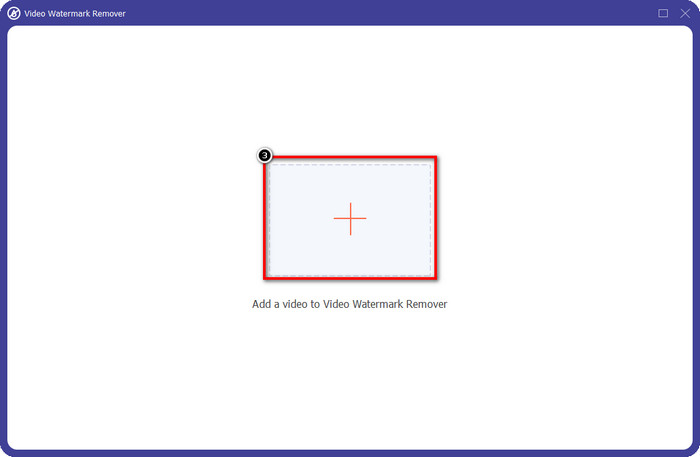
Korak 3. Kliknite ikonu + na zaslonu kako biste učitali Renderforest video koji ste izvezli s vodenim žigom.
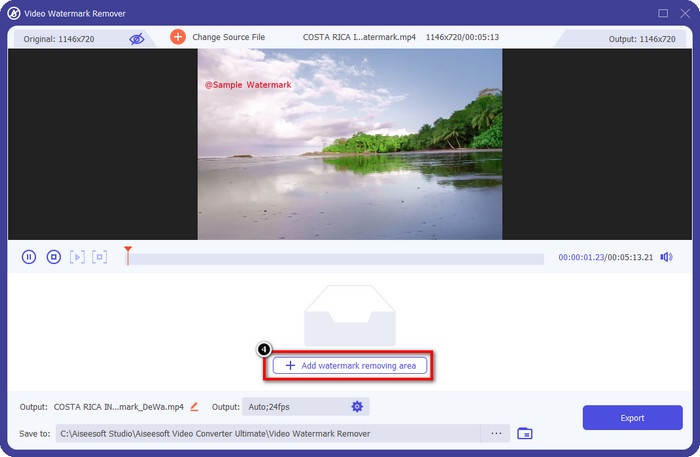
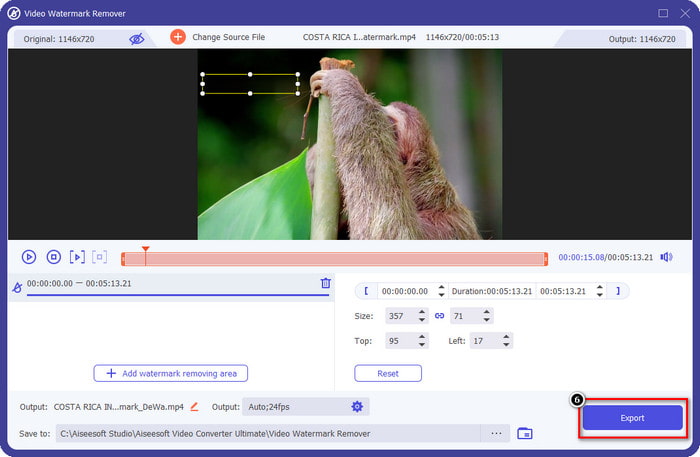
Korak 4. Pritisnite Add Removing Watermark Area kako biste započeli uklanjanje Renderforestovog vodenog žiga.
Korak 5. Na novom prozoru na zaslonu povucite okvir za odabir i prilagodite ga tako da pokrije vodeni žig. Po potrebi okvir za odabir možete slobodno prilagođavati.
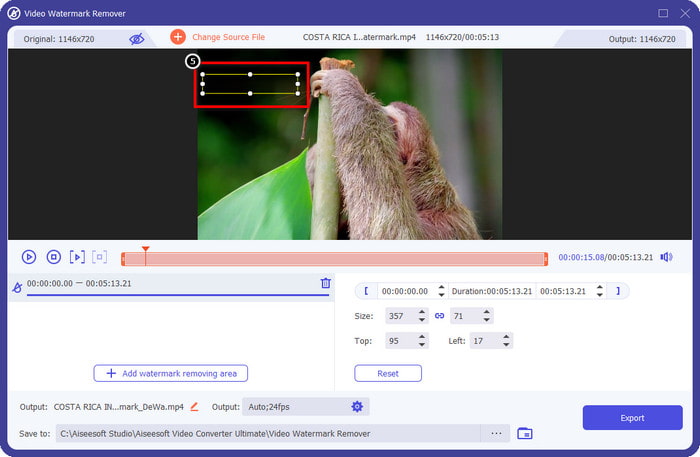
Korak 6. Kada okvir za odabir otkrije vodeni žig u vašem videu, kliknite Export kako biste započeli uklanjanje i spremanje videa bez vodenog žiga. Video će biti obrađen vrlo brzo i zatim možete koristiti video bez ometajućeg vodenog žiga.
Povezano:
Ukloni Video Helper vodeni žig
Uklonite logotip sada
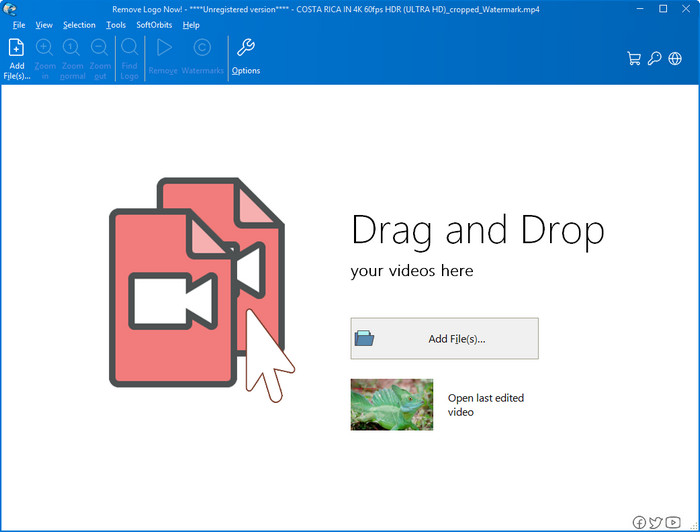
Sljedeći na našem popisu, Remove Logo Now izgradio je izvrsnu reputaciju kada je riječ o uklanjanju preklopljenih vodenih žigova na sustavu Windows. S ovim alatom ne trebate stručna znanja da biste znali kako ukloniti Renderforestov vodeni žig na računalu. Nakon uklanjanja vodenog žiga, pri pažljivijem pogledu mogu se vidjeti tragovi ostataka na mjestu gdje je vodeni žig izvorno bio. No, ako ne gledate jako pomno, nećete primijetiti vodeni žig ni ostatke na izvezenom videu. Donji vodič će vas naučiti kako ukloniti vodeni žig u vašem videu na Windows uređajima.
Korak 1. Preuzmite i instalirajte Remove Logo Now na svoje računalo, zatim slijedite postupak instalacije.
Korak 2. Pokrenite softver, zatim kliknite Add Files da biste ovdje učitali video. Možete i povuci i pusti video radi učinkovitijeg učitavanja datoteka.
Korak 3. Odaberite koji alat želite koristiti za označavanje vodenog žiga. Nakon što odaberete jedan, označite vodeni žig i kliknite Remove.
Korak 4. Kliknite Start kako biste pokrenuli proces uklanjanja vodenog žiga koji ovaj alat nudi.
Video uklanjanje vodenog žiga na mreži

Ne volite preuzimati softver na svoje računalo, ali ipak želite znati kako ukloniti Renderforestov vodeni žig? Tada pokušajte upotrijebiti Video Watermark Remover Online. Ovaj potpuno automatizirani alat za uklanjanje vodenih žigova možete koristiti kako biste besplatno uklonili vodeni žig iz svog videa bez preuzimanja na računalo. Kao i s ranije spomenutim alatom, čak i ako ste početnik u uređivanju videa ili uklanjanju vodenih žigova, možete ovladati korištenjem ovog alata u nekoliko minuta. Slijedite vodič u nastavku kako biste naučili kako ga koristiti.
Korak 1. Otvorite mrežni alat za uklanjanje vodenih žigova tako da ga potražite u svom omiljenom web-pregledniku.
Korak 2. Kliknite ikonu upload cloud na glavnoj stranici kako biste umetnuli video koji ste izvezli na Renderforest.
Korak 3. Pričekajte da završi postupak učitavanja jer on automatski uklanja vodeni žig iz vašeg videa, zatim kliknite Download kako biste preuzeli video bez vodenog žiga.
Dio 2. Često postavljana pitanja o tome kako ukloniti Renderforst vodeni žig
Kolika je pretplata za Renderforest?
Renderforest podržava tri različite vrste cijena koje možete iskoristiti; $ 14,99 za Lite, $24,99 za Pro i $29,99 za Business svaki mjesec. Ova cijena ima različitu svrhu jedna od druge; možete otići na njegovu glavnu web-stranicu da biste vidjeli što je navedeno dostupno na pretplati koju želite iskoristiti.
Je li moguće ukloniti vodeni žig s Renderforest videa bez alata?
Da, možete ukloniti vodeni žig u svom Renderforestu bez upotrebe alata, a to je kupnjom mjesečne ili godišnje naknade za softver. Tako da kada izvezete videodatoteku, na nju neće biti dodan vodeni žig.
Koji je najbolji plan za Renderforest; Mjesečno ili godišnje?
Mjesečna pretplata je dobar izbor ako želite koristiti alat nekoliko puta, ali ako se odlučite koristiti softver dulje vrijeme, bolje je iskoristiti godišnji plan jer će vas koštati manje od obnove svaki mjesec. Ali prije nego što iskoristite, možete besplatno koristiti Renderforest tako da ovdje prijavite svoj račun, a zatim pokušajte koristiti druge predloške koje nudi besplatno.
Zaključak
Doista, ovaj članak pruža jake dokaze za besplatno uklanjanje Renderforest vodenog žiga pomoću tri najkorisnija alata za uklanjanje vodenog žiga koje možete koristiti. Ako ste korisnik Windowsa i želite ukloniti vodeni žig na radnoj površini, morate pokušati upotrijebiti Remove Logo Now. Ali ako vam se ne sviđa preuzimanje softvera, morate pokušati koristiti Video Watermark Remover Online jer ovaj alat možete koristiti za učinkovito uklanjanje vodenih žigova.
Ali ako ste korisnik Windowsa ili Maca koji želite učinkovito sredstvo za uklanjanje vodenog žiga, tada je bez sumnje najbolji alat za uklanjanje vodenog žiga koji možete koristiti FVC Video Converter Ultimate. To je vrhunski alat za uklanjanje vodenog žiga koji možete koristiti za učinkovito i profesionalno uklanjanje vodenog žiga koji smeta vašem Renderforest videu.
-
 2 načina za brzo uklanjanje VSDC vodenog žiga na Windows i Mac
 Tražite li način da uklonite VSDC vodeni žig na svojim videozapisima? U ovom članku nudimo alate koje možete koristiti da biste se riješili vodenog žiga.
-
 Uklonite Animoto vodeni žig na videozapisima jednostavno i učinkovito
 Kako ukloniti Animoto vodeni žig na videu? Nastavite čitati ovaj članak jer smo dali potpuni vodič o tome kako to učiniti.
-
 Kako ukloniti vodeni žig s videa pomoću programa Final Cut Pro [Kompletan vodič]
 Imate li problema s vodenim žigom na videozapisima? Ništa više, jer smo dali vodič o tome kako ukloniti vodeni žig iz videa pomoću Final Cut Pro.
