


 Video Converter Ultimate
 Snimač zaslona
 Video popravak
Najbolja aplikacija za poboljšanje boje fotografija koju morate preuzeti na svoje mobilne uređaje [besplatno]
Prilikom obrade slike boja je ključna kako bi ona bila privlačna publici i svima koji je gledaju. U svakom pikselu nalaze se pripadajući podatci o boji. Bez obzira na to koliko je dobra fotografija koju ste snimili, ponekad je trebate dodatno obraditi kako biste publici prikazali još dojmljivije vizuale. Srećom, prilagodbe možete raditi i na Androidu i na iOS‑u, a ovaj članak donosi najbolje aplikacije iz različitih trgovina koje možete preuzeti. Kako biste dobili profinjenije detalje na snimljenim fotografijama, trebate pročitati ovaj tekst i odmah preuzeti aplikaciju za poboljšanje boja fotografija!

Dio 1. Top 4 Photo Color Enhancers možete preuzeti na Playstore & Appstore
EnhanceFox - AI Photo Enhancer 12+
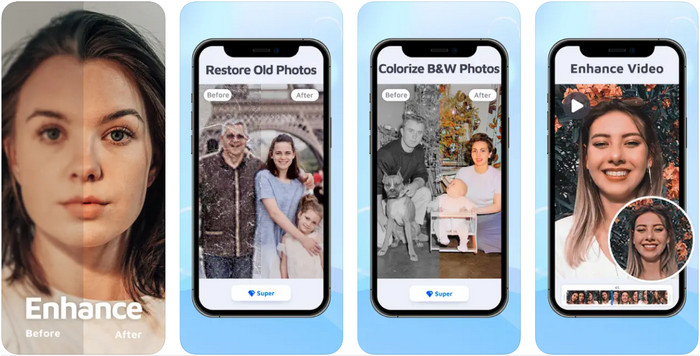
Ovu aplikaciju za pojačavanje boja fotografija možete preuzeti na svoj iOS za doradu grafičkog dizajna. EnhanceFox svojim korisnicima daje priliku da fotografije koje su snimili učine dotjeranijima u odnosu na izvorni rezultat. Čak i ako ste početnik u uređivanju slika, vrlo ćete lako svladati korištenje ove aplikacije i učiniti svoje fotografije ljepšima nego ikad. Osim toga, uz pomoć AI tehnologije ovog alata možete pretvoriti mutne slike u fotografije visoke rezolucije. Iako možete koristiti besplatnu verziju aplikacije, za potpuni pristup svim funkcijama morat ćete kupiti PRO verziju.
Pros
- Aplikaciju možete besplatno preuzeti na svoj iOS.
- Popravlja i pretvara slike u bolji izgled.
- Ova aplikacija podržava AI.
Protiv
- Neke značajke nisu dostupne u besplatnoj verziji.
- Trebat će vam internetska veza za obradu vaše slike.
Remini - AI Photo Enhancer 4+
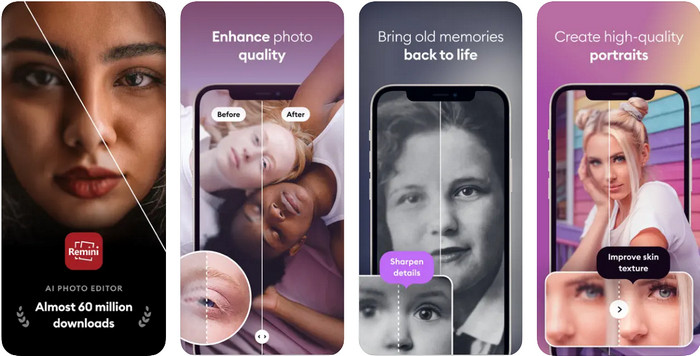
Remini je jedna od najpopularnijih aplikacija za pojačavanje boja fotografija koju možete preuzeti na iOS i Android uređaje. Njezina snaga u unaprjeđivanju fotografija privukla je pozornost brojnih korisnika na obje platforme. Uz skup njezinih funkcija za uređivanje, možete preobraziti stare, vintage fotografije u manje od sekunde uz pomoć AI tehnologije. Osim toga, možete uljepšati svoje selfije prije nego što ih objavite. Iako aplikaciju trebate kupiti, možete odabrati vrstu pretplate koja vam odgovara – tjednu, mjesečnu ili godišnju.
Pros
- Pretvorite svoju fotografiju lica u glatku i svilenkastu sliku.
- Popravite izgubljenu boju na slikama koje imate pomoću AI tehnologije.
- Uljepšajte svoju sliku promjenom postavki u ovoj aplikaciji.
Protiv
- Cijena svake značajke ove aplikacije ima dodatna plaćanja.
- Automatski obnavlja pretplatu nakon završetka pretplate.
Obojeno - obojite stare fotografije
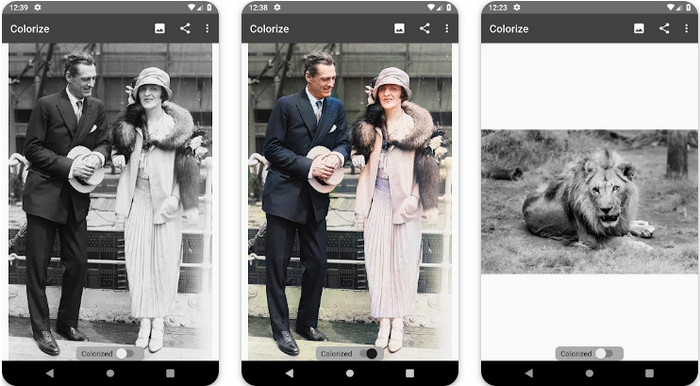
Colorize je inteligentna skenerska aplikacija koju možete preuzeti na Android uređaje za vraćanje izgubljene boje na vašim slikama i izvođenje restauracije starih fotografija. Uz funkcije za uređivanje ove aplikacije možete naučiti kako poboljšati boju očiju na fotografijama, što mnoge druge aplikacije ne podržavaju. Ovaj alat može pretvoriti vaše crno‑bijele fotografije u kolor verziju zahvaljujući tehnologiji Photomyne. Aplikacija je jasno osmišljena i iznimno jednostavna za korištenje, čak i ako prvi put uređujete fotografiju. Kao i kod drugih aplikacija koje spominjemo, i ovdje je potrebno izvršiti kupnju u aplikaciji prije korištenja svih funkcija.
Pros
- Automatski dodaje boje crno-bijelim slikama pomoću programa Photomyne.
- Profesionalci ili ne mogu lako koristiti ovaj softver zbog njegove izgrađenosti.
- Postavke bojanja ove aplikacije daleko su superiornije od drugih aplikacija za bojanje slika.
Protiv
- Nedostaju mu neke točke kada dodate boju na sliku.
- Automatski izrezuje sliku kada se obradi.
- Morat ćete kupiti aplikaciju kako biste spriječili ograničenja.
Photoshop Express uređivač fotografija
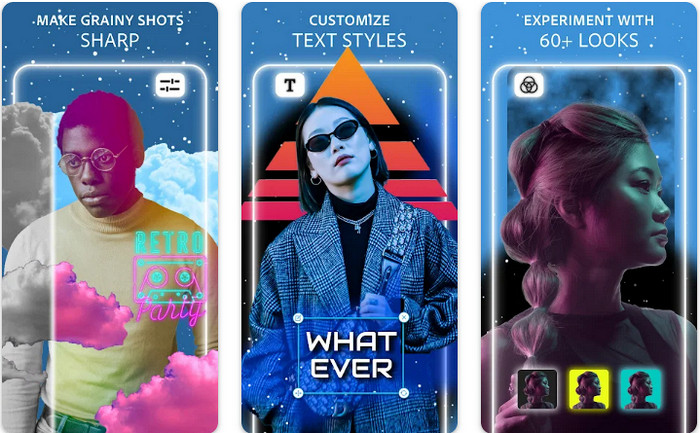
Photoshop Express Photo Editor je mini verzija profesionalnog programa koji milijuni stručnjaka i urednika već koriste kako bi pretvorili svoje slike u HD. Ovu poboljšanu verziju Photoshopa za boje fotografija možete imati i na Androidu i na iOS‑u. Rješava li problem? Da, i to bez puno truda. Kao što smo ranije spomenuli, ova je aplikacija slična Photoshopu, ne po sučelju, već po mogućnostima uređivanja. Korisnicima pruža vrhunski detaljan rezultat dodavanjem ili podešavanjem PPI‑ja svake snimljene slike. Ipak, aplikaciju je teže koristiti, pa ćete možda morati odvojiti vrijeme kako biste pročitali upute za rad. Unatoč tome, ovo je kompletan softverski paket koji će vam ikada trebati.
Pros
- Softver možete preuzeti ne samo na stolno računalo već i na mobilne uređaje.
- Podržava značajke profesionalnog uređivanja koje možete primijeniti na svoje fotografije.
- Ima sličnosti s Photoshopom jer oba pružaju profesionalne rezultate.
- Ovdje možete raditi mnoge vrste uređivanja koje vam druge aplikacije ne mogu ponuditi.
Protiv
- Aplikacija može biti skupa u usporedbi s drugim kupnjama putem aplikacije.
- Treba poboljšati druge manje probleme.
Dio 2. Najbolje preporučeni alat za poboljšanje kvalitete fotografija koji ne biste trebali preuzeti [web-usluga]
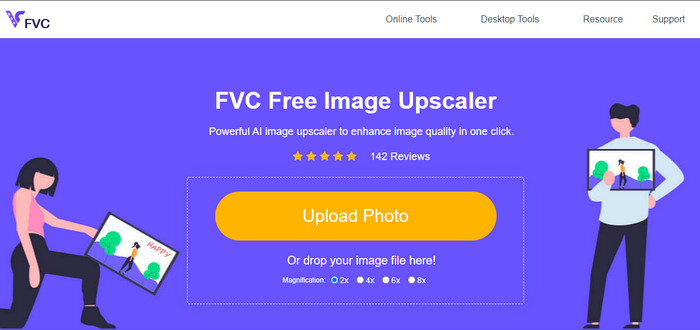
FVC Free Image Upscaler može vam pomoći riješiti problem bez ikakve kupnje. Ovaj alat za poboljšanje kvalitete fotografija dostupan je na webu, tako da ga ne morate preuzimati prije korištenja. Osim toga, možete iskoristiti njegovu snažnu funkciju uređivanja uz pomoć umjetne inteligencije, koja skenira što nije u redu s vašom slikom i odmah to ispravlja. U usporedbi s ostalim aplikacijama koje smo spomenuli, ovo je daleko najjednostavniji 'one‑click' alat za poboljšanje. Učitajte fotografiju, promijenite povećanje i dobit ćete poboljšanu verziju svoje slike. Ako ga koristite, nema potrebe za dodatnim podešavanjem ili finim prilagodbama. Želite li ga isprobati? Kliknite na poveznicu, koja će vas izravno odvesti na web‑stranicu ovog alata.
Dio 3. Često postavljana pitanja o Photo Colour Enhancer
Moram li postati profesionalac da bih koristio pojačivač boje fotografija?
Ako koristite dobro razvijen softver, morat ćete imati ideju, a ne profesionalac, o njegovim značajkama i njihovoj funkciji na slici. Međutim, postoji pojednostavljeni softver, što znači da je AI podržan; ponekad ne biste trebali raditi ugađanje, ili ponekad morate. Za početnike, morate koristiti softver jednostavan za korištenje prije nego što svoju igru podignete na profesionalno poboljšanje.
Što se događa sa slikom. Poboljšam boju?
Slike s dobro razvijenom bojom bit će detaljnije i oštrije u usporedbi sa slikama koje podržavaju manje boja. Njihov piksel se ne vidi u usporedbi s fotografijama koje imaju podržanu nisku kvalitetu.
Koji format slike podržava najbolju kombinaciju boja slike?
JPEG i PNG podržavaju 16 milijuna boja i jedan su od najboljih slikovnih formata koje možete koristiti u različite svrhe. Ali HEIC podržava napredne bitove u usporedbi s dva formata slike.
Zaključak
Koji biste pojačivač boje fotografija odabrali među aplikacijama koje pregledavamo? Pa, uz sve informacije koje dodamo, možete brzo shvatiti koju biste aplikaciju trebali preuzeti na svoj uređaj. Iako imaju različite prednosti i nedostatke, ipak mogu brzo poboljšati boje vaših slika.
-
 7 najboljih poboljšivača piksela za sve web preglednike koje morate koristiti
 Ako želite znati koje najbolje pojačivače piksela možete koristiti, bolje pogledajte ovaj post. Ovaj članak navodi sedam najboljih pojačivača foto piksela za sve web preglednike.
-
 Najbolja aplikacija za promjenu veličine fotografija online, offline, Android i iPhone
 Koje su najbolje aplikacije za promjenu veličine fotografija? Kliknite stranicu kako biste saznali pet najboljih najmoćnijih aplikacija za promjenu veličine fotografija koje možete koristiti za poboljšanje ili promjenu veličine datoteke.
-
 Top 7 najboljih online i offline povećavača fotografija
 Želite li saznati koji su vrhunski uređaji za povećanje fotografija za vaš Windows ili Mac uređaj? Pročitajte ovaj post da biste saznali koji su najbolji uređaji za povećanje fotografija koje vrijedi isprobati.
