


 Video Converter Ultimate
 Snimač zaslona
 Video popravak
Kako brzo poništiti pikselizaciju slike s 3 najbolja rješenja za korištenje
Razmuti sliku je rješenje koje trebate kada želite preobraziti sliku koja je ispala pikselizirana ili ako vam je slika pretvorena u bitmapu s malim kvadratićima. Mnogi korisnici misle da je zamorno mijenjati, podešavati, prepravljati i poboljšavati sliku; iskreno, i jest – ali to je bilo prije. Uz naprednu tehnologiju kojoj danas imamo pristup, ovaj je zadatak postao vrlo jednostavan kad koristite pravi alat.
Nemate pravi alat za uklanjanje pikselizacije na vašoj fotografiji? Srećom, ovaj će vam članak donijeti tri najbolja softvera koja smo pronašli, a koji bi vam mogli pomoći u uređivanju pikselizacije fotografije i upute za rješavanje problema za svaki od njih.

Dio 1. Kako depikselizirati sliku na mreži pomoću uređivača fotografija najboljeg izbora [preporučeno]
FVC Free Image Upscaler je potpuno automatiziran online alat koji možete koristiti da besplatno uklonite pikselizaciju sa slika na internetu. Možete ga otvoriti u bilo kojem web‑pregledniku kojem imate pristup – nema potrebe preuzimati poseban program za pokretanje, pa alat možete koristiti odmah nakon što mu pristupite. Iako je ovaj softver dostupan putem weba, njegova snaga i učinkovitost pri uklanjanju pikselizacije usporedive su s najprofesionalnijim uređivačima slika, bilo online ili offline. Možda mislite da ćete imati poteškoća s korištenjem ovog alata, ali nećete. Još uvijek niste uvjereni? Ako je tako, možete pročitati ili pratiti dolje navedeni vodič koji će vas korak po korak provesti kroz jednostavno korištenje ovog alata.
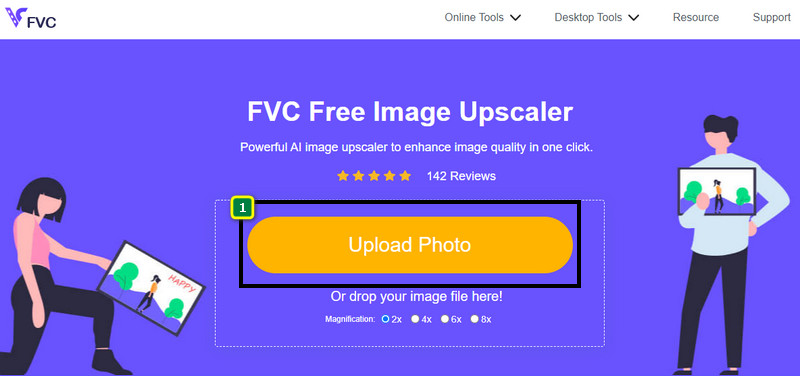
Korak 1. Ovom web‑alatu možete pristupiti u bilo kojem web‑pregledniku na svom uređaju tako da potražite njegovo ime ili kliknete ovu poveznicu kako biste otvorili njegovu glavnu web‑stranicu.
Korak 2. Kada se nađete na web‑alatu, kliknite Add Image kako biste učitali pikseliziranu sliku. Na ekranu će se pojaviti prozor s mapama; pronađite sliku spremljenu na svom lokalnom disku, zatim pritisnite Open kako biste je učitali.
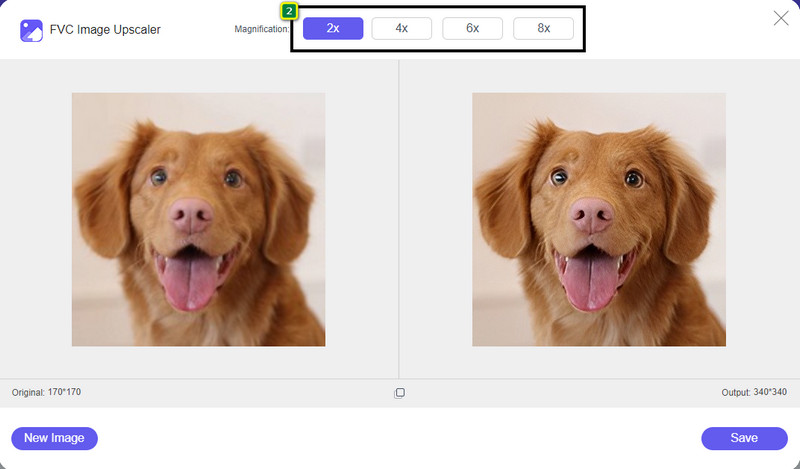
Korak 3. Zatim odaberite opciju povećanja koju želite primijeniti na svoju sliku kako biste joj zagladili izgled, tako da više ne izgleda kao bitmapa s malim kvadratićima.
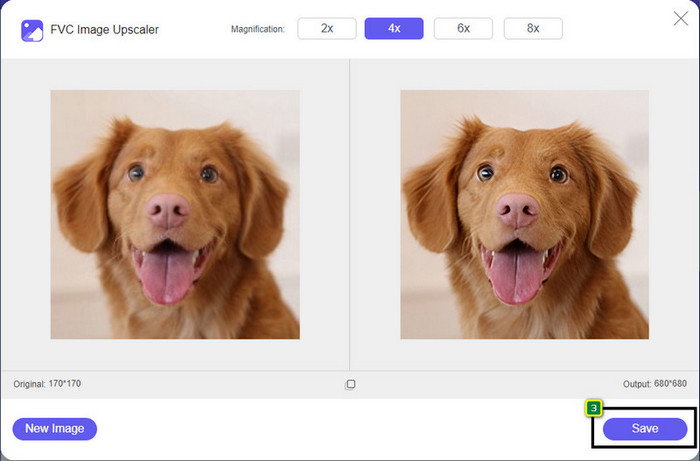
Korak 4. Tako jednostavno – kliknite Save da preuzmete verziju bez pikselizacije na svoj lokalni disk.
Dio 2. Kako poništiti pikselizaciju slike izvan mreže na 2 načina na Windows i Mac [Jednostavno]
Pixbim - Unpixelate Photos on Windows
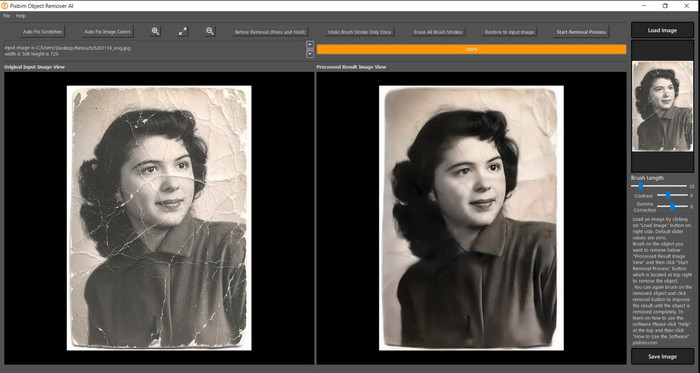
Pixbim je jedan od najsnažnijih i AI‑podržanih programa za uklanjanje pikselizacije slika koje možete preuzeti na Windows kako biste riješili ovaj problem. Ovaj uređivač zaslužuje spomen u ovom članku jer vrlo brzo i učinkovito ispravlja pikselizirane slike. Uz njega, umjetna inteligencija podešava parametre umjesto vas, tako da nećete imati poteškoća pri korištenju softvera. Zbog njegovih značajki i funkcija, morate kupiti licenčni ključ da biste ga nastavili koristiti nakon probnog razdoblja. Mnogima koji ga žele na svom računalu to može biti preskupo.
Korak 1. Nakon što ste preuzeli softver, trebate ga pokrenuti kako bismo mogli prijeći na sljedeći korak.
Korak 2. Pritisnite Load Image kako biste dodali pikseliziranu sliku koju ovdje želite poboljšati.
Korak 3. Zatim podesite parametre povlačeći klizače prema vrijednostima koje želite postići.
Korak 4. Kada završite s podešavanjem slike, spremite rezultat kako biste ga izvezli.
Movavi uređivač fotografija [Windows & Mac]
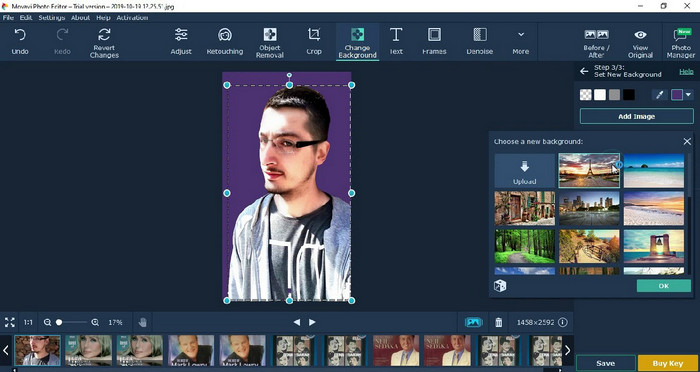
Mnogi su korisnici već isprobali Movavi Photo Editor zbog njegove svestranosti u uređivanju slika. Poput Pixbima, može vratiti izgubljene piksele slike uz podršku neuronskih mreža svoje umjetne inteligencije. S ovim uređivačem u rukama možete raditi osnovna i napredna podešavanja izgleda, kao što su obrezivanje, rotiranje, dodavanje filtera, popravljanje piksela i još mnogo toga. Ipak, sve to ne možete dobiti ako ne kupite njegovu premium verziju za svoje računalo.
Ima gotovo sličnu cijenu kao Pixbim, koji je za mnoge prilično skup. Ali ako imate proračun za kupnju editora, ovo bi mogao biti onaj koji vam treba. Naučite kako poništiti pikselizaciju slika pomoću ove aplikacije slijedeći korake.
Korak 1. Preuzmite aplikaciju na svoj Windows ili Mac OS.
Korak 2. Pokrenite softver, a zatim učitajte fotografiju kojoj želite ukloniti pikselizaciju.
Korak 3. Sada kada ste učitali sliku, kliknite Magic Enhance kako biste automatski doradili sliku uz pomoć umjetne inteligencije.
Korak 4. Izvezite sliku i uživajte u rezultatu.
Dio 3. Često postavljana pitanja o tome kako povećati pikselizaciju slike
Zašto postoji vodeni žig na izvezenoj nepikseliziranoj slici?
Kada koristite besplatnu probnu verziju aplikacije, postoji mogućnost da ostavi vodeni žig prilikom izvoza. Dakle, ako želite izvesti sliku bez vodenog žiga, možete kupiti licencu za aplikaciju ili upotrijebiti FVC Free Image Upscaler, jer on neće ostaviti vodeni žig na izvezenoj slici.
Koja je razlika između mutnog i pikseliziranog?
Mnogi su članci dokazali da zamućeno i pikselirano nije isto zbog nekih čimbenika. Mutne slike su razlog zašto snimate pokret velikom brzinom ili fotografirate drhtavim fotoaparatom. Dok je slika pikselizirana, kad povećate snimku, pokrenut će se pikselizacija i vidjet ćete bitmapu sa sićušnim kvadratom.
Koji je faktor koji čini sliku pikseliziranom?
Neki razlozi pretvaraju slike u piksele; čest uzrok je kada povećate rastersku sliku. Rasterski formati, kao što su PNG, JPG, GIF i drugi, sastoje se od malih kvadrata koji grade izgled objekta pohranjenog u tim spremnicima. Obično, kada povećate sliku, vidjet ćete da postoje kvadratići, poznati kao pikseli, koji sadrže podatke o boji koji se vizualno prikazuju. To može predstavljati problem za mnoge urednike, posebno kada dođe do pikselizacije.
Kako mogu popraviti šum na slici?
Ovo je još jedan čest problem na koji možete naići s fotografijama koje ste snimili, a rješenje koje trebate nalazi se u ovom članku. Kliknite ovu poveznicu da biste lako pročitali, riješili i naučili kako ukloniti šum sa slike.
Zaključak
Tako jednostavno – sada možete lako ukloniti pikselizaciju sa slike uz pomoć najboljih uređivača slika koje možete preuzeti ili koristiti na internetu. Ovaj je slučaj riješen! Dakle, ako se ikad ponovno susretnete s problemom pikselizacije, možete se osloniti na ovaj članak da vam pomogne. Najbolji alat koji vam treba nalazi se ovdje i spreman je pomoći, kao što je FVC Free Image Upscaler. Najbolje je prilagoditi sliku ispravljanjem pikselizacije na izgledu kako se vizualno ne bi primjećivala. Recite zbogom pikselizaciji kad koristite ovaj online uređivač slika.
-
 7 alata za poboljšanje slike koje možete koristiti za poboljšanje i poboljšanje svake slike [2022.]
 Trebate li poboljšati sliku? Srećom, ovaj članak pokriva najbolji softver kojem možete pristupiti i preuzeti ga na radnoj površini.
-
 5 pojačivača rezolucije slike koje morate koristiti ove 2022. [najnoviji odabiri]
 Ne znate koji pojačivač rezolucije slike trebate koristiti? Pročitajte ovaj članak dok pregledavamo pet alata za korištenje i poboljšanje rezolucije slika.
-
 4 aplikacije za povećanje rezolucije slike na vašim mobilnim uređajima [Najbolji izbor]
 Trebat će vam aplikacije za povećanje rezolucije fotografije ako želite postići 1080p, 4k ili slično. S popisom u nastavku to možete učiniti jednostavno!
