


 Video Converter Ultimate
 Snimač zaslona
 Video popravak
3 Shutterstock sredstva za uklanjanje vodenog žiga za korištenje i uklanjanje vodenog žiga na videozapisima
Trebate visokokvalitetne, licencirane Shutterstock videozapise za svoj projekt, ali na njima postoji Shutterstockov vodeni žig? Uz pomoć alata Shutterstock watermark remover možete lako ukloniti vodeni žig s preuzetog videa. Profesionalno i privatno ne volimo da naši videozapisi imaju vodeni žig jer on kvari cijeli dojam videa. Ako se dakle želite riješiti Shutterstockovog vodenog žiga, nastavite čitati informacije i kratki vodič koje navodimo u ovom članku.

Dio 1. Kako ukloniti Shutterstock vodeni žig pomoću Ultimate Watermark Removera na Marketu [urednički izbor]
FVC Video Converter Ultimate može vam točno pomoći i voditi vas kroz postupak uklanjanja Shutterstockovog vodenog žiga s videa koji ste spremili. To je cjelovito rješenje koje možete preuzeti na Windows i Mac za prilagodbu videa, uključujući uklanjanje vodenih žigova. Unatoč tome što je svestran softver, razvojni tim ovog programa zadržao je jednostavno, korisniku prilagođeno sučelje kako bi ga svatko tko ga želi koristiti mogao upotrebljavati bez velikog predznanja.
Čak i uz niske razine vještina, možete dobiti vrhunski rezultat na kraju nakon što upotrijebite ovaj uređivač. Još uvijek niste uvjereni informacijama koje smo dodali? Da bismo to dokazali, naučit ćemo vas kako besplatno ukloniti Shutterstock vodeni žig pomoću ovog uređivača videozapisa.
Korak 1. Da biste uklonili vodeni žig s videa koji ste preuzeli, najprije morate preuzeti ovaj uređivač klikom na odgovarajuću tipku za preuzimanje za svoj operacijski sustav. Proći ćete kroz kratak instalacijski postupak, a nakon toga možete početi koristiti softver.
Besplatno preuzimanjeZa Windows 7 ili novijiSigurno preuzimanje
Besplatno preuzimanjeZa MacOS 10.7 ili novijiSigurno preuzimanje
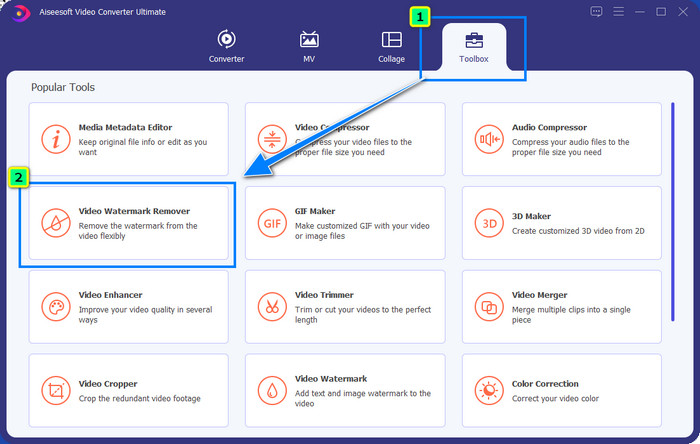
Korak 2. Zatim upotrijebite Video Watermark Remover; ovu funkciju možete pronaći pod Toolbox. Kao što vidite, možete koristiti više funkcija i alata za uređivanje kako biste prilagodili svoju sliku željenom izgledu.
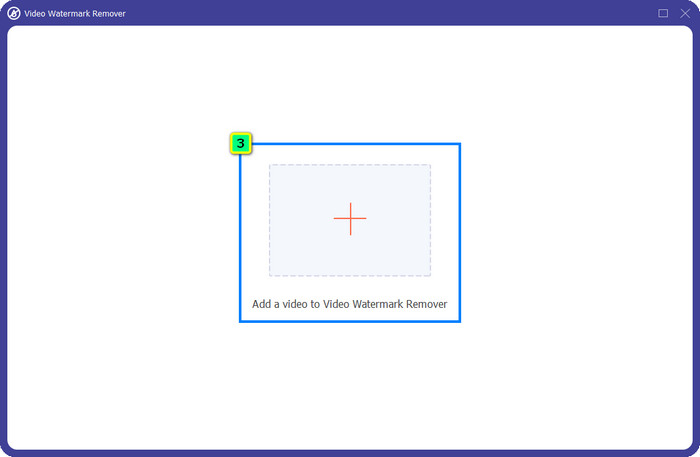
Korak 3. Kliknite ikonu plus i na zaslonu će se pojaviti upravitelj datoteka. Odaberite videosadržaj s vodenim žigom, a zatim kliknite Open kako biste ga učitali.
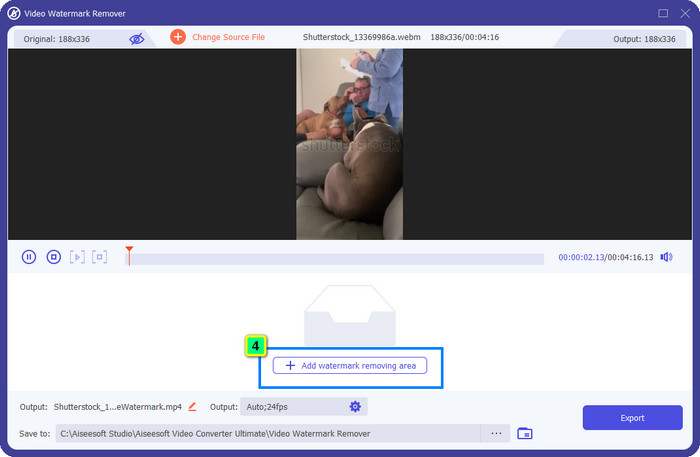
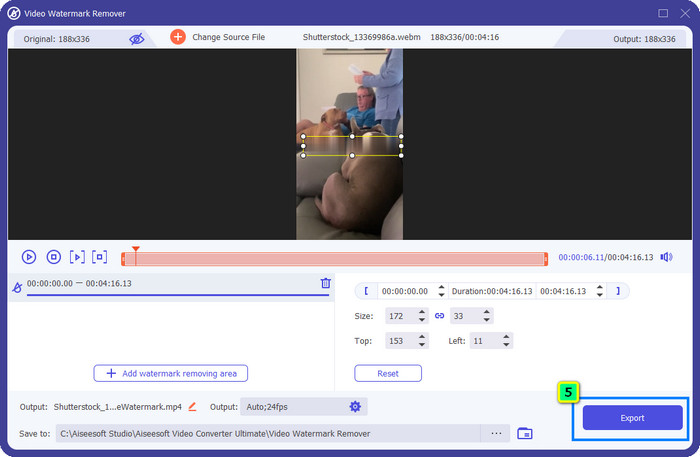
Korak 4. Kako biste izbrisali vodeni žig s učitanog videa, pritisnite Add Watermark Removing Area i pojavit će se novi prozor.
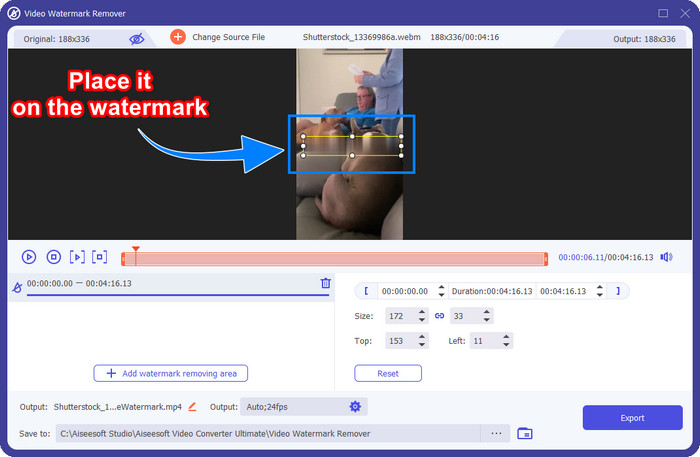
Korak 5. U ovom dijelu na vašem će se videu pojaviti kvadratni okvir; postavite ga na vodeni žig. Možete ga promijeniti veličinu, povući, smanjiti ili povećati tako da točno odgovara vodenom žigu koji želite ukloniti.
Korak 6. Na kraju kliknite gumb Export kako biste preuzeli konačni rezultat Shutterstock videa koji ste preuzeli na svoj uređaj. Sada u njemu možete uživati bez brige o vodenom žigu jer je uklonjen.
Dio 2. Kako besplatno ukloniti Shutterstock vodeni žig na mreži
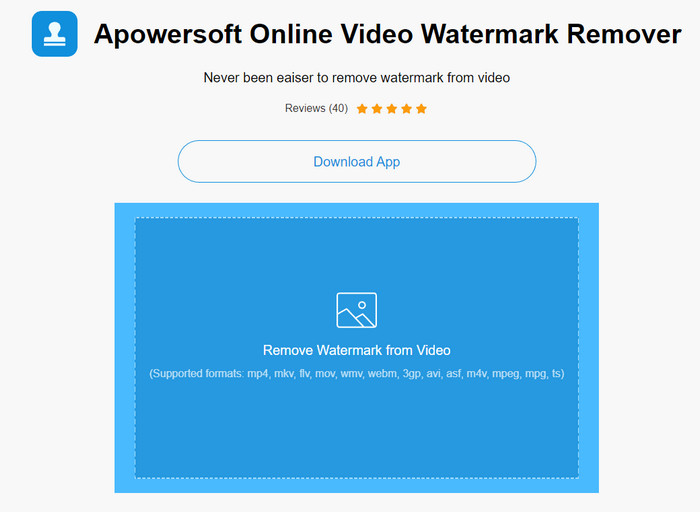
Ne sviđa vam se ideja preuzimanja programa za uklanjanje vodenog žiga na radnu površinu? Ako je tako, možete koristiti Apowersoft Online Watermark Remover, a mi ćemo vam pokazati kako ukloniti Shutterstockov vodeni žig putem interneta. To je izvrstan odabir za sve koji trebaju ukloniti vodeni žig s videa ili slike. Razlog zašto ga navodimo jest taj što je ovaj softver lako dostupan i kompatibilan s različitim operacijskim sustavima koje imate pri ruci.
Za razliku od izvanmrežnih alata, za njihovu upotrebu trebat će vam stabilna i robusna internetska veza. Kao što obećavamo, u nastavku je vodič o korištenju ovog alata za uklanjanje vodenog žiga za uklanjanje vodenog žiga koji na njemu ostavlja Shutterstock.
Korak 1. Otvorite službenu web-stranicu Apowersoft Online Watermark Removera pomoću omiljene tražilice, a zatim kliknite gumb + s desne strane kako biste učitali videosadržaj.
Korak 2. Postavite selection box na Shutterstockov vodeni žig na videu.
Korak 3. Nakon toga kliknite Erase kako biste uklonili vodeni žig i vidjeli rezultat.
Korak 4. Pritisnite Download File kako biste dobili Shutterstock video bez vodenog žiga.
Dio 3. Kako ukloniti Shutterstock vodeni žig pomoću Photoshopa [Plaćeno]
Mnogi korisnici pitaju kako ukloniti Shutterstockov vodeni žig pomoću Photoshopa, a mi smo tu da vam pomognemo! Adobe Photoshop podržava profesionalnu funkciju za uklanjanje vodenih žigova koju ćete rado koristiti. Kao i softver predstavljen u ovom članku, odrađuje posao, ali njegov pristup uklanjanju vodenih žigova ide kadar po kadar. To znači da ćete trebati odvojiti vrijeme kako biste uklonili vodeni žig na svakom kadru videa; što je video duži, to više kadrova ima. Ako želite znati kako alat radi, pročitajte informativne korake u nastavku.
Korak 1. Preuzmite aplikaciju na svoje računalo, a zatim kliknite File. Pod tim izbornikom pritisnite Open kako biste učitali video spremljen na vaše računalo.
Korak 2. S lijeve strane odaberite Magic Wand Tool, a zatim kliknite vodeni žig koji želite ukloniti. Ova će funkcija automatski pratiti vodeni žig na kadru.
Korak 3. Idite na Edit i pritisnite Content-Aware Fill nakon što ste označili vodeni žig.
Korak 4. Nakon što otvorite Content-Aware Fill, on će automatski ukloniti vodeni žig koji ste ranije odabrali, a zatim pritisnite OK.
Daljnje čitanje:
Jednostavne metode za uklanjanje Shootproof vodenog žiga
Kako bez napora ukloniti Bandicam vodeni žig [3 učinkovite metode]
Dio 4. Često postavljana pitanja o tome kako ukloniti Shutterstock vodeni žig
Kako ukloniti Shutterstock vodeni žig bez Photoshopa?
Možete koristiti FVC Video Converter Ultimate da biste uklonili Shutterphoto vezan za vaš video. Ima snažan brisač vodenog žiga koji biste voljeli isprobati. Slijedite korake koje smo dodali u ovom članku kako biste to učinili jednako učinkovito kao Photoshop.
Hoće li obrezivanje Shutterstock vodenog žiga funkcionirati na videu?
Ako želite promijeniti veličinu videozapisa promjenom dimenzije, možete obrezati videozapis uz pomoć više uređivača videozapisa na mreži i izvan nje. Budući da je vodeni žig Shutterstocka u sredini, bolje je ne koristiti značajke izrezivanja. Brojni alati za uklanjanje vodenih žigova tu su da vam pomognu; možete pročitati i kopirati vodič koji smo dodali kako biste ga mogli učinkovito izbrisati bez ostavljanja mrlje na njemu.
Je li legalno ukloniti Shutterstock vodeni žig?
Uklanjanje vodenog žiga Shutterstocka nije legalno, ali ako ga želite koristiti u nekomercijalne svrhe, možete to učiniti uz pomoć sredstva za uklanjanje vodenog žiga. Bolje je kupiti fotografiju koju želite na Shutterstocku ako je namjeravate koristiti u komercijalne svrhe; iako bi vas to koštalo, barem će vam omogućiti da imate zakonska prava da ga koristite.
Zaključak
Sada znate kako ukloniti Shutterstockov vodeni žig pomoću softvera predstavljenog u ovom članku. Dakle, koji softver vam više odgovara: plaćeni, besplatni online ili ultimativni program? Bez obzira na vaš odabir, možete dobiti Shutterstock fotografiju bez logotipa proizvoda. No ako nas pitate što bismo mi koristili, bez sumnje bismo odabrali FVC Video Converter Ultimate, jer pruža najzadovoljniji rezultat u obavljanju zadatka. Unatoč tome što je ultimativni uklanjač vodenih žigova, i dalje je jednostavan za korištenje. Ako želite isprobati ovaj softver, možete kliknuti gumb za preuzimanje i instalirati ovaj alat na svoje računalo.
-
 Vrhunski alati za uklanjanje vodenog žiga iz Renderforest izvezenih videozapisa
 Za uklanjanje vodenog žiga s Renderforesta trebat će vam alat za uklanjanje vodenog žiga na svom uređaju, svi alati koje možete koristiti su ovdje.
-
 Jednostavni koraci za uklanjanje vodenog žiga WOW klizača [Riješeno]
 WOW Slider je aplikacija za stvaranje fantastične prezentacije. Međutim, na svoj izlaz ugrađuje vodene žigove. U nastavku pročitajte kako ukloniti vodeni žig WOW Slider.
-
 Kako se besplatno riješiti Power Director vodenog žiga [Dovršeno]
 Kako se besplatno riješiti Power Director vodenog žiga? Ovdje su najbolji alati za uklanjanje vodenog žiga pa ih naučite čitajući ovo.
