


 Video Converter Ultimate
 Snimač zaslona
 Video popravak
Izvanredni načini kako ukloniti vodene žigove s fotografije
Želite naučiti kako ukloniti vodene žigove s fotografija? Ponekad se dogodi da slike koje želite spremiti imaju vodene žigove koji “bodu oči” pa ne možete vidjeti punu ljepotu fotografije. Srećom, možete koristiti softverske aplikacije za uklanjanje tih nepotrebnih vodenih žigova na računalu, iPhoneu i Androidu. Na taj način možete spremiti željene fotografije pomoću tih aplikacija za uklanjanje vodenih žigova. Čitanje ovog članka najbolji je izbor ako želite saznati više o jednostavnim metodama uklanjanja vodenih žigova.

Dio 1. Kako ukloniti vodeni žig s fotografije na računalu
1. Sredstvo za uklanjanje vodenog žiga bez FVC-a
Ako želite besplatno online ukloniti vodeni žig s fotografije, možete koristiti FVC Free Watermark Remover. Ova aplikacija može pomoći ukloniti bilo koji vodeni žig s vaših slika, poput logotipova, tekstova, slika i još mnogo toga. Osim toga, podržava različite formate slika, kao što su JPG, PNG, JPEG, BMP i drugi. Nadalje, ovaj je softver jednostavan za uporabu i razumijevanje jer ima pregledno sučelje, detaljne upute i jednostavne gumbe. Što se tiče samog uklanjanja vodenih žigova, FVC Free Watermark Remover vam omogućuje da mišem nacrtate poligonalnu liniju ili “lasso” na slici kako biste odabrali vodeni žig koji želite ukloniti. Kist je također druga opcija za uklanjanje vodenih žigova s vaših slika. Ako želite besplatno ukloniti vodeni žig s fotografije, slijedite jednostavne korake u nastavku.
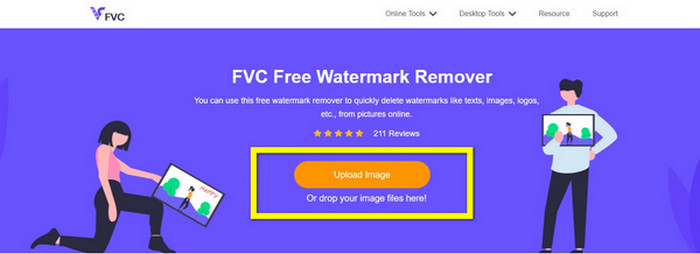
Korak 1: Idite na web-stranicu FVC Free Watermark Remover i kliknite Upload Image. Zatim dodajte sliku s vodenim žigom koji želite ukloniti.
Korak 2: Nakon što otvorite sliku s vodenim žigovima, možete koristiti opcije za uklanjanje, kao što su Polygonal, Lasso i Brush alat, kako biste uklonili vodene žigove.
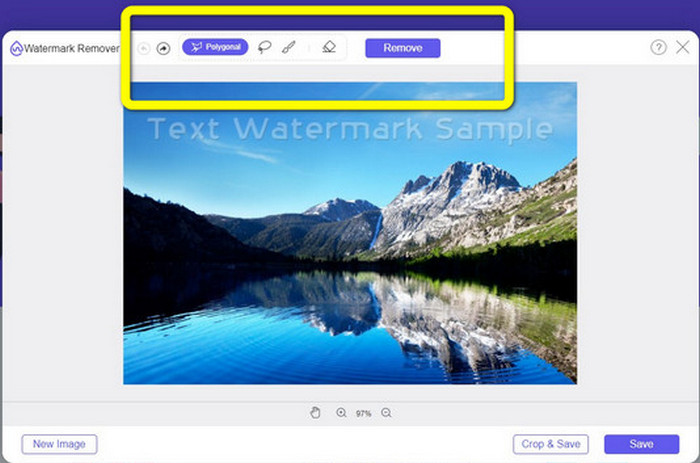
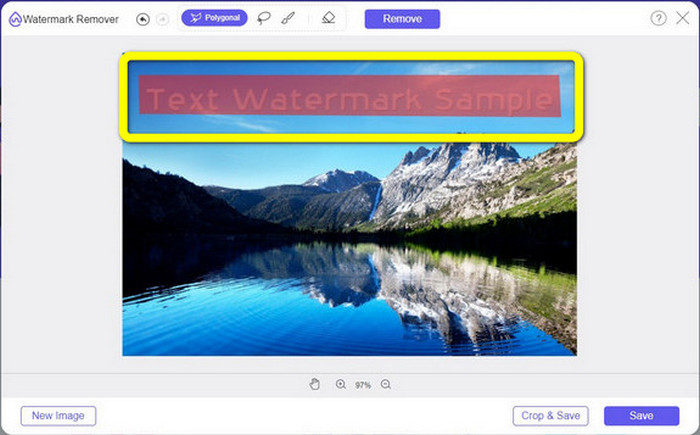
Korak 3: Pomoću alata Brush, Lasso ili Brush označite vodene žigove na svojoj fotografiji.
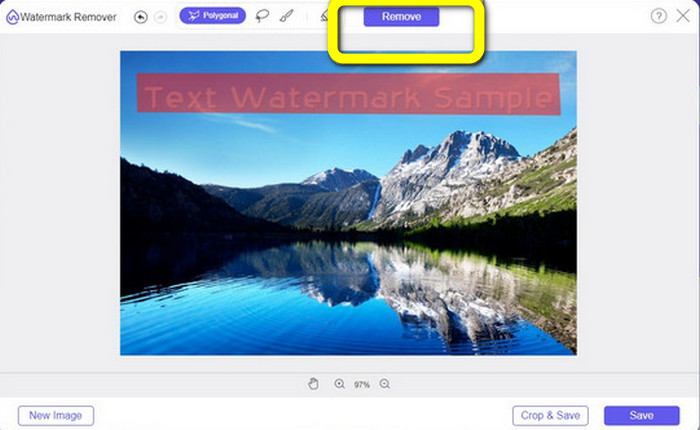
Korak 4: Kada završite s označavanjem vodenih žigova na fotografiji, kliknite gumb Remove.
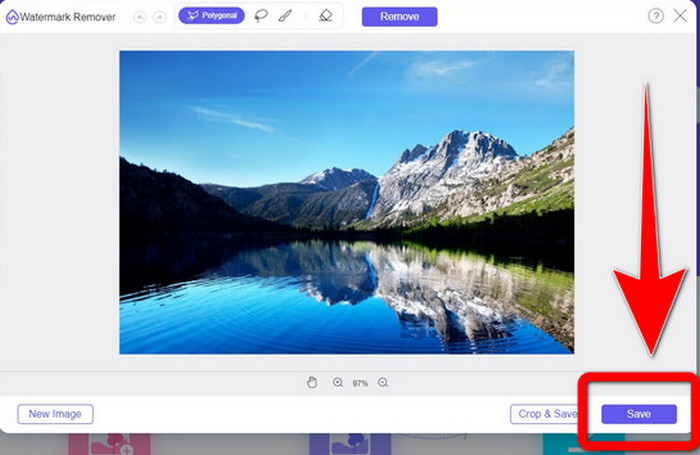
Korak 5: Kada je vodeni žig uklonjen s vaše fotografije, kliknite gumb Save da biste preuzeli svoju sliku i sada možete uživati gledajući fotografije bez iritirajućih vodenih žigova.
2. Photoshop
Ako također tražite izvrsnu i pouzdanu aplikaciju koju želite preuzeti na svoje računalo, Adobe Photoshop jedan je od pouzdanih programa koje možete koristiti. U ovom dijelu prikazat ćemo kako Photoshop uklanja vodene žigove s fotografija. Ova aplikacija prikladna je za fotografe, web-dizajnere, grafičke dizajnere, autore memova itd. Međutim, morate kupiti Adobe Photoshop jer nudi samo 7-dnevno besplatno probno razdoblje. Također, Photoshop nije prikladan za serijsku obradu fotografija i ima složene krivulje učenja. Ako želite znati najjednostavniji način uklanjanja vodenih žigova sa svojih slika, slijedite ove jednostavne korake u nastavku.
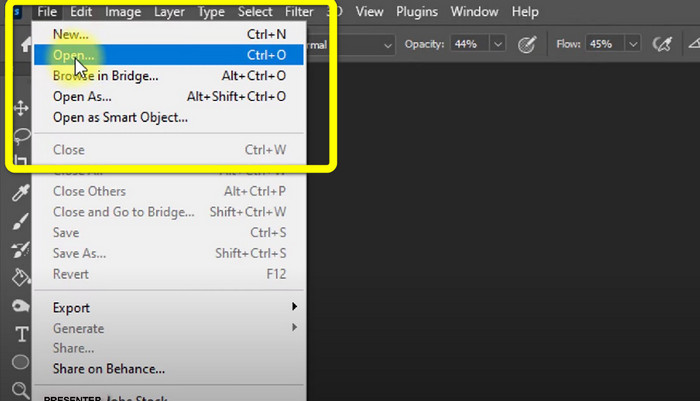
Korak 1: Otvorite Adobe Photoshop. Odaberite File > Open i dodajte svoju fotografiju s vodenim žigovima.
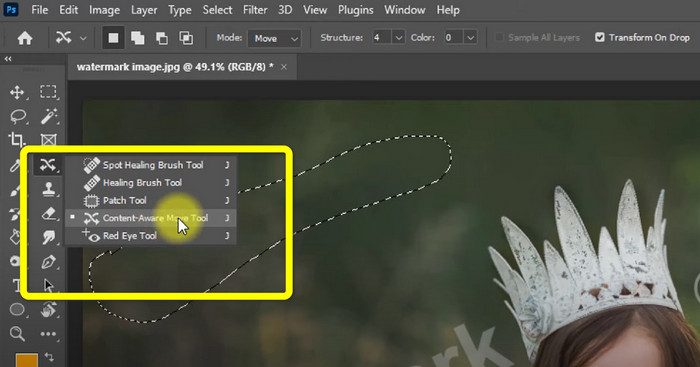
Korak 2: Kliknite Content-Aware Move Tool u alatnoj traci za uređivanje.
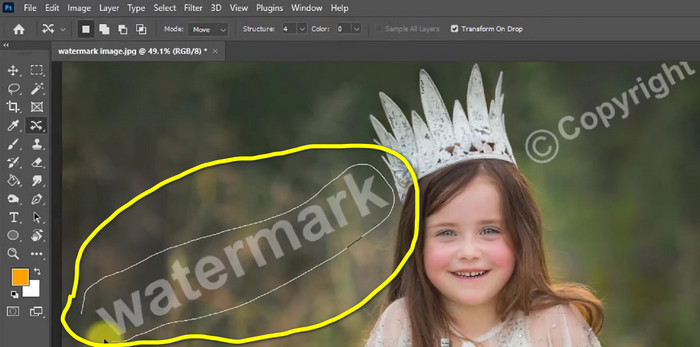
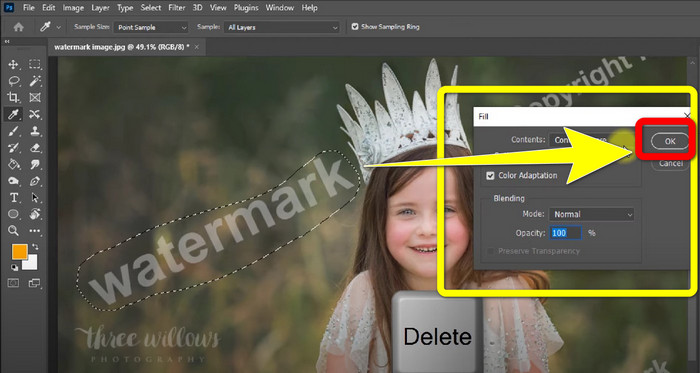
Korak 3: Nakon što kliknete Content-Aware Move Tool, označite područje vodenog žiga na fotografiji i pritisnite tipku Delete na tipkovnici.
Korak 4: Kada pritisnete Delete, pojavit će se dodatno malo sučelje, zatim kliknite OK.
3. GIMP
Još jedna prikladna aplikacija za uklanjanje vodenih žigova s vaših fotografija je GIMP. To je open-source rasterski grafički uređivač koji se koristi za manipulaciju i uređivanje slika, što ga čini korisnim alatom za obradu fotografija. Osim toga, podržava mnoge formate datoteka, kao što su JPG, PNG, TIFF, GIF i drugi. Međutim, ponekad se zna neočekivano srušiti, a teško je i slagati slojeve. Ako želite znati kako ukloniti vodene žigove sa svojih fotografija pomoću GIMP‑a, slijedite ove jednostavne korake u nastavku.
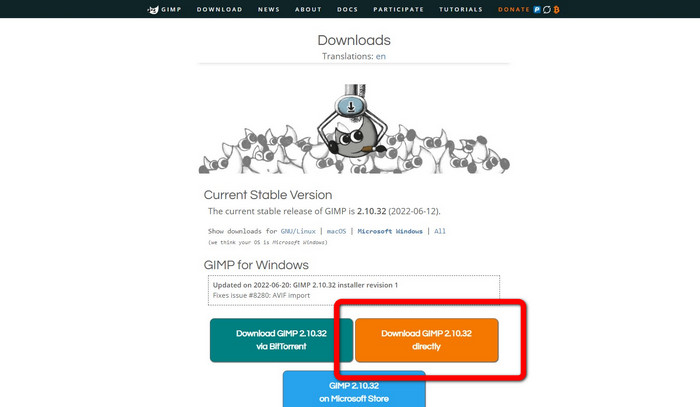
Korak 1: Kada ste na web-stranici GIMP-a, kliknite Download Directly da biste preuzeli aplikaciju i slijedite postupak instalacije.
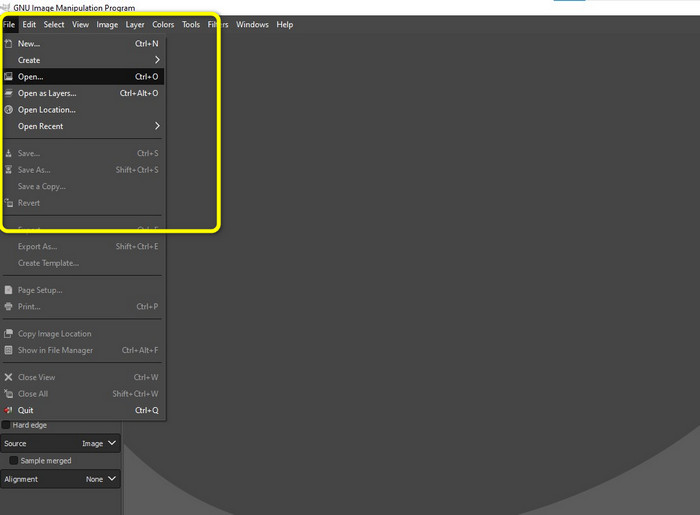
Korak 2: Otvorite aplikaciju i kliknite File > Open kako biste dodali svoju fotografiju s vodenim žigovima.
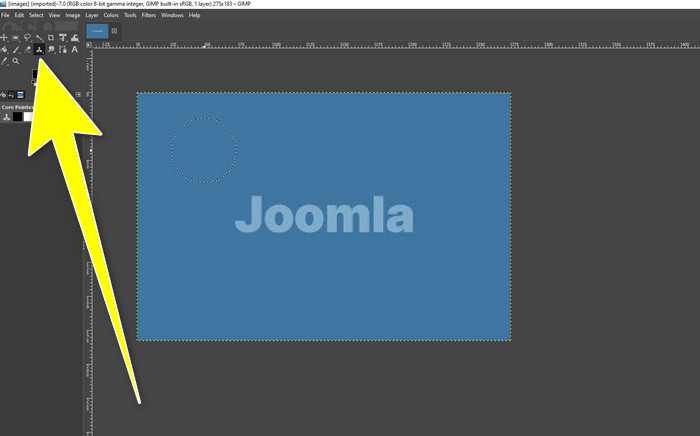
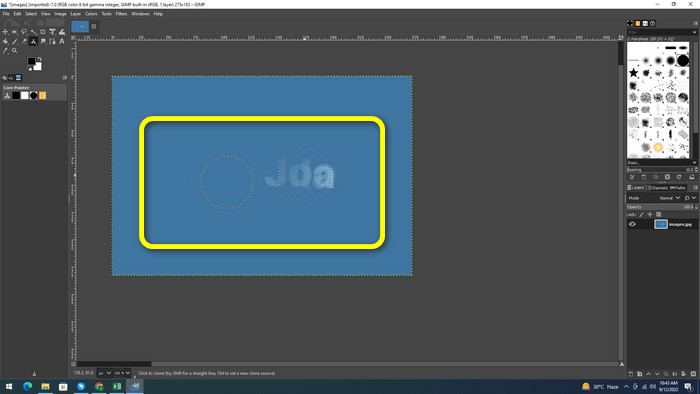
Korak 3: Kliknite Clone tool i postavite pokazivač na prazno područje. Pritisnite Ctrl i kliknite prazno područje.
Korak 4: Povucite pokazivač preko vodenih žigova kako biste ih uklonili. Vodeni žig je već nestao. Sada možete spremiti svoju fotografiju.
4. Aiseesoft besplatni alat za uklanjanje vodenih žigova na mreži
Ako želite najbolji online alat za uklanjanje vodenih žigova s fotografija, Aiseesoft Free Watermark Remover Online je za vas. Ova aplikacija može ukloniti više vodenih žigova, tekst, datumske oznake, logotipove i drugo s vaših fotografija. Štoviše, jednostavna je za korištenje, što je čini savršenom za početnike. Također podržava razne formate slika, poput PNG, JPEG, BMP, JPG i drugih. Međutim, ova aplikacija nije potpuno besplatna; morate kupiti licencu da biste koristili napredne funkcije. Ako želite ukloniti vodene žigove s vaših slika, slijedite ove korake.
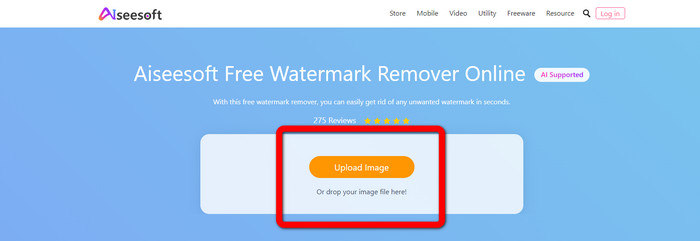
Korak 1: Idite na web-stranicu Aiseesoft Free Watermark Remover Online. Zatim kliknite Upload Image kako biste dodali fotografiju s vodenim žigovima.
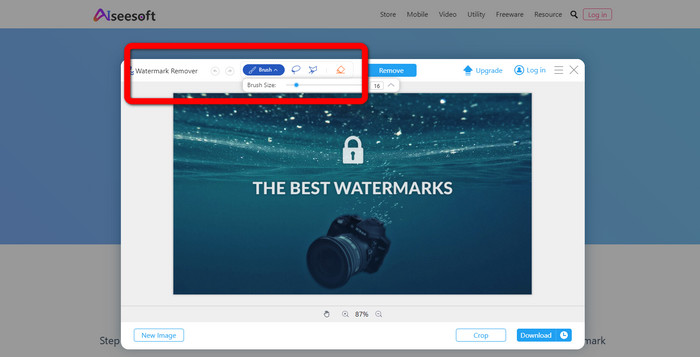
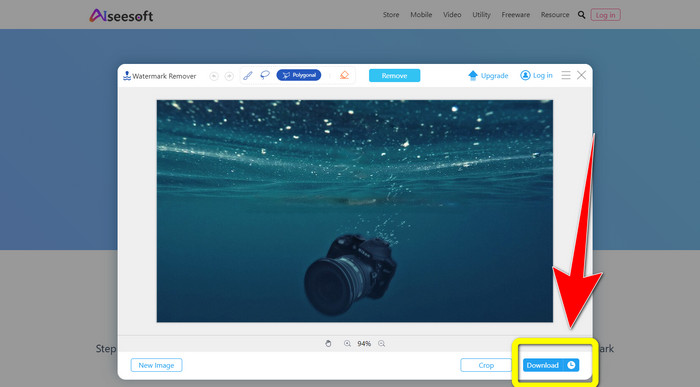
Korak 2: Kada ste već priložili svoju fotografiju, prijeđite na watermark remover tool. Zatim možete vidjeti alate za uklanjanje, kao što su Brush, Polygonal i Lasso.
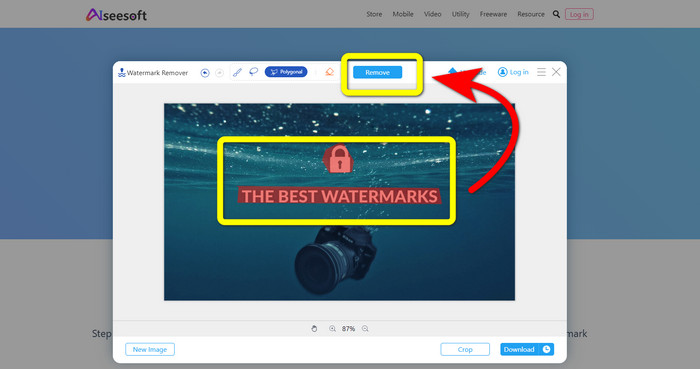
Korak 3: Upotrijebite ove alate i označite vodene žigove na fotografiji, a zatim kliknite Remove.
Korak 4: Ako ste zadovoljni rezultatom, kliknite Download da biste spremili svoju fotografiju.
5. Pixlr
Pixlr je još jedan online alat koji možete koristiti za uklanjanje vodenih žigova s fotografija. Jednostavan je za korištenje i prikladan za početnike. Podržava različite formate slika, poput PSD, PNG, JPEG, WEBP i PXZ. Osim toga, ovu aplikaciju možete koristiti na svojim uređajima kao što su iPhone, Android, stolno računalo i prijenosno računalo. No, nema toliko mogućnosti kao neke druge aplikacije i ima ograničene efekte. Ako želite naučiti kako izbrisati vodeni žig sa slike, slijedite korake u nastavku.
Korak 1: Idite na web-stranicu Pixlr. Kliknite Open Image kako biste dodali sliku s vodenim žigom.

Korak 2: Nakon što dodate fotografiju, idite na alat retouch > heal.
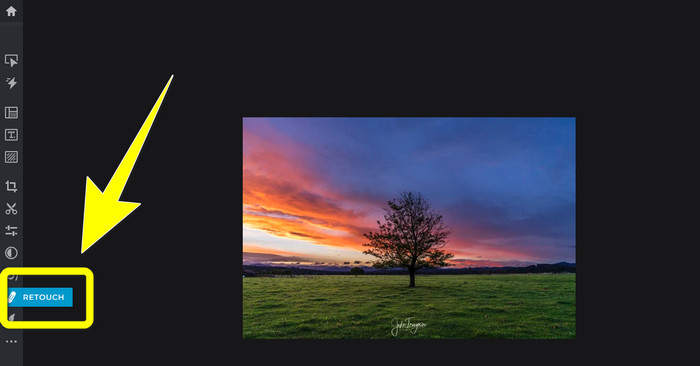
Korak 3: Nakon što kliknete alat retouch > heal, kliknite na vodeni žig na svojoj slici.
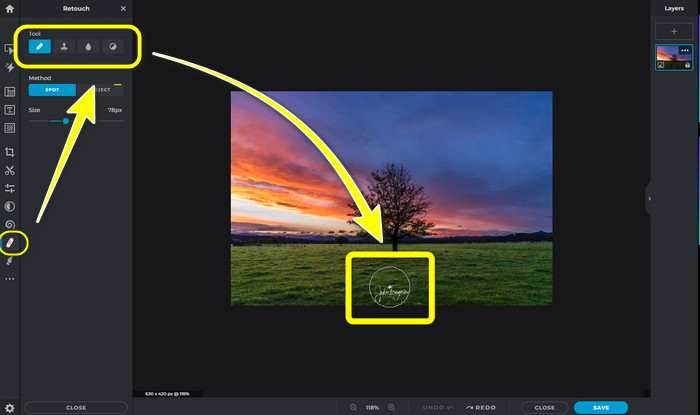
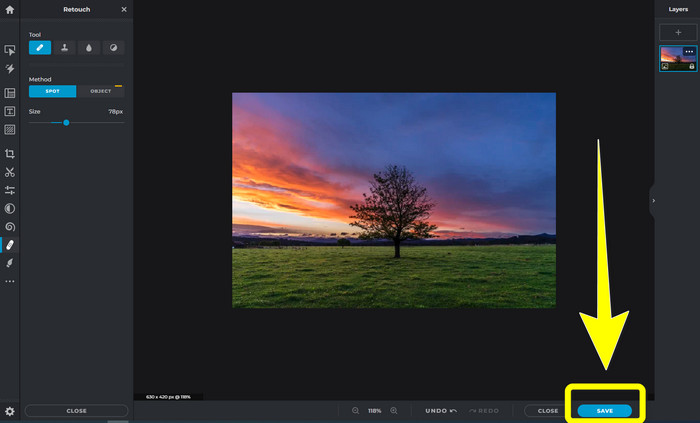
Korak 4: Kada vodeni žig nestane, kliknite gumb Save.
6. Inpaint
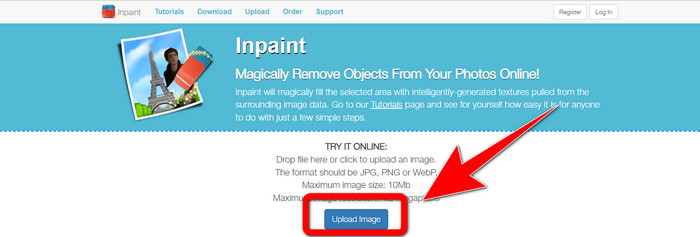
Inpaint je još jedna online aplikacija koju možete koristiti ako želite ukloniti vodene žigove sa svojih slika. Ne samo vodene žigove, već i logotipove i tekst. Također podržava formate slika kao što su JPG, PNG i WEBP. Međutim, ako želite dobiti slike visoke kvalitete, morate kupiti aplikaciju. Ako želite ukloniti vodene žigove sa svojih fotografija, slijedite jednostavne korake u nastavku.
Korak 1: Idite na web-stranicu Inpaint. Kliknite Upload Image i dodajte svoju sliku s vodenim žigom.
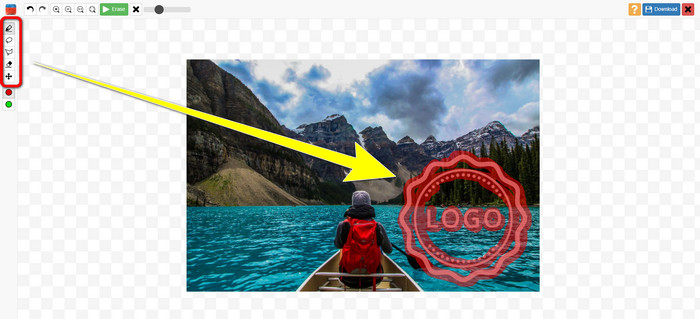
Korak 2: Kada učitate sliku, odaberite watermark remover tools kao što su Marker, Polygonal, Lasso i Eraser tool te označite vodene žigove na fotografiji.
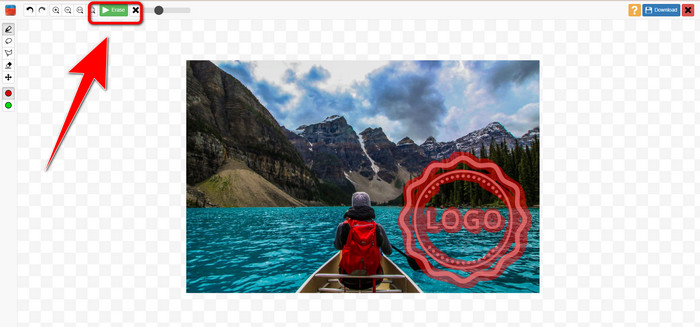
Korak 3: Kada završite s označavanjem vodenih žigova, kliknite Erase.
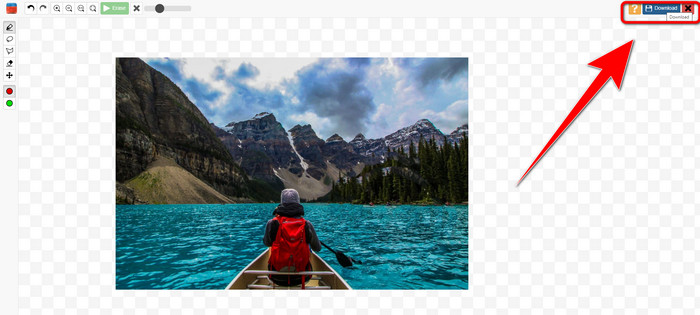
Korak 4: Kada vodeni žig nestane, kliknite gumb Download da biste spremili svoju sliku.
7. Photo Stamp Remover
Photo Stamp Remover je aplikacija koju možete koristiti sa svojim računalom. Možete ga besplatno preuzeti. Ova aplikacija može brzo ukloniti nepotrebne objekte na vašim slikama, poput logotipa, teksta, vodenih žigova i datuma. No, ne radi dobro na slikama s kompliciranom pozadinom. Štoviše, ovaj softver može vratiti boje i teksturu izvorne fotografije kako bi prekrio vodene žigove tako da izgleda autentično. Slijedite ove korake za uklanjanje vodenih žigova na svojim slikama.
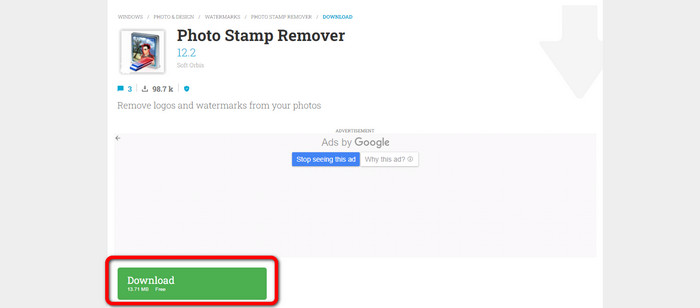
Korak 1: Kliknite gumb Download kako biste preuzeli Photo Stamp Remover na svoj Windows i slijedite postupak instalacije.
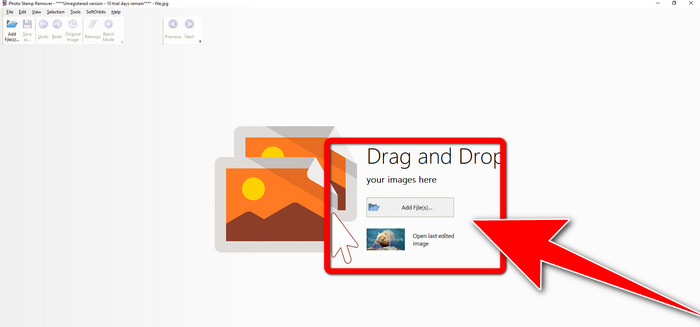
Korak 2: Pokrenite aplikaciju i kliknite Add File kako biste dodali fotografiju s vodenim žigovima.
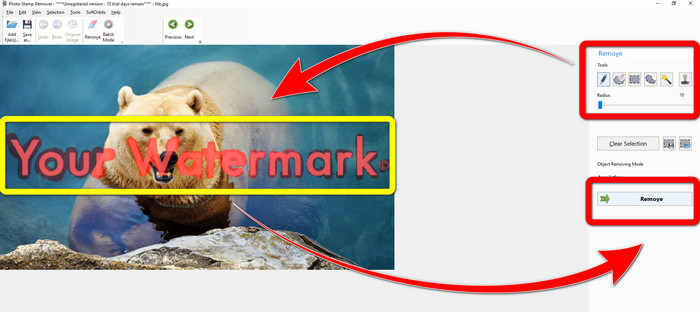
Korak 3: Idite na Remover tools i kliknite Selection Marker. Označite vodene žigove i kliknite Remove.
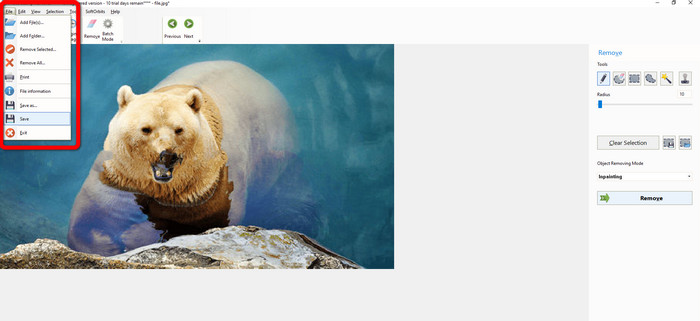
Korak 4: Kada uklonite vodene žigove s slike, kliknite File > Save. Time završavate uklanjanje vodenih žigova s fotografije.
Dio 2. Kako ukloniti vodeni žig s fotografije na iPhoneu i Androidu
1. Video brisač
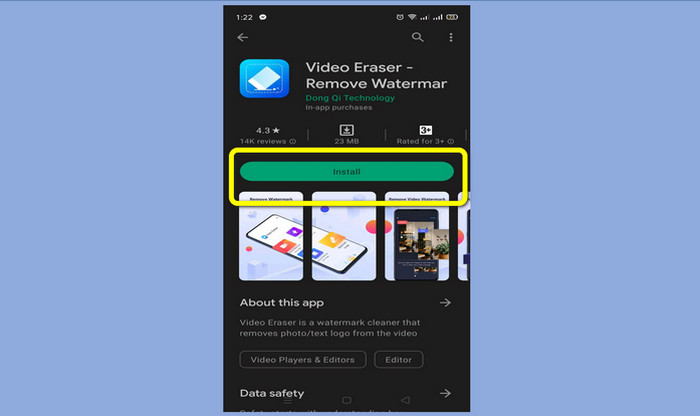
Ako želite znati koja vam aplikacija može pomoći naučiti kako ukloniti vodene žigove s fotografije na Androidu, Video Eraser je za vas. Ova aplikacija može ukloniti nepotrebne objekte s vaših fotografija, poput teksta, vodenih žigova itd. Osim toga, pomoću ove aplikacije možete uklanjati vodene žigove i s videozapisa. No, slika može postati mrljasta na mjestu gdje je vodeni žig uklonjen. Ako želite naučiti kako koristiti Video Eraser, slijedite korake u nastavku.
Korak 1: Instalirajte Video Eraser na svoj Android. Kada je instalacija gotova, otvorite aplikaciju.
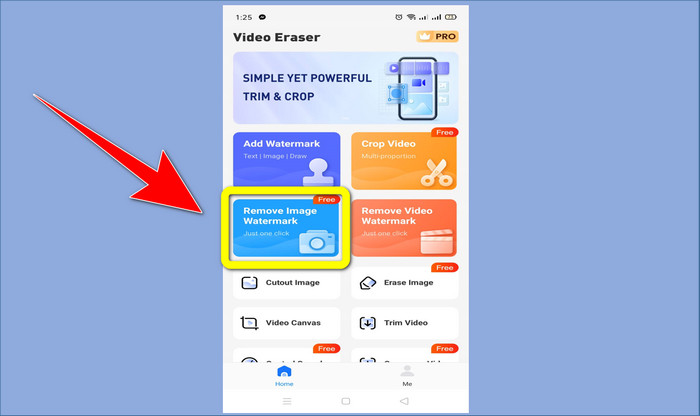
Korak 2: Kliknite Remove Image Watermark kako biste dodali fotografiju s vodenim žigovima.
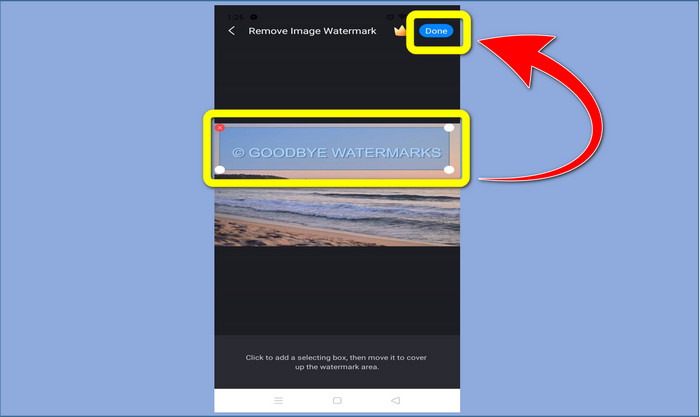
Korak 3: Označite vodeni žig na fotografiji i kliknite Done.
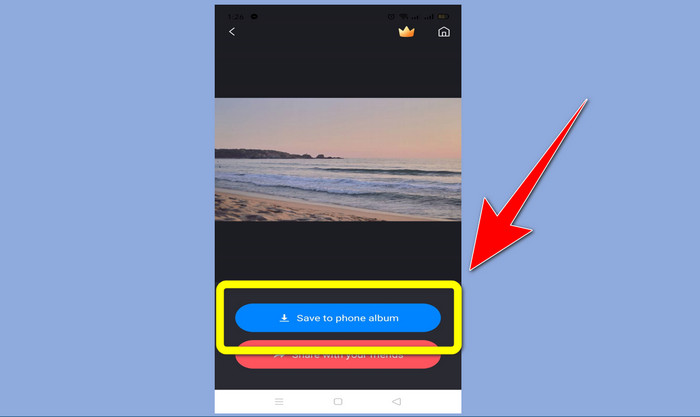
Korak 4: Nakon što kliknete Done, vodeni žig će nestati. Kliknite Save to Photo Album da biste spremili fotografiju.
2. Snapseed
Snapseed je izvrstan uređivač koji možete koristiti, posebno ako želite naučiti kako ukloniti vodeni žig s fotografije na iPhoneu. Ova aplikacija je dobra kada želite ukloniti vodene žigove sa slika. Osim toga, ima razne alate za uređivanje koje možete koristiti, poput izrezivanja, rotacije i drugih. Ova aplikacija ipak nije za potpune početnike, posebno kada je riječ o naprednom uređivanju, iako je korisničko sučelje prilično jednostavno, postoji određeni proces učenja. Slijedite korake u nastavku da biste uklonili vodene žigove sa svoje fotografije pomoću ove aplikacije.
Korak 1: Instalirajte Snapseed na svoj iPhone. Kada je instalacija završena, otvorite softver.
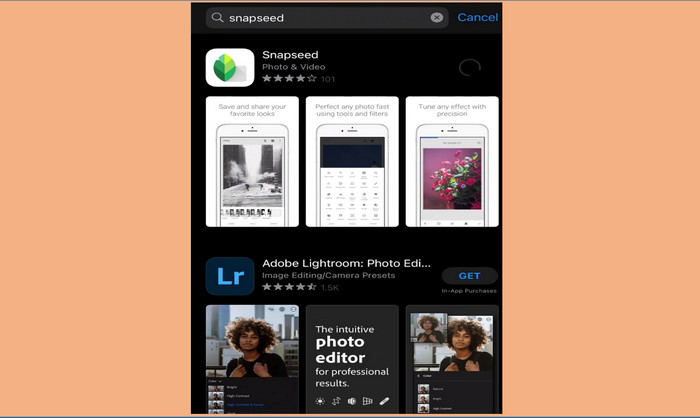
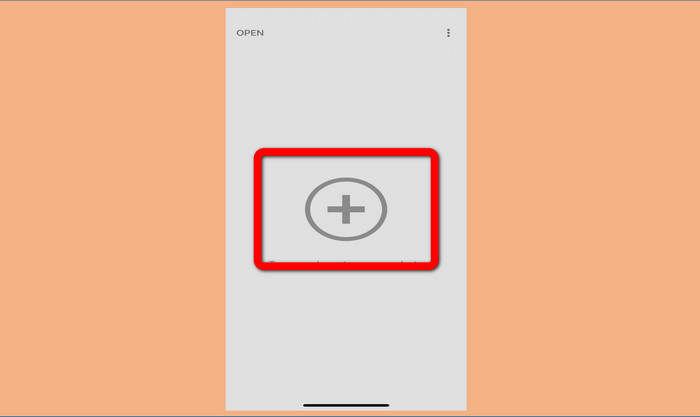
Korak 2: Kliknite gumb s Plus sign da biste dodali fotografiju s vodenim žigovima.
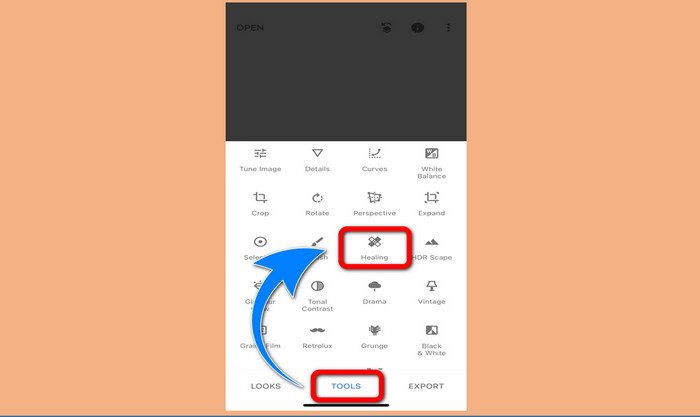
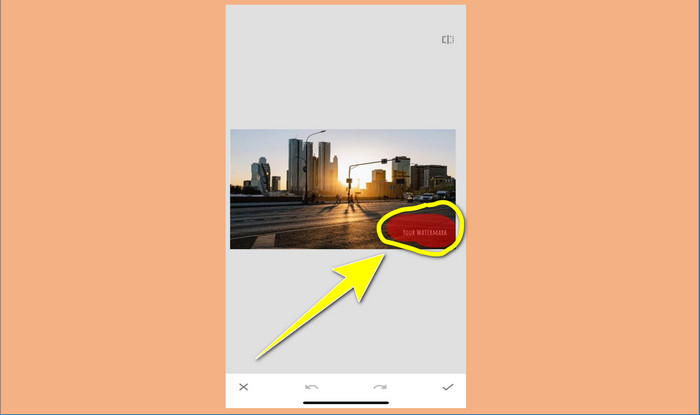
Korak 3: Kada ste već dodali fotografiju, odaberite Tools > Healing i označite vodene žigove na slici. Nakon što ih označite, automatski će nestati.
Korak 4: Nakon što označite vodene žigove, oni će automatski nestati.
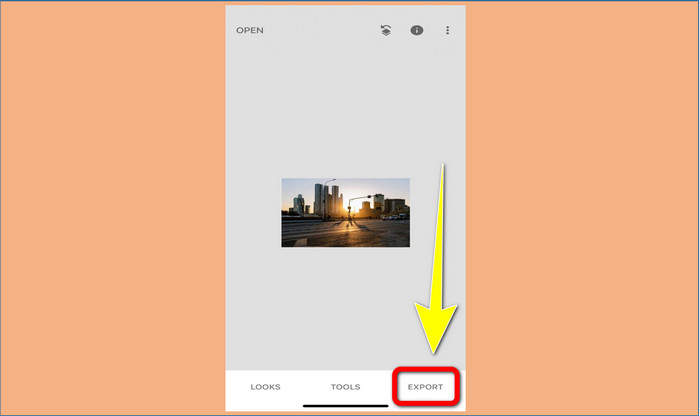
Korak 5: Kada završite s uklanjanjem vodenih žigova s fotografije, kliknite znak Check i Export kako biste spremili sliku na svoj iPhone.
Povezano s:
Najbrži trik za uklanjanje Adobe Stock vodenog žiga s videa [ vodič ]
5 načina za profesionalno uklanjanje vodenog žiga s videa
Dio 3. Često postavljana pitanja o uklanjanju vodenih žigova s fotografija
Postoji li alat za uklanjanje vodenog žiga koji mogu besplatno koristiti, posebno za Mac?
Da, postoji! Na Macu možete koristiti mnoge alate za uklanjanje vodenih žigova, poput FVC Free Watermark Remover. To je online aplikacija za uklanjanje vodenih žigova na Macu.
Postoji li način za uklanjanje vodenih žigova s videozapisa?
Definitivno! To je lako učiniti. Neke od aplikacija za uklanjanje vodenih žigova koje sada možete koristiti mogu ukloniti vodene žigove na fotografijama i videozapisima. Sve što trebate učiniti je potražiti sredstvo za uklanjanje vodenog žiga u okviru za pretraživanje i vidjeti stranicu s rezultatima.
Je li lako ukloniti vodene žigove?
Da naravno! Ako već imate aplikaciju koju ćete koristiti, trebate potražiti alate za uklanjanje, poput kista, markera, lasa i poligonalnih alata. Zatim označite vodene žigove i gotovo.
Zaključak
Kao što je prikazano iznad, ovaj članak nudi izvanredne načine kako ukloniti vodene žigove s fotografija. No, ako želite izvrstan alat za uklanjanje vodenih žigova, FVC Free Watermark Remover je najbolji izbor za vas.
-
 Kako se besplatno riješiti Power Director vodenog žiga [Dovršeno]
 Kako se besplatno riješiti Power Director vodenog žiga? Ovdje su najbolji alati za uklanjanje vodenog žiga pa ih naučite čitajući ovo.
-
 Najbolje tehnike za uklanjanje vodenog žiga probne verzije Canvasjsa koje morate znati
 Najbolji način za uklanjanje Canvasjs vodenog žiga je da ćete morati koristiti alat. Ako niste odabrali alat, možete ga odabrati u ovom članku.
-
 Kako ukloniti Animaker vodeni žig bez troškova [Provjereni načini]
 Kako ukloniti Animaker vodeni žig? S najboljim alatima koje smo uključili u ovaj blog možete ih koristiti da biste se riješili vodenog žiga.
