


 Video Converter Ultimate
 Snimač zaslona
 Video popravak
Izvanredne metode za trenutačno pretvaranje MTS-a u M4V
Želite li učinkovit pretvarač za svoj uređaj? Onda ćete dobiti ideju čitanjem informativnih pojedinosti iz ovog članka. Pokazat ćemo vam razne načine kako pretvoriti MTS u M4V na Macu i Windowsu. Također ćete otkriti mrežni alat koji možete isprobati za pretvaranje većeg broja datoteka.

Dio 1: Razlike između MTS i M4V
Kako biste vidjeli razlike između ova dva formata datoteka, pogledajte pojedinosti u tablici u nastavku.
| MTS | M4V | |
| Ekstenzija datoteke | Ekstenzija naziva video datoteke naprednog video kodiranja visoke razlučivosti (AVCHD) je MTS. Ima .mts ekstenziju naziva datoteke i uključuje HD MPEG video snimljen određenim markama i modelima kamkordera, uključujući JVC, Sony, Canon i Sanyo. Može se otvoriti na mnogim softverima i podržavati HD videozapise do 1080i x 720p. | Apple Inc. stvorio je format digitalnog video spremnika M4V. Što se tiče strukture, može se usporediti s dobro poznatim MP4, ali M4V datoteke mogu imati DRM. Glavni video format za video zapise na iTunes Storeu danas je M4V, koji može zajedno spajati više audio i video podataka. |
| Razvijen od | Sony/Panasonic | Apple Inc. |
| Pridruženi programi | VLC Media Player Apple Final Cut Pro X Roxio Creator NXT Pro 7 | Media Player Classic KMPlayer VLC Media Player Zoom Player |
| Vrsta MIME | video/mp2t | video/x-m4v |
Dio 2: Izvrsne metode za pretvaranje više MTS u M4V pomoću Maca
Ako želite pretvoriti MTS u M4V pomoću Maca, možete isprobati FVC Video Converter Ultimate. Ovaj izvanmrežni alat može trenutno pretvoriti datoteke jer ima 30 puta veću brzinu pretvorbe. Osim toga, ovaj alat nudi skupnu pretvorbu, što omogućuje pretvorbu više formata datoteka odjednom. Također, gotovo svi video formati mogu se prenijeti u ovu aplikaciju jer podržava brojne formate datoteka, uključujući MKV, MOV, MP4, FLV, AVI, SWF i druge. Također možete urediti svoju MTS video datoteku. Možete se osloniti na ovaj alat ako imate više MTS datoteka i želite da se kombiniraju jer nudi alat za spajanje videozapisa. Na ovaj način možete spojiti više MTS videozapisa u jedan dio. Također, ako želite prilagoditi glasnoću svog MTS videa, možete koristiti alat za pojačavanje glasnoće. Uz pomoć ove offline aplikacije možete jednostavno promijeniti glasnoću svog videa. Postoji više značajki u kojima možete uživati koristeći Video Converter Ultimate.
Značajke
◆ Može pretvoriti više od 100 formata video datoteka.
◆ Nudi alat za izradu glazbenih videozapisa s mnogo besplatnih tema.
◆ Dostupna je izrada kolaža s besplatnim predlošcima i filtrom.
◆ Pruža alate za uređivanje, kao što su upravljač brzinom videa, kompresor i alat za obrezivanje.
◆ Može ukloniti vodene žigove s videozapisa.
Slijedite osnovne korake u nastavku za pretvaranje vaše MTS videodatoteke u M4V format koristeći FVC Video Converter Ultimate na vašem Macu.
1. korak: Na svom Macu preuzmite FVC Video Converter Ultimate klikom na gumb Download u nastavku. Zatim pokrenite aplikaciju.
Besplatno preuzimanjeZa Windows 7 ili novijiSigurno preuzimanje
Besplatno preuzimanjeZa MacOS 10.7 ili novijiSigurno preuzimanje
2. korak: U sredini sučelja kliknite ikonu Plus kako biste priložili svoju MTS video datoteku. Također možete izravno ispustiti datoteku u okvir.
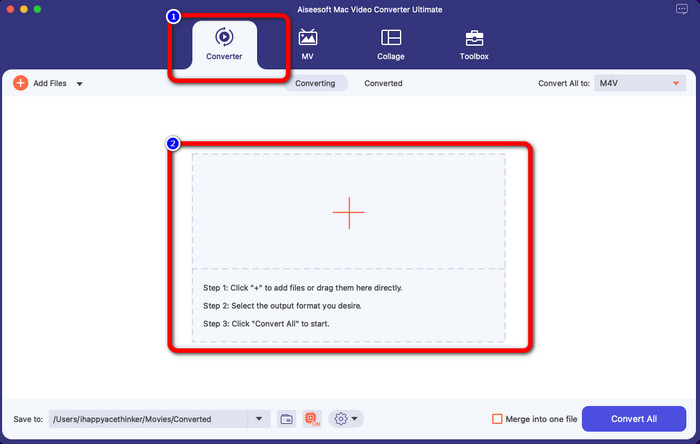
3. korak: U sljedećem postupku vidjet ćete gumb Convert All to u gornjem desnom kutu sučelja. Kliknite ga da biste vidjeli mogućnosti formata, a zatim odaberite M4V format datoteke. Da biste dodali više MTS datoteka, pritisnite gumb Add Files u gornjem lijevom dijelu sučelja.
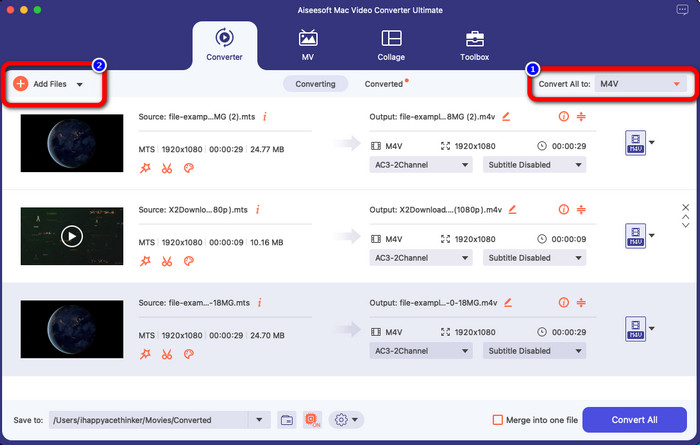
4. korak: Nakon što pretvorite sve MTS datoteke u M4V format, kliknite gumb Convert All i spremite svoj konačni rezultat na željenu lokaciju.
Dio 3: Kako besplatno pretvoriti više MTS datoteka u M4V u sustavu Windows
U ovom ćete dijelu otkriti kako pretvoriti više MTS datoteka u jedan M4V u sustavu Windows. Za pretvaranje MTS datoteka možete koristiti FVC Free TS Converter. Može pretvoriti vaše video datoteke 10x brže od prosječne brzine konverzije. Nudi skupnu konverziju, pri čemu možete pretvoriti više datoteka odjednom. Na taj način vam neće biti dosadno pretvarati datoteke jednu po jednu. Osim toga, ima intuitivno sučelje s osnovnim postupcima, što ga čini prikladnijim za korisnike. Ako želite pretvoriti više MTS datoteka u M4V format pomoću FVC Free TS Converter na Windowsu, slijedite jednostavne korake u nastavku.
Značajke
◆ Pretvorite formate video datoteka, kao što su AVI, MOV, MPEG, MP4, DIVX, XVID, itd.
◆ Pruža Video Enhancer.
◆ Mogućnost snimanja zaslona.
◆ Može reproducirati bilo koji Blu-ray disk.
◆ Nudi skupnu konverziju.
1. korak: Preuzmite FVC Free TS Converter na svoj Windows klikom na gumb Download u nastavku. Pokrenite aplikaciju nakon postupka instalacije.
Free DownloadZa Windows 7 ili novijiSigurno preuzimanje
Free DownloadZa MacOS 10.7 ili novijiSigurno preuzimanje
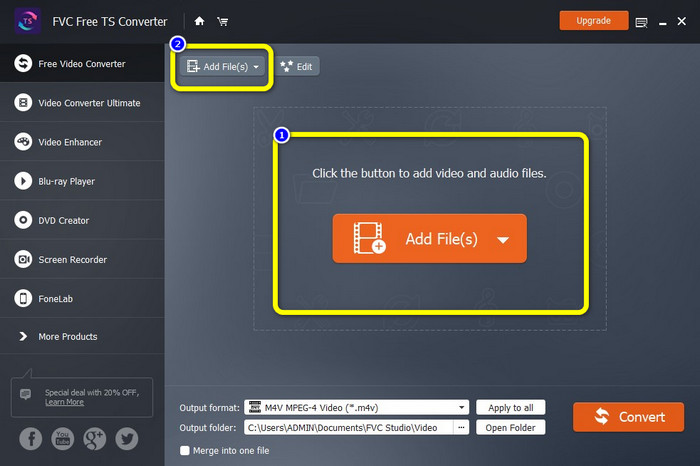
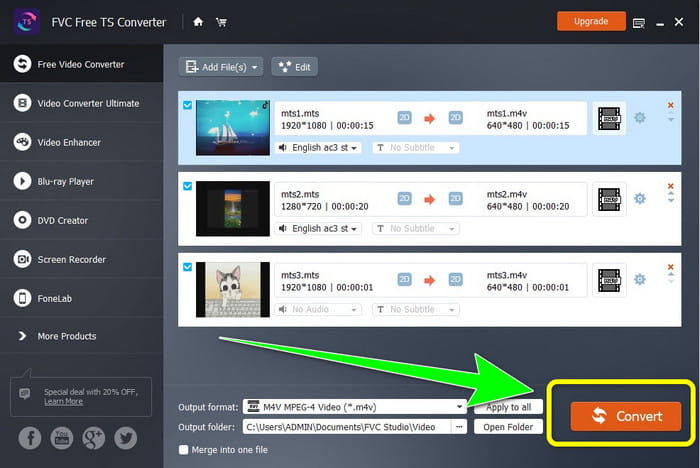
2. korak: Nakon pokretanja aplikacije pritisnite gumb Add Files u sredini kako biste učitali MTS datoteke. Također možete kliknuti drugi gumb Add Files u gornjem dijelu sučelja kako biste dodali još MTS datoteka koje želite pretvoriti.
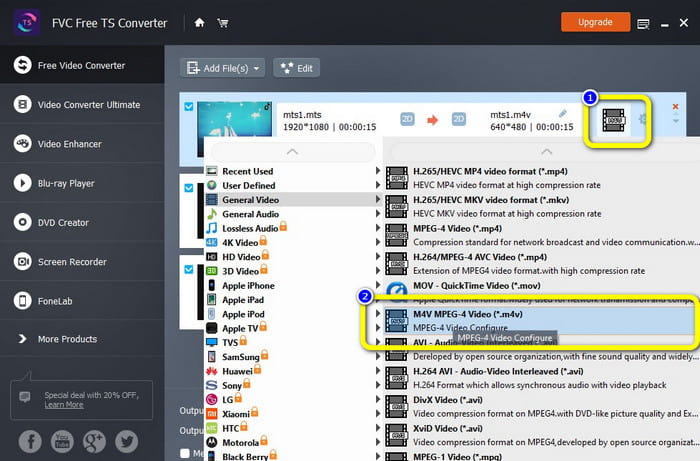
3. korak: Kliknite mogućnosti formata na desnoj strani sučelja. Zatim odaberite M4V format datoteke kao svoj izlazni format. Učinite isto za preostale MTS datoteke.
4. korak: Pritisnite gumb Convert da biste pretvorili više MTS datoteka u M4V format.
Dio 4: Najbolji načini za pretvaranje MTS-a u M4V pomoću online aplikacije
Kada pretvarate MTS u M4V pomoću mrežnog alata, najbolji pretvarač koji možete koristiti je FVC Free Video Converter Online. Uz pomoć ovog alata možete lako pretvoriti svoju MTS datoteku u M4V. Za pretvaranje datoteka potrebna su samo tri koraka. Također, ovaj mrežni alat je 100% besplatan. Dakle, bez daljnjeg odgađanja, pretvorimo vaš MTS u M4V format datoteke. Slijedite korake koje smo vam pružili!
Značajke
◆ Pretvorite više datoteka, poput MP4, FLV, WMA, MOV, MTS, M4V itd.
◆ Omogućuje skupnu pretvorbu.
◆ Dostupno na Mac i Windows.
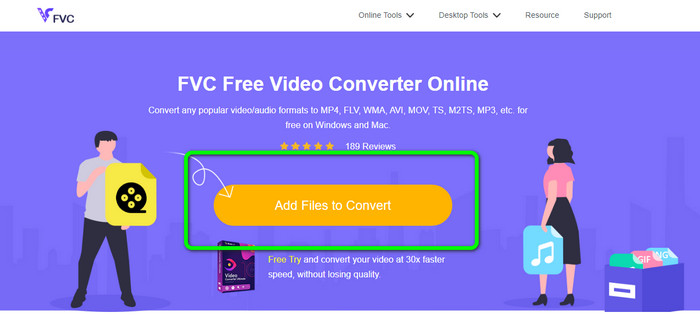
1. korak: Posjetite web-stranicu FVC Free Video Converter Online. Zatim kliknite gumb Add Files to Convert kako biste učitali svoj MTS videozapis.
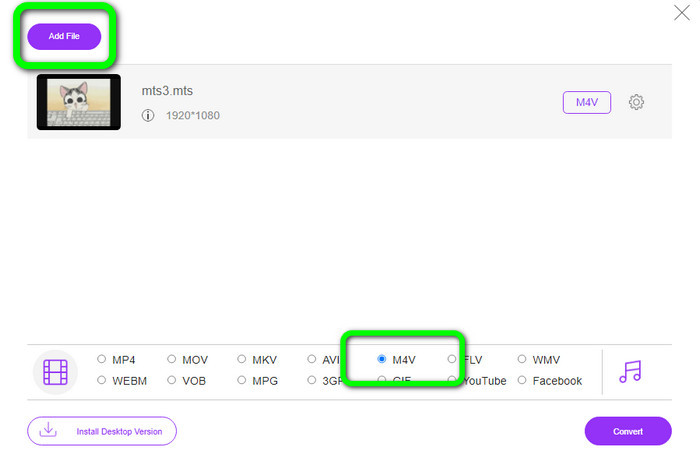
2. korak: Zatim odaberite M4V format u mogućnostima formata u donjem dijelu sučelja. Također možete kliknuti gumb Add File kako biste pretvorili više datoteka.
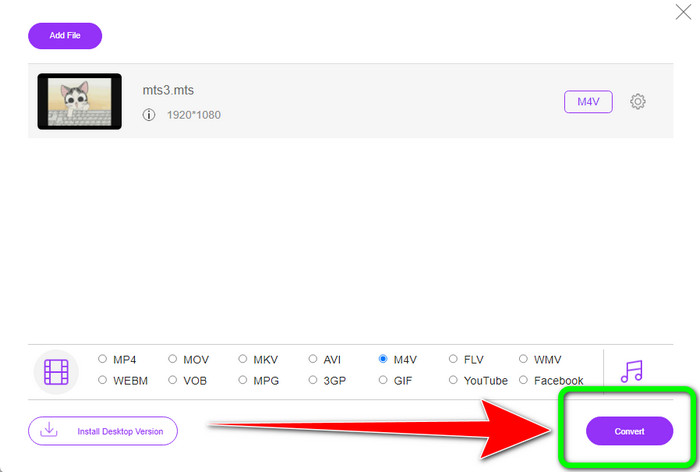
3. korak: Nakon odabira željenog formata, možete kliknuti gumb Convert kako biste spremili svoj video u M4V format datoteke.
Dio 5: Često postavljana pitanja o pretvaranju MTS-a u M4V
1. Je li MTS dobar format?
Da. 720p i 1080i HD video kodeke podržava MTS, MPEG visoke razlučivosti i H.264 prijenosni video format. Ljudi često nazivaju MTS datoteke AVCHD, koje su zajednički izradili Sony i Panasonic i izdale su ih u formatu visoke kvalitete 2006.
2. Kako mogu pretvoriti MTS u MP4?
Možete koristiti gore navedene aplikacije. Ti su pretvarači učinkoviti i korisni za pretvaranje MTS u MP4 i druge formate datoteka.
3. Zašto biste koristili M4V?
M4V datoteke mogu imati meke titlove i DRM zaštitu kako bi se zaustavilo piratstvo i otežalo korisnicima distribuciju datoteka među uređajima.
Zaključak
Tri gore navedene aplikacije najbolji su pretvarači koje možete koristiti na svojim uređajima. Ako ste korisnik sustava Windows, možete koristiti FVC Video Converter Ultimate. Ako koristite Mac, možete isprobati FVC Free TS Converter. Na kraju, možete koristiti FVC Free Video Converter Online ako preferirate mrežnu aplikaciju. Ti pretvarači mogu glatko pretvoriti MTS u M4V.
-
 MTS VS M2TS - Razlika između MTS-a i M2TS-a
 Što je MTS ili M2TS datoteka? Koja je razlika između M2TS i MTS? Kako mogu gledati MTS ili M2TS datoteku snimljenu kamkorderom? Pronađite sve odgovore u ovom postu
-
 Top 5 M4V playera za Windows / Mac / Android / iOS koje biste trebali znati
 Kada ne možete reproducirati svoje M4V videozapise na QuickTime Playeru, trebali biste naučiti više o 5 izvrsnih M4V playera za Windows, Mac, Android i iOS iz ovog članka
-
 [Riješeno] Kako pretvoriti MTS u MKV u izvornoj kvaliteti
 Pitate li se kako možete besplatno pretvoriti MTS u MKV? U ovom smo članku naveli najbolje besplatne pretvarače MTS u MKV
