


 Video Converter Ultimate
 Snimač zaslona
 Video popravak
FLAC u odnosu na MP3: Uvod i usporedba audio formata
Rasprava o formatima datoteka FLAC vs. MP3 traje već godinama. Iako je MP3 jedan od najstarijih i najraširenijih formata, FLAC je stekao popularnost među audiofilima zbog svoje bezgubitne kompresije zvuka. Ali koji je bolji? U ovom vodiču detaljnije ćemo pogledati razlike između FLAC‑a i MP3‑a, uključujući kvalitetu zvuka, veličinu datoteka, kompatibilnost i još mnogo toga, kako bismo vam pomogli odlučiti koji format odabrati za svoju glazbenu kolekciju.

Dio 1. FLAC nasuprot MP3: Uvod u audio formate
Anegdota o MP3 formatu
MP3 je popularan format za digitalne audio datoteke koji se naširoko koristi od svog predstavljanja 1990-ih. Koristi oblik kompresije s gubitkom kako bi smanjio veličinu audio datoteka uz zadržavanje dobre kvalitete zvuka. MP3 datoteke mogu se jednostavno dijeliti, preuzimati i reproducirati na različitim uređajima, što ga čini prikladnim izborom za ljubitelje digitalne glazbe. Pitanje je je li FLAC bolji od MP3? Otkrijmo to čitajući opis FLAC-a.
Anegdota o FLAC formatu
FLAC (Free Lossless Audio Codec) je format audio datoteke visoke kvalitete koji koristi kompresiju bez gubitaka za očuvanje izvornih audio podataka bez žrtvovanja kvalitete. To znači da su FLAC datoteke mnogo veće od MP3 datoteka, ali zadržavaju istu razinu vjernosti zvuka kao izvorni izvorni materijal.
Dio 2. Podržani uređaji/platforme FLAC i MP3
Pogledajmo sada usporedbu MP3-a i FLAC-a da vidimo kakav je učinak s obzirom na platforme ili uređaje koje podržavaju.
MP3 je široko podržan format audio datoteke koji se može reproducirati na različitim platformama, uključujući:
◆ Računala s operacijskim sustavima Windows, macOS i Linux.
◆ Prijenosni medijski reproduktori, poput iPoda i drugih MP3 playera.
◆ Pametni telefoni i tableti s operativnim sustavima iOS, Android i drugim mobilnim operativnim sustavima.
◆ Auto stereo uređaji s USB-om ili pomoćnim ulazima.
◆ Sustavi kućnog kina i stereo prijemnici s USB ili mrežnom vezom.
◆ Usluge strujanja glazbe, kao što su Spotify i Apple Music, često koriste MP3 kao zadani format za strujanje i preuzimanje glazbe.
FLAC nije toliko široko podržan kao MP3, ali se još uvijek može reproducirati na raznim platformama, uključujući:
◆ Računala s operacijskim sustavima Windows, macOS i Linux.
◆ Neki prijenosni media playeri, kao što su Astell&Kern AK Jr i PonoPlayer.
◆ Neki pametni telefoni i tableti s Androidom i drugim mobilnim operativnim sustavima.
◆ Neki stereo uređaji za automobile i sustavi kućnog kina s USB ili mrežnom vezom.
◆ Neke usluge strujanja glazbe, kao što je Tidal, koje nude opcije strujanja i preuzimanja FLAC formata visoke vjernosti.
Dio 3. Je li FLAC bolji od MP3?
Ovaj put dopustite nam da navedemo razliku između FLAC-a i MP3-a sveobuhvatnom usporedbom ovih audioformata.
Evo sveobuhvatne usporedbe FLAC-a i MP3-a na temelju različitih čimbenika:
Kvaliteta zvuka: FLAC nudi bolju kvalitetu zvuka od MP3‑a, jer je bezgubitni format koji čuva sve zvučne podatke iz izvornog materijala. S druge strane, MP3 je format s gubicima koji odbacuje dio zvučnih podataka tijekom kompresije, što može dovesti do gubitka kvalitete zvuka.
Veličina datoteke: MP3 datoteke znatno su manje od FLAC datoteka, budući da MP3 koristi kompresiju s gubicima kako bi smanjio veličinu datoteke. To MP3 čini praktičnijim izborom za one s ograničenim prostorom za pohranu ili za one koji trebaju brzo dijeliti ili preuzimati glazbene datoteke putem interneta.
Kompatibilnost: MP3 je široko kompatibilan s raznim uređajima i softverom, uključujući stolna i prijenosna računala, prijenosne medijske reproduktore, pametne telefone, auto‑radije i usluge za streaming glazbe. FLAC, s druge strane, možda neće biti kompatibilan s nekim uređajima i softverom zbog svoje veće veličine datoteka i bezgubitne kompresije.
Brzina prijenosa (bitrate): MP3 datoteke mogu se kodirati pri nižem bitrateu kako bi se dodatno smanjila veličina datoteke, ali to također dovodi do gubitka kvalitete zvuka. FLAC datoteke, pak, uvijek zadržavaju isti bitrate kao izvorni materijal.
Uređivanje: FLAC je bolji izbor za uređivanje zvuka jer nudi višu razinu vjernosti zvuka i ne uvodi dodatne artefakte kompresije. MP3 datoteke, naprotiv, mogu unijeti dodatne artefakte kompresije tijekom uređivanja zbog kompresije s gubicima.
Cijena: I FLAC i MP3 su besplatni i otvorenog koda, tako da nema troškova povezanih s korištenjem bilo kojeg od ovih formata.
Dio 4. Pretvorite FLAC u MP3 ili MP3 u FLAC
Sada kada smo završili s postupkom usporedbe FLAC-a i MP3-a, prijeđimo na postupak kako pretvoriti MP3 u FLAC ili obrnuto.
Video Converter Ultimate je moćan softverski alat koji vam omogućuje jednostavnu konverziju audio i video datoteka iz jednog formata u drugi. Jedan od brojnih formata koje podržava FVC Video Converter Ultimate je FLAC, visokokvalitetni, bezgubitni audio format koji često koriste audiofili i zaljubljenici u glazbu. Svoje FLAC datoteke možete brzo i jednostavno pretvoriti u MP3, čime štedite prostor na uređaju i olakšavate dijeljenje glazbe. Video Converter Ultimate nudi korisnički prilagođeno sučelje i mnoštvo opcija za prilagodbu, što ga čini praktičnim i korisnim alatom za svakoga tko treba pretvarati audio i video datoteke.
Za pretvaranje audio datoteka između FLAC i MP3 formata pomoću ovog alata, trebate slijediti nekoliko jednostavnih koraka.
Korak 1. Najprije preuzmite i instalirajte program na svoje računalo klikom na jedan od gumba Free Download te slijedite čarobnjaka za instalaciju. Zatim pokrenite program kako biste pristupili njegovom jednostavnom sučelju.
Besplatno preuzimanjeZa Windows 7 ili novijiSigurno preuzimanje
Free DownloadZa macOS 10.7 ili novijiSigurno preuzimanje
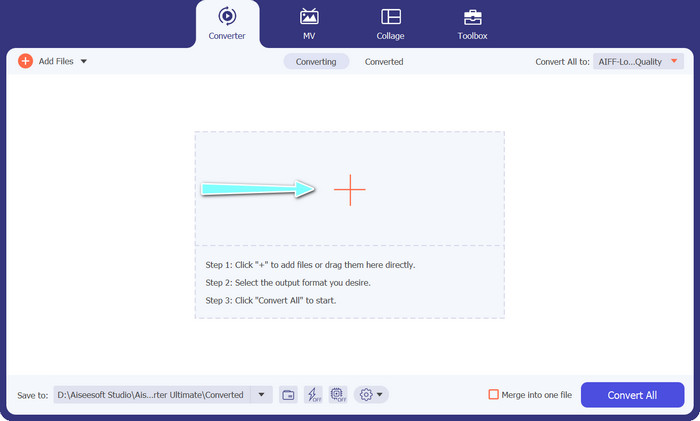
Korak 2. Zatim dodajte audio datoteku koju želite pretvoriti klikom na gumb sa znakom plus u glavnom sučelju. Nakon dodavanja, na sučelju ćete vidjeti sličicu svake datoteke.
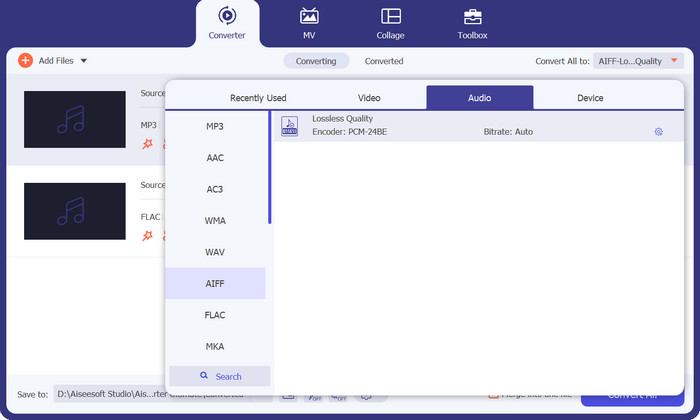
Korak 3. Odredite izlazni format odabirom kartice Audio iz izbornika Profile u gornjem desnom dijelu alata. Odaberite MP3 ili FLAC, ovisno o smjeru konverzije.
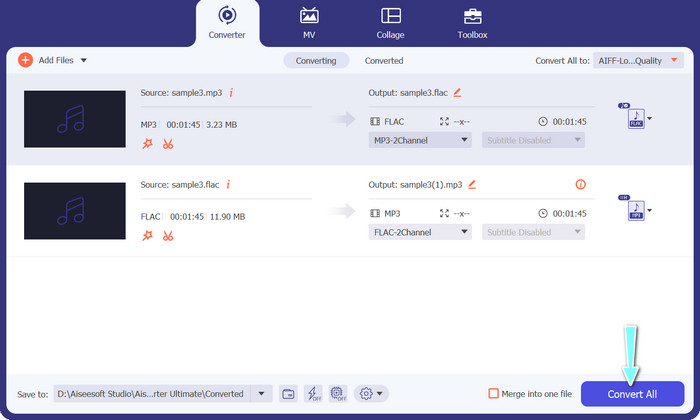
Korak 4. Odredite izlaznu mapu u koju želite spremiti pretvorene datoteke odabirom odgovarajuće lokacije pri dnu sučelja. Na kraju kliknite gumb Convert All da biste započeli postupak pretvorbe.
Ako trebate besplatan online alat za pretvaranje FLAC‑a u MP3, ne tražite dalje od programa Free Video Converter Online. Ovaj praktičan program korisnicima omogućuje pretvaranje video i audio datoteka bez ikakvih troškova, a nudi i mogućnost prilagodbe izlaznih postavki prema vašim željama. Brzina pretvorbe je pouzdana, pod uvjetom da imate internetsku vezu. Za početak slijedite ove korake:
Korak 1. Pokrenite željeni web preglednik i otvorite web‑stranicu Free Video Converter Online.
Korak 2. Kliknite gumb Add Files to Convert kako biste učitali FLAC datoteku koju želite pretvoriti u MP3.
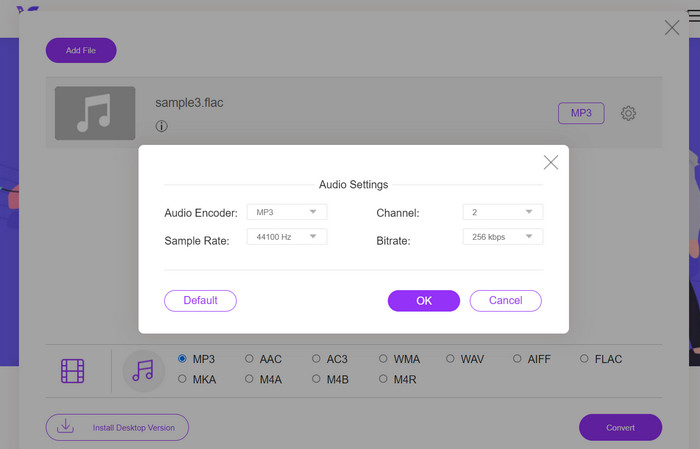
Korak 3. Odaberite MP3 kao izlazni format s popisa dostupnih formata u izborniku Audio. Također možete odabrati željeni bitrate ili izlaznu kvalitetu za MP3 datoteku.
Korak 4. Kliknite gumb Convert kako biste pokrenuli postupak pretvorbe.
Dio 5. Često postavljana pitanja o FLAC-u u odnosu na MP3
Što je bolje između 16-bitnog FLAC-a i 320Kbps MP3-a?
Izbor između 16-bitnog FLAC-a i MP3-a od 320 kbps svodi se na osobne preferencije i namjeravanu upotrebu audio datoteke. Ako vam je kvaliteta zvuka prioritet i imate dovoljno prostora za pohranu, 16-bitni FLAC bi mogao biti bolja opcija. Ako trebate manju veličinu datoteke bez previše kompromisa u kvaliteti zvuka, MP3 od 320 kbps može biti dobar izbor.
Jesu li FLAC datoteke veće od MP3 datoteka?
Da, FLAC datoteke obično su veće od MP3 datoteka zbog svoje prirode bez gubitaka.
Podržavaju li svi media playeri FLAC?
Ne, ne podržavaju svi media playeri FLAC. Međutim, mnogi moderni media playeri i softver podržavaju FLAC reprodukciju, uključujući VLC, Foobar2000 i Winamp.
Zaključak
Odabir između MP3‑a i FLAC‑a ovisi o vašim osobnim preferencijama i specifičnim potrebama. Stoga je usporedba FLAC vs. MP3 nužna za donošenje odluke. U konačnici, odluka o tome koji format koristiti svodi se na vaše prioritete u pogledu kvalitete zvuka, veličine datoteka i kompatibilnosti.
-
 4 najbolje metode za jednostavno pretvaranje MOV u MP3 na sustavima Windows i Mac
 Kada želite izdvojiti MP3 audio datoteke iz MOV datoteka, možete saznati više o 4 najučinkovitija MOV u MP3 pretvarače kako biste iz članka dobili željene datoteke.
-
 Najbolji MP3 pretvarači za jednostavno pretvaranje audio datoteka u MP3
 Bez napora pretvorite bilo koji audio format u MP3 pomoću naših jednostavnih mrežnih i izvanmrežnih MP3 pretvarača. Dobijte rezultate visoke kvalitete u samo nekoliko klikova.
-
 3 najbolja uređivača FLAC metapodataka na Macu i Windowsu [ažurirano 2023.]
 Želite li promijeniti FLAC metapodatke? U tom slučaju morate pročitati ovaj članak jer pružamo dovoljno znanja o najnovijem uređivaču metapodataka FLAC koji možete koristiti.
