


 Video Converter Ultimate
 Snimač zaslona
 Video popravak
MOV u MPG: Kratki vodič o tome kako pretvoriti ove formate u 2023
Za zapisnik, MOV datoteke danas nailaze na pohvalne reakcije jer se smatraju jednim od najprikladnijih formata za pohranu filmova. Ova je datoteka naširoko prepoznata kao zadani format za Apple proizvode poput iPhonea, iPada i Macbookova. Međutim, kada pokušate učitati MOV datoteke na internet, možete naići na poteškoće jer zauzimaju više prostora u usporedbi s drugim video formatima. Da biste to zaobišli, možete se odlučiti za pretvaranje MOV u MPG. Zato ostanite uz ovaj vodič i pomoći ćemo vam naučiti kako to uspješno napraviti.

Dio 1. Pretvorite MOV u MPG
1. Video Converter Ultimate
Video Converter Ultimate je najbolje izvanmrežno rješenje koje će zadovoljiti sve vaše potrebe za pretvaranjem MOV u MPG. U samo nekoliko klikova, program vam omogućuje pretvaranje datoteke, bez obzira na to je li male ili velike veličine. Štoviše, ovaj je alat opremljen postavkama za prilagodbu izlaza, što korisnicima omogućuje dobivanje izlaznog formata visoke kvalitete i prilagođavanje vlastitim preferencijama. U nastavku slijedi jednostavan vodič kako brzo pretvoriti MOV u MPG.
Korak 1. Instalirajte program
Za početak kliknite odgovarajuću tipku za Preuzimanje za svoj uređaj u nastavku. Zatim kliknite instalacijsku datoteku i pokrenite je kako biste program pokrenuli na svom zaslonu.
Besplatno preuzimanjeZa Windows 7 ili novijiSigurno preuzimanje
Besplatno preuzimanjeZa macOS 10.7 ili novijiSigurno preuzimanje
Korak 2. Učitajte MOV datoteke za pretvorbu
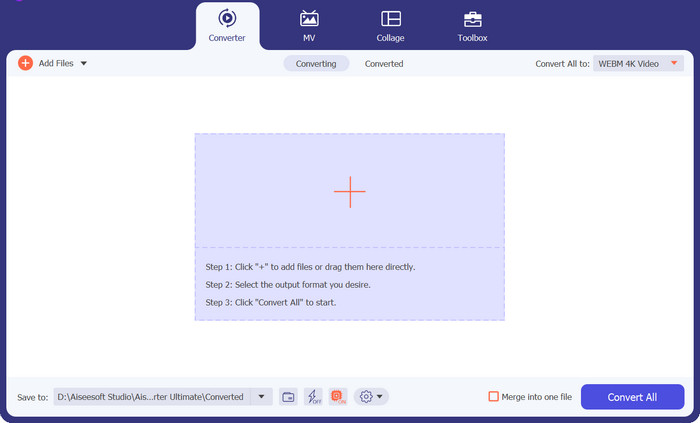
Nakon instalacije programa, odaberite gumb Plus u središtu sučelja. Kada se pojavi direktorij računala, odaberite MOV datoteku za učitavanje. Osim toga, možete učitati više od jedne datoteke za skupnu pretvorbu.
Korak 3. Odaberite izlaz
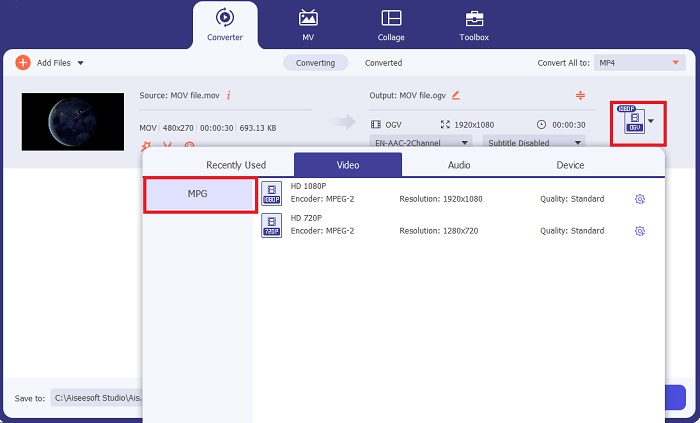
Sličica vaše MOV datoteke pojavit će se u programu, što potvrđuje da je učitavanje bilo uspješno. Za odabir izlaznog formata, proširite karticu Output i kliknite na karticu Video. Od tamo se pomaknite kroz popis i odaberite MPG.
Korak 4. Pokrenite pretvorbu
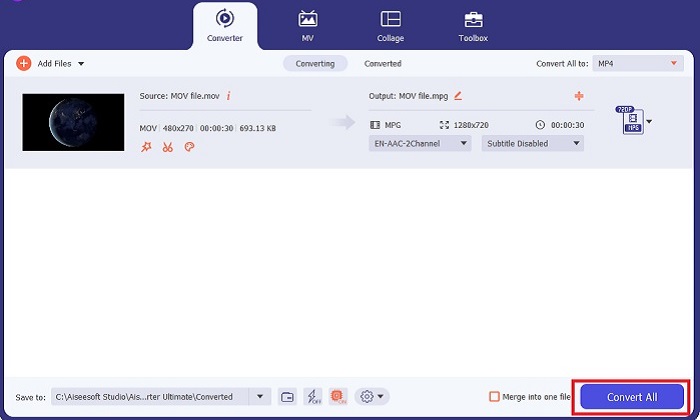
Na kraju prilagodite zahtjeve za kvalitetu izlaza podešavanjem izlaznih postavki. Kada završite, pritisnite gumb Convert kako biste obradili svoju MOV u MPG datoteku.
Ključne značajke
◆ Besprijekorna konverzija MOV u MPG: Jedna stvar koju volimo kod Video Converter Ultimate je njegovo korisničko sučelje. Ovaj je alat najbolji za svakoga, bilo početnika ili iskusnog korisnika.
◆ 50 puta veća brzina pretvorbe: zahvaljujući tehnologiji kodiranja GPU Acceleration, Video Converter Ultimate nadmudriva sve druge izvanmrežne pretvorbe zbog svoje brze pretvorbe bez zastoja i rušenja.
◆ Značajka skupne pretvorbe: S Video Converter Ultimate također možete pretvoriti mapu MOV datoteka u više od 1000 formata osim MPG.
2. Besplatni video pretvarač na mreži
Free Video Converter Online još je jedan softver koji revolucionira pretvaranje formata. Iako ovaj mrežni program ne nudi tako sveobuhvatne alate kao neki izvanmrežni programi, pokazao se pouzdanim rješenjem za internetsko pretvaranje MOV u MPG. Nudi funkciju skupne pretvorbe i daje vam potpunu kontrolu nad izlazom.
Korak 1. Najprije idite na glavnu web-stranicu alata Free Video Converter Online. Prije učitavanja MOV datoteke, kliknite Add Files i najprije ćete biti upitani da pokrenete mrežni alat.
Korak 2. Za učitavanje datoteke koju želite pretvoriti ponovno odaberite gumb Add Files i jednom učitajte svoju datoteku. Možete koristiti i funkciju povlačenja i ispuštanja (drag-and-drop).
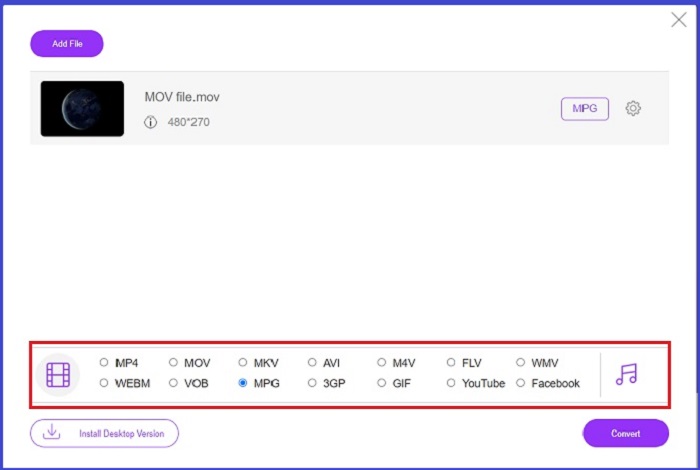
Korak 3. Kada se pojavi vaša izvorna datoteka, odaberite izlazni format u donjem kutu zaslona. Na kartici Video vidjet ćete sve moguće formate, a u našem slučaju odaberite MPG. Na kraju pritisnite gumb Convert i pričekajte preuzimanje svoje datoteke.
Ključne značajke
◆ Mrežni pretvarač za više platformi: bilo da koristite telefon, tablet ili računalo, ovaj alat radi savršeno dobro, što omogućuje video ili audio konverziju.
◆ Jamstvo privatnosti: Tko želi dobiti napad na privatne podatke? Uz Free Video Converter Online, ne biste se trebali suočiti s nula dilema o ovom problemu. Ovaj mrežni alat omogućuje korisnicima pretvaranje MOV-a u MPG besplatno bez potrebe za prijavom.
◆ Nema instalacijskih zahtjeva: Ovaj je alat još jedan pretvarač bez muke koji će vam pomoći da se izvučete iz užurbanih instalacija, osobito ako vam ponestane nešto digitalnog prostora.
Dio 2. Pretvorite MPG u MOV
1. Video Converter Ultimate
Još jednom, Video Converter Ultimate i dalje je najbolje rješenje koje vam možemo ponuditi za pretvaranje MOV u MPG na Mac i Windows uređajima. Ovaj alat podržava više od 1000+ video i audio formata, uključujući i one posebno pripremljene za uređaje poput Samsunga, Applea, Sonyja i drugih. Slijedite donji vodič kako biste bilo koju svoju MPG datoteku pretvorili u MOV.
Besplatno preuzimanjeZa Windows 7 ili novijiSigurno preuzimanje
Besplatno preuzimanjeZa macOS 10.7 ili novijiSigurno preuzimanje
Korak 1. Pritisnite gumb Add Files kako biste u program uvezli MPG datoteku.
Korak 2. Nakon što se vaša datoteka učita na zaslon, odaberite izlaz klikom na Output > Video > MOV. Za bolju kvalitetu možete dodatno prilagoditi video parametre.
Korak 3. Odaberite gumb Convert kako biste programu zadali naredbu da pretvori datoteke iz MPG u MOV. Nakon završetka pretvorbe izlaz možete provjeriti unutar samog programa.
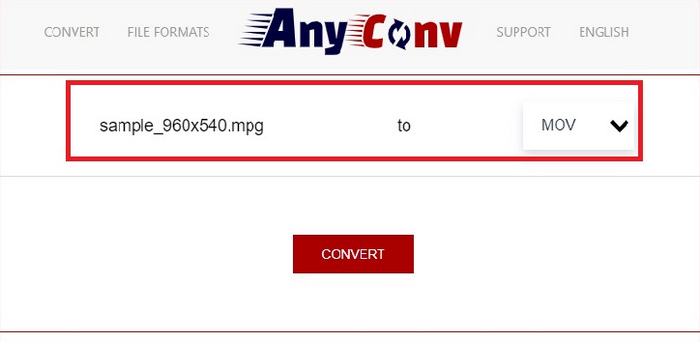
2. AnyConv
AnyConv je besplatni online pretvarač MPG u MOV. Ovaj program radi dobro na svim uređajima i nudi značajku povlačenja i ispuštanja kada učitavate svoje MPG datoteke. Štoviše, ovo online rješenje štiti podatke korisnika brišući njihove konvertirane datoteke nakon sat vremena. Osim MOV-a, svoje MPG datoteke možete pretvoriti u 3GP, AVCHD, MP4, MKV i druge.
Korak 1. Najprije otvorite web-stranicu AnyConv. Kada se pojavi na zaslonu, kliknite Choose File i odaberite željeni MOV materijal za pretvorbu.
Korak 2. Kada se vaša MOV datoteka učita, odaberite MPG s popisa izlaznih formata u stupcu Output u sredini.
Korak 3. Na kraju kliknite gumb Convert i pričekajte da se vaša datoteka preuzme.
Daljnje čitanje:
3 najbolja načina za brzo pretvaranje MPG u MP4
5 najboljih vrhunskih MOV u 3GP pretvarača koje ne smijete propustiti
Dio 3. Često postavljana pitanja o tome kako pretvoriti MPG u MOV
Postoji li besplatni pretvarač MOV u MPG?
Definitivno da! Mrežni pretvarači vaš su najbolji izbor za sprječavanje plaćanja naknada. Možete odabrati Free Online Video Converter za besplatno pretvaranje MOV-a u MPG.
Je li MPG bolji od MOV-a?
MOV je bolji od MPG-a zbog njihove razlike u vrsti. MOV je format spremnika koji sprema sve vaše izvorne podatke. U isto vrijeme, MPG je komprimirani kodek koji se koristi za smanjenje veličine datoteke videozapisa za brži prijenos datoteka putem interneta.
Koja je prednost MOV datoteke?
MOV datoteke prikladne su za uređivanje i smatraju se standardima za odabir najboljeg video formata. Jedan nedostatak ove datoteke je da samo nekoliko medijskih playera otvara ovaj format.
Smanjuje li MOV u MPG kvalitetu?
Da. Pretvaranje vaših datoteka iz MOV u MPG ne samo da će smanjiti veličinu datoteke vašeg videozapisa, već će smanjiti i kvalitetu. Obje su datoteke izvrsne u svakom slučaju da vam zatrebaju.
Mogu li reproducirati MOV u Windows Media Playeru?
Srećom, MOV datoteke na Windows Media Playeru mogu se reproducirati sve dok je u verziji 12 ili novijoj.
Zaključak
Evo dakle mogućih načina za pretvaranje MPG u MOV ili obratno. Oba formata najbolje će poslužiti različitim potrebama. Uz mrežne pretvarače možete imati jednostavan, izravan postupak pretvorbe. S druge strane, ako želite dotjerati svoje datoteke prilagodbom kvalitete pa čak i uređivanjem, preporučujemo Video Converter Ultimate.
-
 FLV u MPG - Kako pretvoriti FLV u MPG na Macu, PC-u i besplatno putem Interneta
 Kako pretvoriti FLV u MPEG? Mogu li besplatno pretvoriti FLV u MPG? Ovaj post dijeli 3 besplatna video pretvarača koji će vam pomoći pretvoriti FLV u MPG bez gubitka kvalitete.
-
 Kako pretvoriti MPG u M4V na Macu i pomoću mrežnog alata
 Jeste li novi korisnik Maca i ne znate kako pretvoriti MPG u M4V? Zatim možete pročitati ovaj članak da biste saznali više i otkrili kako pretvoriti datoteke pomoću svog Maca.
-
 8 najboljih MOV igrača za reprodukciju QuickTime MOV datoteka s izvornom kvalitetom
 Samo saznajte više o 8 najboljih MOV uređaja koji su dostupni i za Windows i za Mac. Možete odabrati željenu i prikladnu za reprodukciju MOV datoteka s izvornom kvalitetom.
