


 Video Converter Ultimate
 Snimač zaslona
 Video popravak
Popravljanje koda pogreške 224003: Sve što trebate znati
Najmanje što osoba želi doživjeti je da vidi pojavu koda greške 224003 na svom ekranu. Razumijevanje uobičajenih uzroka koda pogreške 224003, kao što su problemi s mrežom, kompatibilnost preglednika i zastarjeli softver, ključno je za učinkovito rješavanje problema. Poznavanje pravih alata neophodno je kada se bavite takvim pitanjem, što zahtijeva donošenje odluka kako biste bili sigurni da nećete potpuno uništiti video datoteku.
Ovaj će se članak detaljno pozabaviti rješenjima korak po korak, obraditi svaki mogući uzrok i pružiti praktične savjete za otklanjanje pogreške. Na kraju ovog vodiča bit ćete opremljeni znanjem kako se snaći u složenostima pogreške 224003 i osigurati besprijekorno digitalno iskustvo. Bez obzira na to susrećete li se s ovom pogreškom prvi put ili vam se pojavljuje više puta, naš je vodič osmišljen tako da vam pruži alate za dijagnosticiranje, uklanjanje i sprječavanje pogreške 224003 ubuduće. Svakako pročitajte cijeli članak još danas kako biste znali kako postupiti ako se ponovno pojavi.

Dio 1. Razumijevanje koda video greške 224003
Kod pogreške 224003 može se manifestirati u različitim oblicima, često ukazujući na grešku ili problem unutar sustava. Korisnici mogu naići na ovu pogrešku dok koriste određene aplikacije, usluge strujanja ili preglednike, što dovodi do značajnih neugodnosti. Za učinkovito rješavanje i rješavanje ove pogreške, ključno je razumjeti njezine potencijalne uzroke, navedene u nastavku.
Uobičajeni uzroci koda pogreške 224003
◆ Problemi s mrežom: Slaba ili nestabilna internetska veza može izazvati pogrešku 224003, osobito pri online streamingu sadržaja. To je ujedno i razlog za pogrešku 232404.
◆ Kompatibilnost preglednika: Određeni preglednici možda nisu u potpunosti kompatibilni s aplikacijom ili uslugom, što dovodi do pojave pogreške.
◆ Zastarjeli softver: Zastarjeli softver, uključujući preglednike i aplikacije, može biti jedan od čimbenika pojave ove pogreške.
◆ Oštećena predmemorija ili kolačići: Nagomilana predmemorija ili oštećeni kolačići u vašem pregledniku mogu ometati ispravan rad aplikacije i dovesti do pogreške 224003.
U kojim se situacijama javlja kod pogreške
◆ Problemi sa streaming platformom: Problemi na strani poslužitelja streaming platforme, kao što su održavanje, tehničke poteškoće ili velika opterećenost, mogu rezultirati pogreškom 224003. U takvim slučajevima korisnik ima ograničenu mogućnost rješavanja problema i možda će morati pričekati da ga platforma otkloni.
◆ Hardversko ubrzanje: Hardversko ubrzanje u postavkama preglednika ponekad može dovesti do problema s kompatibilnošću s određenim videozapisima, što rezultira pogreškom 224003. Isključivanje hardverskog ubrzanja može biti moguće rješenje u takvim situacijama, kao i za druge probleme s reprodukcijom videa, poput zelenog zaslona pri reprodukciji videa, zamrzavanja videa i drugih smetnji.
◆ Nekompatibilnost s uređajem: Određeni uređaji ili operativni sustavi možda nisu u potpunosti kompatibilni s video sadržajem, što može uzrokovati pogreške tijekom reprodukcije.
◆ Mrežni vatrozid ili sigurnosni softver: Određeni sigurnosni programi ili vatrozidi mogu blokirati streaming određenog video sadržaja, što dovodi do prikaza pogreške 224003.
◆ Ommetanje proširenja preglednika: Određena proširenja ili dodaci preglednika mogu ometati ispravan rad online video reproduktora, što dovodi do pogreške 224003.
Ključno je razumjeti da se specifični uvjeti koji su doveli do koda pogreške 224003 mogu razlikovati; stoga se mjere za rješavanje problema također mogu razlikovati. Identificiranje temeljnog razloga ovisi o kontekstu u kojem se pogreška pojavljuje kako bi se ispravno riješio problem.
Dio 2. Vodič korak po korak za rješavanje pogreške 224003
Aiseesoft Video Repair
Pogreška 224003 može se dogoditi bilo kome, u bilo kojem trenutku i s bilo kojom video datotekom, a kada se pojavi, možda ćete vidjeti poruku poput: Pogreška 224003: Video datoteku nije moguće reproducirati. Aiseesoft Video Repair pouzdan je alat za rješavanje problema poput oštećenih ili korumpiranih videozapisa, uključujući pogrešku 224003. Može popraviti videozapise u raznim formatima, uključujući MP4, MOV, AVI, WMV, MKV i FLV. Također podržava popravak videozapisa oštećenih virusima, zlonamjernim softverom i drugim čimbenicima. Slijedite ovaj vodič korak po korak kako biste svoj problem riješili pomoću Aiseesoft Video Repair alata i vratili svoje videozapise u besprijekorno stanje.
Koraci za rješavanje pogreške 224003 pomoću Aiseesoft Video Repair alata:
Korak 1. Posjetite Aiseesoftovu web-stranicu, preuzmite Video Repair i slijedite upute za instalaciju.
Besplatno preuzimanjeZa Windows 7 ili novijiSigurno preuzimanje
Besplatno preuzimanjeZa macOS 10.7 ili novijiSigurno preuzimanje
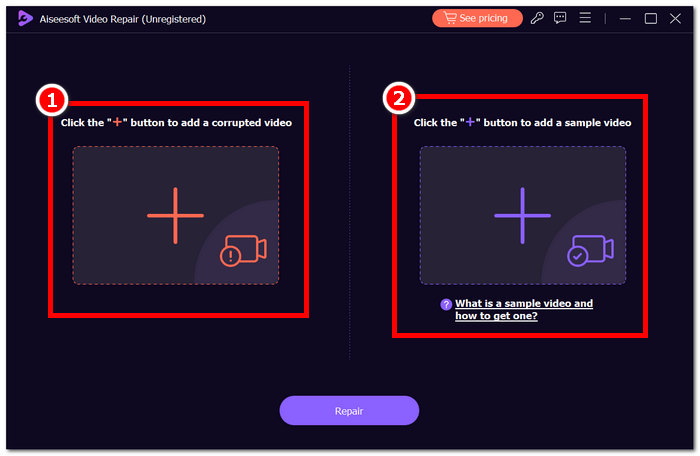
Korak 2. Otvorite Aiseesoft Video Repair i dodajte videozapis na kojem se pojavljuje pogreška 224003 klikom na crveni simbol +. Kliknite ljubičasti simbol + s desne strane kako biste dodali svoj primjerak videozapisa.
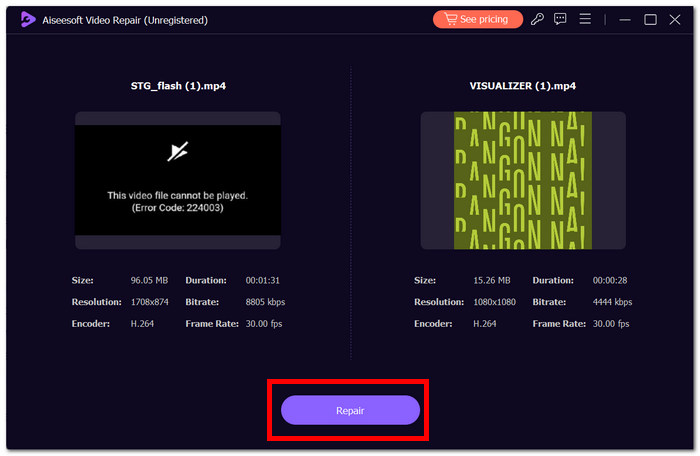
Korak 3. Kliknite Repair, a softver će analizirati i popraviti videozapis.
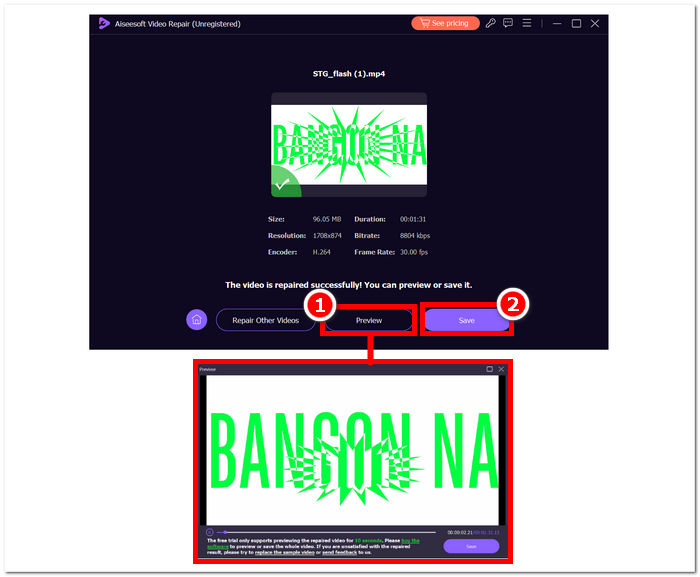
Korak 4. Nakon popravka kliknite Preview za provjeru. Kliknite Save kako biste preuzeli popravljeni videozapis i otvorite ga u svom media playeru da provjerite je li pogreška 224003 uklonjena.
Dodatni savjeti:
◆ Napravite sigurnosnu kopiju izvorne videodatoteke prije pokušaja bilo kakvih popravaka.
◆ Provjerite koristite li najnoviju verziju Aiseesoft Video Repair za optimalnu izvedbu.
Marljivo slijedeći ove upute korak po korak, možete učinkovito upotrijebiti Aiseesoft Video Repair za rješavanje i uklanjanje pogreške 224003, vraćajući svoje video datoteke u funkcionalno i ugodno stanje. Ne zaboravite spremiti popravljeni video na željenu lokaciju i uživati u neprekidnom gledanju bez frustracija pogreške 224003. Ako naiđete na bilo kakve izazove tijekom procesa, pogledajte dokumentaciju Aiseesoft Video Repair ili potražite pomoć od njihovih resursa podrške za daljnje upute.
Dio 3. Često postavljana pitanja o kodu pogreške 224003
Zašto Firefox stalno izgovara kod video greške 224003?
Firefox video pogreška 224003 može nastati zbog problema s mrežnim povezivanjem, odstupanja u postavkama preglednika ili nekompatibilnosti s video sadržajem. Da biste riješili ovu pogrešku, započnite s provjerom stabilnosti vaše internetske veze, provjerite je li vaš preglednik ažuriran i izbrišite predmemoriju i kolačiće preglednika. Osim toga, privremeno uklanjanje proširenja iz vašeg preglednika može pomoći u utvrđivanju i rješavanju sukoba kompatibilnosti, potencijalno eliminirajući pojavu pogreške 224003 tijekom reprodukcije videozapisa.
Smanjuje li popravljanje video datoteke kvalitetu videa?
Popravljanje videodatoteke može se izvršiti bez ugrožavanja kvalitete ako se pravilno izvede. Ovaj postupak primarno rješava pitanja poput oštećenja ili pogrešaka u formatiranju unutar datoteke. Ključno je osloniti se na pouzdane alate za popravak videozapisa i, kao mjeru predostrožnosti, izraditi sigurnosnu kopiju izvorne video datoteke prije pokretanja bilo kakvih postupaka popravka.
Možete li popraviti šifru pogreške online video zapisa?
Za rješavanje koda pogreške online videa kao što je 224003, osvježite stranicu, provjerite internetsku vezu i ažurirajte preglednik. Ako se problem nastavi, razmislite o pokušaju drugog preglednika radi kompatibilnosti. Ako ništa drugo ne uspije, obratite se podršci platforme ili forumima zajednice za pomoć u rješavanju pogreške i vraćanju besprijekorne reprodukcije videozapisa.
Zaključak
Pogreška 224003 može biti vrlo iritantna, ali uz prave informacije i postupke za rješavanje problema možete je prevladati. Jednostavno možete otkloniti ovu pogrešku i vratiti besprijekorno digitalno iskustvo tako da identificirate i ispravite moguće uzroke, poput problema s mrežom, nekompatibilnosti preglednika i zastarjelog softvera. Ako ponovno naiđete na pogrešku 224003, pogledajte naš vodič za rješenje korak po korak. Uz ove uvide, vaše će tehnološke frustracije postati stvar prošlosti, a vi ćete u miru uživati u neprekinutim digitalnim aktivnostima.
-
 Što je pogreška 0xc10100bf u videu i kako je popraviti
 Vaš se video ne reproducira zbog pogreške 0xc10100bf, a vi tražite načine kako to popraviti? U ovom ćete članku saznati što je to i kako to popraviti.
-
 Brza rješenja za popravak pogreške Video ne može se reproducirati 150
 Jeste li se ikada susreli s frustrirajućom nemogućnošću reprodukcije videozapisa greška 150 tijekom vašeg iskustva gledanja videozapisa? Ne brinite jer mi ćemo vam objasniti kako to popraviti.
-
 [Detaljan vodič] Kako popraviti video s Google diska koji se ne reproducira na računalu
 Videozapisi na Google disku ne reproduciraju se s pogreškom "Pojavio se problem prilikom reprodukcije ovog videozapisa". Uzrok tome može biti sam Google pogon ili problemi s kromom. Ovaj će članak detaljno predstaviti 6 rješenja.
