


 Video Converter Ultimate
 Snimač zaslona
 Video popravak
3 metode za učinkovito popravljanje šifre pogreške 232011
Tražite način kako riješiti kôd pogreške 232011? Ovo je uobičajena pogreška i pravi izvor frustracije za svakog gledatelja. Kada se pojavi, može prekinuti nesmetano uživanje u online videozapisima, uzrokovati probleme s reprodukcijom i prekide. No, ne brinite, jer postoji nekoliko učinkovitih metoda za rješavanje ovog problema i poboljšanje vašeg iskustva streaminga. U ovom vodiču istražit ćemo kako možete lako riješiti ovu pogrešku s pomoću naše tri metode te vam dati savjete kako je ubuduće spriječiti. Pročitajte ovaj članak i uživajte u svojim omiljenim videozapisima bez ikakvih poteškoća.

Dio 1. Što je šifra pogreške 232011? Zašto se to događa
Kôd pogreške 232011 česta je pogreška na koju se nailazi u raznim softverskim aplikacijama i internetskim uslugama. Po naravi je sličnija pogrešci 150 – video se ne može reproducirati.
Obično se događa kada postoji problem s mrežnom vezom ili postavkama, sprječavajući aplikaciju ili uslugu u pristupu potrebnim resursima.
Evo iscrpnih informacija o tome zašto se ova pogreška događa:
◆ Problemi s mrežnom povezanošću: Jedan od mogućih uzroka ove pogreške jest problem s mrežnom vezom. Može se pojaviti ako postoje poteškoće s korisnikovom internetskom vezom, poput slabe ili nestabilne veze, zagušenja mreže ili ograničenja vatrozida koji blokira potrebnu komunikaciju.
◆ Problemi s poslužiteljem: Kôd pogreške 232011 može se pojaviti i ako postoje problemi na strani poslužitelja. To može uključivati nedostupnost poslužitelja, radove na održavanju ili tehničke poteškoće s poslužiteljem na kojem je smještena aplikacija ili usluga.
◆ Pogrešna konfiguracija: Još jedan mogući uzrok su pogrešno postavljene konfiguracijske postavke. Do toga može doći ako su mrežne postavke pogrešno konfigurirane, ako su IP adrese ili brojevi portova netočni ili ako se između klijenta i poslužitelja koriste nekompatibilni protokoli.
◆ Problemi s kompatibilnošću softvera: Kôd pogreške 232011 može se pojaviti i zbog problema s kompatibilnošću između različitih softverskih komponenti. Primjerice, može biti uzrokovan sukobima s dodacima ili proširenjima preglednika, zastarjelim ili nekompatibilnim verzijama softvera ili oštećenim instalacijskim datotekama.
Dio 2. Kako popraviti šifru pogreške 232011
Postoji nekoliko metoda za učinkovito rješavanje šifre pogreške 232011 jer je to čest problem za mnoge od nas. Evo načina na koje možete riješiti ovaj problem.
Metoda 1: Brisanje predmemorije preglednika i kolačića
Brisanje predmemorije preglednika i kolačića neophodno je za rješavanje problema s pogreškama videozapisa uzrokovanih oštećenjem podataka. Oštećena predmemorija ili kolačići ometaju funkcioniranje web stranice, uključujući pogreške poput 23201. Predmemorija pohranjuje dugoročne resurse web stranice, a kolačići čuvaju korisničke postavke. Stoga brisanje ovih datoteka uklanja probleme, dopuštajući pregledniku da dohvati svježe podatke bez grešaka s web-mjesta. Evo kako možete očistiti predmemoriju preglednika i kolačiće:
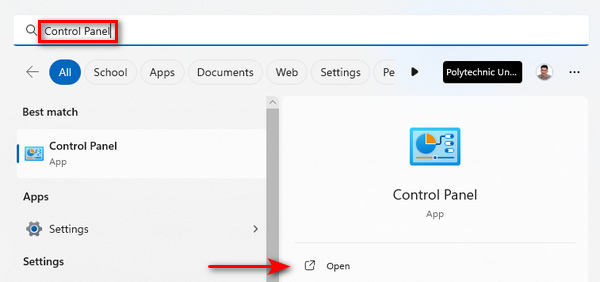
Korak 1. Za početak u tražilicu upišite Upravljačka ploča (Control Panel) i otvorite je.
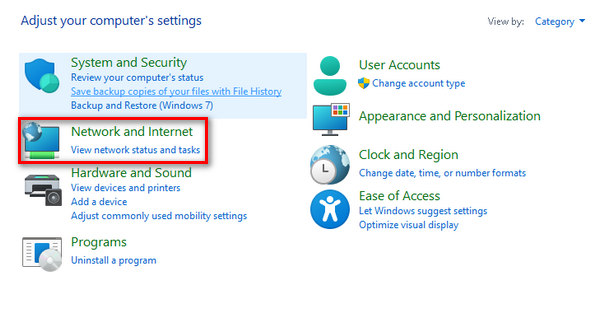
Korak 2. U Upravljačkoj ploči pronađite i odaberite opcije Mreža i internet (Network and Internet).
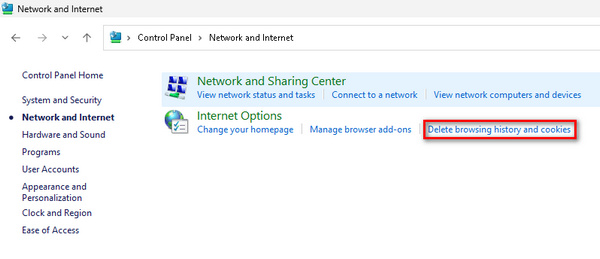
Korak 3. Pronađite Brisanje povijesti pregledavanja i Kolačiće te kliknite na to.
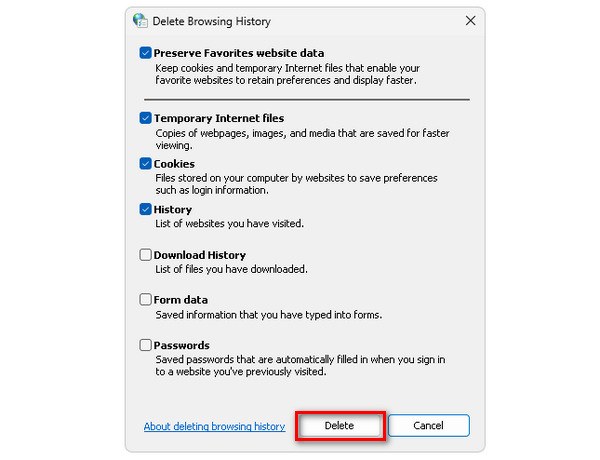
Korak 4. Na kraju će se pojaviti kartica koja vam omogućuje da označite okvire uz stavke koje želite izbrisati. Nakon odabira kliknite gumb Delete (Izbriši) da biste dovršili postupak.
Brisanje predmemorije i kolačića ne samo da poboljšava ukupnu izvedbu vašeg računala, već služi i kao rješenje za potencijalne smetnje, uključujući ispravljanje šifre pogreške 232011.
Metoda 2: Korištenje anonimnog preglednika
Korak 1. Kliknite na tri točkice smještene u gornjem desnom kutu prozora preglednika.
Korak 2. U padajućem izborniku odaberite New incognito window (Novi anonimni prozor).
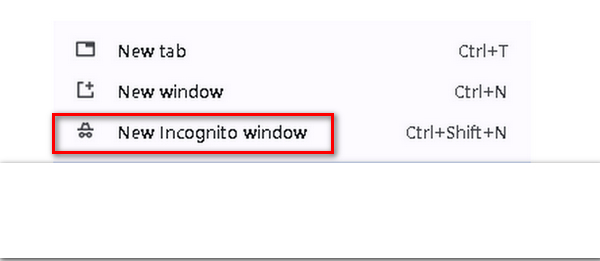
Korak 3. Otvorit će se novi prozor u kojem možete koristiti ovaj „svježi” preglednik za reprodukciju videozapisa kod kojeg se pojavljuje kôd pogreške 232011.
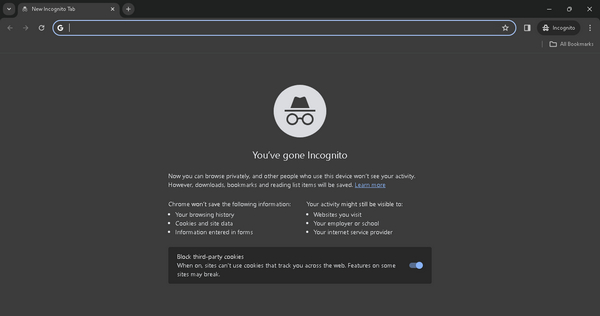
Doista, korištenje anonimnog načina rada može pomoći u rješavanju koda pogreške 232011 pružanjem čistog okruženja pregledavanja bez predmemoriranih podataka ili proturječnih proširenja.
Metoda 3: Korištenje alata za popravak videa
Ako ništa od navedenog ne uspije riješiti probleme preglednika i ako se problem javlja prilikom reprodukcije videa izvan mreže, možete brzo upotrijebiti alat treće strane za popravak videozapisa. Jedan od najboljih alata za popravak videozapisa koji možete koristiti za rješavanje ovog problema jest FVC Video Repair. Ovaj alat omogućuje popravljanje uobičajenih problema s videozapisima, uključujući i kôd pogreške videozapisa 232011. Osim toga, podržava razne videoformate poput MP4, MOV i 3GP, što osigurava veliku fleksibilnost. Njegovo jednostavno sučelje, pokretano najnovijom umjetnom inteligencijom, čini ga prikladnim i za korisnike bez tehničkog znanja. Za korištenje postupite prema koracima u nastavku:
Korak 1. Najprije posjetite njihovu službenu web-stranicu. Preuzmite program i instalirajte ga na svoj uređaj.
Besplatno preuzimanjeZa Windows 7 ili novijiSigurno preuzimanje
Besplatno preuzimanjeZa MacOS 10.7 ili novijiSigurno preuzimanje
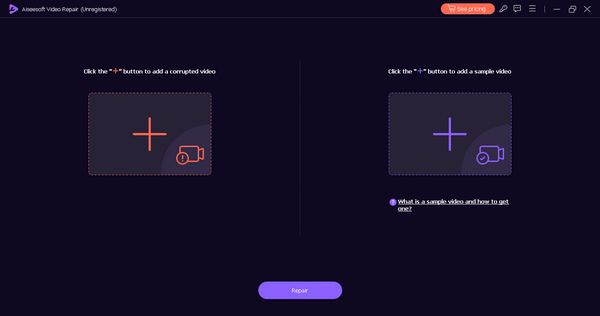
Korak 2. Zatim dodajte videozapis koji sadrži kôd pogreške videa 232021 klikom na gumb Red Plus (Crveni plus). Također kliknite gumb Blue Plus (Plavi plus) kako biste dodali ogledni videozapis.
Korak 3. Nakon toga kliknite gumb Repair (Popravi) kako biste pokrenuli postupak popravka videozapisa.
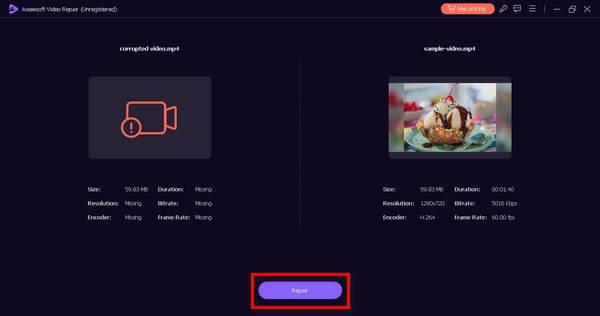
Korak 4. Na kraju provjerite sadrži li videozapis još uvijek poruku o kôdu pogreške i je li moguće njegovo reproduciranje klikom na gumb Preview (Pregled). Kada je sve u redu, možete ga spremiti klikom na gumb Save (Spremi).
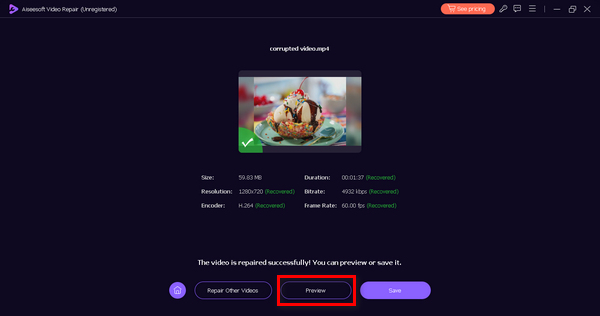
Ova izvanmrežna metoda sigurno može popraviti šifru pogreške 232011. Samo ne zaboravite dati ogledni videozapis za besprijekoran popravak.
Dio 3. Savjeti za sprječavanje koda pogreške 232011
Kako biste poboljšali svoje iskustvo strujanja videozapisa i spriječili nailazak koda pogreške 232011, preporučljivo je slijediti savjete navedene u nastavku. Ove su preporuke osmišljene za rješavanje potencijalnih problema povezanih s internetskom vezom, performansama preglednika i drugim čimbenicima koji mogu poremetiti besprijekornu reprodukciju videozapisa.
Savjet 1. Održavajte stabilnu internetsku vezu kako biste spriječili prekide tijekom reprodukcije videozapisa. To je ujedno i rješenje za otklanjanje trzanja i smetnji u videu.
Savjet 2. Ažurirajte svoj web‑preglednik kako biste imali koristi od najnovijih poboljšanja i ispravaka grešaka, čime se poboljšavaju performanse video streaminga.
Savjet 3. Redovito brišite predmemoriju i kolačiće preglednika kako nakupljeni podaci ne bi utjecali na učitavanje i reprodukciju videozapisa.
Savjet 4. Onemogućite ili uklonite nepotrebna proširenja preglednika koja bi mogla ometati reprodukciju videozapisa.
Savjet 5. Provjerite svoju brzinu interneta pomoću internetskih alata kako biste bili sigurni da zadovoljava zahtjeve za neometano emitiranje (streaming).
Dio 4. Često postavljana pitanja o kodu pogreške 232022
Koji je kod greške 233011 na 123movies?
Šifra pogreške 233011 na 123movies problem je specifičan za platformu, a njegovo se značenje može odrediti samo pozivanjem na službene resurse podrške 123movies. Korisnici se potiču da posjete njihovu web stranicu i kontaktiraju korisničku podršku za pomoć i pojašnjenje ove konkretne pogreške.
Koji je kod greške 232011 na 9anime?
Šifra pogreške 232011 na 9anime je jedinstvena za 9anime platformu. Kako bi razumjeli konkretan razlog iza ovog koda pogreške, korisnici bi trebali provjeriti službene kanale podrške 9animea ili se obratiti svojoj korisničkoj podršci za smjernice o rješavanju problema.
Koji je kod greške 232011 na Kissanime?
Slično drugim platformama, šifra pogreške 232011 na Kissanime je specifična za platformu. Za točne informacije o značenju i razrješenju ovog koda pogreške, korisnici bi trebali konzultirati službene resurse podrške koje pruža Kissanime ili kontaktirati svoju korisničku podršku za pomoć.
Kako popraviti šifru pogreške 232011 na Netflixu?
Ako na Netflixu naiđete na šifru pogreške 232011, pokušajte osvježiti stranicu, očistiti predmemoriju preglednika ili ponovno pokrenuti uređaj. Osim toga, provjerite brzinu interneta i onemogućite sve VPN ili proxy usluge jer bi mogli ometati strujanje.
Zaključak
Zaključno, rješavanje kôda pogreške 232011 ključno je za nesmetano gledanje videozapisa putem streaminga. Ovaj vodič nudi učinkovita rješenja i preventivne savjete za poboljšanje vašeg iskustva gledanja. Slijedeći ove korake možete otkloniti poteškoće i spriječiti prekide, što će vam omogućiti neprekinuto uživanje u online videozapisima.
-
 Što je pogreška 0xc10100bf u videu i kako je popraviti
 Vaš se video ne reproducira zbog pogreške 0xc10100bf, a vi tražite načine kako to popraviti? U ovom ćete članku saznati što je to i kako to popraviti.
-
 Kako popraviti video grešku kod 224003: Vaš najbolji vodič za popravak
 Naučite kako riješiti ovaj video kod pogreške 224003 koji se ne može reproducirati i riješite problem za besprijekorno korisničko iskustvo. Vratite se na pravi put s našim vodičem!
-
 Rješavanje problema s kodom pogreške 232404 [2025 popravci]
 Otkrijte pouzdana rješenja za ovu videodatoteku koja se ne reproducira kod pogreške 232404. Riješite je s lakoćom pomoću našeg stručnog vodiča koji će vas vratiti na posao.
