


 Video Converter Ultimate
 Snimač zaslona
 Video popravak
Kako dobiti zvuk s DVD-a [Online i offline metode]
Ako želite slušati svoju omiljenu audiozapisku na DVD-ima, ali ste ograničeni nedostatkom podrške za njezin format od strane raznih uređaja, ne brinite jer smo tu za vas!
Razumijemo potrebu pretvaranja DVD-ova u MP3, budući da su DVD-ovi nekoć bili široko korišten format za pohranu i reprodukciju audio sadržaja. Međutim, upotreba fizičkih diskova postupno je opadala, a digitalizirani formati poput MP3 postali su preferirani izbor zbog svoje fleksibilnosti, kompatibilnosti s više uređaja i jednostavnosti pohrane.
Stoga, ako imate kolekciju starih DVD‑ova koje želite digitalizirati radi očuvanja ili lakšeg pristupa, pretvaranje u MP3 je najbolje rješenje. U ovom vodiču saznajte kako izvući zvuk s DVD‑a na učinkovit način. Bilo da preferirate brzi internetski alat ili naprednije desktop rješenje, sastavili smo najbolje opcije koje će vam pomoći da započnete. Istražimo različite načine pretvaranja DVD zvuka u MP3!

1. dio. FVC je odabrao AnyMP4 DVD Ripper
Najbolja metoda za pretvaranje DVD-a u MP3 je putem AnyMP4 DVD Rippera, kojeg je odabrao FVC. Ovaj softver za pretvaranje s punom značajkom omogućit će korisnicima jednostavno kopiranje glazbe s DVD-ova. S podrškom za više audio formata poput MP3, AAC, AC3, AIFF, M4R, WAV, WMA, AMR, AU, FLAC, MP2, M4A i OGG, korisnici mogu jamčiti kompatibilnost sa širokim rasponom uređaja i media playera.
Osim opsežne podrške za formate, ovaj alat za pretvorbu DVD-a u MP3 nudi skupnu pretvorbu, omogućujući korisnicima istovremeno kopiranje više DVD audio zapisa. Softver također nudi opcije prilagodbe koje će korisnicima omogućiti podešavanje brzine prijenosa, brzine uzorkovanja i audio kanala njihovog DVD audio sadržaja. Konačno, ovaj alat ima korisničko sučelje, što proces pretvorbe čini besprijekornim čak i za početnike.
Kako izvući zvuk s DVD‑a pomoću od strane FVC odabranog AnyMP4 DVD Rippera:
Besplatno preuzimanjeZa Windows 7 ili novijiSigurno preuzimanje
Besplatno preuzimanjeZa macOS 10.7 ili novijiSigurno preuzimanje
Korak 1. Prvo morate preuzeti i instalirati softverski alat na svoje računalo. Zatim se uvjerite da ste umetnuli DVD u DVD pogon prije nego što prijeđete na sljedeći korak.
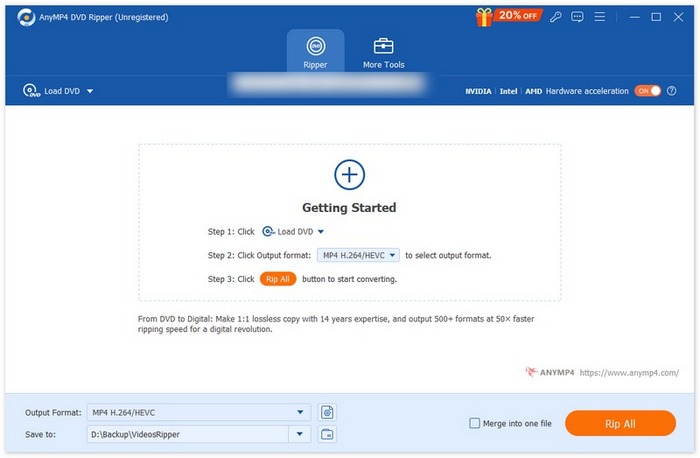
Korak 2. Kada vaš uređaj očita DVD, pokrenite od strane FVC odabrani AnyMP4 DVD Ripper i kliknite gumb Getting Started (Započni), prikazan kao znak plus u sredini, kako biste učitali DVD.
Korak 3. Nakon toga idite na Output Format (Izlazni format) ispod, kliknite karticu Audio i kao audio format odaberite MP3. Kada odaberete, kliknite gumb Convert All (Pretvori sve) kako biste izripali glazbu s DVD‑a.
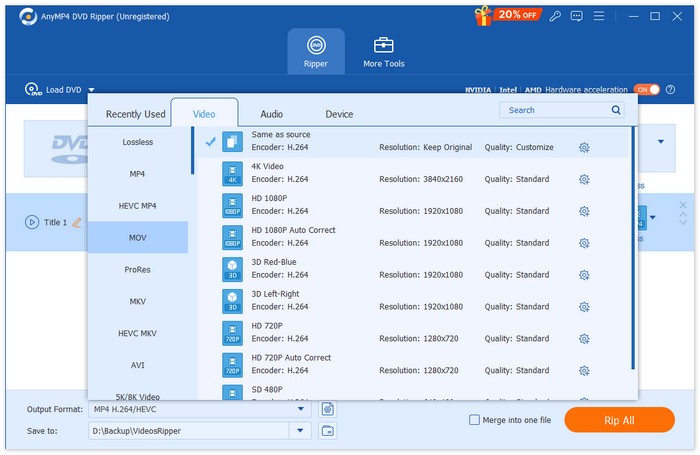
Eto ga, sa samo nekoliko klikova možete jednostavno uvesti DVD datoteke, odabrati željeni izlazni format i pokrenuti ekstrakciju. Stoga je FVC odabrao AnyMP4 DVD Ripper kao najbolju metodu za pretvaranje DVD-ova u MP3.
Dio 2. Pretvori DVD u MP3 [Besplatno]
Ako tražite besplatni DVD u MP3 pretvarač, postoje dva alata koja možete provjeriti za svoje potrebe ekstrakcije zvuka.
VLC Media Player
VLC Media Player vam je sigurno već poznat. Ovaj alat poznat je po svojoj sposobnosti reprodukcije raznih medijskih sadržaja, ali osim toga, sposoban je i pretvoriti DVD-ove u MP3. VLC podržava brojne audio formate poput AAC, AC-3, DV Audio, FLAC, MP3, Speex i Vorbis. Međutim, u usporedbi s drugim namjenskim alatima za pretvaranje DVD-a u MP3, proces u VLC-u može se činiti pomalo zamornim, posebno početnicima. Ipak, ovaj besplatni alat izvrsna je alternativa kopiranju glazbe s DVD-a.
Kako izvući zvuk s DVD‑a pomoću VLC Media Playera:
Korak 1. Najprije, ako alat još nemate na svom uređaju, preuzmite ga i instalirajte.
Korak 2. Nakon toga pokrenite alat, kliknite karticu Media i odaberite Convert/Save iz proširenog izbornika.
Korak 3. U prozoru Open Media kliknite na Discs i odaberite DVD.
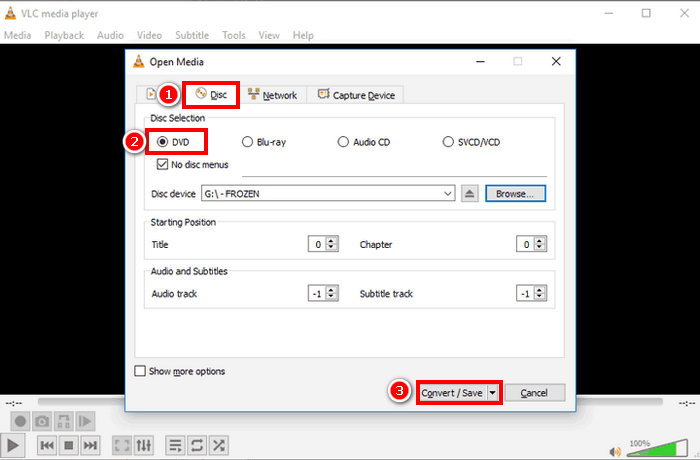
Korak 4. Sada kliknite gumb Convert/ Save i odaberite željeni audio format.
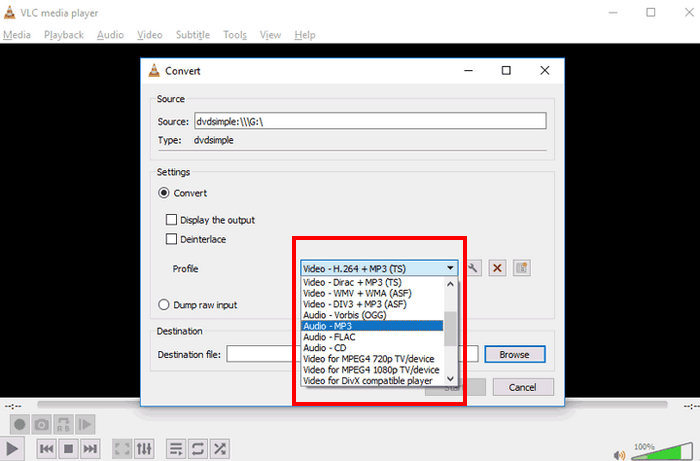
Korak 5. Na kraju kliknite gumb Browse kako biste odabrali mapu u koju želite spremiti izripan zvuk. Zatim kliknite gumb Start kako biste započeli proces ripanja.
Iako proces pretvaranja DVD-a u MP3 pomoću VLC-a traje dulje i zahtijeva više koraka, a podržani izlazni audio formati mogu se činiti ograničenima u usporedbi s drugim namjenskim alatima za pretvorbu, to je i dalje izvrsna alternativa za one koji traže besplatni alat za pretvorbu, s obzirom na njegove mogućnosti i značajke.
Savjet: kliknite ovdje kako biste saznali više o snimanju zvuka pomoću VLC‑a, ako vas zanima.
Ručna kočnica
Još jedan besplatni alat za pretvaranje DVD-a u MP3 koji možete isprobati je HandBrake. Ovaj alat poznat je po svojoj besplatnoj prirodi otvorenog koda, omogućujući korisnicima pretvaranje DVD-ova u različite formate bez ikakvih troškova. Iako je prvenstveno dizajniran za pretvorbu videa, ovaj alat također omogućuje korisnicima izdvajanje zvuka iz DVD-ova prilagođavanjem izlaznih postavki.
Kako izvući zvuk s DVD‑a pomoću HandBrakea:
Korak 1. Najprije na njihovoj službenoj stranici preuzmite i instalirajte HandBrake.
Korak 2. Zatim umetnite DVD u DVD pogon svog računala. Nakon što ga sustav prepozna, pokrenite alat.
Napomena: Nakon što pokrenete alat, trebali biste vidjeti da se vaš DVD očitava.
Korak 3. Sada idite na opciju Format i odaberite MKV, budući da HandBrake ne može izravno ripati DVD u audio format. Međutim, MKV je otvoreni format koji može podržavati širok raspon video i audio kodeka.
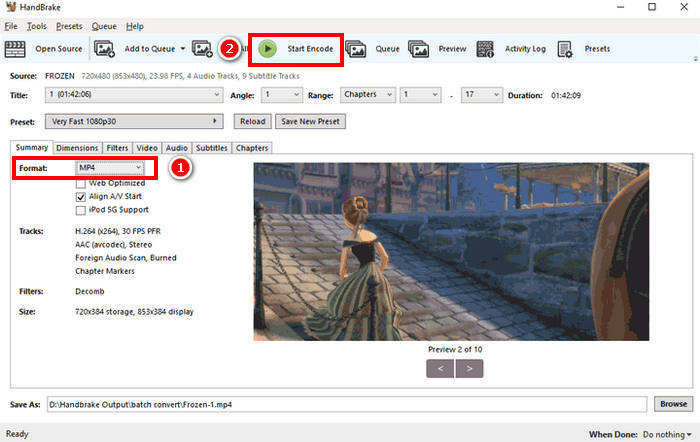
Korak 4. Na kraju kliknite Start Encode kako biste započeli ripanje DVD‑a.
Problem s HandBrakeom je što ne podržava nijedan izravni audio izlazni format. Stoga korisnici trebaju prilagoditi izlazne postavke ili koristiti MKV kao alternativni format, jer podržava širok raspon audio kodeka.
Dio 3. Kako dobiti MP3 s DVD-a [Online]
U međuvremenu, ako radije štedite prostor na uređaju i želite praktičnost kopiranja glazbe s DVD-a bez instaliranja softverske aplikacije, korištenje online metode bilo bi za vas. Međutim, jedan uobičajeni problem s online metodom je taj što većina njih ne može obraditi DVD-ove i podržava samo VOB datoteke.
Zamzar online konverzija
Zamzar je besplatan internetski alat za pretvorbu datoteka koji korisnicima omogućuje konvertiranje raznih medijskih datoteka, uključujući DVD u MP3. Ovaj mrežni pretvarač podržava izlazne audio formate kao što su MP3, AAC, M4A, WAV, OGG i drugi. Osim toga, ima intuitivno korisničko sučelje, što proces pretvorbe čini lakšim.
Kako izvući zvuk s DVD‑a pomoću Zamzar Online Conversiona:
Korak 1. Najprije idite na službenu web‑stranicu Zamzar Online Conversiona.
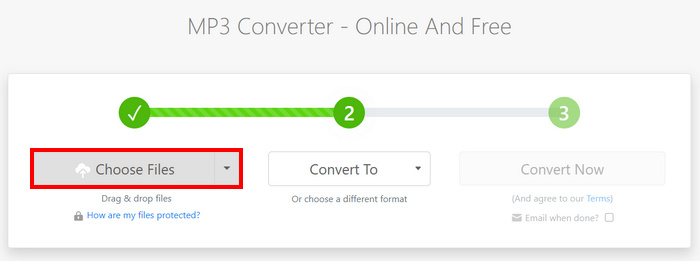
Korak 2. Kada se nađete na glavnom sučelju alata, kliknite gumb Choose Files kako biste uvezli VOB datoteku s DVD‑a.
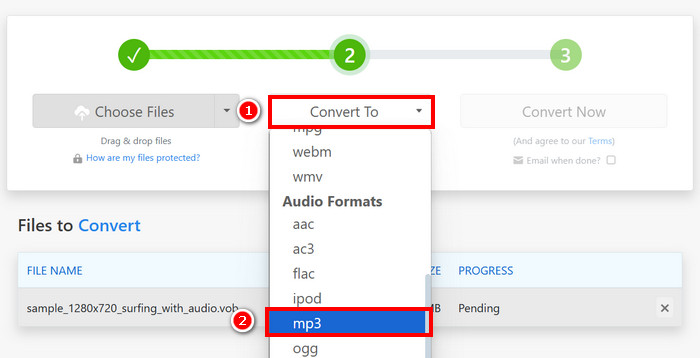
Korak 3. Zatim kliknite gumb Convert To i s popisa ispod odaberite audio format.
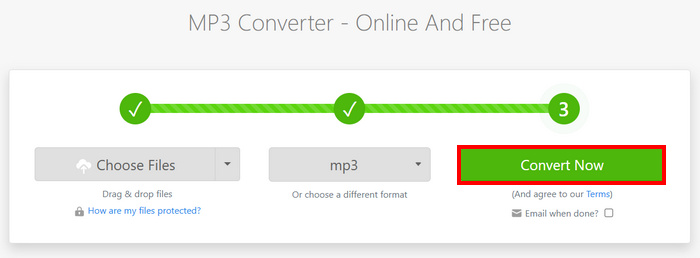
Korak 4. Na kraju kliknite gumb Convert Now kako biste započeli ripanje glazbe s DVD‑a.
Napomena: Ako vaša datoteka premašuje ograničenje učitavanja od 50 MB, softver će vas potaknuti da izradite račun kako biste mogli pretvarati veće datoteke.
Apowersoft besplatni online video pretvarač
Apowersoft besplatni online video konverter sličan je Zamzaru jer također pretvara DVD VOB datoteke u MP3, FLAC, WAV, WMA, AAC i druge. Međutim, možda ćete morati unaprijed instalirati Java applet da biste koristili ovu online web stranicu.
Kako izvući zvuk s DVD‑a pomoću Apowersoft Free Online Video Convertera:
Korak 1. Najprije na njihovoj službenoj web‑stranici instalirajte Download Launcher kako biste pristupili njihovoj online usluzi.
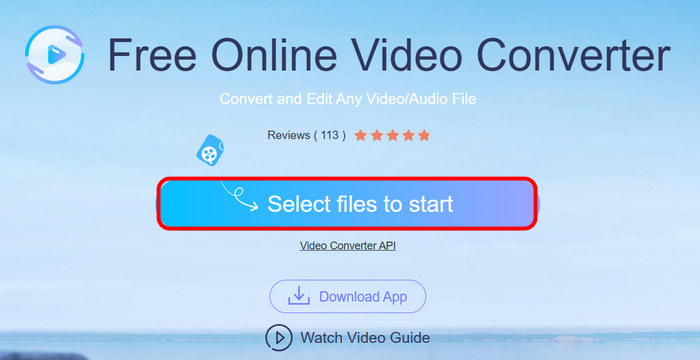
Korak 2. Kliknite na Select Files to Start kako biste uvezli VOB datoteku.
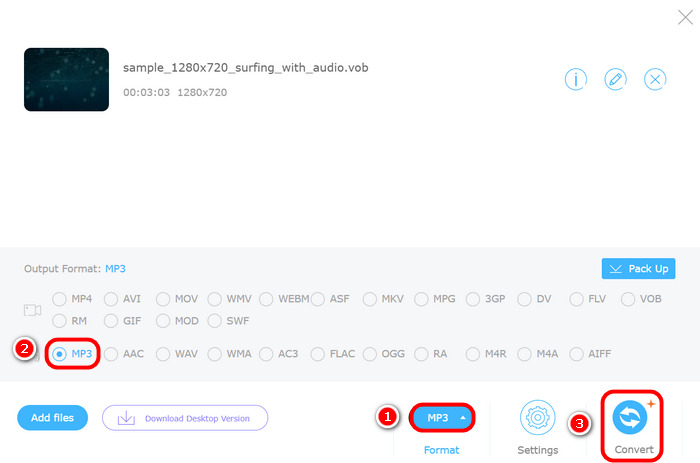
Korak 3. Sada kliknite na Format i odaberite željeni audio format. Kada završite, kliknite gumb Convert.
Baš kao i kod Zamzara, problem s Apowersoft Online Video Converterom je taj što može obraditi DVD-ove kao diskove. Može obraditi samo VOB datoteke, što znači da ih morate ručno izdvojiti s DVD-a prije nego što ih prenesete u konverter.
Dio 4. Često postavljana pitanja o pretvaranju DVD-a u MP3
Mogu li pretvoriti DVD u MP3 bez gubitka kvalitete zvuka?
Da. Moguće je pretvoriti DVD u MP3 uz održavanje visoke kvalitete zvuka korištenjem profesionalnog softvera za ripanje DVD-ova poput FVC Video Converter Ultimate. Ovi alati omogućuju vam podešavanje potrebnih postavki, poput brzine prijenosa podataka, brzine uzorkovanja i audio kanala, kako biste sačuvali izvorni zvuk. Međutim, korištenje besplatnih ili online pretvarača može rezultirati blagim gubitkom kvalitete zbog kompresije.
Zašto ne mogu izravno pretvoriti svoj DVD u MP3 pomoću online alata?
Većina online alata, poput Zamzara i Apowersofta, podržava samo VOB datoteke, a ne cijele DVD-ove. To znači da morate ručno izdvojiti VOB datoteku s DVD-a prije pretvaranja.
Mogu li istovremeno ripati više DVD audio zapisa?
Da, alati poput FVC Video Converter Ultimate podržavaju grupnu konverziju, što vam omogućuje istovremeno izdvajanje više audio zapisa.
Zaključak
Sada kada znate kako izvući zvuk s DVD‑ova, bit će vam lako pretvarati DVD‑ove u MP3 i druge audio formate. Stoga jednostavno slijedite 5 metoda i pronađite onu koja vam najbolje odgovara. Jeste li spremni digitalizirati zvuk iz svoje DVD kolekcije? Započnite pretvorbu odmah!
-
 Pretvorite M4A u MP3: 5 najboljih pretvarača koje biste trebali znati
 Ako želite pretvoriti M4A u MP3 za jednostavnu reprodukciju i uređivanje, pogledajte 5 pretvarača koje nudimo. Dobit ćete najdetaljniji vodič s koracima.
-
 Kako pretvoriti WMA u MP3 na računalu/online: 5 rješenja
 Da biste naučili kako pretvoriti WMA u MP3, ne propustite ovaj vodič. Imamo 5 pretvarača za različite platforme koji će zajamčeno zadovoljiti korisnike s različitim potrebama.
-
 5 najpraktičnijih MP3 razdjelnika: Koji odabrati?
 Želite li podijeliti svoj dugi MP3 audio? Ako vam je to potrebno, pročitajte naš sadržaj. Ponudit ćemo vam 6 naprednih MP3 razdjelnika i naučiti vas kako ih koristiti.
