


 Video Converter Ultimate
 Snimač zaslona
 Video popravak
Kako pretvoriti MTS u FLV s 3 MTS u FLV Converter
Želite pretvoriti MTS datoteke u FLV? Videozapisi snimljeni AVCHD kamerama obično se spremaju u MTS ili M2TS formatu. Neki multimedijski reproduktori ne podržavaju MTS datoteke, a ne mogu se ni izravno učitati na YouTube ili Facebook. Ako imate AVCHD kamkorder marke Sony, Panasonic ili Canon, možda ćete htjeti pretvoriti snimljene MTS videozapise u Flash video format, kako bi se mogli reproducirati na većini medijskih uređaja. Zato biste trebali nastaviti čitati naš članak, jer ćemo predstaviti 3 metode kako pretvoriti MTS datoteke u FLV na Windows i Mac računalima.

Dio 1. Profesionalni način za besplatnu konverziju MTS-a u FLV
Da biste pretvorili svoju MTS datoteku u Flash video za učitavanje, potreban vam je profesionalni alat kao što je FVC Free MTS Converter. To je MTS u FLV pretvarač koji može skupno pretvarati MTS datoteke u FLV, MP4, WMV, MOV i druge video i audio formate. Uz ugrađene alate za uređivanje videa možete urediti MTS datoteke prije pretvorbe.

FVC besplatni MTS pretvarač
1,286,400+ preuzimanja- Pretvorite MTS u FLV na Windowsima 10/8/7 / Vista / XP i Mac OS X.
- Stisnite, spojite i dodajte druge video efekte u MTS datoteke.
- Dodajte posebne teme u svoje MTS datoteke, poput praznika, obitelji, rođendana.
- Skupno pretvorite MTS u FLV, MP4, MKV itd. Brzinom od 50 puta bržom.
Besplatno preuzimanjeZa Windows 7 ili novijiSigurno preuzimanje
Besplatno preuzimanjeZa MacOS 10.7 ili novijiSigurno preuzimanje
Korak 1. Dodajte MTS datoteku
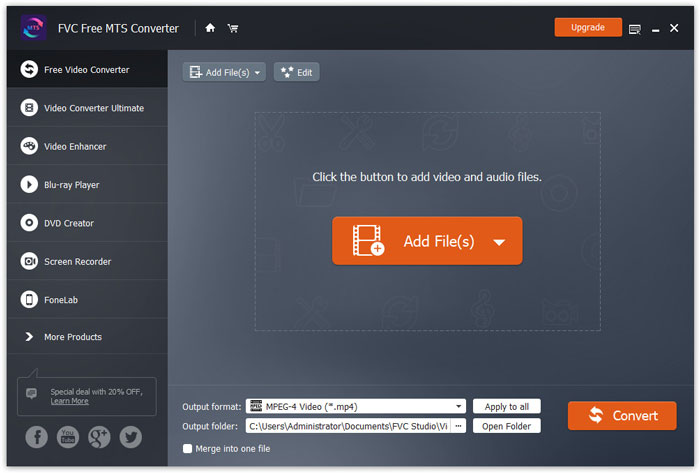
Besplatno preuzmite, instalirajte i pokrenite FVC Free MTS Converter. Kliknite gumb Add File(s) da biste uvezli svoju MTS datoteku. Također možete povući više od jedne MTS datoteke u program, potpuno besplatno.
Korak 2. Uredite MTS datoteku
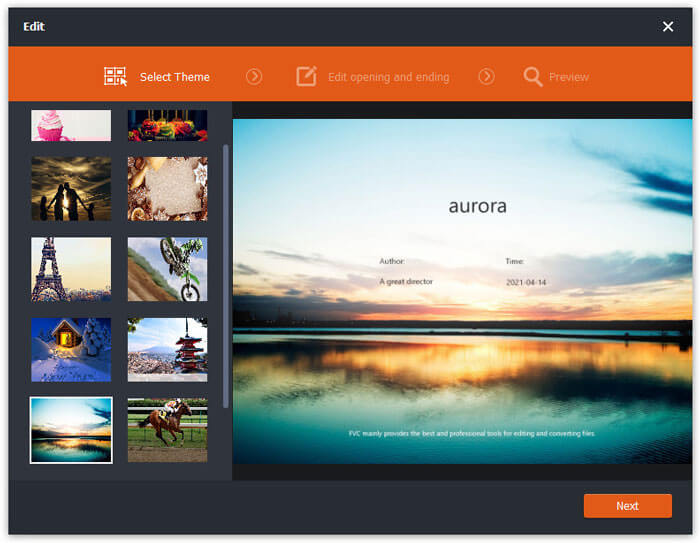
Kliknite gumb Edit da biste započeli uređivanje svoje MTS datoteke. Možete odabrati određenu temu, urediti naslov, autora, vrijeme na početku i na kraju videa.
Korak 3. Postavite FLV kao izlaz
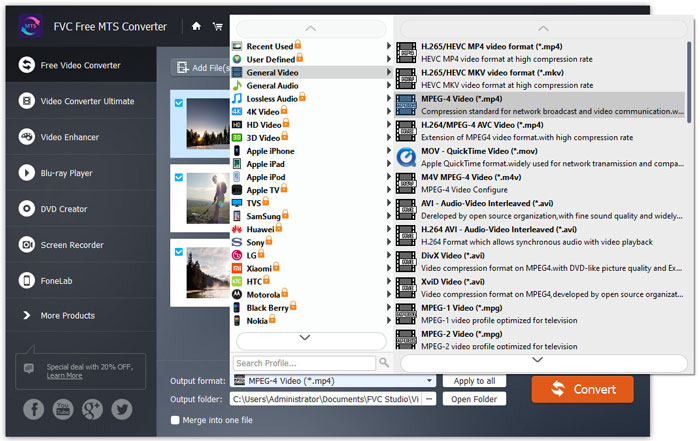
Zatim idite u područje Output format i odaberite kategoriju General Video. Pronađite FLV - Flash Video Format (.flv) i postavite ga kao izlazni format. Ovaj format je široko korišten format za mrežno strujanje videozapisa.
Korak 4. Pretvorite MTS u FLV
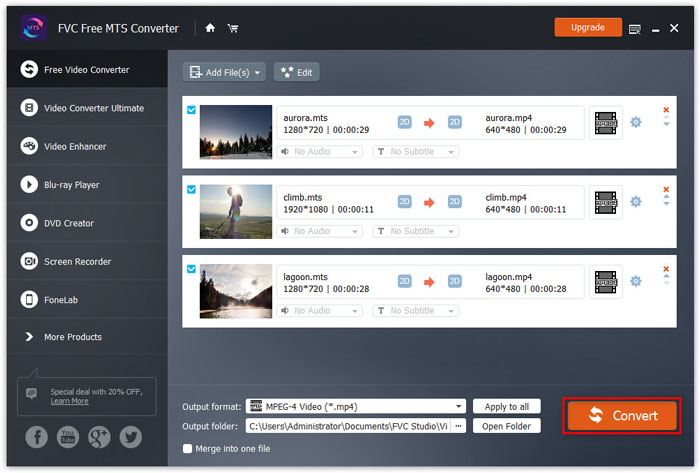
Na kraju idite u područje Output folder i odaberite odredište gdje će se spremiti pretvorena FLV datoteka. Zatim možete kliknuti gumb Convert da biste započeli besplatnu pretvorbu MTS datoteke u FLV.
Nakon toga možete pretvoriti pretvorenu FLV datoteku na YouTube, Vimeo, Facebook, Google video ili druge medijske platforme.
Dio 2. Kako promijeniti MTS u FLV Free Online
Ako želite pronaći mrežni alat bez preuzimanja ikakvog softvera, možete koristiti FVC Free Online Video Converter. To je jednostavan i besplatan mrežni MTS u FLV pretvarač koji pomaže u pretvorbi bilo kojeg popularnog video/audio formata, poput MTS u FLV, MP4, WMV, AVI, MOV, MP3 itd., potpuno besplatno na Windows i Mac sustavima. Možete provjeriti detaljne korake za promjenu MTS u FLV pomoću ovog besplatnog mrežnog alata.
Korak 1. Posjetite službenu web-stranicu FVC Free Online Video Converter (https://www.free-videoconverter.net/free-online-video-converter/). Kliknite gumb Add Files to Convert da biste preuzeli i instalirali pokretač.

Korak 2. S računala odaberite MTS datoteke koje želite pretvoriti.
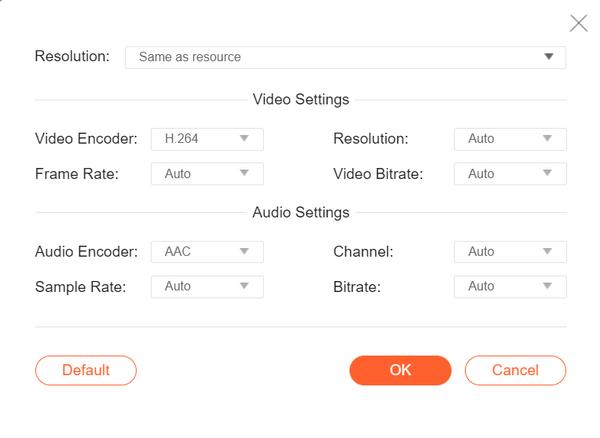
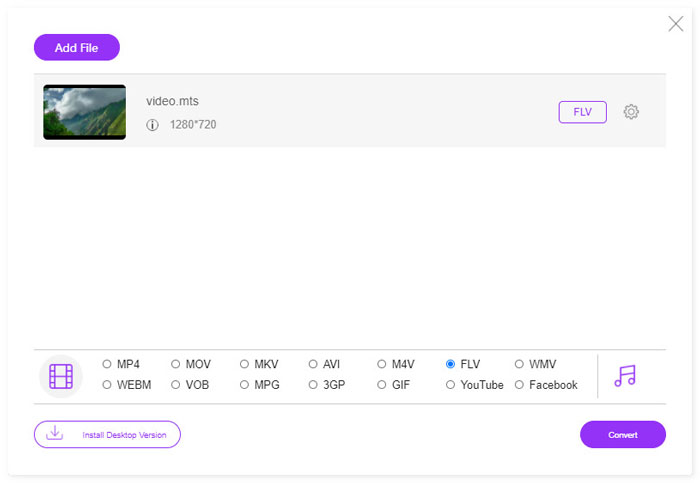
Korak 3. Postavite FLV kao izlazni format pri dnu. Ako želite dodatno prilagoditi postavke, možete kliknuti ikonu zupčanika kako biste podesili video koder, rezoluciju, broj sličica u sekundi, bitrate i druge audio postavke poput audio kodera, kanala, uzorka i bitratea.
Korak 4. Kliknite gumb Covert da biste započeli pretvorbu svoje MTS datoteke u FLV.
Dio 3. Besplatni izvoz Flash videa iz MTS datoteke s VLC-om
VLC Media Player nije samo jednostavan video/audio reproduktor, već i video pretvarač opremljen korisnim značajkama. Djeluje kao dobar MTS u FLV pretvarač koji podržava širok raspon datoteka za konverziju. Potpuno je besplatan i bez ograničenja. Pomoću VLC‑a možete besplatno izvesti Flash videozapise iz MTS datoteka na Windows ili Mac računalu. Da biste pretvorili MTS datoteku u FLV, trebate preuzeti i instalirati VLC na svoje računalo.
Korak 1. Pokrenite VLC Media Player, idite na Media i kliknite gumb Convert / Save.
Korak 2. Kliknite gumb Add da biste dodali MTS datoteku, a zatim kliknite gumb Convert / Save za nastavak.
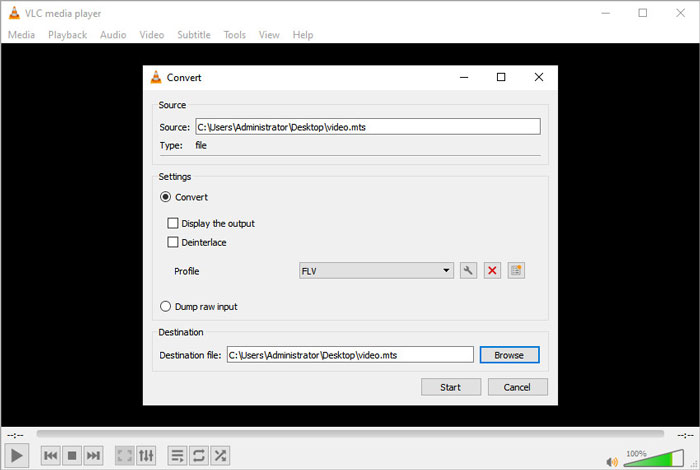
Korak 3. Označite opciju Convert u području Settings i kliknite padajuću strelicu kako biste odabrali FLV kao izlazni format. Ako nema FLV izlazne datoteke, možete kliknuti ikonu za izradu novog profila i stvoriti novi FLV profil.
Korak 4. Zatim idite u područje Destination i kliknite gumb Browse da biste postavili izlaznu mapu.
Korak 5. Provjerite jeste li dovršili sve postavke i kliknite gumb Start da biste započeli pretvorbu MTS u FLV u VLC‑u.
Dio 4. Česta pitanja o pretvaranju MTS-a u FLV
Što je MTS video format?
MTS datoteka je videozapis spremljen u formatu Advanced Video Coding Definition (AVCHD). MTS datoteka je standardni video format koji koriste mnogi Sony i Panasonic HD kamkorderi. Također se koristi za pohranu videozapisa visoke razlučivosti na Blu-ray diskovima.
Kako pretvoriti MTS datoteke u MP4?
Pomoću FVC Free MTS Converter‑a možete također pretvoriti MTS datoteku u MP4. Kliknite gumb Add File(s) da biste uvezli MTS datoteke. Zatim idite na Output format i odaberite MP4 kao izlazni format. Nakon toga kliknite gumb Convert da biste započeli besplatnu pretvorbu MTS u MP4.
Može li Windows 10 reproducirati MTS datoteke?
Da. Windows Media Player možete koristiti za reprodukciju MTS datoteka. Ako MTS datoteka nije uspjela za reprodukciju, možete isprobati druge MTS uređaje poput VLC Media Player, 5K Player, FVC Free Video Player i još mnogo toga.
Zaključak
U ovom smo članku uglavnom govorili o 3 metode za besplatno pretvaranje MTS datoteka u FLV. Možete isprobati sve gore navedene pretvarače MTS u FLV za izvoz Flash video datoteka za prijenos. Ovaj besplatni MTS pretvarač može brzom brzinom lako promijeniti vaše MTS datoteke u FLV, MP4, WMV, VOB, MP3 i više.
-
 10 najboljih FLV playera za Windows, Mac, iOS i Android 2021. godine
 FLV player pomaže vam da lako pristupite svojim FLV datotekama na Windows, Mac, Android, iOS uređajima. Pogledajte najbolje uređaje za reprodukciju datoteka FLV koje trenutno možete preuzeti.
-
 Najbolji načini za pretvaranje VOB u FLV
 Želite li pretvoriti VOB datoteku u FLV datoteku? Zadatak možete jednostavno izvršiti bilo putem stolnih računala ili putem mrežnih pretvarača. Pročitajte ovaj vodič i naučite kako lako i brzo transformirati VOB u FLV.
-
 MTS VS M2TS - Razlika između MTS-a i M2TS-a
 Što je MTS ili M2TS datoteka? Koja je razlika između M2TS i MTS? Kako mogu gledati kamkorder snimljenu MTS ili M2TS datoteku? Sve odgovore pronađite u ovom postu.
