


 Video Converter Ultimate
 Snimač zaslona
 Video popravak
Kako besplatno pretvoriti vaše DAT video datoteke u FLV format
Budući da postoji toliko mnogo video formata, možda ćete morati pretvoriti jedan format u drugi. Ovaj se članak usredotočuje na to kako besplatno pretvoriti DAT u FLV na računalu i putem interneta. Datoteka s nastavkom DAT nije standardna vrsta datoteke, već podatkovna datoteka koja pohranjuje informacije. Stoga ne postoji određeni program koji je zadužen za otvaranje DAT datoteka. Ako je u ovom obliku pohranjena video datoteka, odgovarajući pretvarač iz DAT u FLV može vam pomoći da je otvorite.

1. dio: Najbolji besplatni načini za pretvaranje DAT-a u FLV
Način 1: Pretvorite DAT u FLV pomoću besplatnog FLV pretvarača
FVC Free FLV Converter moćan je video pretvarač iako je besplatan. To znači da možete dobiti funkcije slične profesionalnom softveru, a da ne potrošite ni lipe.
Ključne značajke najboljeg besplatnog pretvarača iz DAT u FLV
- 1. Brzo pretvorite DAT datoteke u FLV format.
- 2. Proizvodite visokokvalitetne rezultate korištenjem napredne tehnologije.
- 3. Uključite širok raspon bonus alata, poput uređivanja video zapisa.
Besplatno preuzimanjeZa Windows 7 ili novijiSigurno preuzimanje
Besplatno preuzimanjeZa MacOS 10.7 ili novijiSigurno preuzimanje
Kako besplatno pretvoriti DAT u FLV
Korak 1: Otvorite DAT datoteke
Pokrenite najbolji besplatni pretvarač iz DAT u FLV nakon što ga instalirate na svoje računalo. Kako biste zaštitili svoje podatke, najbolje je da ga preuzmete s službene web-stranice. Kliknite veliki gumb Add File(s) na početnom sučelju, pronađite i odaberite DAT video datoteke te ih otvorite. Zatim će se pojaviti u biblioteci.

Korak 2: Postavite FLV kao izlazni format
Idite u donje područje, kliknite i proširite opciju Output format. Otvorite karticu General Video na popisu, pomaknite se prema dolje i odaberite FLV ili srodni format. Možete i promijeniti broj sličica u sekundi, rezoluciju i druge parametre klikom na ikonu Gear na svakom naslovu.

Korak 3: Pretvorite DAT u FLV
Zatim kliknite gumb Open Folder i promijenite odredišnu mapu prema svojim željama. Prema zadanim postavkama, pretvarač iz DAT u FLV spremit će izlazne datoteke u vašu video biblioteku. Na kraju kliknite gumb Convert kako biste odmah započeli pretvaranje DAT u FLV na svom računalu. Dovršetak pretvorbe traje samo nekoliko minuta.

Način 2: Kako pretvoriti DAT u FLV pomoću VLC-a
VLC je još jedan način da besplatno pretvorite DAT u FLV. Media player s otvorenim izvorom može otvoriti video datoteku s DAT nastavkom i pretvoriti je u standardne video datoteke. S obzirom na složeni postupak, u nastavku dijelimo osnovne korake.
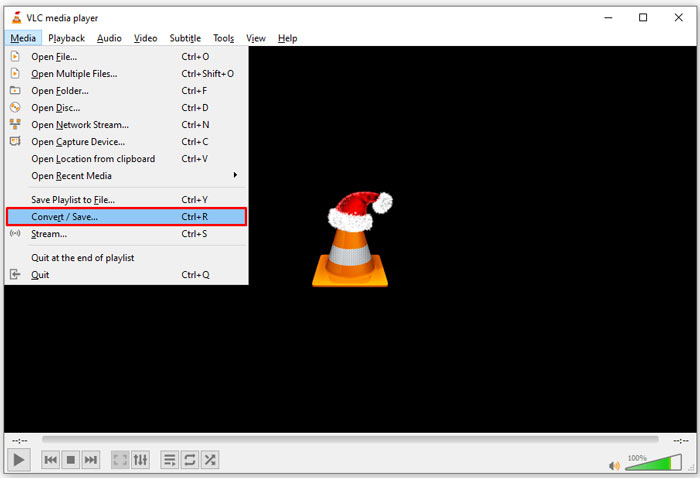
Korak 1: Otvorite VLC i kliknite Convert/Save u izborniku Media na vrhu. Zatim ćete vidjeti dijaloški okvir za otvaranje medija.
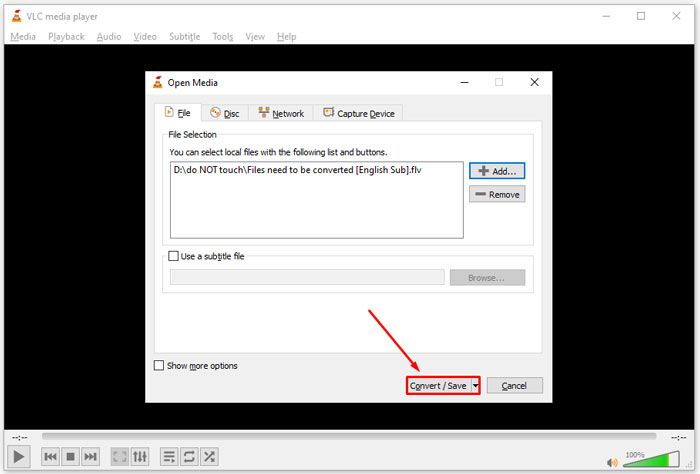
Korak 2: Kliknite gumb Add i otvorite DAT video datoteke u VLC-u. Pritisnite gumb Convert/Save za nastavak.
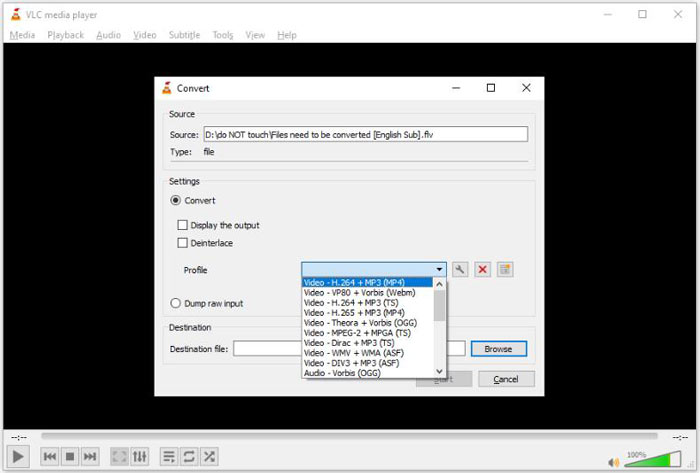
Korak 3: Proširite padajući popis Profile i postavite FLV kao izlazni format. Kliknite gumb Browse kako biste odabrali izlaznu mapu u odjeljku Destination.
Korak 4: Kliknite gumb Start da pokrenete pretvorbu iz DAT u FLV. Pretvorba u VLC-u traje otprilike onoliko koliko traje i vaš videozapis.
Dio 2: Kako pretvoriti DAT u FLV Online
FVC Free Online Video Converter jednostavan je način da besplatno pretvorite DAT u FLV putem interneta. U usporedbi s drugim mrežnim video pretvaračima, omogućuje vam da to učinite bez ikakvih ograničenja, poput veličine datoteke, registracije, vodenog žiga itd.
Korak 1: Otvorite preglednik i posjetite https://www.free-videoconverter.net/free-online-video-converter/. Kliknite gumb Add Files to Convert da preuzmete pokretač.

Korak 2: Kliknite gumb Add File na pokretaču i prenesite DAT video datoteke sa svog računala. Zatim idite na odjeljak s formatima pri dnu i odaberite FLV.

Korak 3: Pritisnite gumb Convert da pokrenete internetsko pretvaranje DAT u FLV. Kada je gotovo, preuzmite video datoteke na svoj tvrdi disk.
Možda će vam se svidjeti i:
Pretvorite svoje TS datoteke u FLV format
Dio 3: Česta pitanja o DAT-u za FLV
Mogu li pretvoriti DAT datoteke u FLV iz Internet Explorera?
Ako DAT datoteke iz IE pohranjuju video sadržaj, možete ih pretvoriti u standardni video. Međutim, DAT ne pohranjuje samo video podatke, već i druge podatke. Za ostale podatke ne možete pretvoriti u videozapise.
Kako otvoriti DAT datoteke?
DAT datoteka je podatkovna datoteka koja sadrži informacije o programu s kojim je povezana. DAT datoteku možete pokušati otvoriti dvostrukim klikom. Vaš sustav može distribuirati odgovarajući program.
Mogu li pretvoriti DAT u QuickTime?
Ovisi o vašoj situaciji. Prvo, DAT datoteke moraju pohranjivati video podatke. Tada vam je potreban i video pretvarač koji podržava DAT i QuickTime.
Zaključak
Ovaj je vodič podijelio tri načina za pretvaranje DAT-a u FLV na radnoj površini ili na mreži. VLC je besplatan način za obavljanje posla na sustavima Windows, Mac i Linux. Međutim, FVC Free FLV Converter nudi više pro-level značajki uz traženje bilo kakve uplate. Ako imate dodatnih pitanja, ostavite poruku ispod ovog posta.
-
 MP4 u FLV | Top 3 besplatna konvertera (na mreži / Mac / Windows)
 Ovaj je post detaljan vodič za pretvorbu MP4 u FLV. Možete uzeti top 3 besplatna pretvarača kako biste s lakoćom promijenili MP4 u FLV na mreži, na Windows ili Mac računalu.
-
 3 rješenja za pretvorbu MTS-a u FLV Free & Online
 Želite pretvoriti MTS u FLV? Evo 3 besplatna softvera za pretvorbu MTS u FLV koji možete pokušati pretvoriti u MTS u FLV na Mac OS X i Windows 10/8/7.
-
 4 najbolja besplatna načina za pretvaranje FLV videozapisa u MP4 na radnoj površini i na mreži
 Ovaj vodič dijeli četiri besplatne metode za pretvorbu FLV video datoteka u MP4 format na Windowsima 10/8/7 / XP i Mac OS X, tako da možete uživati u videozapisima na bilo kojem uređaju.
