


 Video Converter Ultimate
 Snimač zaslona
 Video popravak
4 najbolja besplatna načina za pretvaranje MTS-a u MOV
Snimio sam nekoliko videozapisa pomoću Sony videokamere koja je izvezla MTS datoteke. Primjećujem da MTS ne može podržavati moj media player i iMovie. Koristim Mac i želim urediti ove snimljene MTS videozapise. Bilo kakva pomoć? Postoji li neki jednostavan način, posebno besplatan način pretvorbe MTS-a u MOV?
MTS je format videozapisa visoke rezolucije koji se naširoko koristi u Sony i Panasonic videokamerama, kao nastavak datoteke za AVCHD (Advanced Video Coding High Definition). Nakon snimanja videa svojim digitalnim fotoaparatom, vrlo je vjerojatno da ćete dobiti MTS datoteku. Podržava 720p/1080i HD i može pružiti višu kvalitetu slike. Međutim, MTS nije popularan format koji većina medijskih reproduktora ili uređivača može podržati.

Ako trebate uređivati MTS u iMovieu ili ga reproducirati u medijskom reproduktoru, trebali biste pretvoriti MTS u MOV ili MP4 za bolju kompatibilnost. U ovom članku pokazat ćemo vam 4 besplatna MTS pretvarača koji vam pomažu jednostavno pretvoriti MTS u MOV.
Dio 1. Najbolji besplatni način pretvaranja MTS-a u MOV bez gubitka kvalitete
Na internetu postoji velik broj alata za pretvaranje MTS datoteka koji vam mogu pomoći da pretvorite MTS u MOV uz visoku kvalitetu. U ovom prvom dijelu želimo vam preporučiti najbolji besplatni softver za pretvaranje MTS u MOV, Free MTS Converter.
Posebno je dizajniran za obradu svih vrsta pretvorbi. Kompatibilan je sa gotovo svim video i audio formatima poput MP4, MOV, MKV, MTS, AVI, FLV, WMV, MP3, AAC, FLAC i još mnogo toga. Možete ga besplatno preuzeti i slijediti sljedeći vodič za besplatno pretvaranje MTS-a u MOV.
Besplatno preuzimanjeZa Windows 7 ili novijiSigurno preuzimanje
Besplatno preuzimanjeZa MacOS 10.7 ili novijiSigurno preuzimanje
Korak 1. Prvo morate instalirati i pokrenuti ovaj besplatni pretvarač MTS u MOV na računalu. Nudi verzije za Windows i Mac koje možete preuzeti.
Korak 2. Kliknite Add File(s) za uvoz MTS datoteka koje želite pretvoriti. Dopušteno vam je pretvoriti jednu ili više MTS datoteka odjednom.
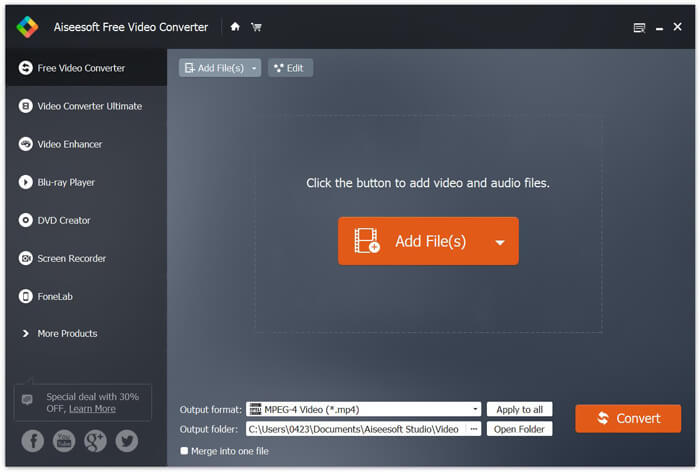
Korak 3. Odaberite MOV kao ciljni format s popisa Output format. Zatim kliknite gumb Convert kako biste započeli pretvaranje iz MTS u MOV.
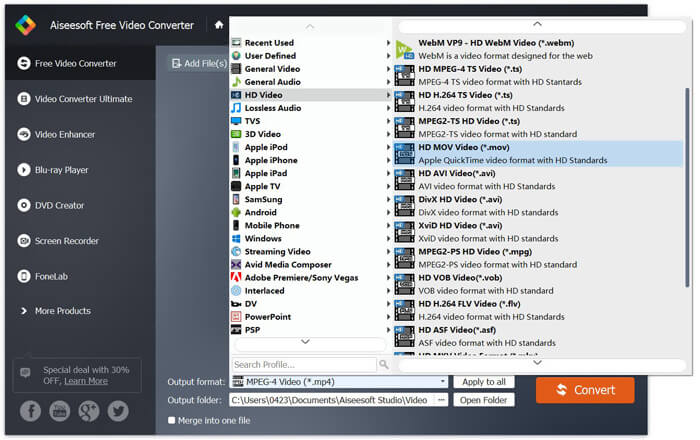
Kao što vidite odozgo, ovaj besplatni pretvarač MTS u MOV također sadrži neke osnovne značajke uređivanja. Prije konačnog pretvaranja, možete ih koristiti za prilagođavanje vaše MTS datoteke. U usporedbi s mrežnim pretvaračima, ovaj besplatni video pretvarač može vam pružiti bržu brzinu pretvorbe i veću kvalitetu izlaznog video zapisa. Zato je to naša prva preporuka.
Dio 2. Besplatni mrežni pretvarač pomaže vam u jednostavnom pretvaranju videozapisa
Kada na Googleu potražite kako pretvoriti MTS u MOV, dobit ćete mnogo rezultata besplatnih internetskih pretvarača. Ovdje vam predstavljamo jednostavan i besplatan online MTS u MOV pretvarač, FVC Free Online Video Converter. Bez instaliranja ikakvog softvera, možete besplatno pretvarati bilo koje popularne video formate u MP4, AVI, MOV itd. I ne trebate se ni za što brinuti jer je pretvaranje sigurno i stabilno. Tijekom procesa pretvaranja neće doći do gubitka podataka.
Korak 1. Otvorite gornju poveznicu i kliknite gumb Add Files to Convert. Prije pretvaranja preuzmite i instalirajte FVC launcher. To traje samo nekoliko sekundi.

Korak 2. Nakon instaliranja i ažuriranja pokretača, jednostavno odaberite video koji želite pretvoriti. Zatim odaberite format koji trebate i pritisnite Convert.

Korak 3. Otvorite gornju poveznicu i kliknite gumb Add Files to Convert. Prije pretvaranja preuzmite i instalirajte FVC launcher. To traje samo nekoliko sekundi.
Dio 3. Kako pretvoriti MTS u MOV Free Online sa ZAMZAR-om
ZAMZAR je jedan od najpopularnijih internetskih programa za pretvorbu video zapisa koji vam može pomoći u besplatnom pretvaranju MTS-a u MOV. Dizajniran je sažetim sučeljem i jednostavnom značajkom za pretvaranje. Možete izvršiti sljedeći vodič za pretvorbu MTS video zapisa.
Korak 1. Otvorite svoj preglednik i prijeđite na službenu stranicu ZAMZAR-a. Ovdje možete izravno otići na https://www.zamzar.com/convert/mts-to-mov/ stranicu. Ovdje možete izravno pretvoriti MTS u MOV bez drugih postavki.
Korak 2. Kliknite gumb Dodaj datoteke da biste učitali MTS datoteku koju želite pretvoriti. Možete povući i ispustiti za prijenos MTS datoteke. Jedna stvar koju biste trebali znati je da vam ovaj besplatni mrežni pretvarač MTS omogućuje pretvorbu MTS datoteke manje od 150 MB.
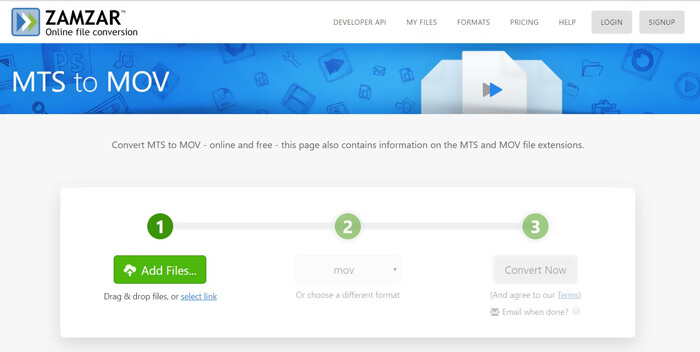
Korak 3. Nakon učitavanja možete kliknuti gumb Convert Now kako biste započeli besplatnu online konverziju MTS u MOV.
Dio 4. Internetski način za pretvorbu MTS-a u MOV pomoću FreeConvert
FreeConvert je još jedan popularan online video pretvarač koji može besplatno izvršiti pretvaranje videa iz MTS u MOV. Ovaj besplatni MTS u MOV pretvarač u potpunosti podržava MTS i M2TS. Omogućuje vam učitavanje MTS datoteke veličine do 1 GB. Štoviše, dopušta vam da za pretvaranje odjednom učitate do 20 MTS datoteka. Sada možete slijediti korake u nastavku kako biste pretvorili svoj MTS u MOV.
Korak 1. Prvo trebate otići na FreeConvert.com u svom pregledniku. Ovdje možete izravno otići na https://www.freeconvert.com/mts-to-mov za pretvaranje.
Korak 2. Kliknite veliki plavi gumb Choose MTS Files kako biste učitali MTS datoteku koju želite pretvoriti u MOV. Kao što je gore spomenuto, ovdje možete učitati jednu ili više MTS datoteka za pretvaranje.
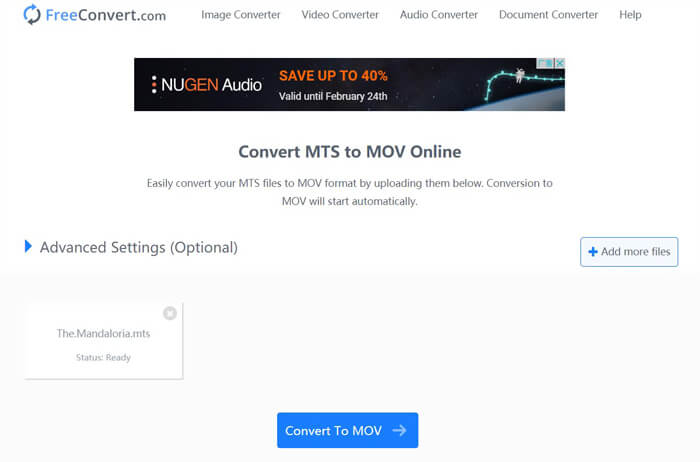
Korak 3. Kliknite gumb Convert To MOV kako biste započeli proces učitavanja i pretvaranja. Nakon toga trebate kliknuti gumb Download da biste spremili pretvorenu datoteku na svoje računalo.
Kada odaberete besplatne online pretvarače za pretvaranje MTS u MOV, za učitavanje i pretvaranje trebat će vam relativno puno vremena. Stoga je bolje da pomoću online alata pretvarate MTS datoteke manje veličine. Ako želite pretvoriti veliku MTS ili M2TS video datoteku, trebali biste se osloniti na visoko preporučeni Free Video Converter.
-
 6 jednostavnih načina za pretvaranje TS u AVI / MKV / MOV / WMV na Windowsima / Macima
 Želite brzo pretvoriti TS datoteke u AVI / MKV / MOV / WMV? Ovaj članak prikazuje mrežne i izvanmrežne video pretvarače s potpunim vodičem. Možda ovdje možete dobiti najbolji besplatni TS pretvarač.
-
 MOV VS MP4 - Koji je bolji
 MOV VS MP4, koji je bolji? Ovaj post govori o razlici između MP4 i MOV, tako da možete dobiti bolji izbor za korištenje za svoje video datoteke.
-
 Kako se besplatno pridružiti MOV (QuickTime) datotekama
 Početnicima može biti teško spojiti nekoliko MOV video isječaka. Dakle, postoji li jednostavan i brz način kombiniranja MOV datoteka? Ako postoji, kako ga onda koristiti? Ovaj će vam post pomoći da dobijete ove odgovore.
