


 Video Converter Ultimate
 Snimač zaslona
 Video popravak
5 metoda za pretvaranje WMA u MP3: na računalu i online
WMA is an audio format developed by Microsoft. Obviously, it's compatible with Windows devices, but outside of that, it's a mediocre fit. Some legacy models of mobile devices and music players do not support this format. If we want to make sure that the content of this audio file can be read using any device or platform, try converting WMA to MP3. MP3 files are smaller in size and, therefore, also save us a lot of storage space on the hard disk. And no platform can edit and play music that doesn't support MP3.
Pretvaranje WMA u MP3 vrlo je isplativa opcija, a mnogi programi i platforme to mogu učiniti za nas. Nakon istraživanja i stvarne upotrebe, ovaj članak odabire 5 najboljih. Ovdje ćete pronaći detalje o tome kako ih koristiti i vidjeti prednosti i nedostatke svakog pretvarača.

Dio 1. Kako pretvoriti WMA u MP3 na Win/Mac [bez gubitka kvalitete]
FVC Video Converter Ultimate
If you are fond of the stable performance of the software on the desktop side, you should definitely be the first to try FVC Video Converter Ultimate. This software is friendly to both Windows and Mac users and supports more than 1,000 formats, which ensures that we hardly encounter compatibility problems when using it. Its batch conversion feature and hardware acceleration technology ensure that it can handle multiple WMA to MP3 conversion tasks with 30X faster efficiency at all times. FVC Video Converter Ultimate is never just a format converter; it has a complete set of video, audio, and image editing tools in its toolbox, such as cropping, enhancement, compression, noise removal, and so on. By downloading this software, we no longer need to travel to multiple platforms but solve all the problems in one breath.
Besplatno preuzimanjeZa Windows 7 ili novijiSigurno preuzimanje
Free DownloadFor MacOS 10.7 or laterSecure Download
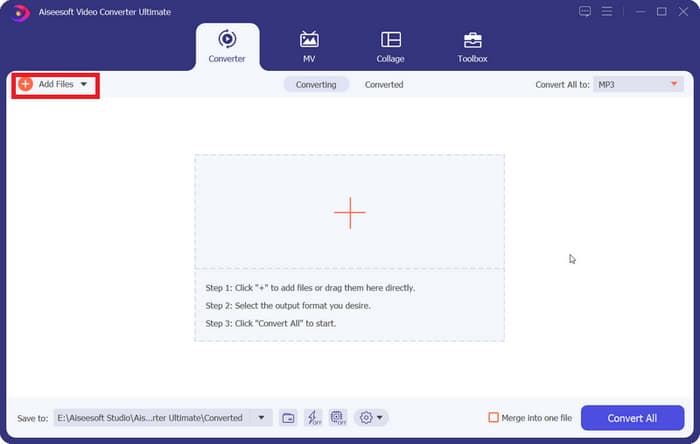
Step 1. Download and install FVC Video Converter Ultimate on your computer. We will use a Windows device as an example. Press Converter > Add Files to upload your WMA audio.
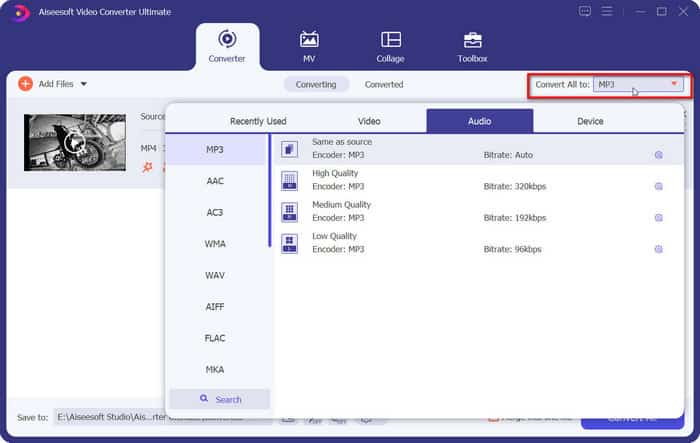
Step 2. Go to Convert All to, expand the list under this tab, and choose Audio > MP3. There are many different options for audio quality. Choose your target one.
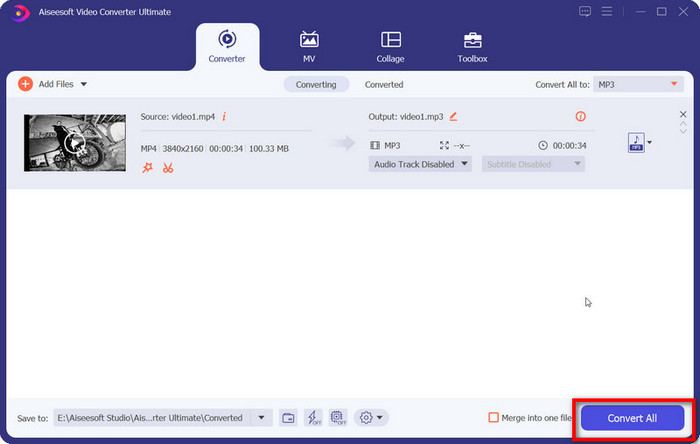
If you want to trim the added audio file, click Cut under the file name.
Step 3. After finishing all these settings, click Convert All to export your MP3 audio.
Dio 2. Kako besplatno pretvoriti WMA u MP3
Kako pretvoriti WMA u MP3 pomoću VLC Media Playera
Uz FVC Video Converter Ultimate, postoji još jedan desktop program kojem se možete obratiti: VLC Media Player. Iako se ova aplikacija najčešće koristi za otvaranje i reprodukciju multimedijskih datoteka, ona također podržava dovršavanje nekih jednostavnih operacija uređivanja, poput pretvorbe formata. Osim izvrsne kompatibilnosti, VLC Media Player ima prednost što je potpuno besplatan i jednostavan za korištenje.
Evo kako pretvoriti WMA datoteke u MP3 pomoću VLC Media Playera.
Step 1. Prepare your computer for VLC Media Player. In the top left corner, choose Media > Convert/Save.
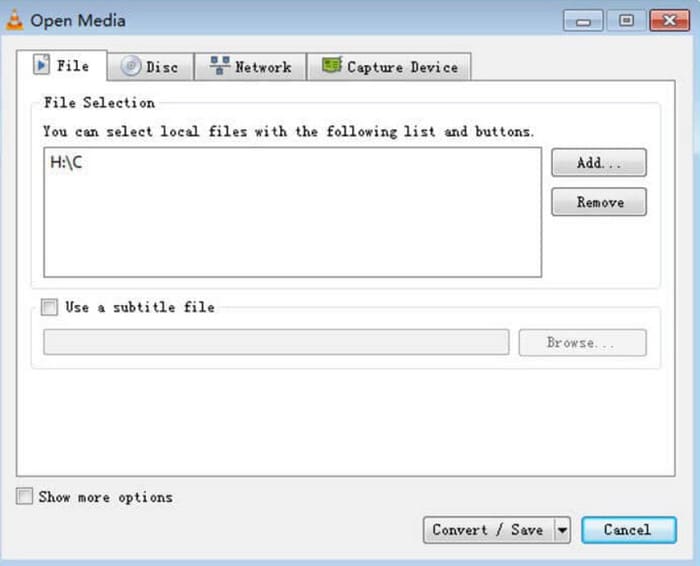
Step 2. The Open Media window will then be launched. Choose File and click + Add to select your prepared WMA audio. Next, click Convert/Save.
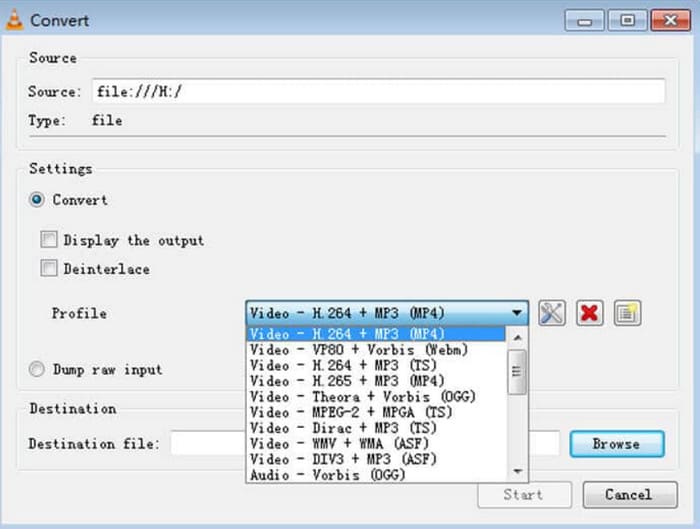
Step 3. Please navigate to the Profile option and expand the list next to it. Choose your target format and click Browse to find a storage path.
Step 4. When you finish all the settings above, click Start to launch the WMA format to MP3 conversion.
VLC Media Player ne podržava mnogo opcija izlaznog formata i na njemu možemo pronaći samo vrlo osnovne alate za podešavanje audio parametara. Dobar je za jednostavan prijenos WMA u MP3, ali za specijaliziranije uređivanje preporučujemo FVC Video Converter Ultimate.
s VLC Media Playerom
iTunes, multimedijski player koji je razvio Apple, može više od samog reproduciranja i pohranjivanja audio datoteka. Možemo mu dopustiti i neke osnovne zadatke pretvorbe formata. Iako je prepoznat kao najkompatibilniji s Mac uređajima, nudi i verziju koju korisnici Windowsa mogu preuzeti.
Neke od osnovnih iTunes usluga su besplatne. Zatim ćemo pokazati kako pretvoriti WMA u MP3 pomoću iTunesa.
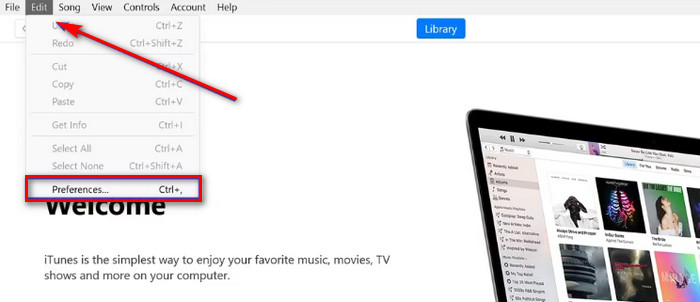
Step 1. Launch iTunes on your computer. Choose Edit > Preference.
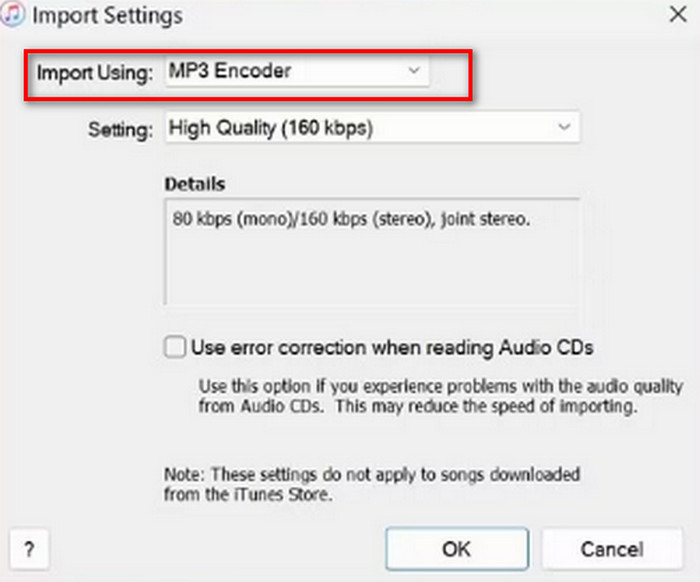
Step 2. After opening the General Preference window, choose General and go to Import Settings. Select MP3 Encoder and choose OK to keep the change.
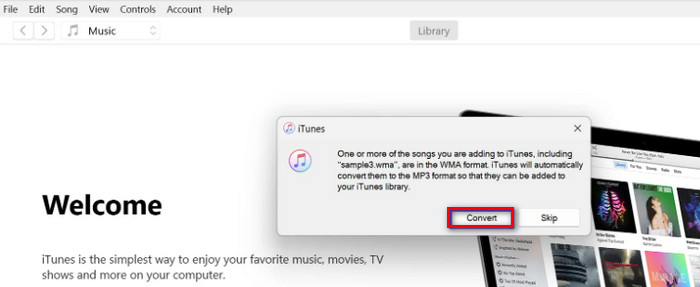
Step 3. Go back to File again and tap Add File to Library. A pop-out window will appear. You should click Convert.
Važno je napomenuti da iTunes također nudi nekoliko profesionalnih alata za uređivanje zvuka, a aplikacija je ukinuta za Apple uređaje nakon izlaska verzije za macOS Catalina. Prije preuzimanja provjerite odgovara li vam model vašeg uređaja.
Dio 3. Kako promijeniti WMA u MP3 online
FVC besplatni audio pretvarač
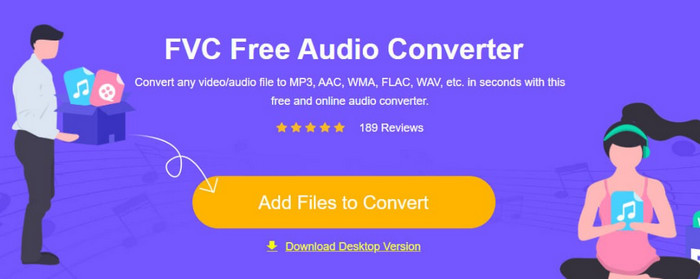
These are the recommendations given for users who prefer desktop applications. If you find it too troublesome to download and install the software and want to have a platform that can start converting as soon as you enter the interface to help you, try FVC Free Audio Converter.. It can be opened in your browser, and the design interface is straightforward. This free and efficient converter is our most loyal assistant when we have any urgent need to adjust audio formats.
Evo kako pretvoriti WMA u MP3 online pomoću FVC besplatnog audio pretvarača.
Step 1. Launch the FVC Free Audio Converter with your browser. Click Add Files to Start and upload your WMA audio file.
Step 2. Choose MP3 as the output format. Then click Convert to start the process. If you want to adjust some parameters of your audio, choose the Settings icon on the right side of the audio file.
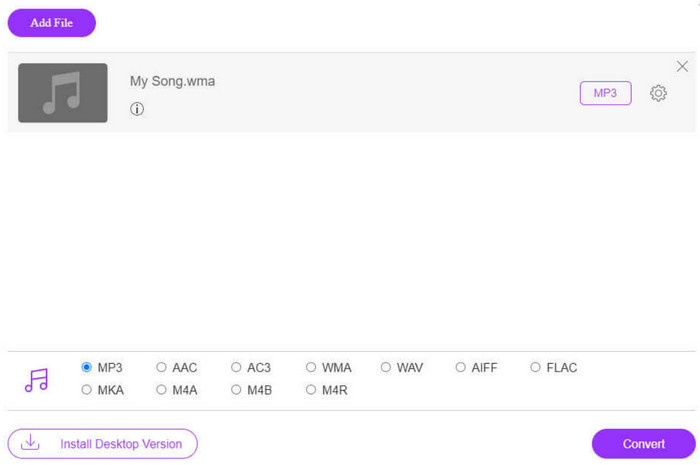
Brzina pretvorbe FVC Free Audio Convertera je vrlo velika, ali i dalje ima manje značajki od FVC Video Converter Ultimate. Ako želite višu razinu audio izlaza, preporučujemo preuzimanje desktop verzije.
FreeConvert
Još jedan online pretvarač formata koji je također lagan je FreeConverter. Podržava preko 1500 pretvorbi formata datoteka i obrađuje e-knjige uz video, audio i slike. Platforma tvrdi da automatski briše izvornu datoteku u roku od nekoliko sati nakon što korisnik završi s uređivanjem kako bi se osiguralo da privatnost nije ugrožena.
Pročitajte vodič u nastavku kako biste saznali kako pretvoriti WMA u MP3 pomoću FreeConvertera.
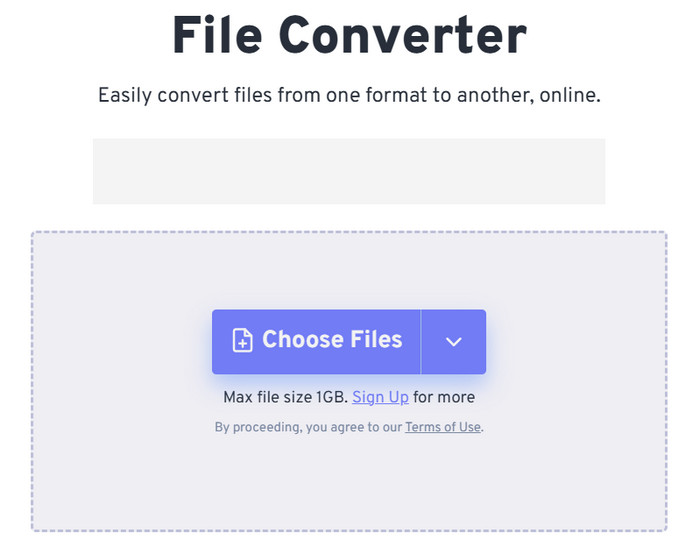
Step 1. Visit FreeConverter's official website. Click Choose Files to add your WMA audio to this platform.
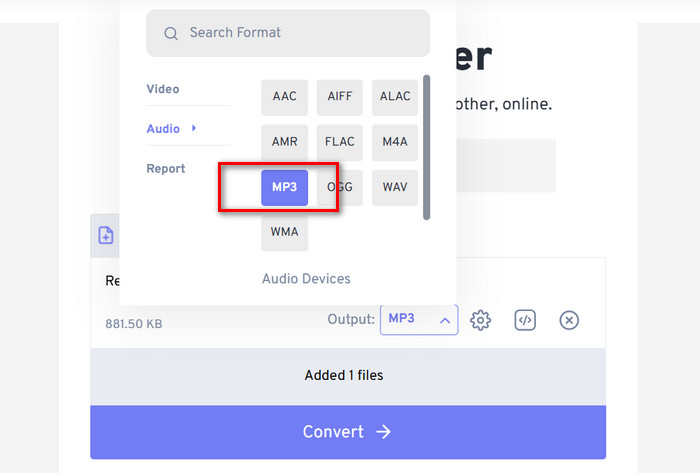
Step 2. Expand the menu of Output. Choose Audio > MP3.
If you want to enhance the audio quality, click the Advanced settings icon.
Step 3. Click Convert to launch the transforming process.
Although FreeConvert claims that converting audio formats is entirely free, let's not forget that it has a file size limit. It can't handle audio over 1GB, so if our file exceeds this limit, we'll need to pay to continue converting with this WMA to MP3 converter properly.
Dio 4. Često postavljana pitanja o pretvaranju WMA u MP3
WMA vs MP3 datoteke, koja je bolja?
Ovisno o tome na koji način uspoređujemo, MP3 je očito superiorniji od WMA u smislu kompatibilnosti. Veličine MP3 datoteka su manje od WMA, što ih čini prikladnijima za pohranu i prijenos zvuka. Ali WMA je bolji u smislu kvalitete zvuka.
Kako mogu reproducirati stare WMA datoteke?
When it comes to choosing a WMA audio player, the best option is Windows Media Player, which comes with Windows. Of course, some third-party players, such as VLC Media Player and MPlayer, are also worth trying.
Može li YouTube Music reproducirati WMA datoteke?
Da, WMA je trenutno među audio formatima koje YouTube službeno podržava.
Dio 4. Zaključak
This is a guide that teaches you how to convert WMA to MP3. Although the audio sound quality of the WMA format is slightly better, its files are more significant at the same time. What's more, not many platforms and music players support this format nowadays. To make sure that you are not hindered when reading audio, converting WMA to MP3 is necessary. Here, you will find five tools, including three desktop software and two online platforms. Comparing these five tools, FVC Video Converter Ultimate is the most versatile choice.
-
 WMA glazbeni player – pregled 10 najboljih WMA glazbenih playera 2025
 Može li Google Music Play WMA? Koji je najbolji WMA glazbeni uređaj? Koji Android glazbeni uređaj može reproducirati WMA datoteke? Ovaj post čini popis 10 najboljih WMA glazbenih playera za reprodukciju WMA glazbe na Macu, Windows PC-u, Androidu i iPhoneu.
-
 2 metode za pretvaranje FLV u WMA audio [besplatno i online]
 Želite li izvući WMA zvuk iz FLV videozapisa? Evo 2 besplatna WMA izvlakača zvuka za pretvaranje FLV (Flash Video) u WMA (Windows Media Audio) brzom brzinom pretvorbe na Mac OS X i Windows 10/8/7.
-
 Top 3 jednostavna za korištenje WMA snimača prikladna za glasovne talente
 Jeste li glasovni talent? Ovaj članak govori o WMA snimačima koji stvaraju visoku kvalitetu poput WMA za autore glasovnog sadržaja.

