


 Video Converter Ultimate
 Snimač zaslona
 Video popravak
Kako pretvoriti MPEG u MP4 [Uključuje besplatne i online metode]
MPEG, ili Moving Picture Experts Group, standardni je format multimedijske kompresije koji korisnicima omogućuje učinkovito pohranjivanje, prijenos i strujanje zvuka i videa. Nadalje, koristi naprednu tehnologiju kompresije koja je odgovorna za smanjenje veličine datoteka uz održavanje njihove kvalitete.
S druge strane, MP4 je video format poznat po svojoj fleksibilnosti i kompatibilnosti. U usporedbi s MPEG‑om, ovaj je format svestraniji jer podržava video i audio zapis, titlove, slike i metapodatke. Osim toga, nudi bolju učinkovitost kompresije. Zbog toga pretvaranje MPEG u MP4 postaje nužno. Kako biste to savladali, uronite u ovaj članak i otkrijte pet jednostavnih načina za pretvaranje svojih MPEG datoteka u MP4.

Dio 1. Kako pretvoriti MPEG video u MP4 [Skupna pretvorba]
Jedan od najboljih načina za pretvaranje MPEG videa u MP4 jest korištenje pažljivo odabranog alata Video Converter Ultimate. Ovaj cjeloviti alat za konverziju videozapisa omogućuje korisnicima brzo pretvaranje video datoteka u razne željene izlazne formate, jer ukupno podržava više od 1.000 ulaznih i izlaznih formata. Štoviše, ako imate više MPEG video datoteka koje treba pretvoriti, ovaj alat za konverziju omogućit će vam da ih sve odjednom pretvorite pomoću funkcije skupne kompresije.
Kako skupno pretvoriti MPEG video u MP4:
Korak 1. Prvo preuzmite i instalirajte preporučeni Video Converter Ultimate na svoje računalo.
Besplatno preuzimanjeZa Windows 7 ili novijiSigurno preuzimanje
Free DownloadZa macOS 10.7 ili novijiSigurno preuzimanje
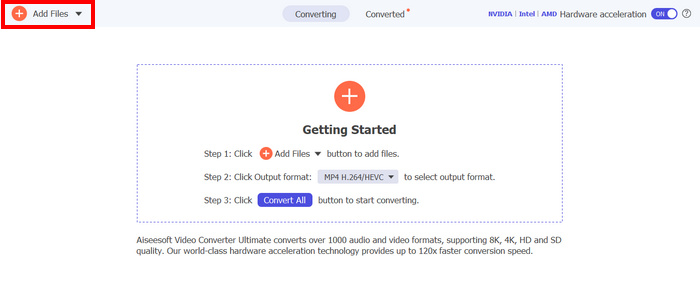
Korak 2. Sada, da biste uvezli MPEG datoteke koje želite skupno komprimirati u MP4, kliknite gumb Add Files.
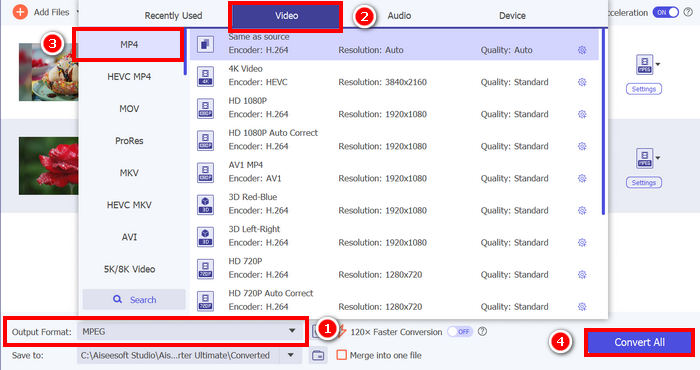
Korak 3. Na kraju, u odjeljku Output Format dolje, kliknite na njega i otvorite karticu Video. Ondje s popisa odaberite MP4. Kada ga odaberete, kliknite gumb Convert All kako biste skupno komprimirali MPEG videozapise u MP4.
S odabranim Video Converter Ultimateom od strane FVC-a, proces pretvaranja MPEG videa u MP4 može se brzo obaviti. Trebate poduzeti samo 2 ili 3 koraka, a korisničko sučelje je intuitivno i vrlo jednostavno za korištenje. Konačno, s naprednom tehnologijom kodiranja alata, korisnici mogu osigurati da će pretvorene MPEG datoteke zadržati visoku kvalitetu uz postizanje optimalne kompresije.
Dio 2. Pretvori MPEG u MP4 [Besplatno]
Ako se pitate postoje li besplatni alati za pretvaranje MPEG videa u MP4, u pravu ste! Ovi besplatni alati za pretvaranje videa omogućit će vam pretvaranje video datoteka u video formate po vašem izboru. Međutim, važno je napomenuti da, budući da su besplatni, postoje stvari koje treba uzeti u obzir prilikom njihovog korištenja. Slijede besplatni alati za pretvaranje MPEG u MP4:
Pretvorite MPEG u MP4 pomoću VLC Media Playera
Znam da ste vrlo dobro upoznati s VLC Media Playerom, budući da se naširoko koristi kao media player na raznim uređajima. No jeste li znali da ovaj media player također može pretvarati MPEG videe u MP4? Odgovor je da. VLC može biti koristan i kada je riječ o pretvaranju video datoteka u različite video formate poput MP4, AVI, MKV i druge. To je besplatna i jednostavna opcija za osnovnu konverziju videa, iako nema napredne funkcije koje nude specijalizirani video konverteri.
Kako možete pretvoriti svoje MPEG videe u MP4 pomoću VLC Media Playera:
Korak 1. Prvo morate preuzeti i instalirati VLC Media Player na svoje računalo.
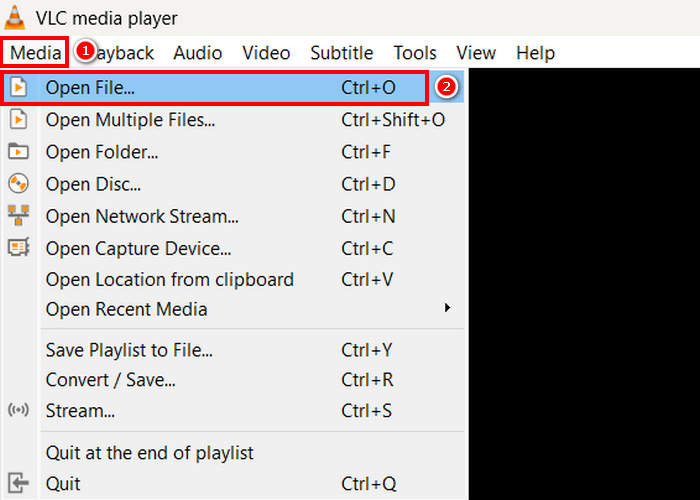
Korak 2. Zatim otvorite karticu Media i ispod nje kliknite Open File. Odatle uvezite MPEG video koji želite pretvoriti u MP4.
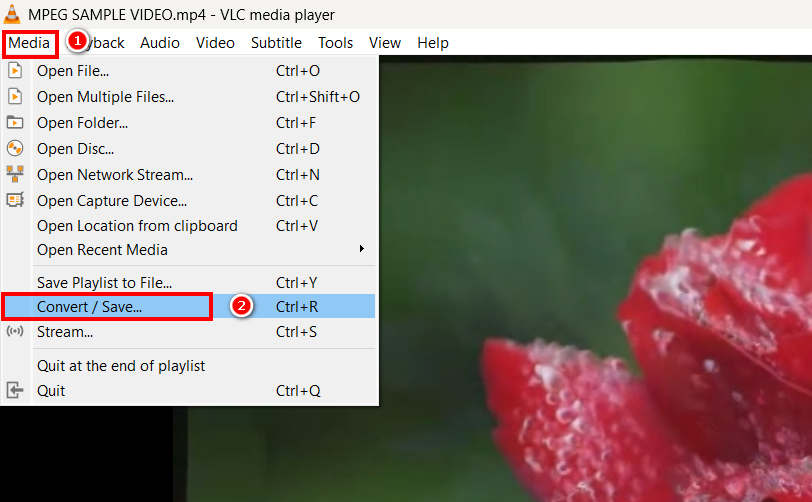
Korak 3. Nakon toga se ponovno vratite na karticu Media i ovaj put odaberite Convert/ Save dolje.
Korak 4. Sada kliknite na Profile i odaberite MP4 kao izlazni format. Kada odaberete, kliknite donji Start button kako biste započeli pretvaranje MPEG videa u MP4.
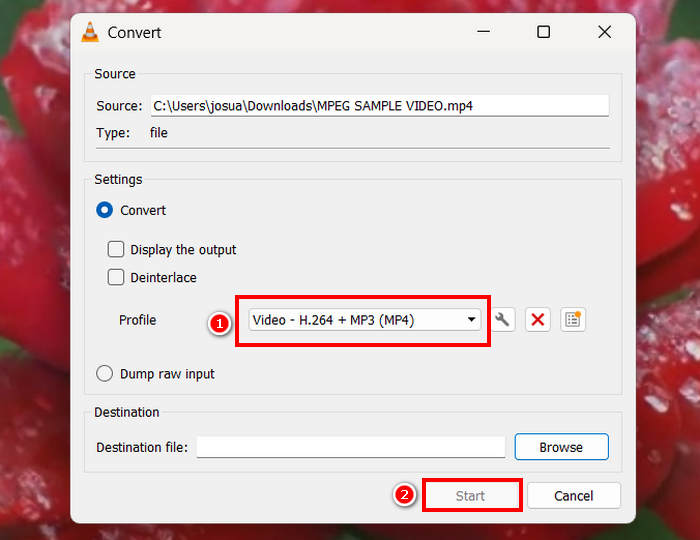
VLC Media Player doista može besplatno pretvoriti MPEG videozapise u MP4, ali za razliku od namjenskih alata za pretvorbu videozapisa, VLC-u nedostaju napredne opcije kodiranja, skupna pretvorba i druge potrebne značajke. Također ima ograničenu podršku za formate, što ga čini manje učinkovitim za korisnike kojima je potrebna brža obrada i više prilagodbi.
Pretvori MPEG u MP4 pomoću HandBrake-a
Još jedan alat koji možete koristiti za besplatno pretvaranje MPEG-a u MP4 je HandBrake. Ovaj alat poznat je kao video transkoder otvorenog koda koji korisnicima omogućuje kopiranje DVD-ova. Međutim, može se koristiti i za učinkovito pretvaranje MPEG datoteka u formate poput MP4.
Kako možete pretvoriti svoje MPEG videe u MP4 pomoću HandBrakea:
Korak 1. Prvo preuzmite i instalirajte HandBrake na svoje računalo.
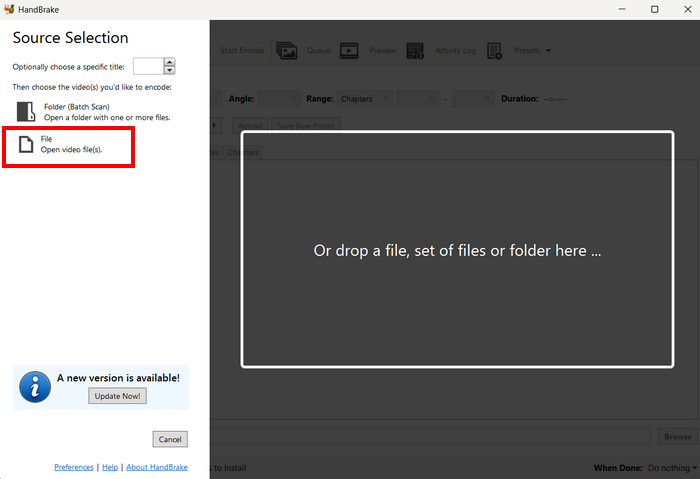
Korak 2. Sada pokrenite alat na računalu i kliknite Open Video File u lijevom kutu kako biste uvezli MPEG video datoteku koju želite pretvoriti u MP4 format.
Korak 3. Nakon toga kliknite na Format i odaberite MP4.
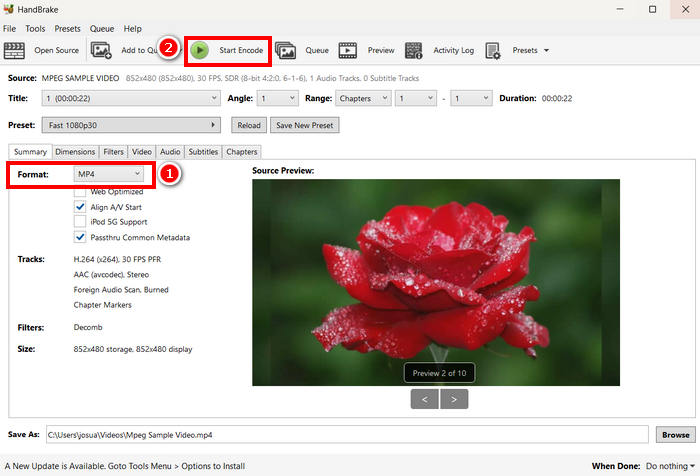
Korak 4. Kada završite, kliknite gumb Start Encode da biste započeli pretvaranje svog MPEG videa u MP4.
HandBrake je jedan od najboljih besplatnih alata za konverziju videa koji se može koristiti za pretvaranje MPEG videa u MP4. Međutim, ovaj alat podržava samo 3 izlazna formata, što može djelovati ograničavajuće u pogledu izbora formata. HandBrake podržava samo MP4, MKV i WebM, što možda nije idealno ako trebate druge formate.
Dio 3. Kako promijeniti MPEG u MP4 online
Još jedan savršen način za promjenu MPEG-a u MP4 je putem interneta. Postoje online alati za pretvaranje videa koji korisnicima omogućuju pretvaranje MPEG videa putem online metoda. U usporedbi sa softverskim aplikacijama, online pretvarači su jednostavniji za korištenje jer ne zahtijevaju instalaciju. Međutim, mogu imati ograničenja veličine datoteke i zahtijevati stabilnu internetsku vezu prilikom korištenja.
Pretvorite MPEG u MP4 online pomoću FVC besplatnog online video konvertera
FVC Free Video Converter Online je besplatni mrežni alat za konverziju multimedije. Savršen je za one koji trebaju pretvoriti MPEG u MP4 jer podržava razne video formate poput MP4, FLV, MKV, MOV, M4V i drugih. Osim toga, ovaj alat podržava skupnu konverziju, što korisnicima omogućuje pretvaranje više video datoteka odjednom.
Kako pretvoriti MPEG u MP4 pomoću FVC Free Video Converter Online:
Korak 1. U Chrome pregledniku upišite i potražite FVC Free Video Converter Online.
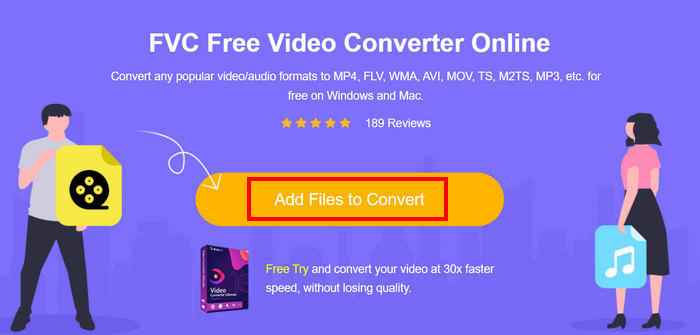
Korak 2. Kada dođete na njegovu stranicu, kliknite gumb Add Files to Convert kako biste uvezli MPEG datoteke koje želite pretvoriti u MP4.
Korak 3. Nakon toga samo odaberite MP4 kao izlazni format i kliknite Convert kada završite.
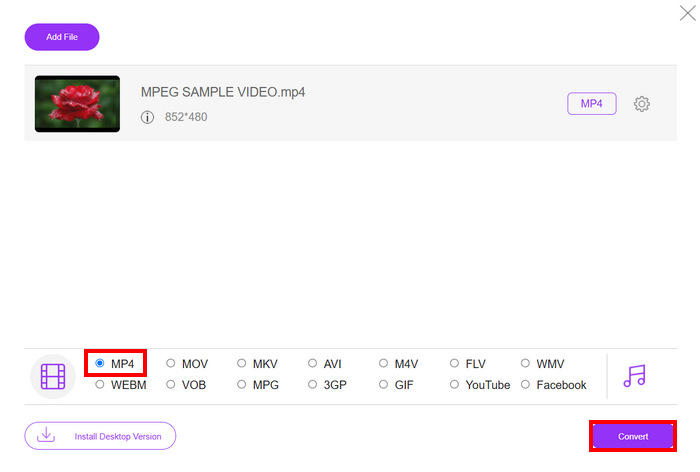
S FVC besplatnim online pretvaračem videa možete jednostavno pretvoriti svoje MPEG videozapise u MP4 bez muke s instaliranjem softverske aplikacije. Također, podržava razne video formate, uključujući MPEG i MP4. Konačno, vrlo je jednostavan za korištenje, savršen čak i za početnike.
Pretvorite MPEG u MP4 pomoću Cloud Convert-a
S druge strane, Cloud Convert je još jedan pouzdan online alat za pretvaranje MPEG-a u MP4. Podržava različite medijske formate i omogućuje korisnicima jednostavno pretvaranje MPEG video datoteka.
Međutim, ovom alatu se ne može pristupiti u potpunosti besplatno, jer besplatni plan dolazi s nekim ograničenjima. Možete pretvoriti do 25 video datoteka dnevno, ali svaka datoteka mora biti manja od 1 GB. Osim toga, istovremeno se može obraditi samo pet konverzija. Ako imate više MPEG datoteka za pretvorbu, Cloud Convert je i dalje izvrsna opcija koju možete isprobati.
Kako pretvoriti MPEG u MP4 pomoću Cloud Convert:
Korak 1. Prvo trebate posjetiti službenu web stranicu Cloud Convert-a.
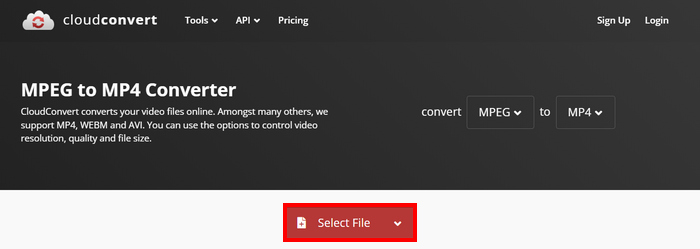
Korak 2. Kada ste na službenoj web stranici alata, kliknite gumb Select File kako biste uvezli MPEG video koji želite pretvoriti u MP4.
Korak 3. Zatim u opciji Format ispod odaberite MP4. Kada završite, kliknite gumb Convert.
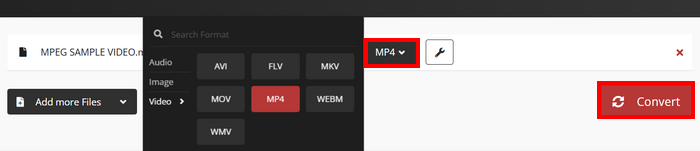
Pomoću Cloud Converta, korisnici koji žele pretvoriti svoje MPEG videozapise u MP4 to mogu jednostavno učiniti. Međutim, stvar je u tome što alat ne možete koristiti u potpunosti besplatno. Ako trebate neograničene konverzije ili podršku za veće datoteke, možda ćete morati nadograditi na plaćeni plan, što je skupo.
Dio 4. Često postavljana pitanja o pretvaranju MPEG-a u MP4
Mogu li pretvoriti MPEG u MP4 bez gubitka kvalitete?
Da. Moguće je pretvoriti MPEG u MP4 bez gubitka kvalitete korištenjem visokokvalitetnih video pretvarača poput FVC Video Converter Ultimate ili HandBrake. Ovi alati omogućuju vam podešavanje postavki kodiranja kako biste zadržali izvornu kvalitetu.
Je li MPEG isto što i MP4?
Ne. Iako su oba video formata, MPEG se odnosi na skupinu standarda kompresije, kao što su MPEG-1, MPEG-2 i MPEG-4, dok je MP4 format spremnika koji može sadržavati video, audio i titlove.
Mogu li grupno pretvoriti više MPEG datoteka u MP4?
Da. Moguće je grupno pretvoriti MPEG videozapise u MP4. Za to možete koristiti Video Converter Ultimate koji je odabrao FVC, jer podržava grupnu pretvorbu za različite video formate.
Zaključak
Pretvaranje MPEG‑a u MP4 i dalje je vrlo raširena praksa iz mnogih razloga, a sada kada točno znate kako pretvoriti MPEG u MP4 pomoću raznih metoda, sljedeće što trebate učiniti jest odabrati ono što vam najbolje odgovara. Dakle, što čekate? Odaberite najbolji alat za sebe i počnite pretvarati svoje MPEG datoteke u MP4.
-
 Kako komprimirati datoteke MPEG-4 na mreži - bez preuzimanja, bez vodenog žiga
 Nemate dovoljno prostora za pohranu datoteka da biste zadržali sve svoje MPEG-4 datoteke? Evo nekoliko rješenja koja bi vam mogla pomoći da svoje video datoteke smanjite.
-
 Najbolji 4 MPG/MPEG playeri za Windows/Mac/Android/iPhone [2025.]
 Želite glatko reproducirati svoju omiljenu MPG ili MPEG datoteku? Ovaj članak govori o 4 najbolja MPG/MPEG playera za računala i mobilne telefone.
-
 4 najbolja izbora od 5 za pretvaranje MPEG u AVI format [online i offline]
 Je li vam teško tražiti konverter za MPEG? Zatim pokušajte pročitati ovaj članak dok učimo kako promijeniti MPEG u AVI format s detaljnim koracima.
