


 Video Converter Ultimate
 Snimač zaslona
 Video popravak
Uredite MP3 s najboljim alatima na Windowsima, Macu, Internetu i mobilnom telefonu
MP3 označava MPEG-1 Audio Layer III i vrsta je datoteke koja pohranjuje glazbu u komprimiranom formatu. Ovakva je datoteka puno manja od nekomprimiranih glazbenih datoteka, što olakšava pohranu i prijenos. Kako nastaje sve više glazbe, ljudi traže jednostavne načine za uređivanje MP3 datoteka kako bi zvučale bolje. To je zato što MP3 ponekad može zvučati bolje od izvorne nekomprimirane glazbe. Problem je u tome što softver za uređivanje može biti skup i zahtijevati snažno računalo. Srećom, ovaj će vam vodič pokazati kako koristiti najpreporučivanije MP3 uređivače kako biste mogli uređivati svoju glazbu na svim platformama koje koristite. Stoga, kakve god da su vaše potrebe, najbolje je početi ovdje!

Dio 1. Najbolji odabir za uređivanje MP3-a s višenamjenskim MP3 uređivačem
Prvi softver koji uređuje MP3 datoteku je pažljivo odabrani FVC Video Converter Ultimate. Da, to je medijski pretvarač koji nije namijenjen samo videodatotekama nego i audio datotekama. Omogućuje vam da jednostavno pojačate glasnoću do dvostruke jačine ili je stišate do šapata. Također možete ubrzati ili usporiti zvuk, a da se ne zamarate tehničkim postavkama.
Povrh toga, može ukloniti pozadinsku buku, izrezati neželjene dijelove, podijeliti datoteke u dijelove, pa čak i uređivati glasovne snimke. Štoviše, nudi sučelje jednostavno za korištenje koje, čak i ako ste početnik u uređivanju zvuka, ovaj program čini sve te stvari jednostavnim u samo nekoliko koraka. Također će vam se svidjeti napredna tehnologija koju nudi, kao što je hardversko ubrzanje, NVIDIA, Intel, AMD i alati za uređivanje koje pokreće AI koje možete koristiti.
Ključne značajke:
• Pretvorba zvuka koja se pretvara do 120x brže.
• Podrška za više od 1000 različitih formata.
• Dijelite, režite i spajajte audio datoteke bez problema.
• Uredite MP3 duljinu bez ikakvih ograničenja.
• Komprimirajte audio datoteke na željenu veličinu.
• Izmijenite koder, brzinu uzorkovanja, kanal i brzinu prijenosa MP3 datoteke.
Besplatno preuzimanjeZa Windows 7 ili novijiSigurno preuzimanje
Besplatno preuzimanjeZa MacOS 10.7 ili novijiSigurno preuzimanje
Kako uređivati audio datoteke pomoću FVC
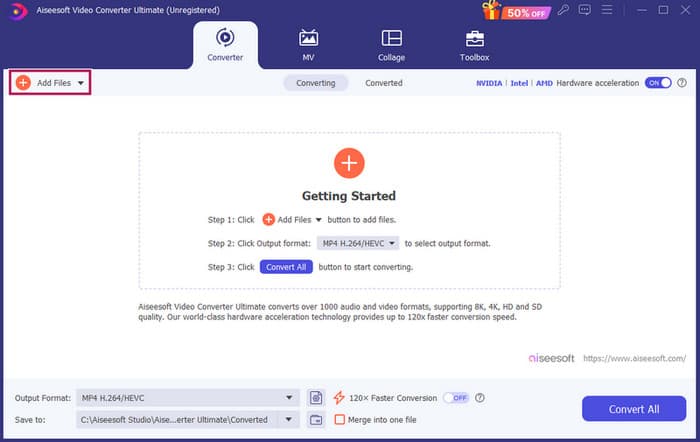
Korak 1. Nakon pokretanja softvera možete dodati MP3 datoteke klikom na gumb Add Files (Dodaj datoteke). Alternativno, možete povući datoteke s njihove lokacije i spustiti ih u softver za uređivanje.
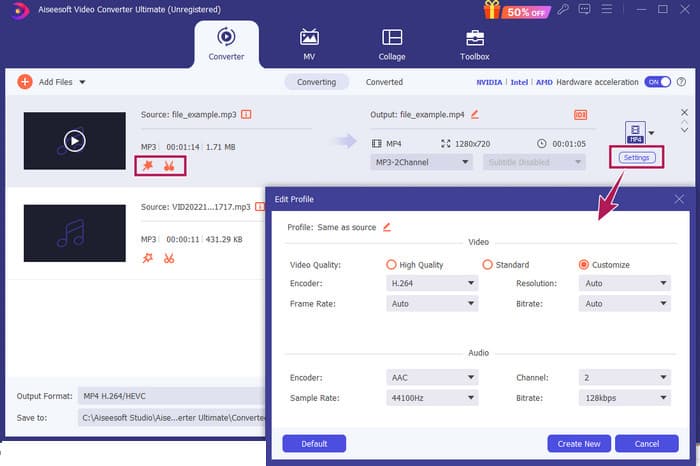
Korak 2. Kada se datoteke učitaju, do postavki glasnoće i kašnjenja možete doći klikom na gumb Zvijezda na minijaturi. Gumb Škare služi za pristup spajanju, razdjeljniku i rezaču. I naravno, gumb Postavke služi za pristup izmjenjivaču profila.
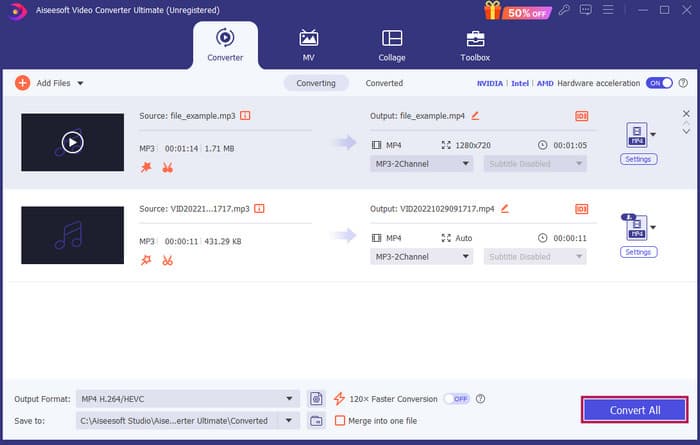
Korak 3. Nakon uređivanja datoteka, morat ćete kliknuti gumb Convert All (Pretvori sve). I tako se uređuje MP3 u sustavu Windows 10 pomoću FVC.
Zaključak: FVC Video Converter Ultimate može biti vaše osnovno rješenje ne samo za poboljšavanje ili mijenjanje MP3 datoteka nego i odličan alat za konverziju. Sviđa nam se koliko je uređivanje zvuka jednostavno i brzo. Iako je većina alata u sklopu alata namijenjena videodatotekama, ondje se ipak nalaze moćni uređivači zvuka. Stoga je to naš osobno odabrani alat za učinkovito i jednostavno uređivanje datoteka, koji je najbolji za početnike.
Dio 2. Uredite MP3 s Adobe Audition u sustavu Windows
Adobe Audition jedan je od najpoznatijih izbora za profesionalno uređivanje zvuka, koji koriste glazbenici, podcasteri i tonski inženjeri. Poznat je kao moćan, ali jednostavan program za korištenje. Nadalje, dolazi s mogućnostima kao što su snimanje i uređivanje više zvučnih zapisa odjednom, dodavanje posebnih efekata koje možete odmah čuti dok ih stvarate, pa čak i bibliotekom zvukova koje možete koristiti u svojim projektima. Možete ga shvatiti i kao dobro osmišljenu nadogradnju starijeg programa zvanog Cool Edit Pro. Osim toga, možete uređivati MP3 datoteke i prilagoditi izgled sučelja svojim željama, a omogućuje vam rad s do 40 odvojenih zvučnih zapisa istodobno. Tu su i alati za uređivanje na mikseti te čak alat za dodavanje glazbenih instrumenata u vaš projekt.
Ključne značajke:
• Uredite čitavu hrpu audio datoteka samo jednim klikom.
• Dodajte cool filtre i efekte kako bi vaš zvuk zvučao nevjerojatno.
• Kombinirajte različite audio zapise kako biste stvorili dotjeran zvuk.
• Popravite i poboljšajte svoje vokale moćnim alatima.
Kako uređivati audio datoteke pomoću Adobe Auditiona
Korak 1. Otvorite program i uvezite MP3 datoteke tako da odete na File-Open (Datoteka-Otvori).
Korak 2. Za uređivanje jedne staze možete koristiti Waveform Editor za detaljnu obradu pojedinačne trake. Za višekanalni zvuk upotrijebite Multitrack Editor.
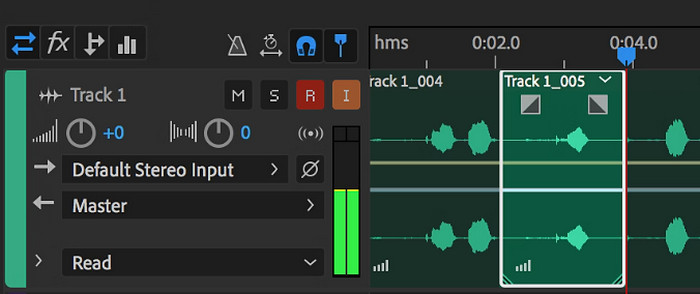
Korak 3. Kada završite s uređivanjem, možete istražiti druge alate programa, poput efekata. Dakle, kad napravite sve što je potrebno, možete prijeći na spremanje audio projekta. Tako se uređuje MP3 u sustavu Windows pomoću Adobe Auditiona.
Zaključak: Doista, Adobe Audition je izvanredan, ali klasičan uređivač zvuka. Nije ni čudo da ga mnogi urednici i dalje koriste. Međutim, za početnike koji ne žele komplicirano snalaženje po sučelju, Adobe Audition možda nije najbolja opcija.
Dio 3. Uredite MP3 s iTunes na Macu
iTunes je poput vašeg glazbenog upravitelja koji organizira sve vaše omiljene pjesme na vašem računalu. Zamislite ga kao digitalnu kutiju u kojoj možete jednostavno sortirati svoju glazbenu kolekciju prema izvođaču, albumu ili čak žanru. Također vam omogućuje ispravljanje informacija koje nedostaju, poput naslova pjesama ili imena izvođača, tako da uvijek možete pronaći ono što tražite. Pomoću ovog uređivača kosa crta za reprodukciju medija možete izraditi prilagođene zvučne zapise ili popise za reprodukciju za različita raspoloženja ili aktivnosti, poput miksa za vježbanje ili popisa za opuštanje uz koje se možete opustiti.
Najbolji dio? iTunes je super user-friendly. Čak i ako niste tehnički potkovani, možete jednostavno i brzo dodati pjesme u svoju biblioteku, uredno ih organizirati i reproducirati bez muke. Iako ne može raditi otmjeno uređivanje kao drugi programi, izvrstan je izbor za osnovne zadatke poput skraćivanja neželjene tišine s početka ili kraja vaših MP3 datoteka. Istražit ćemo kako urediti MP3 na Macu i Windowsu u nekoliko jednostavnih koraka!
Ključne značajke:
• Upravlja i stvara digitalnu biblioteku audio datoteka.
• Osim MP3, također podržava različite audio formate, uključujući WAV, AIFF, Apple Lossless i AAC.
• Omogućuje uređivanje podataka o MP3 datoteci kao što su izvođač, album, žanr i godina izdanja.
Kako uređivati audio datoteke pomoću iTunesa
Korak 1. Pokrenite program i učitajte MP3 datoteku. Pronađite odjeljak File (Datoteka) i odaberite opciju Add File to Library (Dodaj datoteku u biblioteku) ili sličnu opciju. Zatim s uređaja odaberite MP3 datoteku koju želite skratiti.
Korak 2. Sada ponovno idite na File (Datoteka) i odaberite Library (Biblioteka). Provjerite je li MP3 ondje naveden. Zatim desnim klikom miša odaberite Get Info (Informacije).
Korak 3. Sada možete postaviti točke skraćivanja. Da biste to učinili, otvorite prozor Get Info, potražite Options (Mogućnosti), a zatim pronađite Start i Stop (Početak i Kraj). Sada postavite početnu i završnu točku dijela koji želite zadržati. Kada završite, možete spremiti promjene klikom na gumb OK.
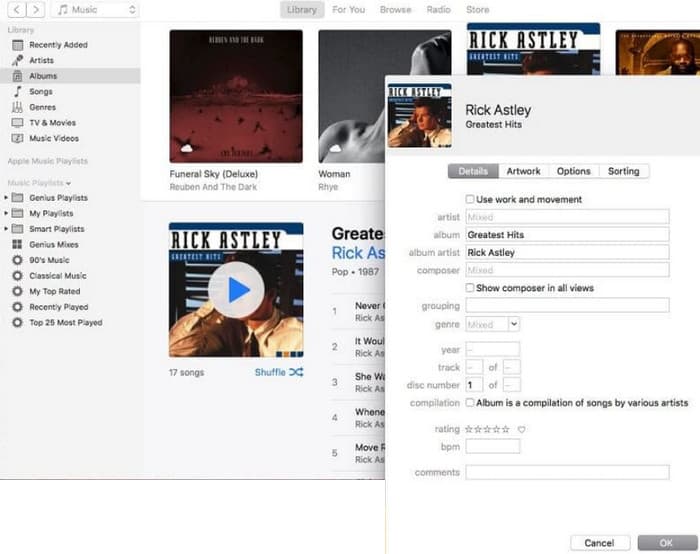
Zaključak: iTunes može pružiti osnovno uređivanje i poboljšanje MP3 datoteka prema potrebi. Međutim, budući da nije namjenski uređivač zvuka koji temeljito uređuje MP3, mogli biste se razočarati njegovim nedostatkom funkcija.
Dio 4. Uredite MP3 pomoću mrežnog MP3 uređivača
Clideo je perspektivan MP3 rezač i uređivač za one koji žele koristiti online uređivač zvuka za rezanje svojih MP3 datoteka. To je internetski alat koji radi na bilo kojem uređaju, pa ne trebate preuzimati nikakav softver. Clideo vam omogućuje rezanje određenih dijelova zvuka postavljanjem točnog početnog i završnog vremena ili jednostavnim povlačenjem oznaka na zaslonu.
Nadalje, podržava razne vrste datoteka, tako da možete uređivati gotovo svaku glazbenu datoteku koju imate. Povrh toga, Clideo vam omogućuje dodavanje efekata kao što su zatamnjenje i zatamnjenje za glatkiji prijelaz zvuka na početku i kraju vašeg isječka. Općenito, Clideo je jednostavan i svestran alat koji uređivanje vaših audio datoteka čini lakim.
Ključne značajke:
• Izrežite neželjene dijelove audio datoteka s lakoćom.
• Dodajte efekte zatamnjenja i zatamnjivanja.
• Podržava različite audio formate.
Kako uređivati audio datoteke pomoću Clidea
Korak 1. Kada otvorite službenu stranicu Clidea, idite na njegov audio cutter (alat za rezanje zvuka).
Korak 2. Za učitavanje MP3 datoteka kliknite gumb Choose File (Odaberi datoteku). Kada je uvoz datoteke uspješan, možete je početi uređivati.
Korak 3. Postavite označivač (dragger) na željenu veličinu, a zatim kliknite Export (Izvezi) da biste spremili promjene.
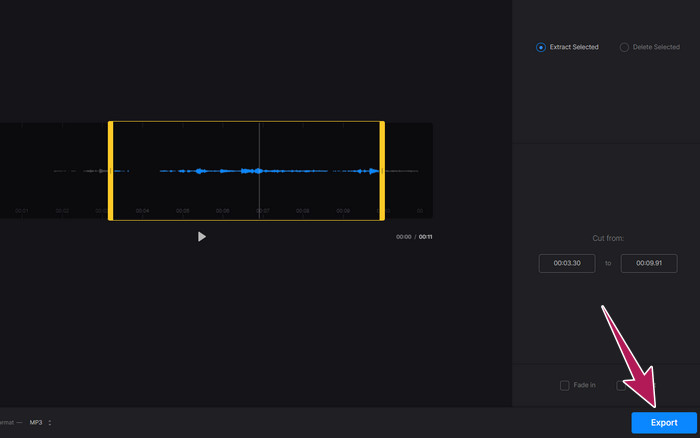
Zaključak: Clideo je online alat koji nudi nekoliko funkcija za uređivanje MP3 i drugih vrsta datoteka, uključujući videozapise. Ipak, imajte na umu da online alati poput Clidea mogu pružiti nesigurniju zaštitu jer su ranjiviji od izvanmrežnih alata.
Dio 5. Uredite MP3 pomoću mobilne aplikacije na iPhoneu/Androidu
Zadnji MP3 uređivač koji preporučujem je aplikacija koju možete nabaviti na Androidu i iOS-u. Zove se WavePad i ima mnogo značajki, pa na prvi pogled može izgledati komplicirano. Pomoću ove aplikacije možete rezati i skraćivati isječke, mijenjati visinu glasa i čak uklanjati pozadinsku buku. Nadalje, omogućuje uređivanje MP3 datoteka na iPhoneu i Androidu uz mnoštvo zvučnih efekata i glazbe koje možete besplatno dodati svojim snimkama. Ima ugrađeni ekvilizator, koji vam pomaže da vaš zvuk zvuči baš kako želite. Osim MP3 formata, WavePad radi i s većinom uobičajenih vrsta zvučnih datoteka.
Ključne značajke:
• Izrežite, kopirajte, zalijepite i dodajte efekte zvukovima.
• Podrška za različite audio formate poput MP3, WAV i AIFF.
• Ima različite postavke kvalitete zvuka.
Kako uređivati audio datoteke pomoću WavePada
Korak 1. Pokrenite aplikaciju, dodirnite tri crtice i odaberite File-Import from the Audio kartice. To će vam omogućiti učitavanje MP3 datoteke koju trebate urediti.
Korak 2. Do alata za uređivanje pristupate povlačenjem udesno po alatnim opcijama na gornjem dijelu zaslona.
Korak 3. Nakon što to učinite, možete dodirnuti gumb REC kako biste snimili dio koji želite zadržati iz datoteke. Zatim ga spremite i izvezite na svoj uređaj.
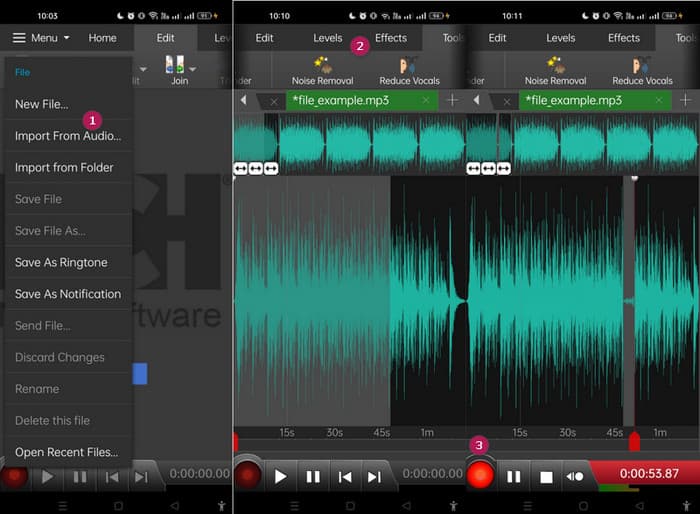
Zaključak: Besplatna verzija WavePada ima većinu značajki, ali postoji i plaćena opcija za $3 mjesečno koja uklanja oglase i otključava sve mogućnosti, poput svih zvučnih efekata i mogućnosti spremanja datoteka u različitim formatima. To će vam omogućiti naprednije uređivanje MP3 datoteka na Androidu ili iPhoneu.
Dio 6. Često postavljana pitanja o uređivanju MP3
Mogu li skratiti pjesmu u Apple Musicu?
Ne. Nažalost, ne možete izravno skraćivati pjesme unutar same Apple Music.
Ima li Microsoft uređivač zvuka?
Postoji mnogo dostupnih audio uređivača, kao što je Audacity za uređivanje MP3-a, koje možete preuzeti iz Microsoftove trgovine.
Kako mogu izrezati MP3 datoteku u Windows Media Playeru?
Nažalost, sam Windows Media Player nema ugrađene funkcije za uređivanje kako bi se skratile MP3 datoteke.
Zaključak
Sada barem znate najbolje načine za uređivanje MP3 datoteka kao nikada prije. Uz najbolje uređivače zvuka koje preporučujemo gore, zasigurno ćete postići željeni zvuk! Ovi alati pružaju cjelovita rješenja za različite platforme, osiguravajući fleksibilnost i praktičnost bez obzira na vaš uređaj ili operativni sustav. Bilo da preferirate desktop aplikaciju, online alat ili mobilnu aplikaciju, možete lako postići profesionalnu kvalitetu uređivanja. Od osnovnog skraćivanja i spajanja do naprednih efekata i poboljšanja, pravi uređivač može učinkovito transformirati vaše MP3 datoteke. Istražite mogućnosti i počnite svoje audiozapise dotjerivati do savršenstva već danas.
-
 10 najboljih FLV playera za Windows, Mac, iOS i Android u 2024
 FLV player pomaže vam da lako pristupite svojim FLV datotekama na Windows, Mac, Android, iOS uređajima. Pogledajte najbolje uređaje za reprodukciju datoteka FLV koje trenutno možete preuzeti.
-
 8 najboljih MOV igrača za reprodukciju QuickTime MOV datoteka s izvornom kvalitetom
 Samo saznajte više o 8 najboljih MOV uređaja koji su dostupni i za Windows i za Mac. Možete odabrati željenu i prikladnu za reprodukciju MOV datoteka s izvornom kvalitetom.
-
 Nabavite svoj najbolji MP4 uređaj za reprodukciju MP4 datoteka s visokom vizualnom kvalitetom
 Pročitajte i nabavite svoj najbolji MP4 uređaj iz preporuka 10 najnovijeg softvera MP4 video uređaja. Možete reproducirati MP4 video datoteke na sustavima Windows i Mac bez zastoja.
