


 Video Converter Ultimate
 Snimač zaslona
 Video popravak
Možete li napraviti melodiju zvona iz videa i kako je primijeniti
Postavljanje omiljenih melodija zvona oduvijek je bilo popularno među mnogim korisnicima pametnih telefona. Kad god čujete svoju omiljenu glazbu, povezivanje s telefonom postaje ugodnije. S razvojem tehnologije, izbor melodija zvona koje ljudi mogu odabrati znatno se proširio. Danas ne samo da možemo snimiti vlastiti zvuk i preuzeti omiljene pjesme, nego čak možemo izvući zvuk iz videozapisa i koristiti ga kao melodiju dolaznog poziva. Ovaj je postupak jednostavan, a postoji mnogo alata koji u tome mogu pomoći. Kako odabrati između njih? U nastavku ćemo vam pružiti detaljan vodič za pretvaranje videa u melodiju zvona. Bez obzira jeste li korisnik Androida ili Applea, pronaći ćete ono što vam je potrebno.

Dio 1. Možete li postaviti video kao melodiju zvona
Prije nego što počnemo, prvo razmotrimo izvedivost postavljanja videa kao melodije zvona. Odgovor je, naravno, da. Općenito govoreći, morate izdvojiti zvuk iz videa i pretvoriti ga u format zvona koji vaš telefon podržava da biste započeli. Bit ovog čina također možete smatrati pretvaranjem datoteke iz video formata u audio format. Profesionalni softver za uređivanje zvuka i videa i pretvarači formata mogu vam pomoći besplatno pretvoriti video u melodiju zvona. Važno je napomenuti da mobilni telefoni s različitim sustavima podržavaju različite formate zvona i morate provjeriti jeste li potražili informacije o audio formatima koje vaš uređaj podržava prije nego što započnete operaciju.
Dio 2. Napravite melodiju zvona iz videa
Nakon što smo saznali da možemo izraditi melodiju zvona iz videozapisa, trebamo odabrati pravi alat za taj zadatak. Toplo vam preporučujemo da isprobate FVC-ov odabrani Video Converter Ultimate. To je izvrstan pretvarač zvuka i videa koji vam omogućuje da zasebno uređujete zvuk u videu te prilagodite glasnoću glazbe, zvučne efekte, audio zapis itd. Možete mu također prepustiti ispravljanje zvuka ako postoji kašnjenje. Trenutačno podržava više od stotinu formata, što znači da može pretvoriti vaš video u format prikladan za bilo koji pametni telefon i nećete imati problema s kompatibilnošću. Zahvaljujući tehnologiji hardverskog ubrzanja, sposoban je pretvarati bilo koju datoteku do 30 puta brže. Tijekom obrade neće doći do gubitka kvalitete zvuka vaših datoteka, a vaša privatnost neće biti ugrožena.
Besplatno preuzimanjeZa Windows 7 ili novijiSigurno preuzimanje
Besplatno preuzimanjeZa MacOS 10.7 ili novijiSigurno preuzimanje
Nakon što smo dobili opću ideju o FVC Video Converter Ultimate, moramo razumjeti kako ga zapravo primijeniti na pretvaranje videa u melodiju zvona. Zatim ćemo za vas raščlaniti detaljne korake iz perspektive iPhone i Android telefona.
Napravite video kao melodiju zvona za iPhone
Najprije ćemo objasniti kako izraditi melodiju zvona za iPhone. Prvo što trebamo znati jest da iPhone trenutačno podržava melodije zvona u M4R formatu. Zatim možemo započeti s postupkom.
Korak 1. Preuzmite video koji želite pretvoriti na svoje računalo. Također morate instalirati FVC Video Converter Ultimate na uređaj.
Korak 2. Pretvorite video u M4R format. Da biste to učinili, najprije kliknite Add Files kako biste učitali svoj video.
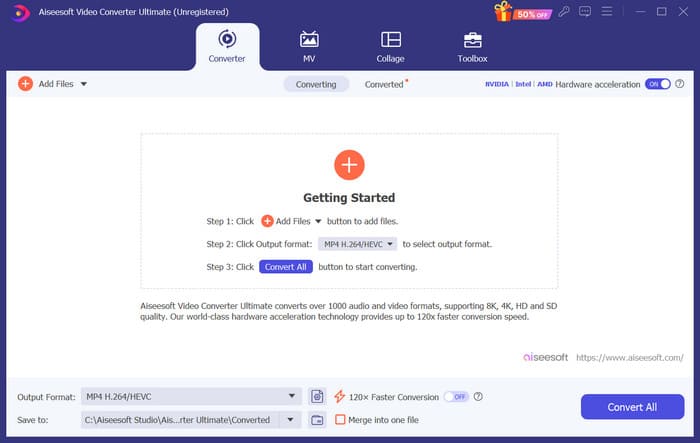
Korak 3. Proširite izbornik pokraj Output Format. Ovdje možete pronaći format koji vam je potreban.
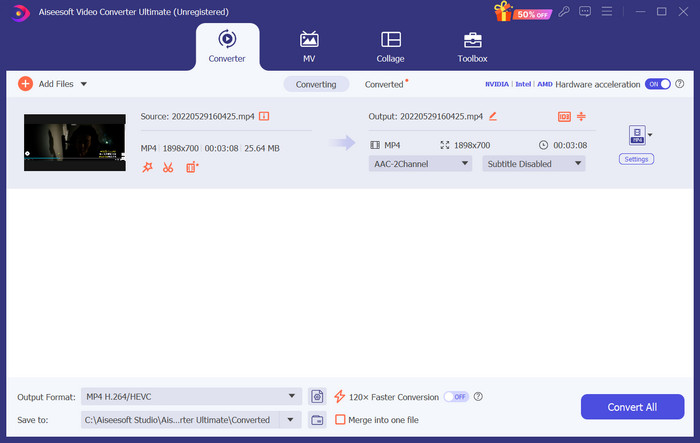
Korak 4. Kliknite Audio i među svim opcijama odaberite M4R.
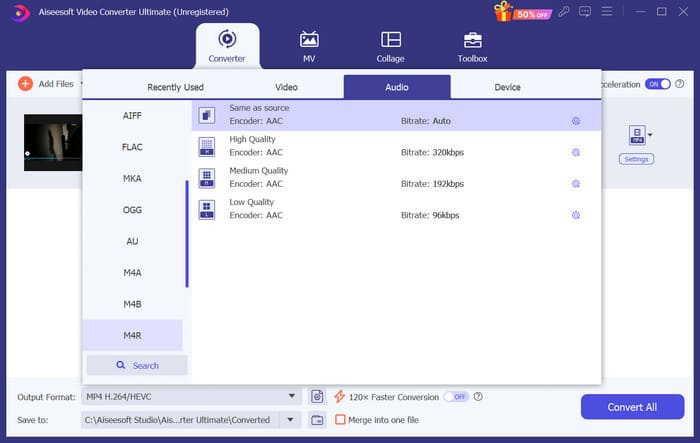
Korak 5. Zatim kliknite Convert All da biste izvezli M4R zvuk.
Korak 6. Zatim ponovno učitajte pretvoreni video u program. Ako želite skratiti audio datoteku, kliknite Cut u sučelju. Ako želite prilagoditi audio zapis ili glasnoću, kliknite Edit.
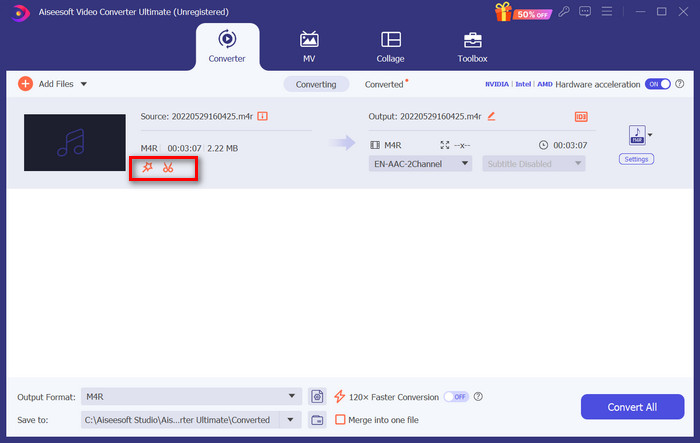
Korak 7. Na kraju ponovno kliknite Convert All kako biste dobili svoju uređenu M4R melodiju zvona.
Napravite video kao melodiju zvona za Android
Ako želite pretvoriti video u melodiju zvona Android mobitela, razmislite o pretvaranju video datoteka u MP3, M4A, WAV ili OGG.
Evo što trebate učiniti kako biste video pretvorili u melodiju zvona.
Korak 1. Preuzmite i instalirajte FVC Converter Ultimate na svoje računalo. Pripremite svoj video za pretvorbu.
Korak 2. Kliknite Add Files kako biste učitali ciljani video na platformu.
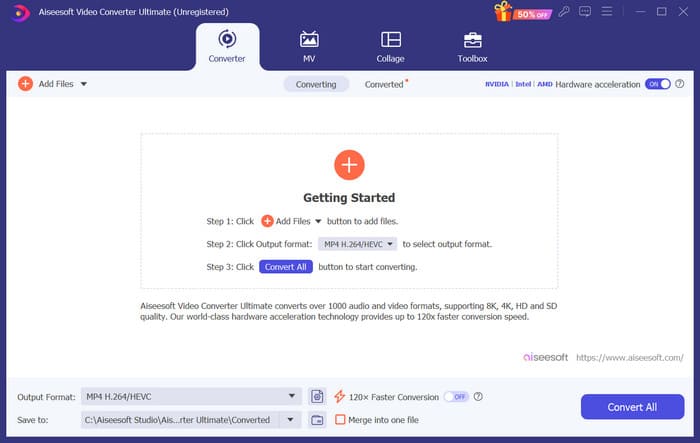
Korak 3. Otvorite padajući popis formata pokraj Output Format.
Korak 4. Kliknite Audio. Ovisno o vašim potrebama, svoj video možete pretvoriti u MP3, M4A, WAV ili OGG.
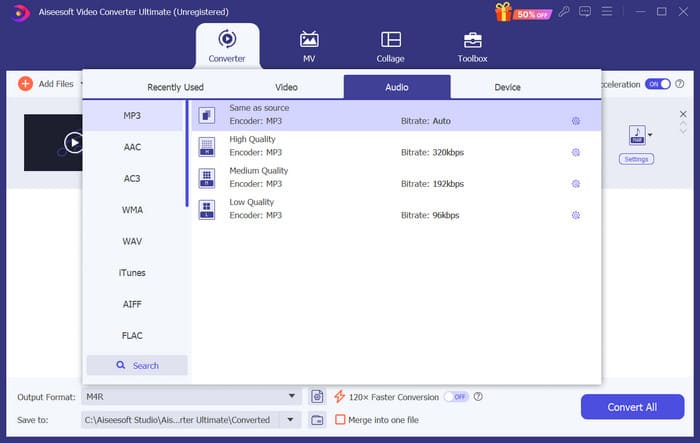
Korak 5. Odaberite Convert All kako biste najprije preuzeli pretvoreni zvuk.
Korak 6. Ponovno dodajte svoju audio datoteku u softver. Zatim kliknite Cut kako biste odabrali dio koji želite koristiti kao melodiju zvona. Funkcije pod Edit također vam mogu pomoći da izmijenite neke elemente svoje datoteke.
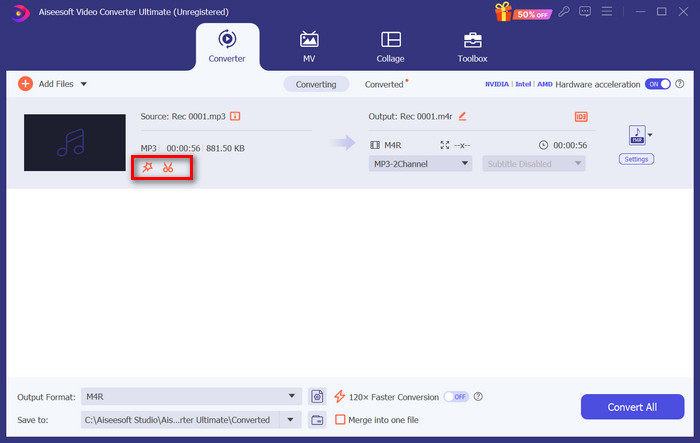
Korak 7. Nakon dovršetka uređivanja kliknite Convert All.
Dio 3. Postavite konvertirani zvuk kao melodiju zvona
Sada kada smo uredili audio datoteku, moramo ići dalje u postavke telefona kako bismo ovaj konvertirani video postavili kao melodiju zvona.
Postavite melodiju zvona na iPhone
Ako koristite iPhone, možda će vam trebati neki alati da postavite odabrani M4R zvuk kao melodiju zvona. GarageBand je dobar izbor.
Ovdje ćemo vas naučiti kako napraviti melodiju zvona s GarageBandom koristeći zvuk iz videa.
Korak 1. Provjerite imate li uređenu audio datoteku na svom iPhoneu. Zatim otvorite GarageBand.
Korak 2. Nakon pokretanja GarageBanda idite na Loop i odaberite Files. Zatim dodirnite Browse items from the Files app kako biste pronašli zvuk koji želite koristiti.
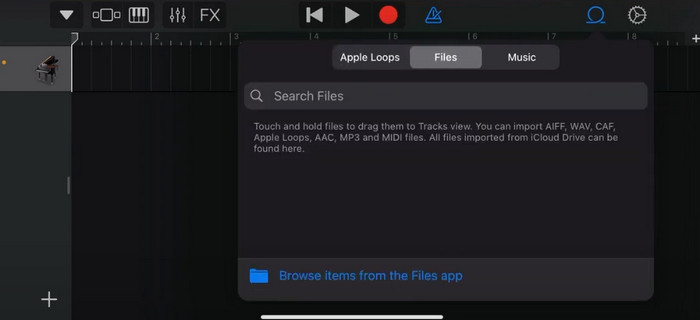
Korak 3. Postavite odabranu M4R audio datoteku na vremensku traku u GarageBandu.
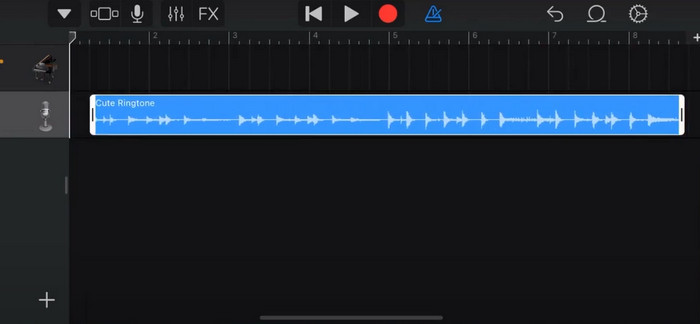
Korak 4. Dodirnite Metronome kako biste ga isključili. Dodirnite ikonu strelice prema dolje > My Songs.
Korak 5. Dulje pritisnite zvučni isječak i odaberite Share.
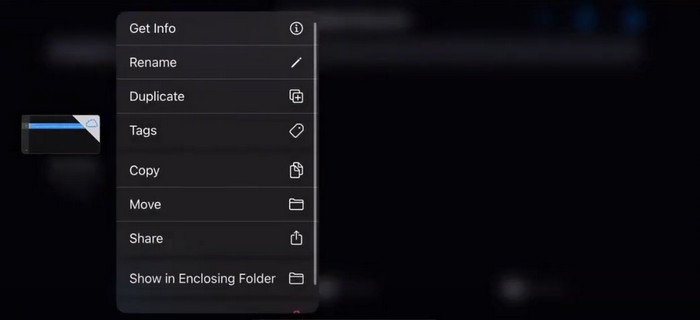
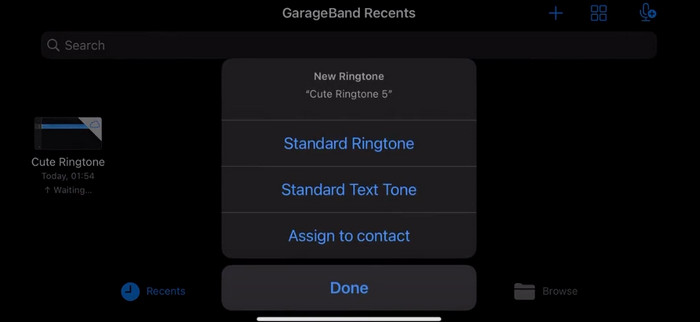
Korak 6. Odaberite Ringtone > Export. Kada se pojavi prozor Use sound as, dodirnite Standard Ringtone.
Postavite melodiju zvona na Android
Ako želite da vaš zvuk bude izdvojen iz videozapisa kao melodija zvona na vašem Android uređaju, učinite to izravno u aplikaciji Postavke. Točni koraci su nešto lakši.
Uzet ćemo Samsung telefon kao primjer i reći vam kako ga detaljno primijeniti.
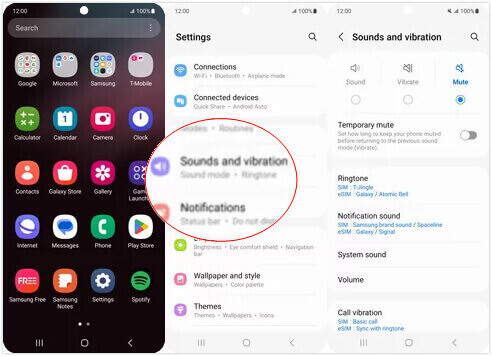
Korak 1. Na svom Android uređaju otvorite Settings i dodirnite Sounds and vibration.
Korak 2. Odaberite Sound u odjeljku Sound mode. Zatim dodirnite Notification sound.
Korak 3. Odaberite audio datoteku koju ste pretvorili i uredili. Postavka će biti primijenjena kada se vratite na prijašnju stranicu.
Dio 4. Česta pitanja o izradi videa kao melodije zvona
Kako mogu dodati melodije zvona na svoj Android telefon?
Na svom Android telefonu idite na Postavke i potražite opciju Zvuk ili Zvukovi i vibracija. Odaberite melodiju zvona telefona ili melodiju zvona za odabir prilagođene melodije zvona. Vaša prilagođena melodija zvona sada bi se trebala pojaviti na popisu dostupnih melodija zvona. Odaberite ga da biste ga postavili kao melodiju zvona.
Mogu li preuzeti iPhone zvono za Android?
Da, možete preuzeti iPhone melodije zvona i koristiti ih na Android uređaju. Međutim, iPhone melodije zvona obično su u M4R formatu, koji nije izravno kompatibilan s Android sustavom. Morat ćete pretvoriti iPhone melodiju zvona u format koji Android podržava, kao što je MP3 ili AAC. Na primjer, pretvarač koji je odabrao FVC može vam pomoći da pretvorite M4R u MP3.
Zašto moj telefon ne zvoni na dolazne pozive?
Ako vaš telefon ne zvoni na dolazne pozive, može postojati nekoliko razloga za ovaj problem. Provjerite je li zvuk na vašem telefonu pojačan i nije isključen. Također provjerite je li vaš telefon u načinu rada Ne uznemiravaj. Ovaj način rada utišava sve pozive i obavijesti. Ako problem i dalje nije riješen, pokušajte ponovno pokrenuti telefon da biste osvježili sustav.
Zaključak
Ovo je potpuni vodič za pretvaranje videa u vašu melodiju zvona. Preporučujemo vam jedan od najboljih alata, FVC Video Converter Ultimate, koji će vam pomoći da prilagodite svoje video datoteke tako da izgledaju upravo onako kako želite. Ovaj je alat dostupan i za iPhone i za Android telefone, tako da, bez obzira na to koji sustav vaš uređaj koristi, uz njegovu pomoć možete izraditi svoju omiljenu melodiju.
-
 Top 3 rješenja za komprimiranje WAV datoteka u manju veličinu
 Ako također tražite načine komprimiranja veličine WAV audio datoteka, pročitajte naš sadržaj. Upoznat ćemo vas s različitim alatima s tri aspekta.
-
 Detaljni vodič za kompresiju zvuka u 2024. (korak po korak)
 Trebate li komprimirati zvuk, ali vam je potrebna pomoć da shvatite odakle početi? U ovom ćemo postu predstaviti najbolje izbore za smanjenje veličine datoteke vaših zapisa.
-
 Učinkoviti audio kompresori za offline i online korisnike
 Imate problema s velikim audio datotekama? Dostupni su mnogi kompresori audio datoteka za offline i online korisnike. Provjerite ih ovdje.
