


 Video Converter Ultimate
 Snimač zaslona
 Video popravak
Kako pretvoriti M2TS u kompatibilne formate iPad na Windowsima / Mac / Online
Možete li reproducirati M2TS izravno na iPadu? Nažalost, odgovor je ne. M2TS nije kompatibilan s iPadom. Ako želite reproducirati M2TS na iPadu, morate instalirati aplikaciju za M2TS reprodukciju na iPad ili možete pretvoriti M2TS u format za iPad. Očito, ovaj članak bira drugo rješenje. Samo čitajte dalje i saznajte kako promijeniti video format na iPadu iz M2TS-a.

1. dio: Kako pretvoriti M2TS u iPad na sustavima Windows i Mac
Koje formate podržava iPad? Zapravo, iPad prihvaća uobičajene video formate H.264, MP4, M4V, MOV, MPEG-4 i M-JPEG. Da biste M2TS postavili na iPad, prvo morate pretvoriti M2TS u iPad format video zapisa.
Kako besplatno pretvoriti M2TS u iPad na sustavu Windows
FVC Free M2TS Converter je potpuno besplatan batch konverter M2TS u iPad. Možete serijski pretvarati M2TS datoteke u iPad brzinom i do 50x većom od uobičajenih M2TS konvertera. Stoga nije važno ako trebate masovno pretvoriti velike M2TS video datoteke za iPad. Besplatni M2TS u iPad konverter to može savršeno odraditi.
Štoviše, možete spojiti M2TS datoteke i dodati teme prije pretvorbe M2TS u iPad. Prozor za pregled u stvarnom vremenu može vam odmah prikazati video efekte. Ukratko, možete uređivati i pretvarati AVCHD M2TS u iPad na Windowsu besplatno, na jednom mjestu.

Besplatni M2TS Converter
113.456+ preuzimanja- Pretvori M2TS u iPad H.264, MP4, MOV, MPEG-4 i drugi kompatibilni formati.
- 50 puta veća brzina s podrškom za pretvorbu serije.
- Održavajte visoku razinu kvalitete tijekom pretvaranja u iPad sa svih HD kamkordera.
- Pretvarač M2TS u iPad radi s računalom sa sustavom Windows 10/8/7.
Besplatno preuzimanjeZa Windows 7 ili novijiSigurno preuzimanje
Besplatno preuzimanjeZa MacOS 10.7 ili novijiSigurno preuzimanje
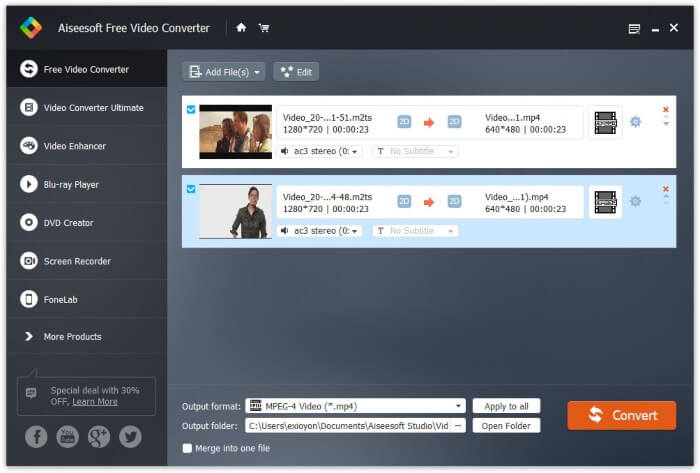
Korak 1: Besplatno preuzmite, instalirajte i pokrenite FVC Free M2TS Converter. Povucite i ispustite M2TS datoteke u glavno sučelje.

Korak 2: Proširite popis Output format pri dnu. Da biste pretvorili M2TS u iPad na Windowsu, možete izravno postaviti izlazni format iz kategorije Apple iPad.

Korak 3: Kliknite ikonu zupčanika Settings za prilagodbu video koderā, brzine sličica i još mnogo toga. Na kraju kliknite Convert kako biste pretvorili video iz M2TS u format za iPad.
Kako besplatno pretvoriti M2TS u iPad na Macu
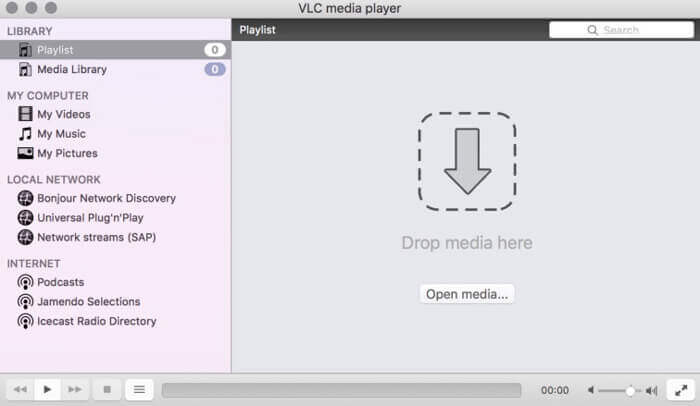
Ako želite besplatno pretvoriti M2TS video u iPad na Macu, VLC Media Player može biti vaš dobar izbor. Riječ je o besplatnom i otvorenom izvoru M2TS playera i pretvarača za više platforme.
Korak 1: Otvorite VLC Media Player na Macu. Odaberite Convert/Save iz padajućeg izbornika Media.
Korak 2: Kliknite Add za uvoz M2TS datoteke. Zatim odaberite datoteku i kliknite Open ispod kako biste nastavili postupak.
Korak 3: Kliknite Convert/Save na dnu kako biste prešli na sljedeći prozor.
Korak 4: Odaberite iPad format iz padajućeg popisa Profile. Možete kliknuti ikonu Tools pokraj za prilagodbu video postavki.
Korak 5: Kliknite Start za početak pretvaranja M2TS datoteke u iPad na Macu putem VLC-a.
Dio 2: Kako pretvoriti M2TS u iPad Online
Za mobilne korisnike također je ugodan odabir mrežnog pretvarača M2TS u iPad. M2TS datoteku možete besplatno pretvoriti u iPad bez potrebe za preuzimanjem, instalacijom ili registracijom.
Korak 1: Otvorite mrežni M2TS u iPad konverter, kao što je FVC Free Online Video Converter.

Korak 2: Preuzmite FVC launcher klikom na Add Files to Convert i instalirajte ga.

Korak 3: Pronađite M2TS datoteku na svom računalu za pretvorbu. I ne zaboravite odabrati format.

Korak 4: Kliknite Start Converting kako biste besplatno pretvorili M2TS u iPad online.
Dio 3: Česta pitanja o pretvaranju M2TS u iPad
Što se događa da odjednom nema zvuka u M2TS datotekama u iMovieu?
Apple uređaji izvorno ne podržavaju M2TS. Da biste riješili problem, morate pretvoriti M2TS u Mac format.
Kako mogu otvoriti M2TS datoteke na iPhoneu i iPadu?
AVCHD M2TS nije kompatibilan sa iOS uređajima. Ako inzistirate na reprodukciji M2TS videozapisa na iPadu, možete koristiti aplikaciju VLC Media Player za reprodukciju videozapisa.
Bilo koja dobra aplikacija za reprodukciju video zapisa za iPad?
Zaslon za prikaz na iPadu možete dobiti veći od iPhonea. Tako će i iskustvo gledanja videozapisa biti bolje. Preporučeni video playeri uključuju PlayerXtreme Media Player, KMPlayer, VLC, AirPlayer i još mnogo toga. Možete odabrati bilo kojeg za fleksibilno upravljanje video nadzorom.
To je sve za pretvaranje M2TS u iPad pomoću online i offline alata. Ti su M2TS video konverteri besplatni i sigurni za korištenje. Bez obzira koliko M2TS datoteka želite pretvoriti u formate kompatibilne s iPadom, ovdje možete dobiti najveću brzinu.
-
 Kako pretvoriti M2TS u MP4 bez smanjenja kvalitete
 Želite li pretvoriti videozapis s HD kamkordera u uobičajeni MP4? Evo 4 jednostavna i besplatna načina za promjenu datoteke M2TS u MP4 na sustavima Windows i Mac.
-
 Kako pretvoriti M2TS u MKV bez gubitka kvalitete
 Želite li pretvoriti M2TS u MKV uz zadržavanje izvorne kvalitete? Ovaj vam post prikazuje besplatne i mrežne metode za promjenu M2TS u MKV bez gubitaka.
-
 Koja je razlika između MTS-a i M2TS-a
 Što je MTS ili M2TS datoteka? Koja je razlika između M2TS i MTS? Kako mogu gledati kamkorder snimljenu MTS ili M2TS datoteku? Sve odgovore pronađite u ovom postu.
