


 Video Converter Ultimate
 Snimač zaslona
 Video popravak
Saznajte koja su najbolja 3 pretvarača FLV u MKV za pretvaranje vaših FLV datoteka u MKV
Jeste li umorni od surfanja internetom tražeći najbolji način kako besplatno pretvoriti FLV u MKV? Možda je slučajnost, ali danas smo pronašli najbolje FLV pretvarače koje možete koristiti; naravno, odabrali smo samo najbolje. Kako bi vam istraživanje bilo mnogo lakše, nastavite čitati članak u nastavku, jer ćete puno naučiti o FLV‑u, MKV‑u i pretvaračima koje možete koristiti.

Dio 1. 2 načina za besplatno pretvaranje FLV u MKV
1. način. Koristite Online Converter za pretvaranje FLV u MKV
Ovaj mrežni pretvarač zasigurno je jedan od velikih transkodera za pretvaranje FLV u MKV online. FVC Free Video Converter Online jednostavan je i lako razumljiv pretvarač koji možete koristiti na internetu. No ovaj je alat ovisan o internetu, što znači da, ako nemate internetsku vezu, ne možete na njega računati za pretvaranje. Iako je alat web‑baziran, na sučelju nema oglasa koji bi vas mogli živcirati, a ujedno je i bez zlonamjernog softvera. Ako sada želite praktično isprobati ovaj alat, slijedite korake u nastavku.
Korak 1. Kliknite ovu poveznicu da biste otvorili FVC Free Video Converter Online u novoj kartici.
Korak 2. Kliknite gumb Add Files to Convert da biste otvorili mapu na računalu koje koristite. Odaberite FLV datoteku koju želite pretvoriti i pritisnite Open kako biste je učitali.
Preuzmite desktop verziju za skupno pretvaranje datoteka.
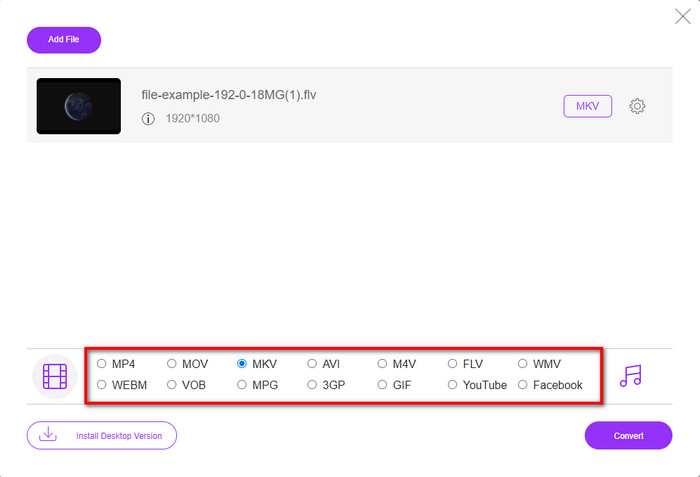
Korak 3. Odaberite format MKV s popisa formata prikazanog ispod.
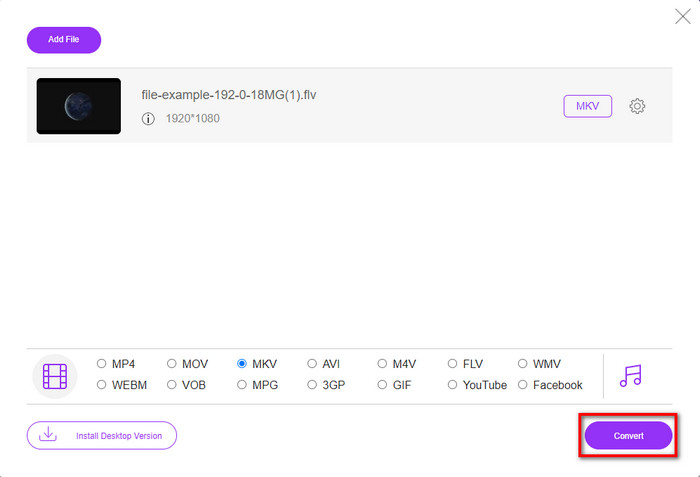
Korak 4. Pokrenite postupak pretvaranja klikom na gumb Convert, a pretvorena datoteka zatim će se automatski spremiti na vaš tvrdi disk.
2. način. Koristite besplatni konverter koji je dostupan za preuzimanje na Windows i Mac
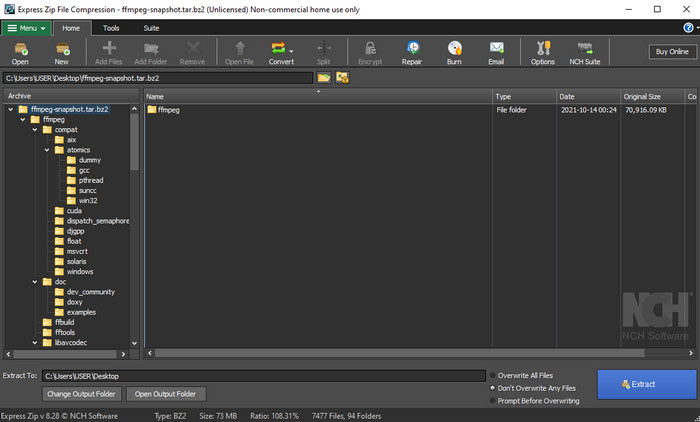
FFmpeg nije klasični pretvarač koji već koristite. Iako nije uobičajeni pretvarač, i dalje može pretvoriti vašu FLV datoteku. Ono što ovaj alat čini drukčijim jest to što koristi CLI sučelje (naredbeni redak), što znači da prije pretvaranja morate zadati naredbu enkodiranjem, odnosno jednostavno rečeno – upisivanjem. Ako vam se ovaj pretvarač čini zanimljivim, pročitajte pojedinosti u nastavku i slijedite korake kako biste koristili ovaj FFmpeg za pretvaranje FLV u MKV.
Korak 1. Preuzmite i otvorite FFmpeg.exe.
Korak 2. Otvorite naredbeni redak (Command Prompt) na svom računalu.
Korak 3. Pronađite FLV datoteku pomoću CMD-a. Zatim kopirajte ovaj kôd i zalijepite ga u naredbeni redak: ffmpeg -i input.flv -vn -ar 44100 -ac 2 -b:a 192k output.mkv, nakon toga pritisnite Enter na tipkovnici da bi se postupak pokrenuo.
Dio 2. Pretvorite FLV u MKV uz najbolji FLV u MKV pretvarač bez gubitaka
3. način. Koristite profesionalni pretvarač za pretvaranje FLV u WMV
Još uvijek niste zadovoljni prva dva pretvarača opisana gore? Ako je tako, svakako isprobajte FVC Video Converter Ultimate. Zašto? Zato što pruža profesionalan izlaz čak i ako ne uložite puno truda u samo pretvaranje. Također podržava više formata pa možete pretvoriti FLV u MKV, AVI, MOV, AVI, MP4 i više od 200 drugih formata. Još uvijek niste impresionirani? Možda želite dodati malo „magije” svom videu? U tom slučaju imate sreće jer ovaj pretvarač nudi napredne mogućnosti uređivanja videa koje možete koristiti. Sumnjate da bi vam alat mogao biti prekompliciran? Ako je tako, slijedite korake u nastavku kako biste isprobali i naučili koristiti ovaj pretvarač iz FLV u MKV.
Korak 1. Prije korištenja ovog pretvarača morate ga preuzeti klikom na gumb za preuzimanje u nastavku. Nakon preuzimanja slijedite upute za instalaciju i pokrenite ga.
Besplatno preuzimanjeZa Windows 7 ili novijiSigurno preuzimanje
Besplatno preuzimanjeZa MacOS 10.7 ili novijiSigurno preuzimanje
Korak 2. Kako biste dodali FLV datoteku koju želite pretvoriti, pritisnite gumb +. Pronađite FLV datoteku u mapi koja će se prikazati na sučelju i pritisnite Open kako biste prešli na sljedeći korak.
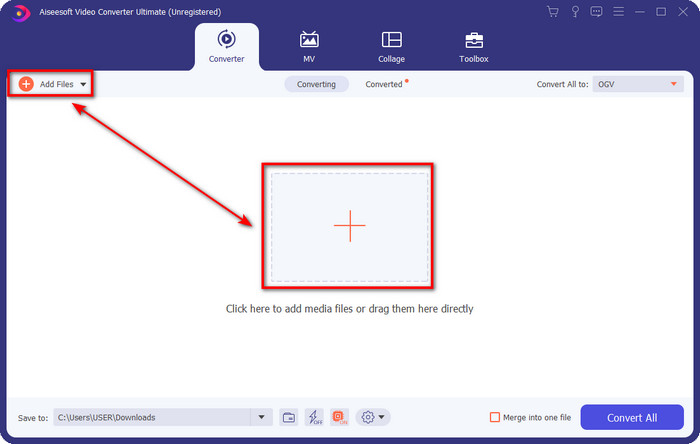
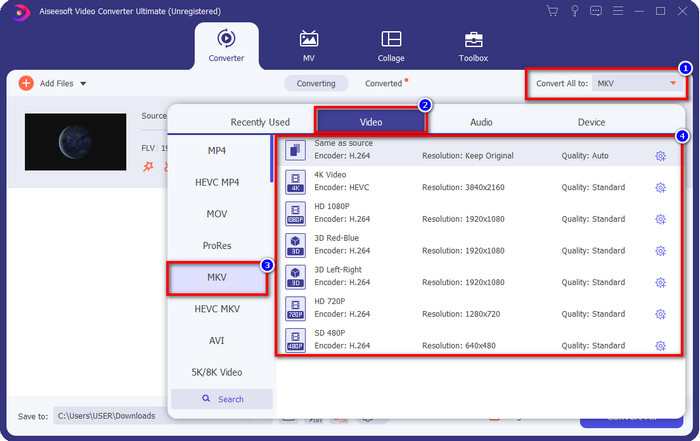
Korak 3. Nakon toga promijenite format u MKV klikom na gumb drop-down u gornjem desnom kutu korisničkog sučelja.
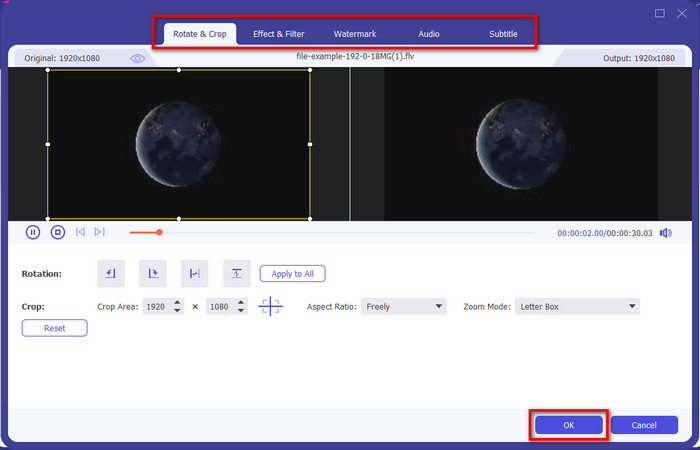
Neobavezno. Ako trebate urediti video, možete kliknuti gumb wand. Pojavit će se novo sučelje u kojem možete Rotate (okrenuti), Crop (obrezati), dodati Effects (efekte), Filter (filtere), Watermark (vodenih žigova), urediti Audio i Subtitle (titlove). Ne ograničavajte svoju maštu, učinite što god želite, a da biste primijenili svu „magiju” koju ste napravili, kliknite OK.
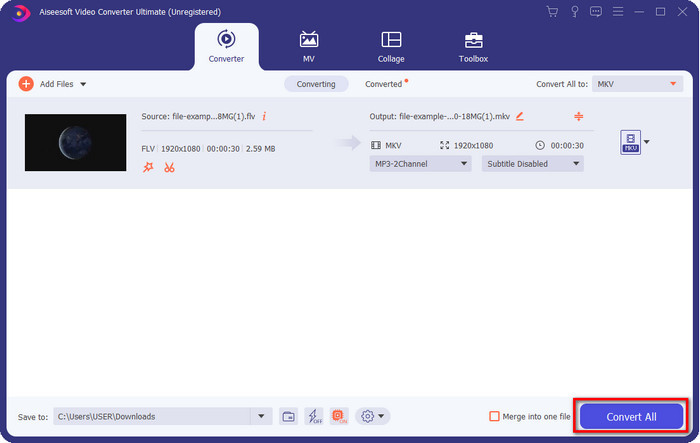
Korak 4. Na kraju kliknite Convert All kako biste pretvorili FLV u MKV format. Postupak će trajati manje od minute, tako da ne morate dugo čekati. Na ekranu će se pojaviti mapa s pretvorenim FLV‑om.
Povezano:
Dio 3. Koja je razlika između FLV-a i MKV-a
FLV i MKV su poznati po tome što su među najboljim kontejnerima koje svi znaju. No prije svega, usporedimo i pogledajmo detaljnije informacije o ta dva formata.
FLV je poznat na svim web stranicama jer je popularan na web stranicama, uglavnom zato što ga je kreirao Adobe. Štoviše, .flv reproducira video streamove na mreži jer ih je puno lakše učitati od drugog formata. Također, ovom formatu je potreban plug-in-play prije nego što možete pogledati ili gledati videozapis u ovom formatu ili možete jednostavno preuzeti Flash Player. Iako je format odličan, plug-in-plays koje koristi već su uzeli maha, što znači da format nije najbolji izbor. Međutim, mnogi media playeri i dalje podržavaju ovaj format i korisnike koji ga još uvijek koriste.
MKV je poznat po tome što je format koji najviše odgovara budućnosti. Ovaj format ne bi bio kao bilo koji drugi format u punom smislu kad bismo ga uspoređivali. Na primjer, struktura izgrađena u ovom formatu nije ista kao MP4 ili AVI, ali je drugačija. Dizajn i jedinstveno pohranjivanje medijskih datoteka čine ga dojmljivijim. Danas je teško odabrati koji je format zastario, a jedan je MKV.
Ako zadubimo više u detalje, pronaći ćemo mnogo razloga zašto trebate pretvoriti FLV u MKV. Iako ova dva formata sadrže medijski sadržaj, MKV je moćniji od FLV-a. Dakle, ako želite imati jedinstvenu snagu MKV-a, morate pretvoriti svoju datoteku u ovaj format.
FLV u odnosu na MKV
Adobe Flash Player koristio je FLV za isporuku video sadržaja poput filmova i TV emisija. Danas Adobe više ne razvija player i preporučuje korisnicima da ga deinstaliraju iz sigurnosnih razloga. Međutim, još uvijek možete koristiti FLV format na mnogim programima koji nisu Adobe/Macromedia.
Format multimedijskog spremnika Matroska, objavljen 2002., je format otvorenog koda koji može uključivati brojne video, audio, slike i titlove. Dakle, možete ga koristiti za jednostavno pohranjivanje kratkih videoisječaka, TV emisija i filmova. Prilično je popularan za obožavatelje animea.
Dio 4. Često postavljana pitanja o pretvorbi FLV u MKV
Je li sigurno pretvoriti FLV u MKV na mreži?
Pa, format pretvaranja trebao bi biti siguran ako koristite web alat. Međutim, nisu svi mrežni pretvarači sigurni za pretvaranje formata datoteke. Budući da postoje neke tendencije, bit će mnogo neočekivanih pogrešaka kada koristite pogrešan pretvarač. Na primjer, gubitak kvalitete je raširen problem, virusi nakon preuzimanja datoteke nakon pretvorbe, više skočnih oglasa, zarazni zlonamjerni softver i još mnogo toga. Dakle, ako želite imati siguran proces pretvaranja na mreži, umjesto toga morate koristiti FVC Free Video Converter Online.
Hoće li pretvorba FLV-a potrajati?
Proces pretvaranja ovisit će o mnogim čimbenicima, a jedan od njih je alat koji koristite i veličina datoteke. Ako imate veliku FLV datoteku, morate koristiti FVC Video Converter Ultimate, osobito u žurbi. Budući da ovaj alat pruža proces brzinom munje, za korištenje vam neće trebati internetska veza. A sada, ako tražite pretvarač koji može brže obraditi vaš format, onda je krajnji alat izbor.
Zašto ne mogu otvoriti svoju FLV datoteku?
Postoji nekoliko razloga zašto ne možete otvoriti svoje FLV datoteke. Uzeti na znanje; ovaj sljedeći detalj jedan je od stotih razloga zašto ne možete otvoriti FLV datoteku. Prije svega, ne možete otvoriti FLV ako je datoteka puknuta ili ako u njoj postoji virus. Drugo, najčešći problem je da video datoteka nije podržana u aplikaciji koju koristite. Treće, ako preuzmete FLV datoteku s interneta, doći će do slučaja da datoteka izgubi neke važne informacije za reprodukciju. Iako je to problem, još uvijek to možemo pomoći pretvaranjem vašeg FLV-a u drugi format. Ali zapamtite, ne možete vratiti FLV promjenom formata ako je oštećen ili nepotpun.
Zaključak
Naučili smo sve što trebamo da bismo na više načina pretvorili FLV u MKV. Alati iznad izvrsni su za korištenje kad pretvaramo format u novu verziju. Sada je na vama da odaberete koji vam format, odnosno alat, najviše odgovara za pretvaranje. Bilo koji od ta tri alata donijet će vam uspjeh, ali ako želite profesionalan rezultat i izvući maksimum iz svoje video datoteke, trebali biste odabrati FVC Video Converter Ultimate. Objašnjenje nije potrebno, jer će ovaj alat popuniti sve praznine u vašim potrebama.
-
 3 rješenja o tome kako pretvoriti FLV u PSP bez gubitaka
 Kako pretvoriti FLV u PSP? Ovdje ćete dobiti vodič za pretvaranje Flash videozapisa u PSP podržane formate (WMV, MP4, AVI, FLV, itd.) Na Windowsima i Mac računalima.
-
 2 metode za pretvaranje FLV u WMA audio [besplatno i na mreži]
 Želite li izvući WMA zvuk iz FLV videozapisa? Evo 2 besplatna WMA izvlakača zvuka za pretvaranje FLV (Flash Video) u WMA (Windows Media Audio) brzom brzinom pretvorbe na Mac OS X i Windows 10/8/7.
-
 [Riješeno] Kako besplatno pretvoriti FLV videozapise u animirane GIF datoteke
 Ako želite stvoriti GIF-ove iz FLV video segmenata radi boljeg slanja, iz ovog članka možete saznati više o tome kako lako pretvoriti FLV videozapise u GIF datoteke.

