


 Video Converter Ultimate
 Snimač zaslona
 Video popravak
3 besplatna načina za pretvaranje FLV u WAV
Želite izvući zvuk iz preuzetih videozapisa, ali ne znate kako? Tražite jednostavan način za pretvaranje FLV u WAV ili MP3?
U nekim vam je slučajevima potreban samo zvučni zapis ili pozadinska glazba jednog videozapisa. Dakle, morate pretvoriti video u audio. Ovaj će post uglavnom govoriti o tome kako pretvoriti FLV u WAV.

Ovdje su vam preporučena 3 izvrsna konvertera iz FLV u WAV za pretvaranje FLV datoteka. Možete odabrati metodu koja vam najviše odgovara kako biste FLV pretvorili u WAV audio.
Dio 1. Pretvori FLV u WAV Online
Kada na internetu tražite način za pretvaranje FLV u WAV, vidjet ćete da su mnogi rezultati pretraživanja besplatni internetski konverteri. Ako ne znate koji biste trebali koristiti, ovdje vam iskreno predstavljamo popularni Free Online Video Converter. Posebno je dizajniran za pretvaranje FLV u bilo koji često korišteni video i audio format poput MP4, MOV, AVI, MP3, AAC, M4A i WAV.
U usporedbi s drugim mrežnim pretvaračima FLV u WAV, podržava više ulaznih i izlaznih formata i nudi bržu brzinu pretvorbe. Štoviše, ne zahtijeva registraciju ili prijavu na račun. Omogućuje vam pretvaranje bilo koje FLV datoteke bez ograničenja veličine datoteke.
Korak 1: Otvorite ovu besplatnu internetsku stranicu za pretvaranje FLV u WAV u svom pregledniku. Kompatibilna je s većinom web preglednika, uključujući Safari, IE, Chrome, Firefox i Yahoo.
Korak 2: Kliknite Add Files to Convert, a zatim gumb Download da instalirate pokretač za FLV konverziju. Nakon instalacije pojavit će se skočni prozor u koji možete učitati svoju FLV datoteku.

Korak 3: Kada dođete do glavnog prozora konvertera, vidjet ćete da su tamo navedeni neki popularni video formati poput MP4, MOV, AVI, FLV, MKV, VOB, MPG, WMV i drugi. U ovom koraku trebate kliknuti ikonu Audio kako biste prikazali audio formate. Odaberite WAV kao izlazni format.
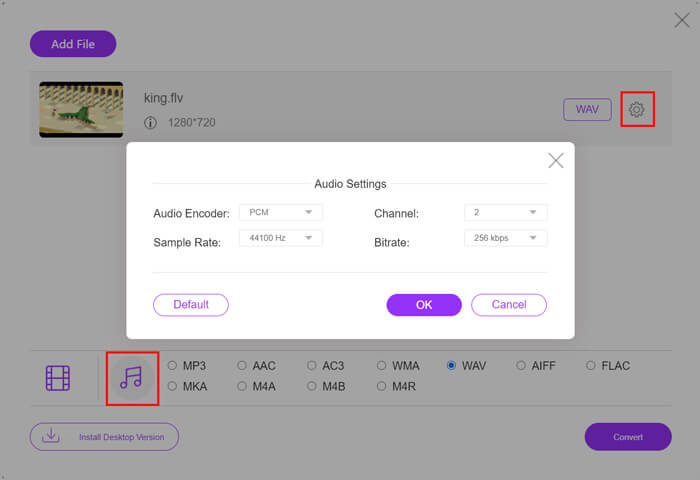
Korak 4: Prije konverzije FLV u WAV, možete kliknuti ikonu Settings pokraj izlaznog formata kako biste dodatno prilagodili audio postavke. Ovdje možete podesiti audio koder, kanal, frekvenciju uzorkovanja i bitrate. Zatim kliknite gumb Convert da biste svoju FLV datoteku pretvorili u WAV audio.
Ako želite pretvoriti FLV u audio format poput MP3, WMA, WAV itd., trebate kliknuti karticu za audio i označiti je.
Dio 2. Besplatno Pretvori FLV u WAV
Osim internetskih FLV konvertera, postoje i neki besplatni video konverteri koji vam mogu lako pomoći pretvoriti FLV u WAV. Za to se možete osloniti na Free FLV Converter.

Besplatni pretvarač FLV u WAV
155321+ preuzimanja- Pretvorite FLV u WAV, AAC, MP3, M4A, MP4, MOV, AVI i još mnogo toga.
- Podržavaju sve često korištene video i audio formate.
- Podržavaju najnovije višejezgrene procesore i GPU ubrzanja.
- Pretvorite jednu ili više FLV datoteka bez gubitka kvalitete.
Besplatno preuzimanjeZa Windows 7 ili novijiSigurno preuzimanje
Besplatno preuzimanjeZa MacOS 10.7 ili novijiSigurno preuzimanje
Sadrži sve pretvorbene značajke koje su vam potrebne. Slijedeći vodič će vam pokazati kako pomoću njega pretvoriti FLV u WAV.
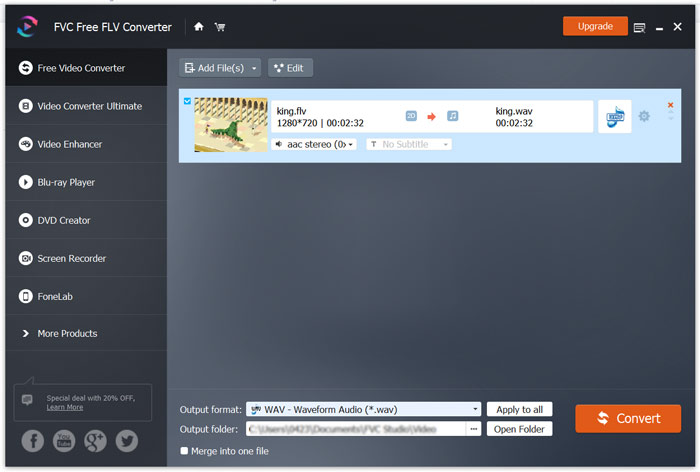
Korak 1: Besplatno preuzmite, instalirajte i pokrenite ovaj besplatni konverter iz FLV u WAV na svom računalu. Kliknite Add Files da biste uvezli svoju FLV datoteku (datoteke).

Korak 2: Kliknite Output format i odaberite WAV kao ciljani format. Zatim odaberite odgovarajuću odredišnu mapu.
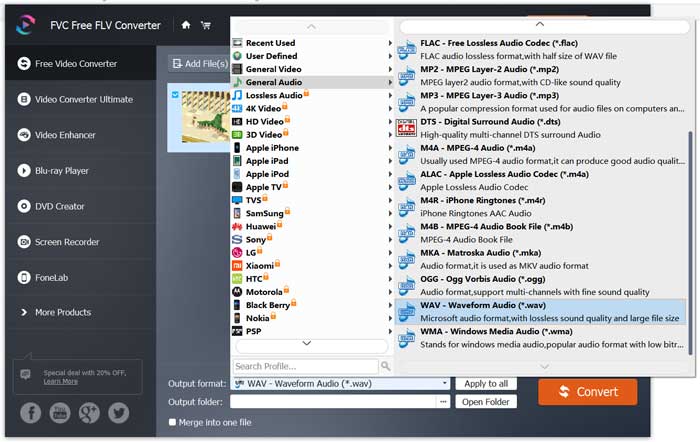
Korak 3: Kliknite gumb Convert da biste započeli pretvaranje FLV u WAV.
Dio 3. Pretvorite FLV u WAV pomoću VLC-a
Ako na računalu imate instaliran VLC Media Player, možete se također osloniti na VLC za pretvaranje FLV u WAV. Trebali biste znati da je VLC popularan multimedijski reproduktor koji sadrži i neke osnovne funkcije za konverziju i uređivanje.
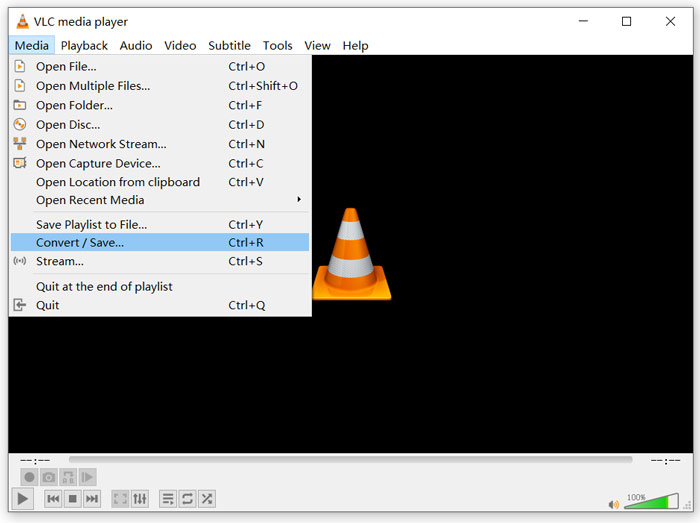
Korak 1: Otvorite VLC Media Player na svom računalu. Možete ga besplatno instalirati s web-mjesta VideoLAN. Kliknite Media, a zatim iz padajućeg izbornika odaberite opciju Convert/Save.
Korak 2: Sada ćete biti prebačeni u prozor Open Media. Kliknite gumb Add da biste dodali FLV datoteku koju želite pretvoriti. Zatim kliknite gumb Convert/Save kako biste otvorili prozor Convert.
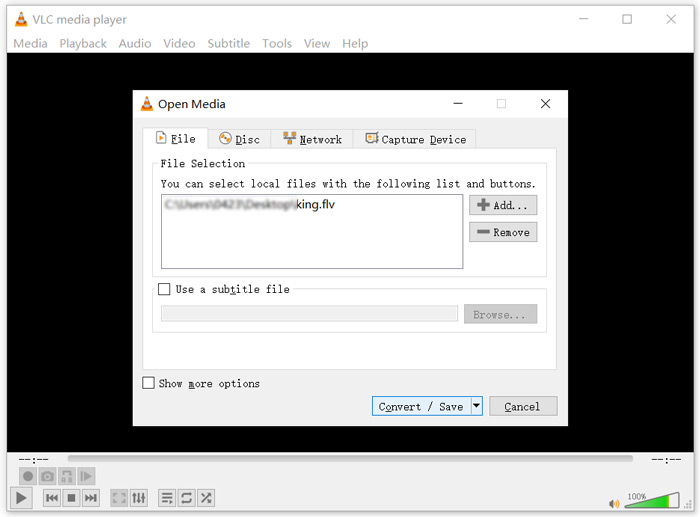
Korak 3: Označite opciju Display the output pod karticom Convert. Zatim odaberite odgovarajući izlazni format iz padajućeg popisa Profile. Kliknite gumb Browse za odabir odgovarajuće odredišne mape. U ovom koraku možete preimenovati izlaznu datoteku.
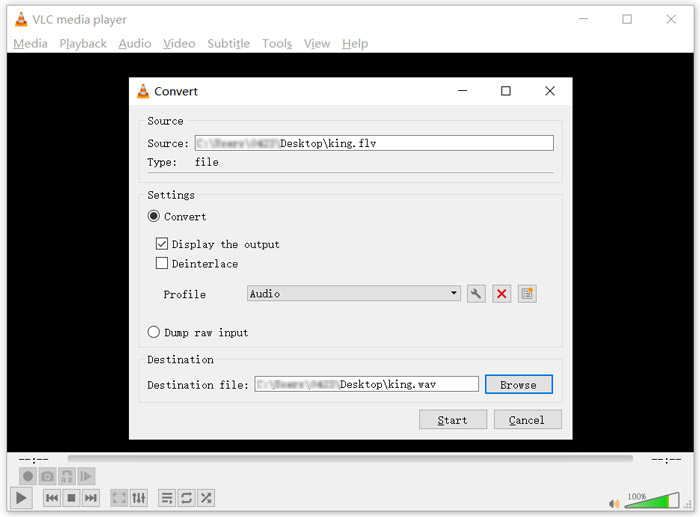
Korak 4: Kliknite gumb Start da biste započeli pretvaranje FLV u WAV. Nakon toga, VLC će automatski reproducirati pretvorenu WAV datoteku. Tijekom konverzije možete vidjeti poruku Converting file. Nemojte potpuno zatvarati VLC Media Player dok konverzija ne završi.
Dio 4. Česta pitanja o pretvaranju FLV u WAV
FLV vs WAV, Koja je razlika između FLV i WAV?
FLV, Flash Video File, je video datoteka kompatibilna s Flashom koju je razvio Adobe Systems. Sadrži kratak zaglavni dio, isprepletene pakete videa, zvuka i metapodataka. FLV je izvorno osmišljen za ugradnju video streamova u Adobe aplikacije. FLV datoteka nosi video stream rezolucije 640x360 i audio stream s 44,1 kHz, 2 kanala, AAC.
Datoteka s nastavkom WAV je Waveform audio format i kontejner koji pohranjuje podatke u segmentima. Izvorno su ga razvili Microsoft i IBM, a pohranjuje nekomprimirani, besprijekorni (lossless) zvuk što rezultira vrlo velikim veličinama datoteka. Format koristi kontejnere za pohranu audio podataka, brojeva zapisa, frekvencije uzorkovanja i bitratea.
Kako pretvoriti FLV u WAV bez softvera?
Ako želite pretvoriti FLV u WAV bez softvera za pretvorbu, možete promijeniti ekstenziju datoteke iz .flv u .wav.
Kako preuzeti FLV u WAV?
Na tržištu se nudi veliki broj snimača zaslona koji vam mogu pomoći u spremanju video zapisa kao audio datoteka na vašem lokalnom računalu.
Zaključak
Nakon čitanja ovog posta, možete naučiti 3 besplatna načina za izdvajanje WAV zvuka iz FLV datoteka. Kada trebate pretvoriti FLV u WAV, možete odabrati željeni FLV konverter za taj zadatak.
-
 5 najboljih besplatnih WAV playera za Android, iOS i računalo
 Kako reproducirati WAV datoteke na Android telefonu? Koji igrač može igrati WAV? Ovaj post dijeli 5 najboljih besplatnih WAV playera za Android, iPhone, Mac i PC.
-
 10 najboljih FLV video uređaja za Windows 10/8/7, Mac, iOS i Android koje morate probati
 FLV player pomaže vam da lako pristupite svojim FLV datotekama na Windows, Mac, Android, iOS uređajima. Pogledajte najbolje uređaje za reprodukciju datoteka FLV koje trenutno možete preuzeti.
-
 Kako pretvoriti WAV u MP3 pomoću 5 najboljih besplatnih konvertera
 Ova je stranica dugačak popis besplatnog WAV u MP3 pretvarača (iTunes, Audacity, VLC, Windows Media Player i Free Audio Converter) za promjenu WAV-a u MP3 na računalu.
