


 Video Converter Ultimate
 Snimač zaslona
 Video popravak
Kako pretvoriti MTV u FLV u 2 neusporediva pristupa

Dio 1. Kako pretvoriti MTV u FLV Offline
Video Converter Ultimate jedan je od najboljih pretvarača MTV u FLV. Možete promijeniti format videozapisa iz MTV u FLV u samo nekoliko klikova. Pomoću ovog softvera možete uređivati i komprimirati MTV videozapise. Ovaj pretvarač iz MTV u FLV dostupan je za korištenje i na Windows i na Mac računalima, a potpuno je besplatan. MTV datoteke možete jednostavno pretvoriti u FLV format tako da preuzmete i instalirate aplikaciju pretvarača, a zatim uvezete videozapise koje želite pretvoriti. Za detaljnije objašnjenje pogledajte sljedeći vodič.
Korak 1: Da biste započeli preuzimanje softvera, kliknite gumb Free Download ispod ovog koraka. Nakon što ga kliknete, pripremite se za instalaciju nakon kratkog vremena.
Besplatno preuzimanjeZa Windows 7 ili novijiSigurno preuzimanje
Besplatno preuzimanjeZa MacOS 10.7 ili novijiSigurno preuzimanje
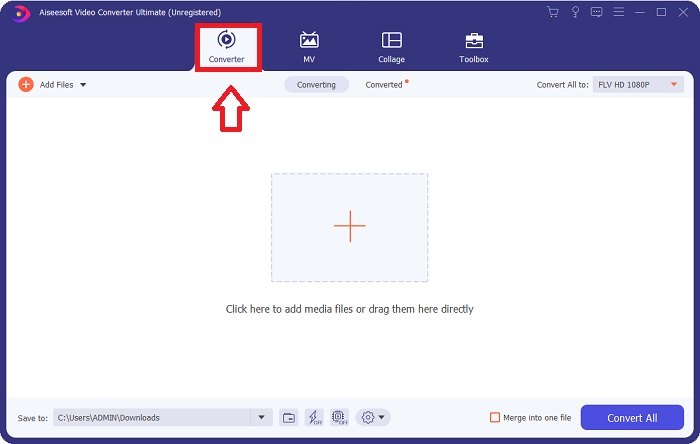
Korak 2: Nakon što instalirate softver na računalo, pokrenite ga i na zaslonu će se pojaviti prozor. Softver prikazuje sučelje Converter na vašem zaslonu, spremno za uvoz datoteke.
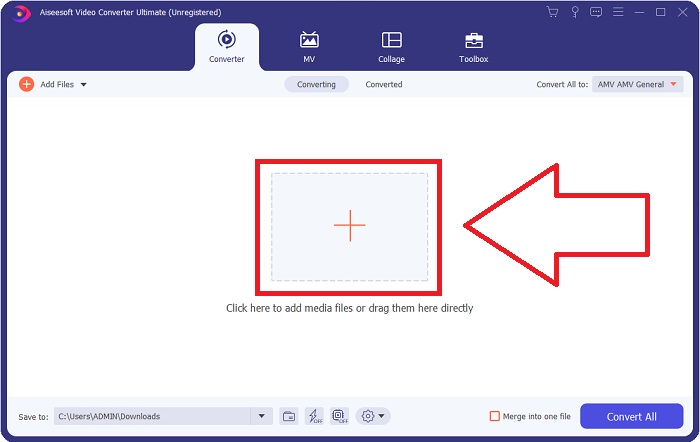
Korak 3: Da biste uvezli datoteku u softver, morate kliknuti gumb + u sredini prozora softvera ili jednostavno možete povući bilo koje video datoteke.
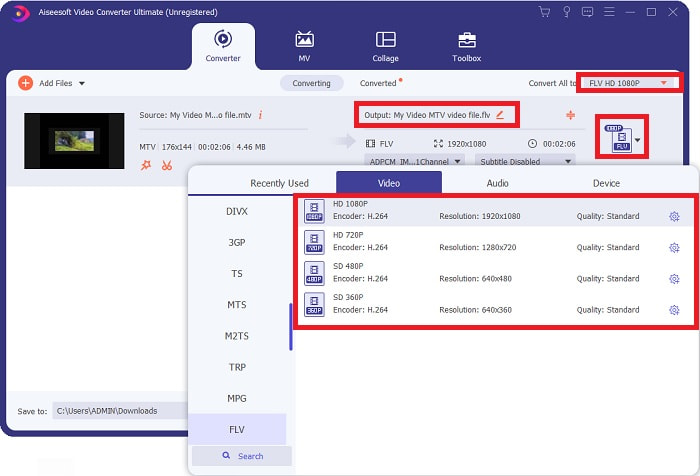
Korak 4: Sada trebate odabrati FLV video format, koji se nalazi u desnom kutu prozora, blizu izlaznog videa. Kliknite ga, pronađite FLV video format i odredite koju kvalitetu želite.
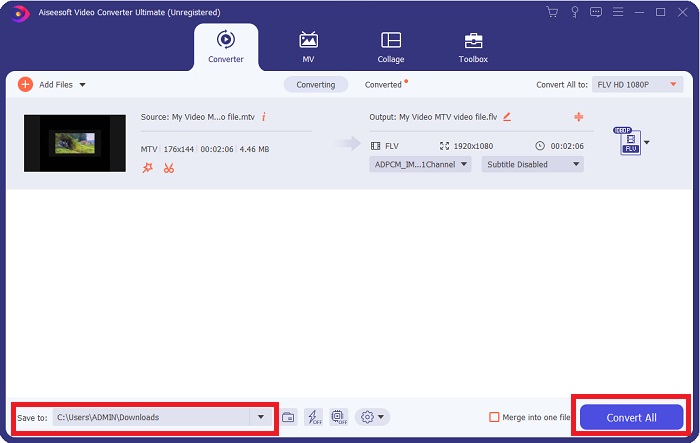
Korak 5: Sada možete pretvoriti svoju datoteku klikom na gumb Convert All koji se nalazi u donjem desnom kutu prozora. Zatim odaberite mjesto na koje ćete spremiti pretvorenu datoteku klikom na padajući izbornik pokraj opcije Save to.
Dio 2. Kako pretvoriti MTV u FLV Online
Ovdje je besplatan online alat koji možete upoznati, a koji može pretvoriti MTV u FLV. Free Video Converter Online može pretvarati video i audio formate kao što su MP4, WMV i ASF u razne druge formate. Svoje videozapise visoke rezolucije možete vratiti u popularne vrste datoteka u samo nekoliko klikova, zadržavajući njihovu izvornu vizualnu kvalitetu. Pretvaranje više video ili audio datoteka odjednom ne narušava kvalitetu. Slijede koraci koje trebate poduzeti:
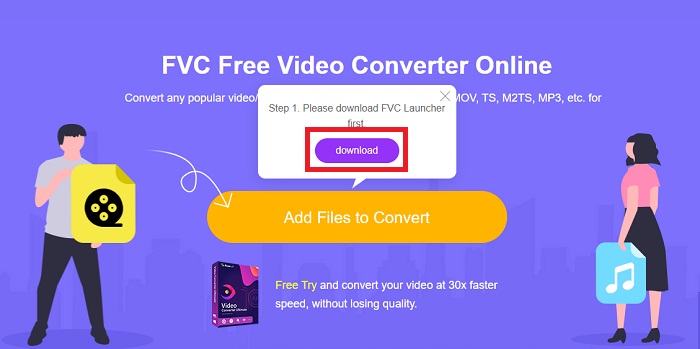
Korak 1: Pristupite glavnoj web stranici Free Video Converter Online klikom na ovu poveznicu. Nakon toga morate kliknuti gumb Add Files to Convert prikazan na glavnom zaslonu da biste preuzeli pokretač koji će vam omogućiti korištenje ovog online alata. Nakon preuzimanja, ponovno kliknite na njega kako biste uvezli datoteke s računala.
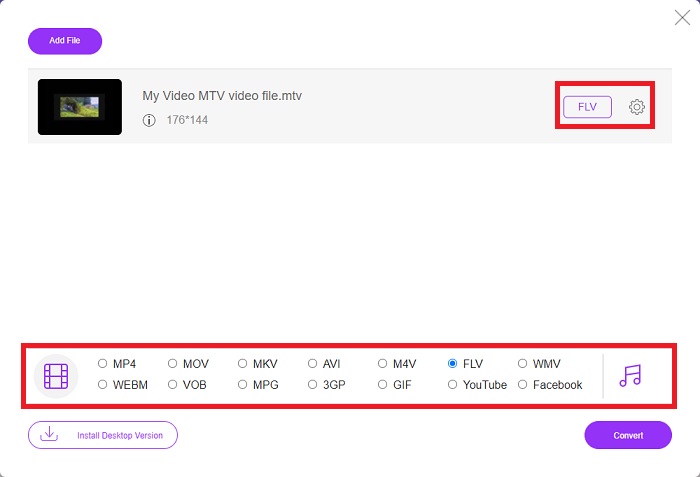
Korak 2: Odaberite FLV video format iz izbora video formata koji se nalazi u donjem dijelu prozora. Ako želite znati sve specifikacije izlaznog videa, kliknite ikonu zupčanika. Prilagodite ga željenim postavkama i kada završite s prilagodbom, kliknite OK.
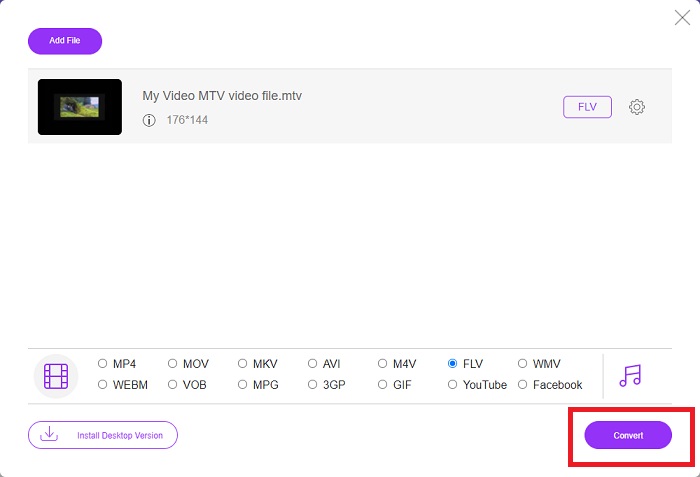
Korak 3: Kada ste zadovoljni svim prilagodbama, možete pretvoriti svoj MTV video format u FLV klikom na gumb Convert.
Povezano:
Dio 3. Prošireno znanje o MTV-u i FLV-u
Neki kineski prijenosni MP4 video playeri koriste ogromno znanje o MTV i FLV video datotekama u MTV formatu za pohranu videozapisa. Brzinom od 12 sličica u sekundi kombinira MP3 zvuk s nizom slika. Postoje neke sličnosti između MTV datoteka i AMV datoteka, ali je formatiranje malo drugačije. Nekoliko jeftinih kineskih prijenosnih MP4 playera ne pohranjuju niti reproduciraju MP4 videozapise. S druge strane, prikazuju se MTV videi. Videozapisi niske razlučivosti (128x128 piksela) i video zapisi malog formata norme su na MTV-u (jedna minuta videa je otprilike 24 MB podataka). Media playeri ne trebaju puno prostora za pohranu ili procesorsku snagu. za pohranu i reprodukciju mnogih MTV videa. Iako je MTV format poput AMV formata, koji također koriste kineski prijenosni media playeri, formati se razlikuju dovoljno da ne može svaki AMV kompatibilan uređaj ili media player reproducirati MTV datoteke.
Međutim, Adobe Systemsov Flash Video Format može se koristiti za online videozapise na YouTubeu, Hulu, Vevo i mnogim drugim uslugama za streaming videa. Osim za iOS, gotovo svaki operativni sustav može čitati i pregledavati FLV datoteke pomoću Adobe Flash Playera (uključujući dodatke preglednika) i softvera treće strane. FLV se može igrati na iPhone i Android uređajima putem softvera otvorenog koda i određenih preglednika. Flash još uvijek uzrokuje probleme na iOS-u. Korisnici Android verzije Jellybean mogu koristiti FLV datoteke. Samo programi za FLV player mogu pregledavati datoteke s nastavkom FLV. FLV video snimanje zaslona moguće je pomoću softvera za snimanje i snimanje zaslona.
| Ekstenzija datoteke | MTV | FLV |
| Vrsta datoteke | Kineski MP4/MTV player | Flash video datoteka |
| Razvijen od | Robert W. Pittman | Adobe sustavi |
| Pros | Jedna od najznačajnijih prednosti MTV formata je njegova mogućnost reprodukcije na većini računala diljem svijeta. | FLV format prevladava na internetu. Tisuće web stranica ga koriste; pruža znatno više značajki od ostalih ekstenzija video datoteka i proizvodi znatno manje datoteke od većine drugih video formata. FLV videozapisi su dobri za prikazivanje pristojne kvalitete i brzo učitavanje. |
| Protiv | Zbog svojih loših mogućnosti poboljšanja zvuka, ima ograničenu razlučivost slike i ne može prikazati videozapis na cijelom zaslonu i u punom pokretu. | Potrebno je imati instalirane flash dodatke za reprodukciju flash datoteka na mreži. |
| Programi koji podržavaju/otvaraju | ◆ VLC Media Player ◆ AVS Media Player | ◆ VLC Media Player ◆ Adobe Flash Player |
Dio 4. Često postavljana pitanja o pretvaranju MTV-a u FLV
Kako mogu pretvoriti MTV u FLV na Macu?
Možete koristiti gore spomenuti Video Converter Ultimate za pretvaranje vaših MTV datoteka u FLV. Prvo morate preuzeti softver na svoj Mac, a zatim ga pokrenuti nakon instalacije. Zatim dodajte svoje datoteke u program i odaberite željeni FLV format. Na kraju kliknite gumb Pretvori sve da biste pokrenuli pretvorbu iz MTV-a u FLV.
Kako da otvorim MTV datoteku?
Neke MTV datoteke možda se neće reproducirati u multi-platformskom VideoLAN ili VLC media playeru ili online Media Technologies AVS media playeru samo za Windows. Audio dio nekih MTV datoteka, na primjer, može se reproducirati samo pomoću VLC-a. MTV videozapisi mogu se pretvoriti u AVI ili MP4 pomoću FFmpeg, AnyMP4 Video Converter ili AVS Video Converter iz Online Media Technologies, sve aplikacije za više platformi (Windows).
Može li VLC pretvoriti video zapise u FLV?
Reproducirajte video pomoću VLC Media Playera. Odaberite opciju Pretvori/Spremi s padajućeg izbornika na kartici Mediji. .flv video datoteke iz sustava mogu se dodati klikom na gumb 'Dodaj' na stranici Open Media.
Zaključak
S obzirom na sve točke navedene u ovom članku, postoje dva preporučena pretvarača koja biste trebali razmotriti za korištenje, a to su Free Video Converter Online i Video Converter Ultimate. Kako je gore navedeno, ova dva alata pokazala su svoj puni potencijal i bolja su od drugih pretvarača dostupnih na internetu.
-
 [Online i besplatno] 3 metode za pretvaranje MTV-a u AVI bez problema
 Jeste li ikada čuli za video format kao što je MTV? Budući da ne znate sve o ovom formatu i želite pretvoriti MTV video u AVI, pažljivo pročitajte ovaj članak kako biste saznali više o ovom problemu.
-
 Konkretni vodič koji će vam pomoći da besplatno pretvorite AVI u FLV
 Da biste pretvorili AVI u FLV, potreban vam je moćan video pretvarač. Srećom, iz ovog pojedinog članka možete naučiti dvoje i njihov detaljni vodič.
-
 2 najlakša načina za pretvaranje WMV datoteka u FLV na PC / Mac
 Kako možete pretvoriti WMV u FLV? Prvo morate pročitati našu preporuku i pronaći svoju omiljenu metodu, a zatim slijediti naš vodič da biste brzo obavili posao.
