


 Video Converter Ultimate
 Snimač zaslona
 Video popravak
Kako trenutno pretvoriti ICO u PNG [Potpune metode]
ICO je slikovna datoteka za računalne ikone, posebno na Microsoft Windowsu. Koristi se za spremanje datoteka ikona. Međutim, ICO nije popularan u drugim programima i na drugim uređajima. Dakle, ako želite pregledavati svoje slike u drugim programima, morate ih pretvoriti u drugi format. Ako vam je draža slikovna datoteka manje veličine, PNG je jedan od najboljih izbora za vas. PNG format ima manju veličinu datoteke, a slike možete gledati u gotovo svim programima. U tom slučaju, ovaj članak nudi najbolje rješenje za vas. Pomoću pretvarača slika naučit ćete najbolje metode za pretvaranje ICO u PNG.

Dio 1. ICO protiv PNG-a
| Format datoteke | ICO | PNG |
| Proširenje naziva datoteke | .ico | .png |
| Puno ime | Ikona | Prijenosna mrežna grafika |
| Razvijen od | Microsoft | Grupa za razvoj PNG-a |
| Opis | ICO je vrsta slikovne datoteke koja može pohranjivati slikovne ikone. Operativni sustavi Microsoft Windows koriste datotečni nastavak ICO za pohranu datoteka ikona. Uključuje bitmap slike. Osim toga, web stranice koriste ICO datoteke kao svoje omiljene ikone. Podržane su slike s 24-bitnim bojama. Dodatno, Windows sprema samo ikone za izvršne datoteke u ICO formatu. Slike u Windows ICO datotekama imaju raspon veličina od 16×16 do 256×256 piksela. Starije ICO datoteke mogu pohranjivati samo slike od 48×48 piksela. | Vrsta rasterske slikovne datoteke je prijenosna mrežna grafika ili PNG. GIF format je evoluirao u ovaj. Oliver Fromme je 1995. godine razvio PNG format za obavljanje zadataka koje GIF-ovi ne mogu. Za razliku od GIF-a, PNG format je bez patenta i pruža širi raspon boja. PNG je trenutno jedan od najčešće korištenih formata slika. PNG možete otvoriti u bilo kojem programu za uređivanje slika bez licence jer patent ne štiti datoteku. Ovaj format također koristi kompresiju bez gubitaka. |
Dio 2. Pretvorite ICO u PNG besplatno na mreži
FVC Free Image Converter jedan je od najboljih internetskih alata za pretvaranje ICO u PNG. Ovaj web-bazirani pretvarač slika može pretvoriti bilo koji format slikovne datoteke u JPG. Ulazne vrste koje ova aplikacija može obraditi uključuju JPG, PNG, JPEG, TIFF, BMP, WEBCO, ICO i druge. Također nudi jednostavan raspored i jasne opcije. Na taj način i stručnjaci i početnici mogu pretvarati fotografije pomoću ovog programa. Osim toga, lakši je za korištenje jer su za pretvaranje slika potrebni samo jednostavni koraci. Svi preglednici podržavaju FVC Free Image Converter. U to se ubrajaju Safari, Microsoft Edge, Internet Explorer, Google Chrome i Mozilla Firefox. Također, FVC Free Image Converter nudi potpuno besplatno pretvaranje fotografija. Ovaj je alat web-baziran, stoga ne morate preuzimati nikakav softver ili dodatke. Slike se lako mogu pretvoriti za upotrebu u preglednicima.
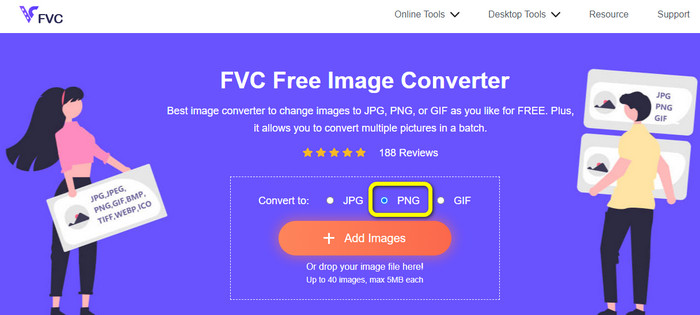
Korak 1: Otvorite web-stranicu FVC Free Image Converter. Zatim idite na opciju Convert to i odaberite PNG format datoteke.
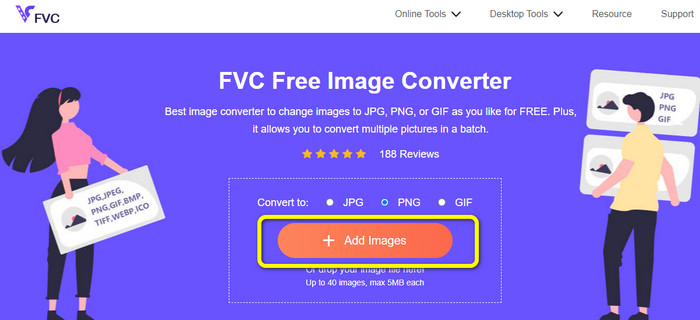
Korak 2: Zatim kliknite gumb Add Images. Datoteke na vašem računalu pojavit će se na zaslonu. Odaberite ICO format koji želite pretvoriti i kliknite Open. Ponovno kliknite gumb Add Images kako biste dodali još datoteka i proveli postupak skupne konverzije.
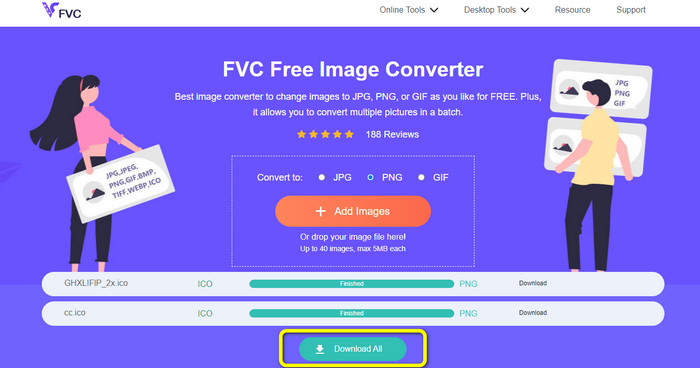
Korak 3: Vaša će se slika automatski pretvoriti u PNG. Nakon postupka pretvaranja, kliknite gumb Download All kako biste spremili slike. Nakon toga možete otvoriti svoju pretvorenu sliku.
Dio 3. Kako jednostavno pretvoriti ICO u PNG na Macu
Preview je unaprijed instalirani program na Macu. Osim pregleda slika, omogućuje vam i pretvaranje slikovnih datoteka. Na taj način možete odmah pretvoriti ICO datoteku u PNG format. Također, proces pretvaranja je brz. Slike možete pretvoriti u samo nekoliko sekundi, što je praktično za sve korisnike. Osim toga, nudi i skupni proces konverzije. Dakle, možete pretvoriti više slikovnih datoteka odjednom. Štoviše, osim pretvaranja, nudi još funkcija u kojima možete uživati. Program može mijenjati veličinu i rezati fotografije. Međutim, proces pretvaranja je zahtjevan, osobito za neprofesionalne korisnike. Opcije je zbunjujuće pratiti. Ako želite pretvoriti ICO u PNG format pomoću ovog programa, potrebno je zatražiti pomoć stručnjaka. Slijedite korake u nastavku kako biste pretvorili ICO u PNG na Macu.
Korak 1: Idite u svoju mapu i kliknite na ICO slikovnu datoteku. Desnom tipkom miša kliknite sliku i odaberite Open with > Preview (default).
Korak 2: U Previewu idite na opciju File na gornjem sučelju i odaberite Export.
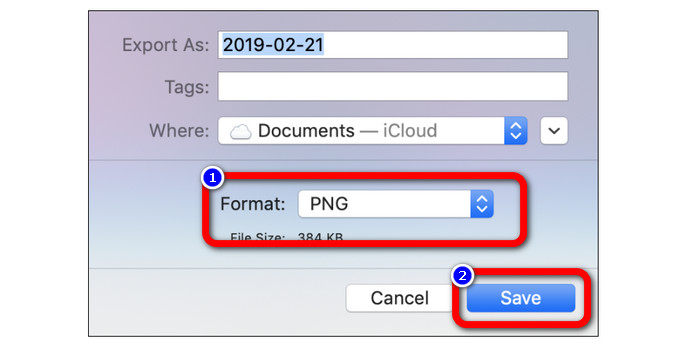
Korak 3: Zatim u opciji formata odaberite željeni izlazni format, a to je PNG. Nakon toga kliknite gumb Save. Na taj će se način vaša slika pretvoriti iz ICO u PNG format.
Dio 4. Kako pretvoriti ICO u PNG na Windowsima
Jedan od najboljih izvanmrežnih pretvarača slika je Video Converter Ultimate. Ovim izvrsnim pretvaračem možete brzo pretvoriti ICO u PNG. Također, možete pretvoriti mnogo datoteka zahvaljujući velikoj brzini pretvaranja. Nudi i metodu skupne konverzije za istodobno pretvaranje više datoteka. Video Converter Ultimate također podržava razne formate slika. Dodatno, podržava PNG, BMP, WEBP i TIF. Ovaj izvanmrežni pretvarač slika pruža korisničko sučelje i jednostavne postupke pretvaranja. Korisnici svih razina znanja lako mogu pretvarati fotografije ovom metodom. Proces pretvaranja u ovom pretvaraču također je brz. U kratkom vremenu možete pretvoriti mnogo fotografija. Osim toga, ovaj je pretvarač dostupan i na Macu i na Windows PC-u.
Korak 1: Instalirajte Video Converter Ultimate na svoje Windows računalo. Nakon instalacije pokrenite program. Kako biste brzo pristupili pretvaraču, kliknite gumb Download u nastavku.
Besplatno preuzimanjeZa Windows 7 ili novijiSigurno preuzimanje
Besplatno preuzimanjeZa MacOS 10.7 ili novijiSigurno preuzimanje
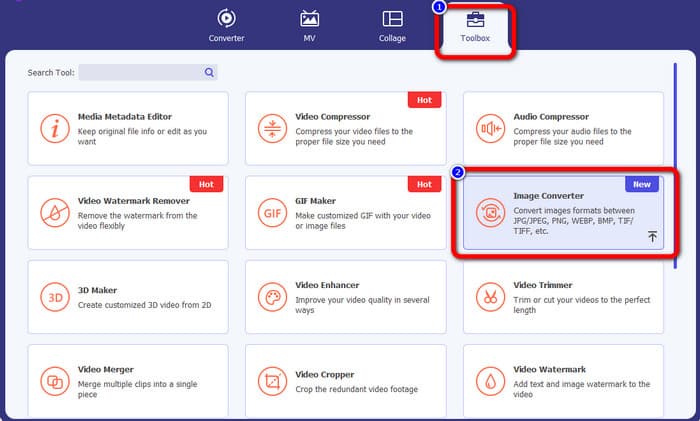
Korak 2: Nakon pokretanja programa, idite na gornje sučelje i odaberite karticu Toolbox. Zatim kliknite funkciju Image Converter. Na zaslonu će se pojaviti novo sučelje.
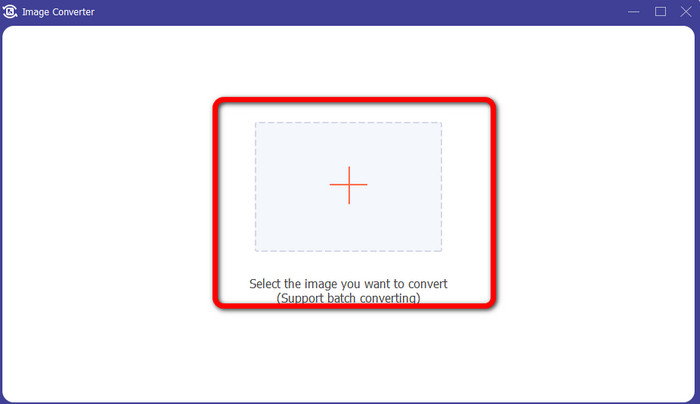
Korak 3: Kada se pojavi novo sučelje, kliknite ikonu Plus. Kada se prikaže mapa, kliknite ICO sliku koju želite pretvoriti i kliknite Open.
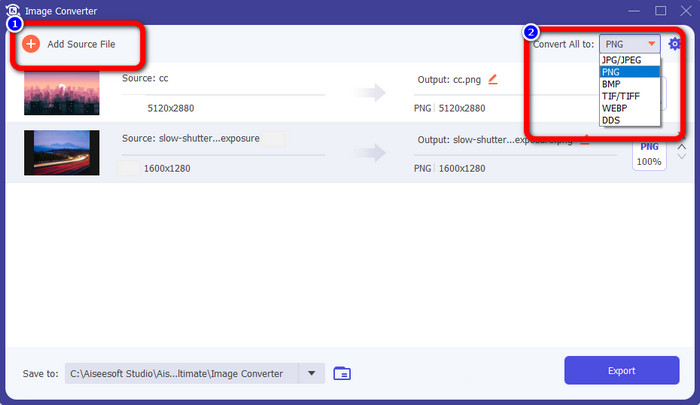
Korak 4: Ako želite dodati više datoteka za izvođenje skupne konverzije, kliknite Add Source File. Idite u gornji desni kut sučelja i kliknite opciju Convert All to. Odaberite PNG format kao željeni izlazni format.
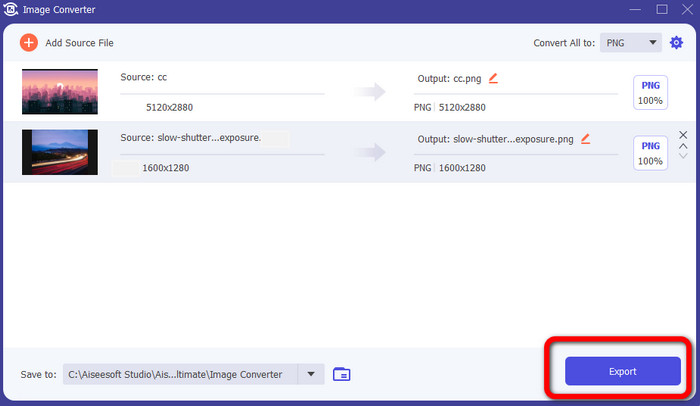
Korak 5: Na kraju, pokrenite proces pretvaranja klikom na gumb Export. Nakon toga, vaše će datoteke biti spremljene na odabranu lokaciju pomoću ovog pretvarača slika.
Dio 5. Često postavljana pitanja o pretvaranju ICO u PNG
1. Kako mogu spremiti ICO u PNG u Photoshopu?
Nažalost, ne možete spremiti ICO u PNG u Photoshopu. Razlog je taj što Photoshop ne podržava ICO format slikovne datoteke. Ako želite spremiti ICO u PNG format, možete koristiti pretvarač slika kao što je FVC Free Image Converter. Ovaj internetski pretvarač omogućuje vam jednostavno pretvaranje ICO u PNG.
2. Je li moguće koristiti PNG kao ICO?
Da je. Za dodatne informacije, ICO datoteke mogu biti PNG datoteke. ICO može sadržavati PNG datoteku i bitmapu + alpha u isto vrijeme.
3. Koji je najbolji pretvarač ICO u PNG koji mogu koristiti?
Najbolji pretvarač ICO u PNG je FVC Free Image Converter. Ovaj pretvarač može trenutno pretvoriti vašu datoteku. Također, ovaj pretvarač možete koristiti besplatno.
Zaključak
Sada ste naučili najjednostavnije načine za brzo pretvaranje ICO u PNG. No, ako tražite pretvarač slika koji je besplatan i jednostavan, koristite FVC Free Image Converter.
-
 Najjednostavnije metode za pretvaranje SVG u PNG
 Znajte kako promijeniti slikovnu datoteku iz SVG u PNG pomoću korisnih pretvarača slika. Pročitajte ovaj vodič kako biste saznali sve što trebate znati o pretvorbi
-
 Potpuni načini pretvaranja JPG u PNG online i offline
 Tražite korisne metode za pretvaranje JPG u PNG format datoteke? Ova smjernica ima odgovor koji trebate. Da biste otkrili ove metode, pročitajte članak
-
 Potpuni detalji o razlikama između JPEG-a i JPG-a i PNG-a
 Ovaj će vam post dati dovoljno informacija o razlikama između JPEG-a i JPG-a i PNG-a. Osim toga, naučit ćete kako pretvoriti slike u te datoteke
