


 Video Converter Ultimate
 Snimač zaslona
 Video popravak
Naučite kako pretvoriti HEIC u GIF pomoću najboljih i besplatnih pretvarača
Želite pretvoriti svoje HEIC slike u pokretne GIF‑ove? Imamo rješenje za vas. HEIC datoteke su visokokvalitetne slikovne datoteke koje ne zauzimaju mnogo prostora za pohranu. I očito, HEIC slike su samo statične slike. Dakle, da biste od slikovne datoteke napravili animiranu sliku, morate svoj HEIC pretvoriti u GIF format datoteke. GIF formati mogu biti statične ili animirane slike. Stoga pročitajte ovaj članak kako biste saznali koji je najbolji HEIC u GIF alat za besprostornu pretvorbu vaše datoteke.

Dio 1. 4 najbolja alata za pretvaranje HEIC u GIF
Što se praktičnosti tiče, sigurno je da su mrežni pretvarači najbolji jer ne morate ništa preuzimati. A ako tražite najbolje online pretvarače HEIC u GIF, isprobali smo neke od najboljih pretvarača HEIC u GIF dostupnih na internetu. Dakle, u ovom ćete dijelu znati tri najbolja online pretvarača HEIC u GIF.
Aiseesoft besplatni online pretvarač slika
Ako tražite izvrstan mrežni pretvarač HEIC u GIF, ovaj je alat upravo ono što trebate. Aiseesoft Free Image Converter Online besplatan je internetski alat koji vam omogućuje pretvaranje HEIC slika u GIF, PNG i JPG format. Poznat je kao najbrži mrežni pretvarač HEIC u GIF koji se može pronaći na internetu. Štoviše, za razliku od drugih mrežnih pretvarača, ne sadrži oglase i ima brz proces učitavanja.
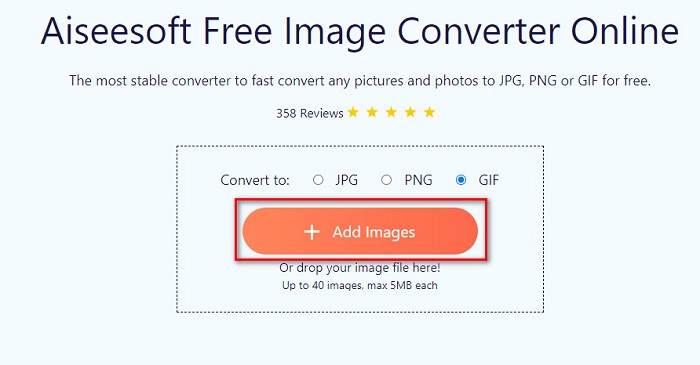
Korak 1. Potražite Aiseesoft Free Image Converter Online ili kliknite ovu poveznicu kako biste izravno otišli na njihovu web-stranicu. Zatim, na početnom sučelju, kliknite gumb Add Images.
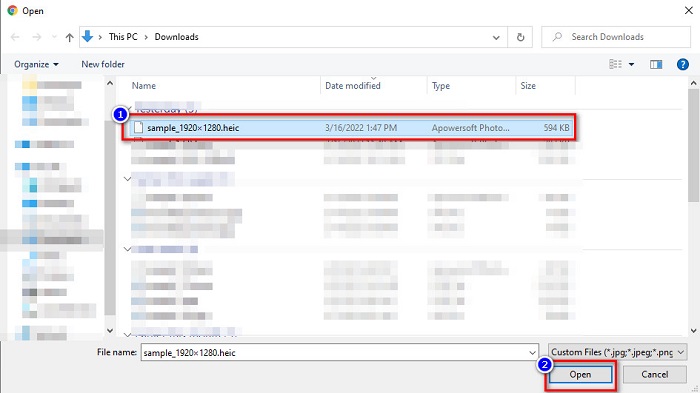
Korak 2. Zatim će se pojaviti vaše datoteke na računalu, pronađite svoju HEIC sliku i kliknite Open.
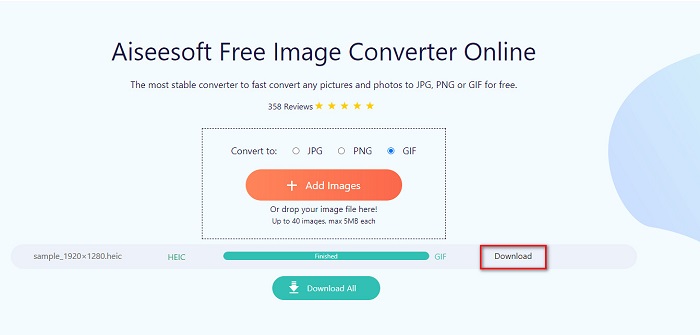
Korak 3. Za završni korak kliknite gumb Download kako biste preuzeli svoju GIF sliku.
Pros
- Ima ultra-brz proces pretvorbe.
- Ne sadrži uznemirujuće oglase.
- Može pretvoriti bilo koju slikovnu datoteku u PNG, JPG i GIF.
- Dostupno na svim web-preglednicima, uključujući Google, Firefox i Safari.
Protiv
- Možda ćete iskusiti spor proces pretvorbe ako je vaša internetska veza spora.
CloudConvert
Jedan od najkorištenijih pretvarača na internetu je CloudConvert. Ovaj pretvarač može jednostavno pretvoriti HEIC u GIF datoteke zahvaljujući svom jednostavnom korisničkom sučelju. Osim toga, podržava mnoge formate slika, uključujući HEIC, GIF, BMP, JPG, ICO i druge. Možete i prilagoditi rezoluciju, veličinu datoteke i kvalitetu slike. Iako je riječ o web-aplikaciji, ne sadrži oglase.
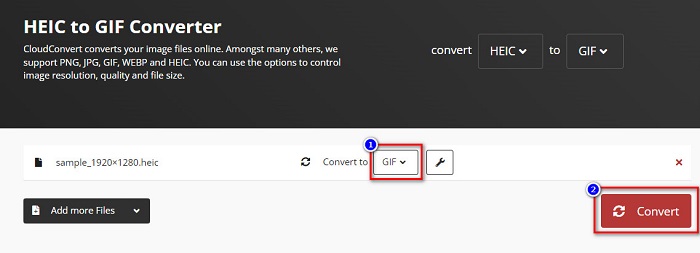
Korak 1. U pregledniku potražite CloudConvert HEIC to GIF converter. Zatim, na glavnom sučelju softvera, kliknite gumb Select. Pojavit će se vaše datoteke na računalu kako biste odabrali HEIC datoteku za prijenos.
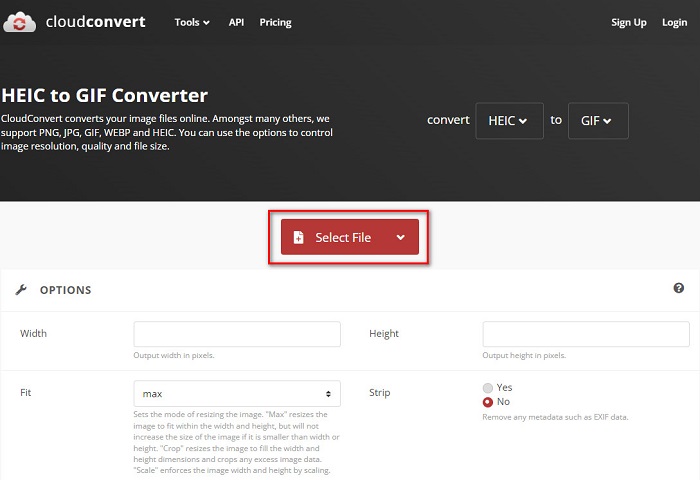
Korak 2. Zatim kliknite gumb drop-down pokraj Convert to i odaberite željeni izlazni format. Nakon toga kliknite gumb Convert kako biste započeli pretvorbu HEIC datoteke u GIF format.
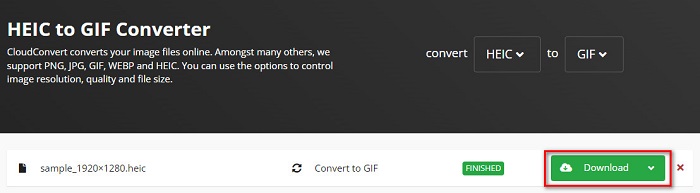
Korak 3. Na kraju, kada je pretvorba završena, kliknite gumb Download kako biste preuzeli svoju GIF datoteku.
Pros
- Ima brz proces pretvorbe.
- Ne sadrži dosadne oglase.
- Podržava različite formate datoteka, uključujući HEIC, GIF, JPG, PNG itd.
- Dostupno na gotovo svim tražilicama kao što su Google i Safari.
Protiv
- Kada je internetska veza spora, možda ćete imati spor proces konverzije.
Online ConvertFree
Još jedan mrežni pretvarač HEIC u GIF koji se isplati isprobati je OnlineConvertFree. Ovaj pretvarač ima jednostavno korisničko sučelje i brz proces pretvorbe. Štoviše, ako tražite pretvarač koji može komprimirati i promijeniti veličinu datoteke, ovaj alat ima tu funkciju.
Međutim, sadrži oglase koji su uznemirujući za mnoge korisnike. Bez obzira na to, ovaj pretvarač još uvijek može praktično pretvoriti HEIC u GIF.
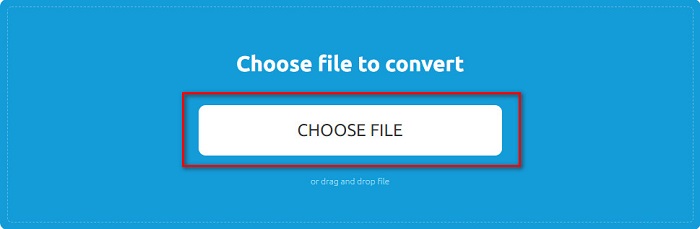
Korak 1. Kao prvi korak, u pregledniku potražite OnlineConvertFree. Na glavnom sučelju softvera kliknite Choose Files. Zatim će se pojaviti vaše datoteke na računalu, gdje ćete odabrati svoju HEIC datoteku i prenijeti je.
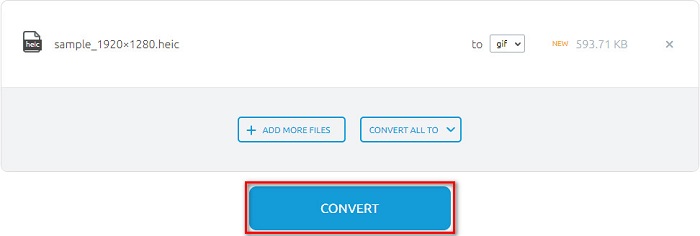
Korak 2. Drugo, kliknite Convert button kako biste pretvorili svoju HEIC datoteku u GIF datoteku. Zatim će se pojaviti novo sučelje.
Korak 3. Na kraju se pomaknite prema dolje i kliknite gumb Download za preuzimanje GIF datoteke.

Pros
- Ima jednostavno korisničko sučelje.
- Sigurno je za korištenje.
Protiv
- Sadrži oglase.
CDKM
CDKM je mrežni alat koji vam pomaže pretvoriti HEIC u GIF datoteke. Ovaj mrežni pretvarač alat je jednostavan za korištenje što ga čini alatom prilagođenim početnicima. Štoviše, podržava standardne formate datoteka kao što su HEIC, GIF, PNG, JPG i SVG. Međutim, ovaj pretvarač sadrži oglase koji bi vas mogli uznemiriti. Unatoč tome, može brzo pretvoriti vašu datoteku, tako da je pretvarač koji morate isprobati.
Korak 1. U svom pregledniku potražite CDKM i otvorite njihovu web-stranicu. Na glavnom sučelju softvera kliknite gumb Choose Files. Kada se pojave mape na vašem računalu, odaberite svoju HEIC datoteku i prenesite je na glavno sučelje.
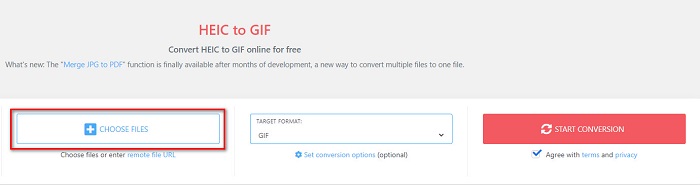
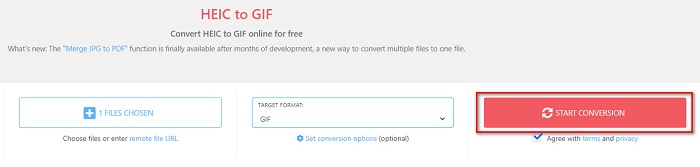
Korak 2. Zatim kliknite gumb Start Conversion kako biste svoju HEIC datoteku pretvorili u GIF datoteku. Zatim prijeđite na sljedeći korak.
Korak 3. Zatim preuzmite svoju GIF datoteku klikom na gumb Download ispod.

Dio 2. Tablica usporedbe između HEIC i GIF
HEIC je format slikovne datoteke koji je stvorio Apple. Kada fotografirate uređajem Apple, vidjet ćete da je ekstenzija fotografije .heic. Također, ove slikovne datoteke imaju visoku kvalitetu i malu veličinu, zbog čega su vrlo popularne. Međutim, HEIC datoteke nisu kompatibilne s mnogim uređajima. Na Apple uređajima otvaranje i pregledavanje HEIC datoteka jednostavno je. No, ako ih želite vidjeti na drugim platformama, morate ih pretvoriti u druge formate.
S druge strane, GIF datoteke su formati slika bez gubitaka koji su animirani. Ovi formati slika mogu biti animirane ili statične slike. Nadalje, gotovo sve medijske platforme podržavaju GIF formate.
| HEIC | GIF | |
| Komprimirano/Nekomprimirano | Komprimirano | Komprimirano |
| Dostupnost | Dostupno na Apple uređajima. | Dostupno na svim medijskim platformama |
| Bez gubitaka/Ne | Bez gubitaka | Bez gubitaka |
| Kvaliteta slike | Visoka kvaliteta slike | Niže kvalitete u usporedbi s HEIC slikama |
| Najbolje koristiti za | Najbolje se koristi za fotografiranje | Najbolje se koristi za animiranje kratkih video zapisa. |
Dio 3. Često postavljana pitanja o pretvaranju HEIC u GIF
Možete li reproducirati animirani GIF na Mac uređaju?
Da. Mac uređaj može reproducirati animirane GIF-ove; međutim, ponekad ih ne može reproducirati, pa u tom slučaju trebate koristiti mrežni preglednik GIF-ova.
Mogu li pretvoriti JPG slike u GIF-ove?
Postoji mnogo načina kako pretvoriti JPG u GIF. Gore spomenuti mrežni pretvarači omogućuju vam pretvaranje JPG slikovnih datoteka u GIF-ove.
Možete li spremiti GIF-ove na svoj iPhone?
Srećom, iPhone uređaji podržavaju GIF datoteke. Stoga možete spremati GIF-ove na svoj iPhone. Ali ako ne možete spremiti GIF datoteku, svakako ponovno pokrenite iPhone i pokušajte ponovno preuzeti.
Zaključak
Kao što je prikazano gore, postoji mnogo načina za pretvorbu HEIC u GIF. Međutim, ne nude svi mrežni pretvarači iznimno brz proces pretvorbe. Ako stoga tražite najbolji mrežni pretvarač HEIC u GIF, koristite Aiseesoft Free Image Converter Online.
-
 Što je VOB datoteka i kako pretvoriti VOB datoteku u GIF besplatno
 Želite li saznati više o VOB datotekama i kako ih podijeliti nakon kopiranja? ili Zašto trebate pretvoriti VOB u GIF? Zatim pažljivo pročitajte ovaj članak.
-
 3 najbolja konvertera koja ne biste smjeli propustiti da biste pretvorili PNG u animirani GIF
 Želite li oživjeti svoj PNG? Zatim pokušajte pretvoriti PNG u GIF animirani format pomoću dostupnih korisnih alata i koraka kako to učiniti.
-
 5 najboljih načina za promjenu slike u animirani GIF [Ažurirano 2022.]
 Trebate sliku za pretvaranje u GIF? Ovaj članak će pružiti pet najboljih pretvarača koje možemo pronaći na tržištu. Dakle, otkrijmo ove alate čitajući ovaj članak.
