


 Video Converter Ultimate
 Snimač zaslona
 Video popravak
3 načina za jednostavno komprimiranje fotografija za e-poštu [Vodič]
E-pošta je izvrsna platforma za slanje poruka s privicima fotografija i drugih potrebnih datoteka. Međutim, neki korisnici nailaze na poteškoće pri slanju fotografija velikih datoteka jer one dovode do sporog vremena učitavanja, neuspjelih isporuka ili prekoračenja ograničenja veličine privitaka koje nameću davatelji usluga e-pošte. Kako biste izbjegli te probleme, važno je promijeniti veličinu fotografija prije slanja.
S tim ćemo vas u ovom članku provesti kroz 3 metode kako komprimirati fotografije za e‑poštu, kako bi vaši fotografski privici bili jednostavni za slanje i primanje, bez narušavanja kvalitete.

Dio 1. Prednosti komprimiranja fotografija za e-poštu
Sažimanje fotografija, općenito, ima puno prednosti, uključujući i korištenje e-pošte. Sljedeće su stvari u kojima možete uživati kada mijenjate veličinu fotografija za e-poštu:
• Budući da kompresija slike znači promjenu veličine fotografije na manju, možete lako poslati više foto‑privitaka u jednoj e‑poruci u usporedbi s nekomprimiranim fotografijama.
• Davatelji usluga e‑pošte često nameću ograničenja veličine privitaka koje možete poslati. Komprimiranjem fotografija za e‑poštu možete ostati unutar tih ograničenja i osigurati da se vaša poruka isporuči bez problema. To je korisno kada šaljete e‑poštu većem broju primatelja ili kada uz fotografije prilažete i druge vrste datoteka.
• Kada su fotografije komprimirane, to jednostavno znači da zauzimaju manje prostora, što vam omogućuje bolje iskorištavanje dodijeljene kvote za pohranu e‑pošte.
• Veliki privici u e‑pošti ponekad mogu biti označeni od strane poslužitelja e‑pošte, što može rezultirati neuspjelom isporukom ili time da se poruka označi kao neželjena pošta. Komprimiranje fotografija za e‑poštu pomaže izbjeći te probleme i osigurava da vaši privici stignu do namijenjenih primatelja bez poteškoća.
• U određenim situacijama, kada korisnici provjeravaju e‑poštu na mobitelu, poslane komprimirane fotografije lakše je preuzeti i pregledavati na mobilnim uređajima nego nekomprimirane.
Dio 2. Komprimirajte fotografije za e-poštu pretvaranjem formata slike
Ako želite komprimirati fotografije za e-poštu, prva metoda koju možete isprobati jest korištenje alata za pretvaranje slika. Time će vašu sliku pretvoriti u format koji želite, a proces pretvorbe također optimizira vašu fotografiju na željenu veličinu kojom se lakše može upravljati.
FVC Free Image Converter je besplatan alat za konverziju koji korisnicima omogućuje pretvaranje njihovih fotografija u različite formate slikovnih datoteka, poput JPG, PNG i GIF. Dakle, ako šaljete slikovnu datoteku e‑poštom u formatu koji sadrži više podataka i time ima veću veličinu datoteke, svakako možete iskoristiti ovaj alat. Štoviše, idealan je kada želite poslati više velikih datoteka jer može skupno pretvoriti do 40 slika odjednom. Evo kako možete koristiti ovaj alat za komprimiranje fotografija za e‑poštu:
Korak 1. Najprije u pregledniku potražite FVC Free Image Converter kako biste pristupili ovom mrežnom alatu.
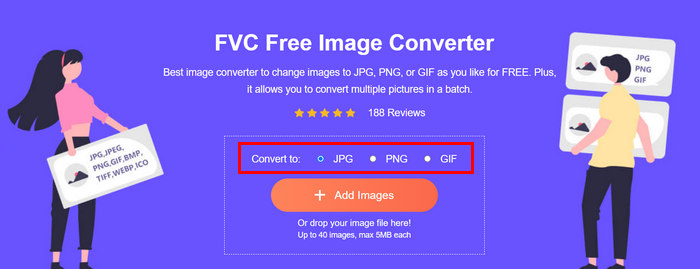
Korak 2. Zatim u opciji Convert to odaberite izlazni format datoteke koji preferirate. Nakon toga kliknite gumb Add Images da biste uvezli slike koje želite pretvoriti.
Korak 3. Kada završite, kliknite gumb Download All.
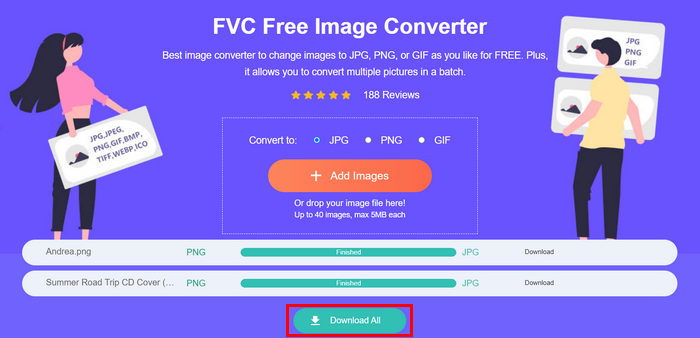 S alatom FVC Free Image Converter zajamčeno je da su vaše konvertirane fotografije sada komprimirane i da im je veličina smanjena, što je savršeno za korištenje e-poštom.
 Dio 3. Smanjite fotografije za e-poštu pomoću mrežnog alata za kompresiju
FVC Free Image Compressor je besplatan mrežni alat za kompresiju koji pojednostavljuje proces komprimiranja fotografija za e‑poštu. Dovoljno je da korisnici prenesu ili uvezu slikovne datoteke i prepuste alatu da ih automatski komprimira. Ako vas brine gubitak kvalitete, ovaj alat koristi najbolju optimizaciju i napredne algoritme kompresije. Time se osigurava da kvaliteta vaše slike ostane očuvana prilikom komprimiranja za e‑poštu.
Također, ako morate skupno komprimirati sliku, ovaj vam alat omogućuje da istovremeno komprimirate 40 slika odjednom. Na kraju, podržava razne popularne formate slika kao što su JPEG, PNG, SVG i animirani GIF-ovi.
Korak 1. U pregledniku otvorite njihovu službenu web‑stranicu.
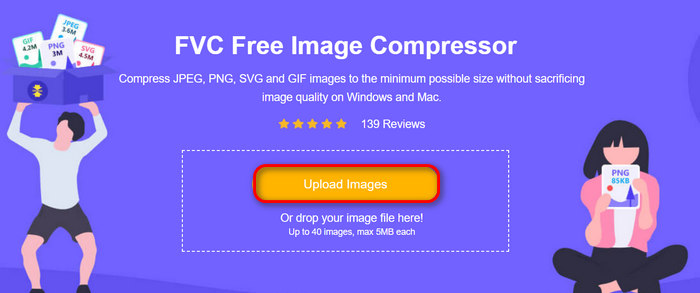
Korak 2. Nakon toga kliknite Upload Images kako biste uvezli slike koje želite komprimirati za web. Imajte na umu da će ovaj alat automatski komprimirati vaše fotografije čim ih odaberete i kliknete na otvaranje.
Korak 3. Nakon komprimiranja slika možete ih pregledati provjerom njihove nove veličine nakon kompresije. Na kraju kliknite Download All kako biste spremili svoju sliku.
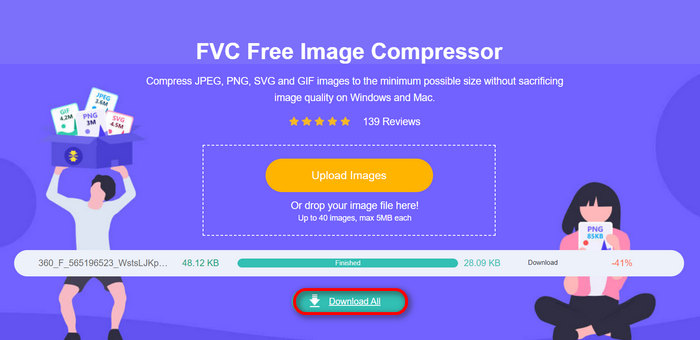
Ova vam metoda stvarno može pomoći u komprimiranju fotografija za e-poštu bez podnošenja složenih koraka i pretplatničkih naknada. Štoviše, njegovo jednostavno i intuitivno sučelje čini ga idealnim alatom za sve razine korisnika. Dakle, ako želite optimizirati svoje fotografije za korištenje e-poštom, isprobajte ovu metodu sada.
Dio 4. Promjena veličine fotografija za e-poštu na određenu veličinu
Ako želite promijeniti veličinu fotografija za e-poštu na određenu veličinu, možete isprobati alat IMGonline. Ovaj alat za kompresiju slike omogućuje vam promjenu veličine slike na veličinu po vašem izboru. Evo kako to učiniti:
Korak 1. Na njihovoj web‑stranici kliknite gumb Choose File kako biste dodali fotografiju koju želite komprimirati.

Korak 2. Zatim podesite postavke za JPEG kompresiju datoteke. Unesite željenu veličinu u KB ili MB, ovisno o vašem odabiru.

Korak 3. U izborniku Size Reducing in Megapixel odaberite koliko želite komprimirati svoju fotografiju ili kako želite ograničiti stupanj kompresije fotografije.
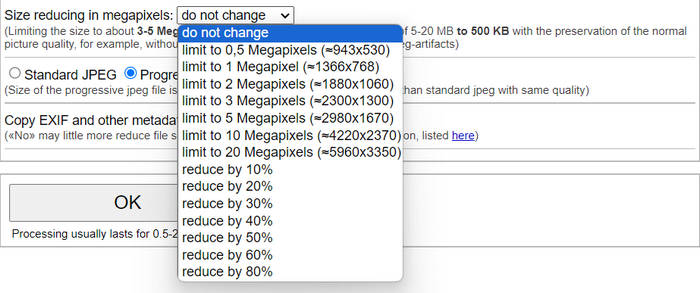
Korak 4. Nakon toga odaberite između Standard JPG ili Progressive JPG.

Korak 5. Kada završite, samo kliknite gumb OK.
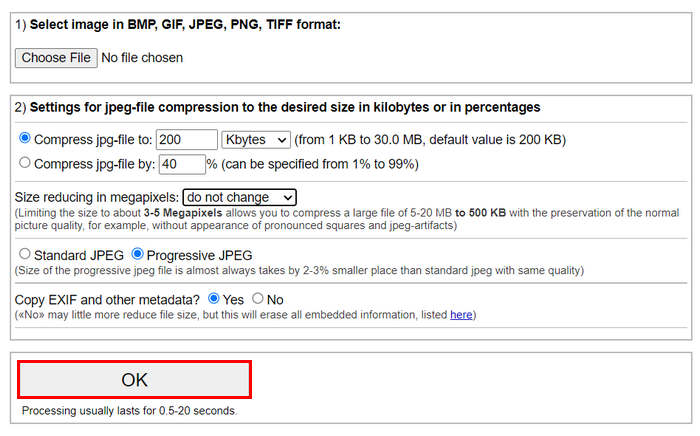
Vezano uz odabir između standardnog JPG-a i progresivnog JPG-a, imajte na umu da je veličina progresivne jpeg datoteke uvijek za 2-3% manje mjesta od standardne jpeg iste kvalitete.
Dio 5. Često postavljana pitanja o komprimiranju fotografija za e-poštu
Koju veličinu trebam promijeniti za svoje fotografije za e-poštu?
Kada je riječ o idealnoj veličini za slanje fotografija e-poštom, iako nema ograničenja, općenito se preporučuje promijeniti veličinu fotografija na najviše 1024x768 piksela. Također, održavanje veličine slike ispod 1 MB pomaže u izbjegavanju problema s ograničenjima privitaka i olakšava primateljima preuzimanje i pregled slika.
Kako komprimirati slike za Gmail?
Kompresija slika za Gmail može se obaviti na razne načine. Jedan od najjednostavnijih je korištenje mrežnih alata za kompresiju, poput FVC besplatnog alata za kompresiju slika. Da biste ga koristili, dovoljno je prenijeti slikovne datoteke, a alat će ih automatski komprimirati.
Koja je vrsta slike najbolja za e-poštu?
Najbolje vrste slikovnih datoteka za e‑poštu su JPEG i PNG. JPEG se široko koristi zbog dobrog stupnja kompresije i ravnoteže između veličine datoteke i kvalitete, što ga čini idealnim za fotografije i slike s mnogo boja. PNG se preferira za slike kojima je potrebna prozirnost ili koje sadrže tekst, logotipe ili grafike s oštrim rubovima, jer zadržava veću kvalitetu tih elemenata, iako veličina datoteke može biti veća u usporedbi s JPEG‑om.
Zaključak
Vrlo je važno znati kako komprimirati fotografije za e‑poštu kako biste izbjegli sporo učitavanje, neuspjelu isporuku i ograničenja veličine privitaka. Slijedeći metode koje su detaljno opisane u ovom članku, možete osigurati da su vaši foto‑privici lako upravljivi te brzi za slanje i primanje.
sta cekas Počnite optimizirati svoje privitke e-pošte danas na ova 3 jednostavna načina.
-
 Previše komprimirana fotografija: Evo kako ih jednostavno popraviti
 Pitate se što učiniti kada je vaša slika previše komprimirana? Pročitajte ovaj članak i saznajte zašto dolazi do ovog problema sa slikom te naučite 2 metode kako ih riješiti.
-
 Promjena veličine slike na 100 KB: 3 najbolja načina za učinkovito sažimanje
 Tražite alat koji će vam pomoći promijeniti veličinu slike na 100 KB? Pročitajte ovaj članak i naučite 3 metode o tome kako možete smanjiti svoje slike na željenu veličinu datoteke.
-
 Kako komprimirati slike u Wordu [Windows i Mac]
 Pitate se kako možete iskoristiti svoj Word za kompresiju slika? Ovaj će vas vodič naučiti kako sažimati slike u Wordu radi besprijekorne kompresije.
