


 Video Converter Ultimate
 Snimač zaslona
 Video popravak
Top 5 nevjerojatnih aplikacija za promjenu veličine fotografija koje morate isprobati
Drugim ljudima je teško promijeniti veličinu fotografije jer ne mogu pronaći alat koji može komprimirati bez gubitka kvalitete. Mnogi ljudi mijenjaju veličinu svojih fotografija kako bi poboljšali kvalitetu svojih slika. Iako promjena veličine slike utječe na kvalitetu, to je najbolji izbor ako nemaš dovoljno prostora za pohranu na svom uređaju. Osim toga, promjena veličine slike također je odličan izbor za poboljšavanje zamućene slike. Dobra vijest je da postoje aplikacije na internetu, izvan mreže, za Android i za iPhone koje mogu promijeniti veličinu tvoje slike bez gubitka kvalitete. Stoga pročitaj ovaj članak do kraja kako bi saznao pet najboljih aplikacija za promjenu veličine fotografija.

1. dio. Aplikacija Photo Resizer besplatna online
Mnogi ljudi žele koristiti mrežni alat za promjenu veličine fotografija jer neće zahtijevati preuzimanje bilo čega na svoj uređaj. Internetski alat najbolji je izbor ako želite uštedjeti prostor za pohranu na svom uređaju. Također, online aplikacije su često besplatne za korištenje, baš kao i alat koji mnogi korisnici preporučuju, a to je FVC Free Image Upscaler.
FVC Free Image Upscaler je internetska aplikacija za promjenu veličine kojoj možeš pristupiti u svim web-preglednicima, uključujući Google, Firefox i Safari. Ova izvanredna aplikacija također može povećati tvoju sliku 2x, 4x, 6x ili 8x. Osim toga, podržava gotovo sve formate slika, poput PNG, JPG, JPEG i BMP. Ono što je još bolje kod ovog alata jest njegov intuitivan korisnički interfejs, zbog čega je prikladan i za početnike. Nadalje, FVC Free Image Upscaler koristi tehnologiju umjetne inteligencije (AI) koja automatski prepoznaje zamućene dijelove tvoje slike i odmah ih poboljšava. Osim povećavanja slike odabirom željenog stupnja uvećanja, ovaj je alat poznat po svojim AI-sposobnostima poboljšavanja. I budući da je riječ o internetskoj aplikaciji, ne trebaš ništa preuzimati na svoj uređaj, što ti omogućuje uštedu prostora za pohranu. Pa što još čekaš? Posjeti ovu najbolju besplatnu aplikaciju za promjenu veličine fotografija već sada.
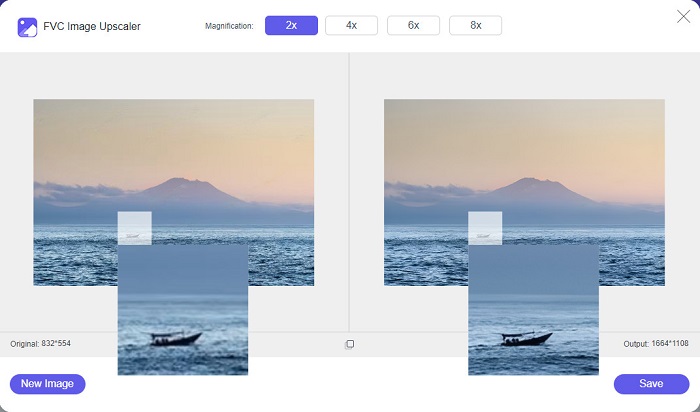
Pros
- Ima brz proces povećanja veličine.
- Ne zahtijeva da se prijavite za račun.
- Ima softversko sučelje jednostavno za korištenje.
- Možete mu pristupiti na svom Windows ili Mac uređaju.
Protiv
- To je alat ovisan o internetu.
Dio 2. Najbolja aplikacija za promjenu veličine fotografija za vaše računalo
Možete koristiti mnoge aplikacije na računalu ako tražite alat za promjenu veličine ili povećanje veličine slike. Međutim, nisu sve aplikacije koje se mogu preuzeti besplatne za korištenje. Softverske aplikacije za vaše računalo često nisu besplatne. Srećom, pronašli smo aplikaciju za vaše računalo koju možete besplatno preuzeti. Pročitajte ovaj odjeljak kako biste saznali više o ovoj najboljoj besplatnoj aplikaciji za promjenu veličine fotografija za vaše računalo sa sustavom Windows.
PNGOUTWin je izvanmrežna aplikacija za promjenu veličine fotografija koju možeš besplatno preuzeti na svoje Windows računalo. Ova aplikacija za promjenu veličine fotografija podržava standardne formate slika, poput PNG i JPG. Štoviše, automatski mijenja veličinu fotografije nakon što preneseš sliku koju želiš komprimirati. Iako je jednostavna za korištenje, njezine je funkcije teže pronaći i razumjeti. No nakon više korištenja sigurno ćeš se priviknuti na ovaj alat. Ima mogućnost serijske promjene veličine, što ti omogućuje da istodobno promijeniš veličinu više slika i spremiš ih u jednu mapu.
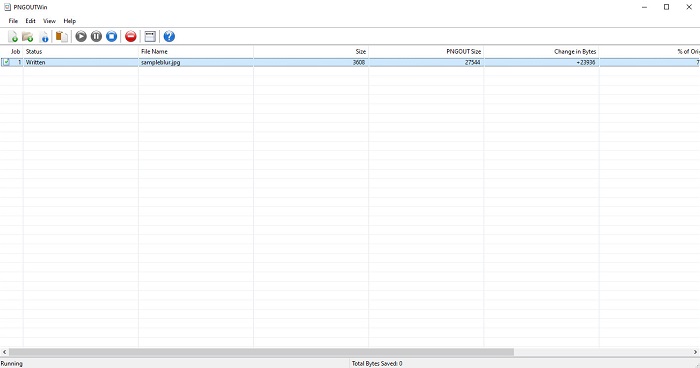
Pros
- Besplatno je za preuzimanje.
- Siguran je i jednostavan za korištenje.
- Nudi proces skupnog povećanja veličine.
Protiv
- Dostupno samo na Windows uređajima.
- Ne možete pregledati svoju povećanu sliku.
Dio 3. Najbolja aplikacija za promjenu veličine fotografija na Androidu
Danas mnogi ljudi koriste Android telefone. A ako u svojoj galeriji imate sliku niske kvalitete, možda biste je trebali poboljšati aplikacijom za promjenu veličine fotografija. Srećom, postoji mnogo besplatnih aplikacija za promjenu veličine fotografija koje možete preuzeti na PlayStoreu kako biste poboljšali svoju sliku niske kvalitete.
Photo & Picture Resizer bit će prvi na popisu ako na Trgovini Play potražiš aplikacije za promjenu veličine fotografija. To je jedna od najboljih aplikacija za promjenu veličine slika koju možeš preuzeti na svoj Android uređaj. Nadalje, nudi serijski postupak povećavanja, pri čemu možeš istodobno komprimirati dvije ili više slika. Osim toga, možeš odabrati dimenziju iz gotovih predložaka i tako odrediti koju veličinu želiš za svoju sliku. Uz to, možeš promijeniti i veličinu datoteke te razlučivost svoje slike. Aplikacija Photo & Picture Resizer također može komprimirati tvoje videozapise. Nedostatak Photo & Picture Resizera jest to što moraš kupiti premium verziju aplikacije prije nego što dobiješ pristup njezinim posebnim funkcijama uređivanja.
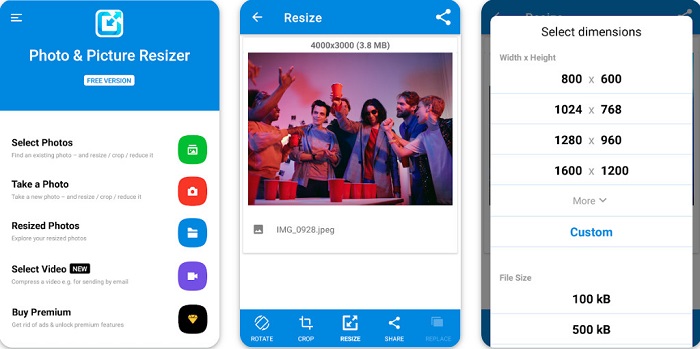
Pros
- Besplatno je i sigurno za preuzimanje.
- Ima brz proces promjene veličine.
- Svoj rezultat možete izvesti na druge platforme društvenih medija.
Protiv
- Kupite premium verziju za korištenje posebnih značajki.
- Sadrži dosadne oglase.
Dio 4. Najbolje aplikacije za promjenu veličine fotografija za iPhone
Mnogi ljudi ovih dana koriste iPhone, a jeste li znali? Na svoj iPhone možete preuzeti mnoge besplatne aplikacije za promjenu veličine fotografije kako biste promijenili veličinu ili poboljšali svoju sliku. A ako želite znati što je najbolje koristiti, pročitajte ovaj dio sveobuhvatno.
Remini
Remini je najbolja aplikacija za promjenu veličine fotografija za iPhone. Remini se besplatno preuzima iz App Storea i sigurna je za korištenje. Također koristi tehnologiju umjetne inteligencije (AI) koja automatski mijenja veličinu i poboljšava tvoju sliku. Osim toga, ova aplikacija ti omogućuje da vidiš promjene napravljene na tvojoj slici prije nego što je spremiš na uređaj. Također ti omogućuje izvoz rezultata na popularne društvene mreže poput Facebooka, Instagrama i TikToka. U Pro verziji dostupno je još više funkcija uređivanja koje možeš koristiti za poboljšavanje svoje slike. Dakle, ako želiš da tvoja slika izgleda oštro i jasno, ova aplikacija bi mogla biti upravo ono što tražiš.
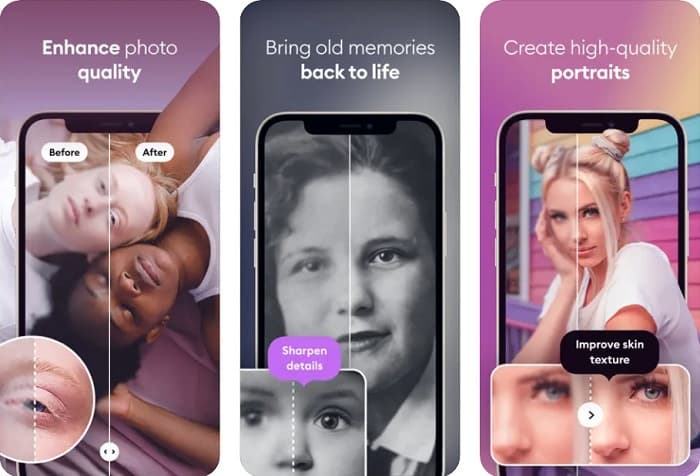
Pros
- Podržava slikovne formate za iPhone.
- Ima jednostavno korisničko sučelje.
- Može popraviti slike niske rezolucije.
Protiv
- Morate kupiti aplikaciju za poboljšanje slika.
Promjena veličine slike
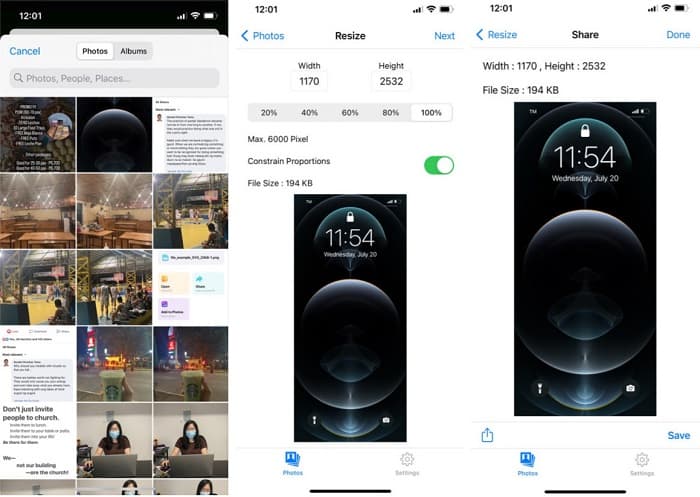
Još jedna izvrsna aplikacija za promjenu veličine slike je Image Resize. Image Resize također možeš besplatno preuzeti na svoj iPhone. Ova aplikacija ti omogućuje da promijeniš veličinu slike birajući postotak koji želiš za svoju sliku. Osim toga, uz ovu aplikaciju možeš prilagoditi širinu i visinu slike. Ono što je kod ove aplikacije posebno odlično jest brz postupak promjene veličine, što mnogim korisnicima djeluje vrlo praktično.
Pros
- Podržava HEIC, Exif i PNG slike.
- To je aplikacija prilagođena korisniku.
Protiv
- Može samo promijeniti veličinu okvira vaše slike, ali je ne poboljšava.
Povezano s:
Kako jednostavno poboljšati kvalitetu slike na Windowsu i Macu
Kako povećati rezoluciju slike [5 načina za poboljšanje]
Dio 5. Često postavljana pitanja o Best Photo Resizer App
Mogu li promijeniti veličinu fotografije bez gubitka kvalitete?
Promjena veličine slike ne znači nužno da će uništiti kvalitetu slike. Iako utječe na veličinu vaše slike, aplikacije većinu vremena mogu promijeniti veličinu slike bez gubitka kvalitete.
Mogu li promijeniti veličinu slike koristeći Adobe Photoshop?
Da. Adobe Photoshop je izvanredna aplikacija za uređivanje fotografija koja ima funkciju promjene veličine slike. Da bi to učinio, otvori Adobe Photoshop, odaberi sliku kojoj želiš promijeniti veličinu, a zatim idi na glavnu traku izbornika > odaberi Image (Slika) > Image Size (Veličina slike) kako bi otvorio dijaloški okvir Image Size i podesio veličinu svoje slike.
Koje formate slika podržava Adobe Photoshop?
Adobe Photoshop podržava gotovo sve poznate formate slika, kao što su JPG, JPEG, PNG, GIF, TIFF itd.
Zaključak
Sada kada znaš koja je najbolja aplikacija za promjenu veličine fotografija, možeš odabrati onu koja ti najviše odgovara. Postoje različite aplikacije za online korištenje, izvanmrežne, za Android i za iPhone, a izbor ovisi o tome koji uređaj koristiš. No ako ne želiš ništa preuzimati na svoj uređaj, odmah koristi FVC Free Image Upscaler.
-
 Učinite iPhone razlučivost fotografija boljom s vrhunskim poboljšačima
 Želite li poboljšati rezoluciju fotografija iPhonea? Pa, u ovom članku pokrivamo najbolje alate koje možete koristiti i druge trikove koje morate znati!
-
 Obnova starih fotografija online i offline [Jednostavni koraci]
 Želite obnoviti staru fotografiju? Uz ove alate, znat ćete postupak restauracije starih fotografija. Pročitajte ovaj post kako biste naučili najjednostavnije metode.
-
 7 najboljih poboljšivača piksela za sve web preglednike koje morate koristiti
 Ako želite znati koje najbolje pojačivače piksela možete koristiti, bolje pogledajte ovaj post. Ovaj članak navodi sedam najboljih pojačivača foto piksela za sve web preglednike.
