


 Video Converter Ultimate
 Snimač zaslona
 Video popravak
Jednostavni koraci kako promijeniti veličinu fotografije za Facebook
Mnogi milenijalci i odrasli koriste Facebook kao najpopularniju platformu društvenih mreža. Facebook je aplikacija na kojoj možete učitavati slike te ih dijeliti ili slati svojim prijateljima. A mnogi ljudi žele imati sliku odlične kvalitete za učitavanje na Facebook. Ako i vi želite učitati fotografije visoke rezolucije i visoke kvalitete, imamo alat koji će vam pomoći. Srećom, pronašli smo aplikacije za iPhone, Android i online, koje mogu brzo i učinkovito promijeniti veličinu slika. Zato se udobno smjestite, jer ćete u ovom članku brzo naučiti kako promijeniti veličinu fotografija za Facebook.

Dio 1. Kako promijeniti veličinu fotografije na iPhoneu za Facebook
Ako koristite iPhone uređaj, aplikacije se mogu preuzeti na vašem AppStoreu da vam pomognu promijeniti veličinu fotografije. Osim toga, postoje besplatne aplikacije koje možete koristiti na svom iPhone uređaju. Međutim, ne proizvode sve aplikacije visokokvalitetne rezultate. Zato smo tražili najbolju aplikaciju za trenutnu promjenu veličine slika.
Remini je najpopularnija aplikacija za promjenu veličine fotografija koju možete preuzeti na svoj iPhone. Ova aplikacija ima korisničko sučelje prilagođeno korisniku jer su joj funkcije intuitivne. Osim toga, Remini može poboljšati vašu sliku koristeći svoj AI (umjetna inteligencija) poboljšivač, koji automatski mijenja veličinu slike i poboljšava je u najboljoj mogućoj kvaliteti. I ne samo to – pomoću ove aplikacije možete poboljšati i videozapis zahvaljujući funkciji za poboljšanje videa. Nadalje, podržava sve uobičajene formate slika, poput JPEG, JPG i PNG. Ono što je također izvrsno kod ove aplikacije jest to da je možete besplatno preuzeti s App Storea. Dakle, ako želite koristiti ovu aplikaciju za promjenu veličine fotografije za Facebook naslovnu sliku, slijedite postupke u nastavku.
Kako promijeniti veličinu slike pomoću aplikacije Remini:
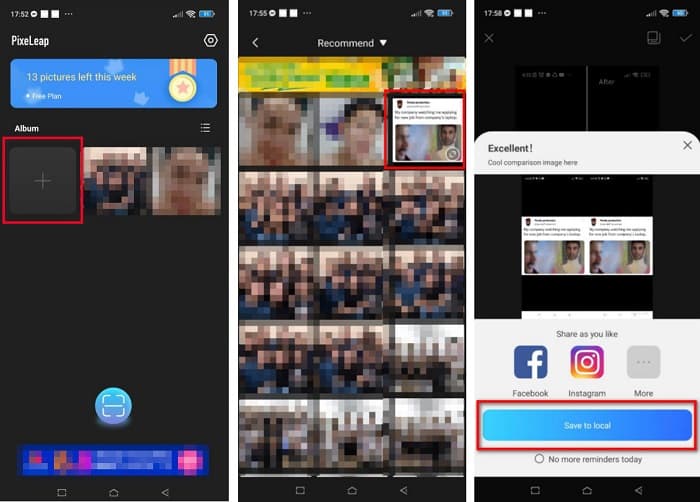
Korak 1. Otvorite App Store, potražite aplikaciju Remini i preuzmite je na svoj uređaj. Nakon instalacije aplikacije, otvorite je.
Korak 2. Nakon otvaranja aplikacije, vidjet ćete svoje fotografije te odaberite sliku koju želite poboljšati. Zatim dodirnite gumb Enhance kako biste prešli na sljedeće sučelje.
Korak 3. Prije prelaska na sljedeće sučelje, najprije morate pogledati oglas. Zatim ćete vidjeti prikaz prije i poslije svoje slike. Dodirnite ikonu preuzimanja u gornjem desnom kutu zaslona.
Dio 2. Kako promijeniti veličinu fotografije na Androidu za Facebook
Jeste li korisnik Androida? Ne brini; također ćemo predstaviti aplikaciju koju možete koristiti za promjenu veličine slike. Iako postoji mnogo aplikacija koje možete preuzeti s PlayStorea, mi smo odabrali najbolju među njima kako bismo vam predstavili. U nastavku pročitajte kako promijeniti veličinu slika za Facebook na Androidu.
AI Photo Enhancer & PixelLeap je još jedna izvrsna aplikacija koja će vam pomoći promijeniti veličinu slike radi bolje kvalitete. Ovaj alat za promjenu veličine fotografija možete besplatno preuzeti iz Play Storea i siguran je za korištenje. Osim toga, ako želite poboljšati ili obnoviti staru fotografiju, tu je AI Photo Enhancer & PixelLeap. Zahvaljujući AI tehnologiji, dovoljno je da učitate sliku kojoj želite promijeniti veličinu, a aplikacija će je automatski poboljšati. Nadalje, ima jednostavno korisničko sučelje, zbog čega je vrlo dobra aplikacija za početnike. Također ima i druge funkcije za uređivanje koje možete koristiti, kao što su ispravljanje (rectify), koloriranje (colorize), animiranje (animate), dodavanje izraza (emote) i posvjetljivanje (brighten) slike. Međutim, problem ove aplikacije je što sadrži mnogo oglasa koji traju dugo i ostavlja vodeni žig na gotovoj slici. Ipak, ova aplikacija je rješenje ako želite promijeniti veličinu fotografije za Facebook bez obrezivanja.
Kako promijeniti veličinu slike pomoću AI Photo Enhancer & PixelLeap:
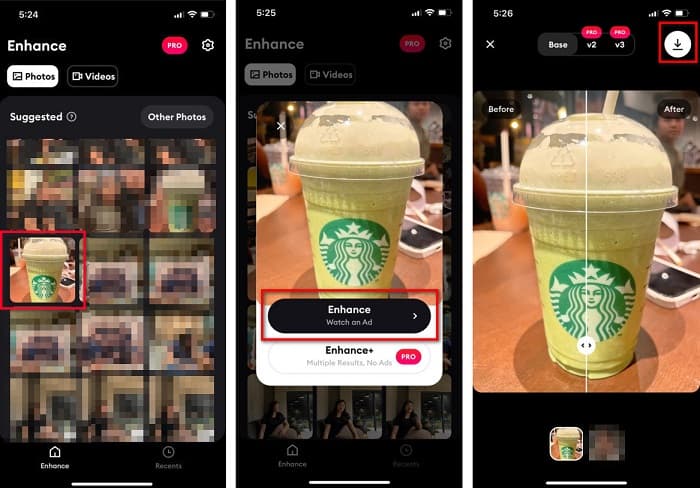
Korak 1. Instalirajte AI Photo Enhancer & PixelLeap na svoj Android uređaj.
Korak 2. Zatim, na glavnom korisničkom sučelju aplikacije, dodirnite kutiju sa znakom + kako biste učitali sliku kojoj želite promijeniti veličinu. Nakon toga, aplikacija će vas natjerati da pogledate oglas prije prelaska na sljedeće sučelje.
Korak 3. Potražite sliku kojoj želite promijeniti veličinu, a zatim je dodirnite. Nakon odabira slike, dodirnite opciju Enhance. Tada će aplikacija automatski poboljšati vašu sliku. Dodirnite Save to local kako biste preuzeli svoj rezultat.
Dio 3. Kako promijeniti veličinu fotografije na mreži za Facebook
Prednost korištenja online aplikacije je u tome što vam omogućuje uštedu prostora na vašem uređaju. Osim toga, postoji mnogo besplatnih web aplikacija koje možete koristiti u svom pregledniku. Dakle, ako želite koristiti online aplikaciju za promjenu veličine slike za prijenos na Facebook, pokazat ćemo vam kako promijeniti veličinu fotografije za Facebook.
FVC Free Image Upscaler je najbolji mrežni alat za promjenu veličine fotografija koji vam omogućuje povećanje slike do 2x, 4x, 6x i 8x. Zahvaljujući jednostavnom korisničkom sučelju, početnici lako mogu promijeniti veličinu slike. Štoviše, podržava sve formate slika, uključujući JPEG, JPG, PNG i BMP. Ono što je još impresivnije kod ove aplikacije jest to da koristi AI tehnologiju koja automatski otkriva dijelove slike niske rezolucije i zatim ih poboljšava. Osim toga, može u potpunosti i precizno popraviti izgubljene piksele, teksture boja i druge detalje. Također je dostupna u svim web preglednicima, uključujući Google Chrome, Firefox i Safari. Stoga, ako želite koristiti FVC Free Image Upscaler za promjenu veličine ili poboljšanje svoje slike, slijedite jednostavne korake u nastavku.
Kako promijeniti veličinu slike za Facebook koristeći FVC Free Image Upscaler:
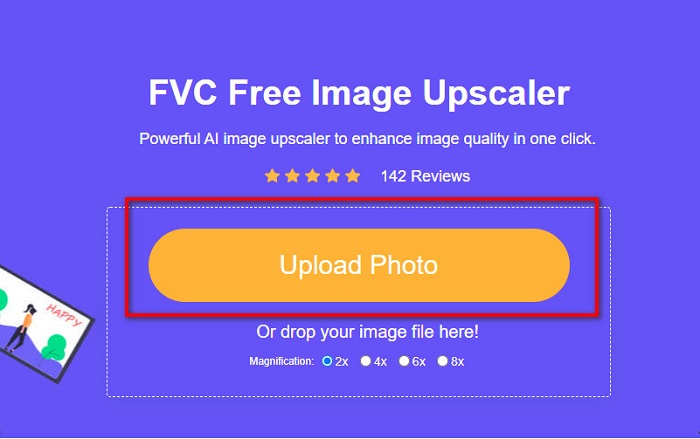
Korak 1. Otvorite preglednik i u polje za pretraživanje upišite FVC Free Image Upscaler. Možete kliknuti na priloženu poveznicu kako biste bili preusmjereni na web-stranicu. Kliknite Upload Photo kako biste pokrenuli aplikaciju.
Korak 2. Na glavnom korisničkom sučelju softvera kliknite Upload Photo kako biste uvezli sliku kojoj želite promijeniti veličinu.
Korak 3. Na sljedećem sučelju odaberite željenu razinu povećanja za izlaznu sliku. Možete odabrati između 2x, 4x, 6x i 8x povećanja. Zatim prijeđite na sljedeći korak.
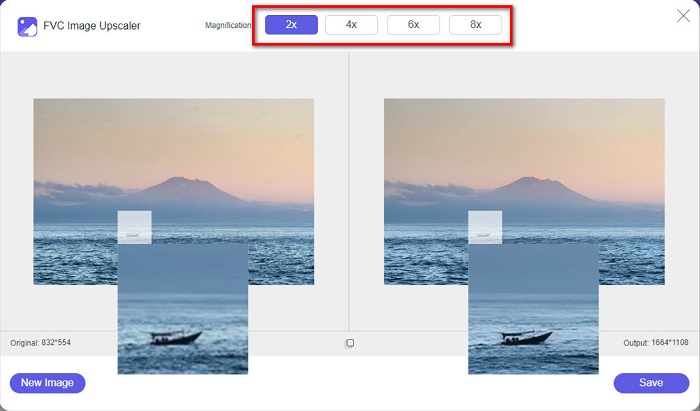
Korak 4. Na kraju označite gumb Save kako biste spremili rezultat na svoje računalo. Vidjet ćete razliku između izvorne datoteke i slike kojoj je promijenjena veličina. Za samo nekoliko sekundi vaša slika bit će spremljena.
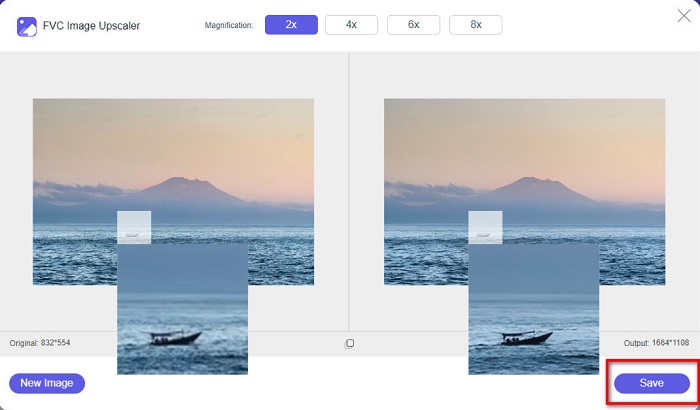
I to je to! Lako kao ABC, vaša je slika sada poboljšana i promijenjena joj je veličina.
Povezano s:
Kako izoštriti sliku na internetu i izvan mreže na 4 jednostavna načina
Kako promijeniti veličinu slike – Adobe promjena veličine slike [online i izvan mreže]
Dio 4. Često postavljana pitanja o tome kako promijeniti veličinu fotografije za Facebook
Koji je najbolji omjer fotografije za Facebook?
Što se tiče omjera fotografije, najbolje je koristiti okomitu sliku omjera 4:5 i 1200 x 1500 px. A ako želite kvadratnu sliku, rezolucija mora biti 1080 x 1080 px.
Kolika je veličina objave na Facebooku?
Preporučena veličina slike za Facebook post je 1200 x 630 piksela kako bi se izbjegla pikselizacija i brže učitavanje.
Koji je najbolji format slike za učitavanje na Facebook?
Najbolji i preporučeni format slike za upload na Facebook je JPG format. Najbolje je učitati JPG format s RGB bojom manjom od 15 MB.
Zaključak
Imamo gore navedena rješenja ako želite promijeniti veličinu fotografije za Facebook. Pažljivim čitanjem ovog članka, nadamo se da ste naučili sve što je potrebno učiniti. Sigurno možete promijeniti veličinu bilo koje slike koju želite koristeći iPhone, Android ili mrežne aplikacije. No za još bolje rezultate koristite FVC Free Image Upscaler, koji će vam ujedno omogućiti i uštedu prostora na uređaju.
-
 Najbolja aplikacija za promjenu veličine fotografija online, offline, Android i iPhone
 Koje su najbolje aplikacije za promjenu veličine fotografija? Kliknite stranicu kako biste saznali pet najboljih najmoćnijih aplikacija za promjenu veličine fotografija koje možete koristiti za poboljšanje ili promjenu veličine datoteke.
-
 Kako promijeniti veličinu slike - Adobe Resize Image [online i offline]
 Ako tražite Adobe promjenu veličine slike, onda imamo rješenje za vas. Detaljno pogledajte ovaj post kako biste naučili kako promijeniti veličinu slika pomoću programa Adobe na računalu.
-
 4 najbolja izvanmrežna i mrežna povećavača GIF-ova koja ne smijete propustiti
 Ovaj je post za vas ako tražite najbolje GIF-ove za povećanje. Naveli smo najuspješnije mrežne i izvanmrežne povećavače GIF-ova za vaše računalo.
