


 Video Converter Ultimate
 Snimač zaslona
 Video popravak
Naučite načine pretvaranja MTV datoteka u MOV format bez gubitka kvalitete
MTV je zamjena za MP4 na kineskim prijenosnim uređajima za reprodukciju medija. Iako ovaj format izgleda isto kao .amv, kada poželite prenijeti datoteku na uređaj kao što je iOS, iPod ili iPad i Mac, .mtv datoteka će se dodati, ali je nećete moći otvoriti u zadanom medijskom reproduktoru. Želite znati kako to riješiti? Onda pročitajte ovaj članak koji objašnjava konvertere koje možete koristiti da biste pretvorili MTV u MOV i reproducirali ga na iOS‑u, iPodu ili iPadu te Macu.

Dio 1. Uvod za MTV i MOV
MTV formati se mogu reproducirati s MP4 playerima stvorenim u Kini. Ovaj format datoteke podržava reprodukciju videa na jeftinom MP4 playeru koji je napravio kineski. Iako se radi o MP4 Playeru koji još uvijek reproducira videozapise na datotečnoj ekstenziji .mp4, ovdje nije podržan. Pogotovo ako prenesete datoteku na neke Apple proizvode, format se ne može reproducirati zbog kompatibilnosti. Također, ovlašćuje proizvođača da stvori više igrača uz manje troškove licencnih honorara.
MOV je jedan od zadanih medijskih formata razvoja koje je napravio Apple. Ovaj medijski format jedan je od najboljih izbora ako želite detaljno uređivati videozapise. Također, ovaj format koristi MPEG-4 koder kako bi se datoteka smanjila bez narušavanja kvalitete. Što se tiče kvalitete, kompatibilnosti i kompresije, MOV je bolji od MTV-a u svim navedenim značajkama.
MTV i MOV su spremnici za medijske datoteke ili podatke kao što su video, audio i tekst. Ali MOV je puno podržan u svakom Apple uređaju. Dakle, ako želite prenijeti svoje MTV datoteke sa svog MP4 media playera na Mac, iOS, iPad ili iPod, prvo morate pretvoriti datoteku. Želite znati kako pretvoriti MTV datoteke u MOV format? Bez ikakvih odgađanja, prijeđimo na MTV pretvarače koje možete koristiti dostupnim na PC-u, Mac-u i na mreži.
Dio 2. Brz i jednostavan način za pretvaranje MTV-a u MOV na Macu
FVC Video Converter Ultimate je izvanredan konverter koji koriste milijuni korisnika kako bi svoje datoteke pretvorili u kompatibilan format. Ovaj lagan i intuitivan softver može vašu konverziju učiniti nevjerojatno brzom, bez gubitka datoteka. Također podržava hardversko ubrzanje kako bi poboljšao rad i performanse na vašem računalu. Štoviše, nudi i višenamjenski Toolbox koji se koristi za uređivanje, spajanje, pojačavanje zvuka, izradu 3D‑a i GIF‑ova i još mnogo toga. Želite znati koje su značajke ovog alata? Onda pročitajte ovaj popis ključnih funkcija koje dobivate nakon preuzimanja.

FVC Video Converter Ultimate
5.689.200+ preuzimanja- Pretvorite MKV u MOV, AVI, MP4, MKV i 200+ formata bez gubitka kvalitete.
- Istodobno pretvoriti više datoteka u različitim formatima.
- Napredne značajke za uređivanje, spajanje, izrezivanje, pojačavanje i još mnogo toga.
- Pretvorite svoj format 30x brže uz tehnologiju hardverskog ubrzanja.
- Dostupno u svim operativnim sustavima kao što su Windows ili macOS.
Besplatno preuzimanjeZa Windows 7 ili novijiSigurno preuzimanje
Besplatno preuzimanjeZa MacOS 10.7 ili novijiSigurno preuzimanje
A sada kada znamo ključne značajke MKTV pretvarača, nastavimo sada s pretvorbom MKV u MOV čitajući i slijedeći korake. Nema potrebe za brigom jer će vam svi napisani koraci jamčiti uspjeh u pretvorbi.
Korak 1. Kliknite gumb za preuzimanje i počnite ga preuzimati na svoj Mac. Kada je preuzimanje završeno, kliknite datoteku za instalaciju, a zatim kliknite Start Now da biste pokrenuli softver.
Besplatno preuzimanjeZa Windows 7 ili novijiSigurno preuzimanje
Besplatno preuzimanjeZa MacOS 10.7 ili novijiSigurno preuzimanje
Korak 2. Kada se alat pokrene, vrijeme je da dodate datoteku klikom na gumb +. Pronađite .mtv datoteku u mapi koja će se prikazati na zaslonu, zatim kliknite Open.
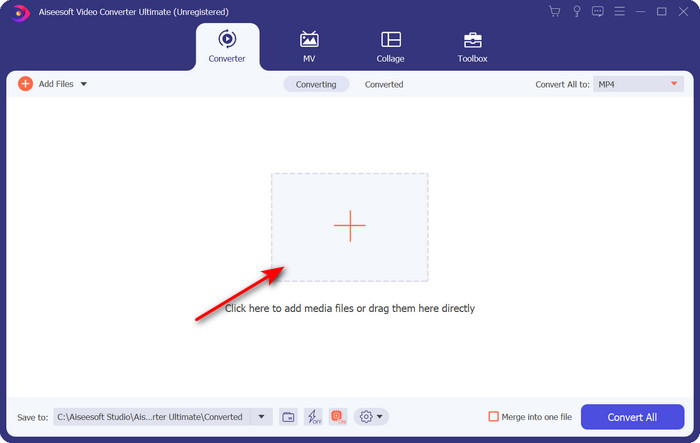
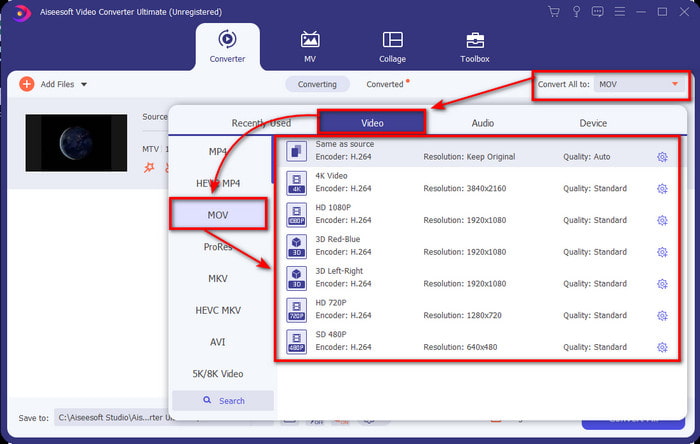
Korak 3. Klikom na Convert All to sada možete pronaći format MOV.
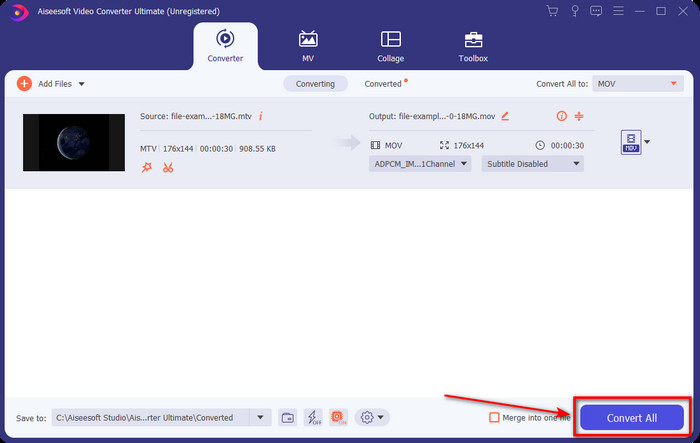
Korak 4. Kliknite Convert All kako biste započeli proces pretvaranja MTV datoteka u MOV format.
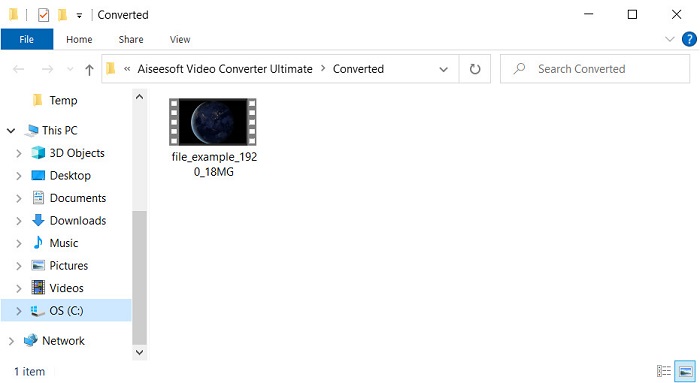
Korak 5. Pretvaranje datoteka će potrajati nešto vremena; kada je gotovo, na zaslonu će se pojaviti mapa s novopretvorenim .mov formatom. Ako želite pogledati datoteku, kliknite je.
Dio 3. Online i besplatan način za pretvaranje MTV-a u MOV
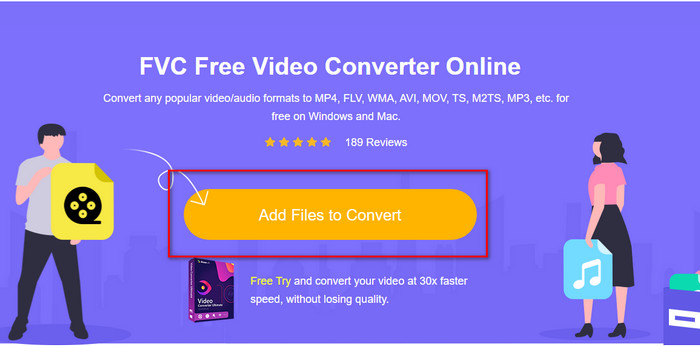
Ne želite preuzimati MTV konverter na svoj uređaj jer želite problem riješiti online? Ako je tako, upotrijebite FVC Free Video Converter Online. Za razliku od prvog spomenutog softvera, ovaj alat možete koristiti u svom omiljenom pregledniku bez preuzimanja. Također, ovdje možete konvertirati bez ograničenja veličine datoteke, bilo kada i bilo gdje u svijetu. Jedan od nedostataka ovog alata je što ovisi o internetu; beskoristan je ako nemate internetsku vezu. No ako imate pristup internetu u svom području i nemate vremena preuzeti gore navedeni softver, slijedite postupak kako biste pretvorili MKV datoteke u MOV.
Korak 1. Ako želite koristiti ovaj web‑alat, kliknite dani link.
Korak 2. Nakon klika na link, otvorit će se web‑stranica; kliknite Add Files to Convert i na zaslonu će se pojaviti prozor s mapama. Pronađite datoteku u mapi, zatim kliknite Open kako biste je učitali.
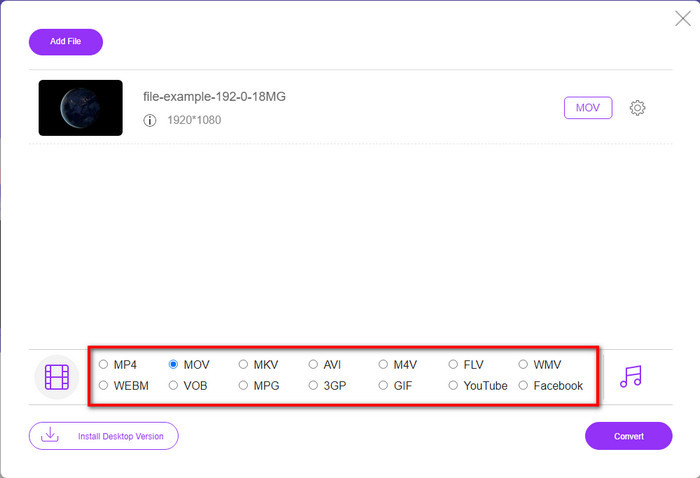
Korak 3. Kada je datoteka učitana, odaberite format MOV dostupan na popisu ispod.
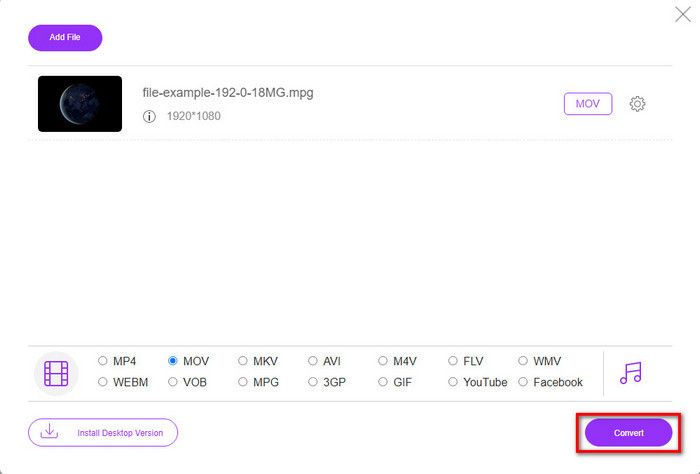
Korak 4. Pritisnite Convert kako bi proces započeo.
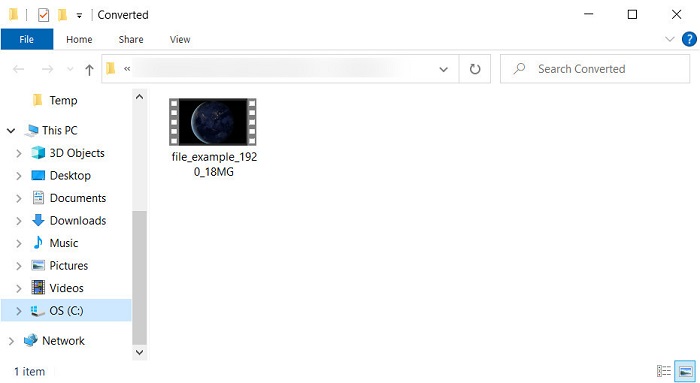
Korak 5. Pojavit će se mapa u kojoj je spremljena MOV datoteka.
Pros
- Dostupno u svim preglednicima za korištenje.
- Pretvornik i sučelje prilagođen korisniku.
- Nema dosadnih oglasa ili prijave za korištenje.
Protiv
- Za korištenje je potreban internet.
- Dostupan je srednji opseg pretvarača
Dio 4. Često postavljana pitanja o MTV i MOV pretvorbi
Mogu li pretvoriti MTV datoteke u AVI?
Naravno, možete pretvoriti i svoje MTV datoteke u AVI, želite znati kako to učiniti? U tom slučaju, otkrijmo tri metode koje možete koristiti za pretvaranje MTV u AVI.
Podržava li Quicktime Player datoteku .mtv?
QuickTime je izvorni medijski reproduktor na svim Appleovim uređajima, ali ovaj reproduktor ne podržava .mtv datoteke. No možete pročitati ovaj članak i upoznati se s zamjenom za QuickTime koju možete koristiti za reprodukciju .mtv datoteka.
Zašto su MTV videi mutni?
Jedan od razloga zašto su videozapisi u ovom formatu zamućeni je taj što podržava nisku razlučivost. Da biste uštedjeli dio prostora i prenijeli mnoge medijske datoteke na kineske prijenosne MP4 playere i smanjili opterećenje prilikom obrade.
Zaključak
Sada kada znamo kako pretvoriti našu .mtv datoteku i kasnije je poslati na naš Apple uređaj, vrijeme je za odabir. Koju god opciju odlučite koristiti, ona je među najboljima za pretvaranje datoteka online ili offline. Dakle, ako želite imati profesionalni konverter koji pruža vrhunsku kvalitetu i snažne mogućnosti pretvaranja, odaberite FVC Video Converter Ultimate. Ali ako ne želite preuzimati softver na svoj uređaj i trebate učinkovit i efektivan online konverter, tada je FVC Free Video Converter Online pravi izbor.
-
 [Online i besplatno] 3 metode za pretvaranje MTV-a u AVI bez problema
 Jeste li ikada čuli za video format kao što je MTV? Budući da ne znate sve o ovom formatu i želite pretvoriti MTV video u AVI, pažljivo pročitajte ovaj članak kako biste saznali više o ovom problemu.
-
 Najbolji GIF pretvarač za pretvaranje animiranog GIF-a u MOV format [2025.]
 Pretvorite svoj GIF u MOV format na jednostavan način bez utjecaja na kvalitetu video datoteke. Sa koracima i različitim alatima.
-
 Kako pretvoriti AVI u MOV pomoću jednostavnih koraka i alata
 Želite li znati kako pretvoriti AVI u MOV koji se može igrati? Morate slijediti ovaj članak da biste znali kako to učiniti i savjete za uspješnu pretvorbu.
