


 Video Converter Ultimate
 Snimač zaslona
 Video popravak
Brz i jednostavan vodič o tome kako pretvoriti TRP u MOV
TRP format nije osobito čest za reprodukciju u media playerima ili uređivanje u programima za obradu videa. Neki su korisnici pokušali promijeniti .trp u .ts, .mpg, .mp4 i ponovno ih pokrenuti u media playeru. No mnogima taj pokušaj nije uspio; iako možete promijeniti ekstenziju, struktura datoteke ostaje ista. Kako biste izbjegli ovu pogrešku, zašto ne biste pokušali pretvoriti TRP u MOV format? Tako ćete doista riješiti problem. U nastavku ćete saznati što je TRP format i kako ga pretvoriti u MOV format koji se može normalno reproducirati.

Dio 1. Što su TRP i MOV
TRP je poznat po multipleksiranju digitalnih tokova za video i audio, a zatim ih sinkrono reproducira. Štoviše, ovaj se format često koristi za ispravljanje pogrešaka u svakom digitalnom video emitiranju ili DVB-u. Također, .trp koristi dva odvojena kodeka za kodiranje videa u H.263 ili H.264 i AC3 za audio. Nakon kodiranja, vizualno-audio datoteke pohranjene ovdje spremne su za emitiranje na cijelom webu bez ograničenja na daljinu. Iako format izgleda izvrsno, pohranjuje datoteke uz zadržavanje vrhunske kvalitete. Ipak, neki softver nije prikladan za ovaj format.
Naprotiv, MOV format preferira reprodukciju visokokvalitetnog videa i zvuka na svakom Quicktime playeru. Iako je format za Apple, i dalje možete reproducirati videozapis čak i ako nemate Mac ili iOS jer ovaj format podržava brojne multimedijske playere i uređivače.
Sada je idealno rješenje za ovaj TRP problem pretvoriti ga, posebno ako želite prenijeti datoteku na Mac ili iPhone, a zatim je reproducirati ili urediti kasnije. Bez ikakvih odgoda, prijeđimo na pretvarač koji idealno možete koristiti za pretvaranje TRP datoteka u MOV.
Dio 2. Kako pretvoriti TRP u MOV pomoću fenomenalnog softvera na Windows/Mac
Ovaj pretvarač TRP u MOV nalazi se na vrhu popisa jer je najbolji alat za pretvaranje vaših TRP datoteka, FVC Video Converter Ultimate. Savršen je alat ako želite najbrži i najjednostavniji način dekodiranja i kodiranja TRP datoteka. Osim kodiranja i dekodiranja, uz pomoć ovog softvera možete i uređivati video, spajati, rezati, obrezivati itd. Sve je to zahvaljujući korisnicima koji su vjerovali ovom alatu da im pretvori datoteke i kupili ga.
Pros
- Najbrži TRP pretvarač koji možete koristiti za pretvaranje TRP-a u MOV, AVI, MP4, MKV i mnoge druge.
- Nema ograničenja za pretvorbu, a skupna pretvorba dobro funkcionira.
- Dostupno za preuzimanje na svim PC ili Mac stolnim računalima.
- Napredne značajke nalaze se unutar ugrađenog Toolboxa.
Protiv
- Morate kupiti softver prije nego što ga upotrijebite.
- Potrebno je preuzeti datoteku na svoj pogon.
Bez ikakvih dodatnih objašnjenja, počnimo koristiti ovaj visoko preporučeni pretvarač slijedeći korake u nastavku.
Korak 1. Prije pokretanja programa, prvo ga preuzmite na disk, zatim instalirajte i kliknite Start Now kako biste otvorili program.
Besplatno preuzimanjeZa Windows 7 ili novijiSigurno preuzimanje
Besplatno preuzimanjeZa MacOS 10.7 ili novijiSigurno preuzimanje
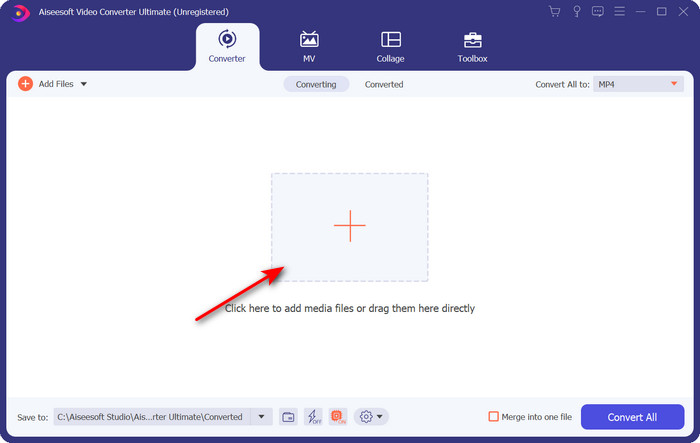
Korak 2. Kliknite gumb + u sredini sučelja softvera; na zaslonu će se pojaviti mapa, pronađite .trp datoteku i kliknite Open da biste je učitali.
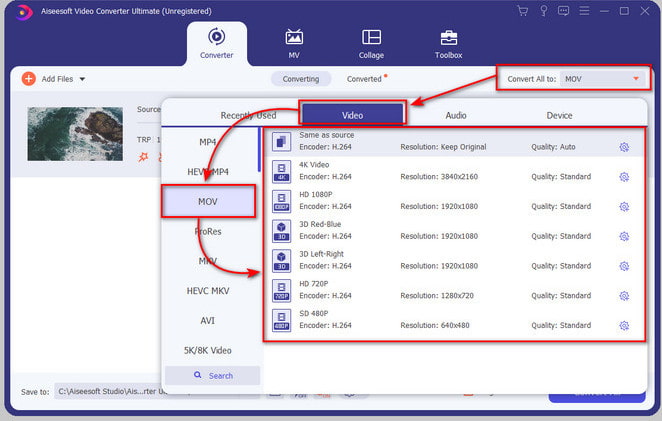
Korak 3. Kliknite Convert All to i pronađite format MOV, zatim odaberite željenu rezoluciju.
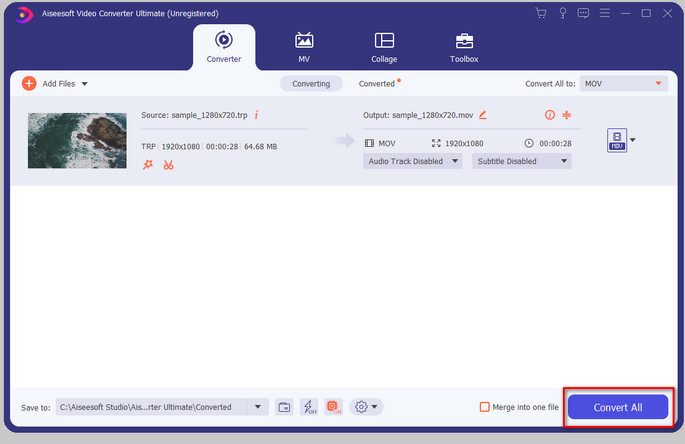
Korak 4. Kada ste spremni započeti pretvaranje formata u .mov, kliknite Convert All.
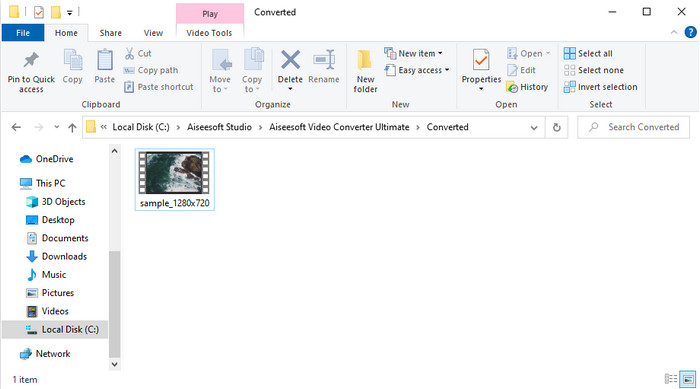
Korak 5. Pričekajte da se postupak dovrši, a zatim će se pojaviti nova mapa s datotekom u formatu koji ste upravo pretvorili. Za gledanje datoteke na Macu ili bilo kojem iOS uređaju, samo je pokrenite.
Dio 3. Kako besplatno pretvoriti TRP u MOV u svim internetskim preglednicima
Ne želite preuzimati softver kako biste promijenili TRP u MOV? Tada savjetujemo da koristite FVC Free Video Converter Online za pretvaranje datoteke izravno na webu. Za razliku od prvog alata predstavljenog gore, ovaj online pretvarač dostupan je putem preglednika. Naravno, siguran je od zlonamjernog softvera i na sučelju nema oglasa. No nedostatak ovog web alata je što ga ne možete koristiti bez internetske veze. Još jedan minus je što ovaj alat podržava prosječan broj formata u usporedbi s FVC Video Converter Ultimate. Osim toga, možete ga koristiti besplatno i bez ograničenja. Ako sada želite isprobati ovaj online pretvarač, prijeđite na korake u nastavku.
Pros
- Kompatibilan u svim tražilicama.
- Nema ograničenja za pretvaranje TRP u MOV, MP4, AVI itd.
- Nema dosadnih reklama na sučelju.
Protiv
- Ne možete izvesti skupnu konverziju kao ultimativni alat.
- Za pristup web alatu potreban je internet jer se radi o internetskom alatu.
Korak 1. Za pokretanje web alata kliknite ovaj link.
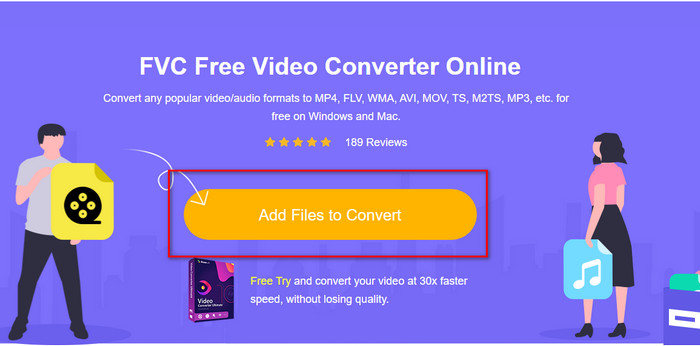
Korak 2. Kliknite Add Files to Convert, otvorit će se mapa, pronađite datoteku u mapi i pritisnite Open.
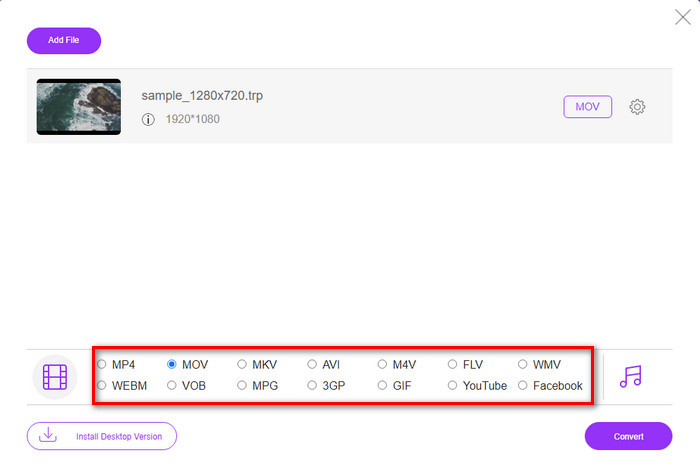
Korak 3. Odaberite MOV na donjem popisu ili odaberite bilo koji drugi format koji želite.
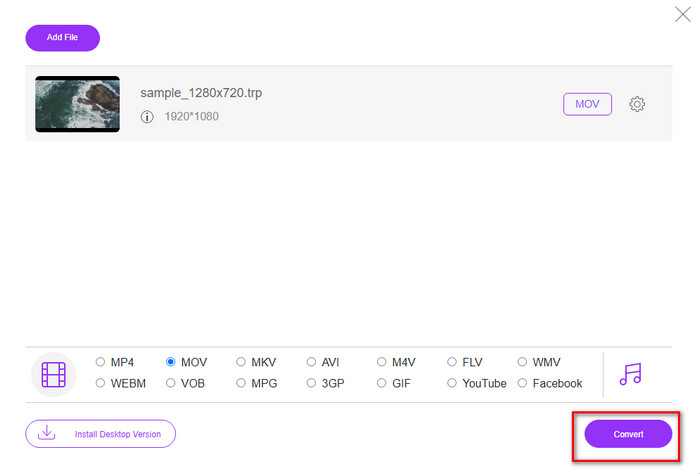
Korak 4. Na kraju, da biste pokrenuli pretvaranje datoteke, kliknite Convert.
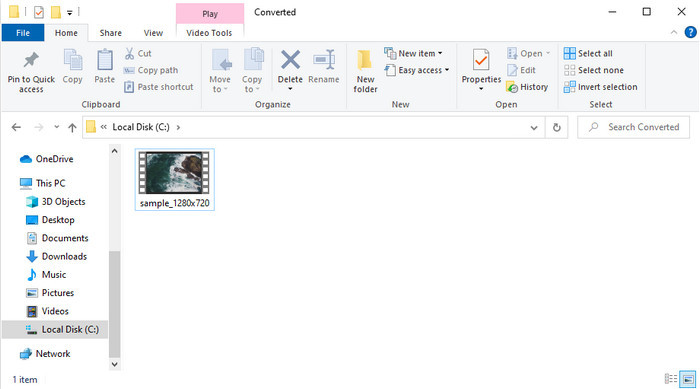
Korak 5. Kada je pretvorba završena, na zaslonu će se pojaviti mapa s datotekom.
Dio 4. Često postavljana pitanja o pretvorbi TRP u MOV
Mogu li spojiti .trp datoteke u jedan video?
Da, možete spojiti dva ili više .trp videa i preuzeti ih kao jednu datoteku. To je vrlo jednostavno ako koristite FVC Video Converter Ultimate. Želite naučiti kako? Onda kliknite ovu poveznicu i odvojite 5 minuta da naučite kako spojiti TRP datoteke ili druge videozapise poput MP4, MOV, AVI i još mnogo toga.
Koliko će trajati pretvaranje TRP-a u MOV?
Ovisi o tome koliko je dugačak video koji pretvarate, ili ako koristite web alat, to će ovisiti o brzini vašeg interneta. Postupak će se razlikovati ovisno o tome što koristite. Ipak, uspjeh je siguran ako koristite gore navedene pretvarače.
Mijenja li se veličina TRP datoteke nakon pretvorbe?
Veličina datoteke trebala bi se malo promijeniti, ali se ne bi smjela udvostručiti ili utrostručiti. Ako pak smatrate da su vaše pretvorene .trp datoteke prevelike, možete pročitati ovaj članak i saznati kako komprimirati TRP videa.
Zaključak
Za kraj, ako želite pretvoriti svoje TRP datoteke u MOV na webu, toplo preporučujemo da koristite FVC Free Video Converter Online. To je izvrstan online pretvarač koji će vam pomoći pretvoriti format u novi. No ako želite jednostavniji način pretvaranja datoteka i obraditi više njih odjednom (batch konverzija), tada koristite FVC Video Converter Ultimate. Ovaj alat nudi vrhunsku izlaznu kvalitetu, napredne funkcije i veliki izbor formata – doživite potpunu konverziju uz pomoć ova dva alata. Ne možete pogriješiti, koji god pretvarač odabrali.
-
 Najlakši vodič o tome kako pretvoriti TRP u AVI na Windows i Mac
 Možda niste upoznati s TRP video formatom i pitate se kako ćete pretvoriti TRP u AVI? Pročitajte ovaj članak nadalje da biste saznali pojedinosti koje se tiču problema.
-
 Izvrsne metode za pretvaranje VOB-a u MOV
 Online video preuzimanja su zgodna, ali što ako je video u VOB formatu, a vaš ga player'ne podržava? Ovaj post će vas naučiti kako pretvoriti VOB u MOV.
-
 Brzi i jednostavni savjeti za pretvaranje WMV u MOV [provjereno]
 Želite li znati koji su najbolji i jednostavni za korištenje pretvarači koji pretvaraju WMV u MOV? Nastavite čitati ovaj članak jer govori o svim mogućim izborima koje trebate razmotriti pri korištenju.
