


 Video Converter Ultimate
 Snimač zaslona
 Video popravak
Jednostavan pristup XviD Converteru: Kako pretvoriti XviD datoteke u MOV format
XviD datoteka je najpoznatiji kodek koji se koristi kao konkurencija DivX‑u. Ovaj kodek koristi MPEG‑4 ASP koji sadrži značajke poput B‑okvira, „lumi masking”, globalne i četvrt‑pikselne kompenzacije pokreta, trellis kvantizacije, prilagođenih kvantizacijskih matrica i H.263. Upravo zbog toga XviD je postao popularniji koder od DivX‑a. Recimo da prenesete datoteku koja koristi XviD kodek na svoj iOS. Ako se datoteka ne reproducira, nemojte se iznenaditi, jer kodek ne podržava mobilne uređaje poput iOS‑a i drugih uređaja. Iako izgleda nerješivo, za svaki problem postoji rješenje; rješenje je pretvaranje datoteke kodirane u XviD‑u u AVI format. Ako želite znati kako pretvoriti XviD datoteke u MOV, nastavite čitati ovaj članak.

Dio 1. Uvođenje XviD-a i MOV-a
Kao što smo ranije rekli, vaša datoteka može postati manja ako je komprimirate XviD‑om bez oštećenja kvalitete i brzo je dekomprimirate. Iako je XviD ne‑vlasnički (open) kompresor, kompatibilnost ovog kodeka ograničena je na prijenosne uređaje, a posebno kada je riječ o montaži. Dakle, ako želite gledati ili uređivati video s XviD kodekom, nužno je datoteku pretvoriti u MOV. Zašto MOV? Zato što ovaj format može sadržavati metapodatke, medijske datoteke poput zvuka, videa i teksta ili titlova. Ne samo to, ovaj format može reproducirati videozapise na iOS uređajima, ali i na drugim uređajima. Sada, kako bismo riješili vaš problem s XviD datotekom, saznajmo kako pretvoriti XviD u MOV uz pomoć alata prikazanog u nastavku.
Dio 2. Najbolji konverter za pretvaranje XviD u MOV na Windows i Mac
FVC Video Converter Ultimate
Tražite najbolji XviD u MOV konverter koji može pretvoriti datoteku u tren oka? Tada je FVC Video Converter Ultimate jedini alat koji tražite. Osim što korisnicima nudi 30x bržu konverziju, možete uređivati, spajati, rezati i još mnogo toga kako bi vaš video izgledao izvanrednije od ostalih. Iako alat pruža napredne značajke, ne trebate imati superračunalo da biste ga preuzeli i koristili.
Uz to, ovaj softver također uključuje hardversko ubrzanje i brzu konverziju kako bi vaše iskustvo pretvaranja bilo brže i bolje. A sada, ako želite naučiti kako pretvoriti Xvid datoteke u MOV uz pomoć ovog alata, prijeđimo na donji vodič.
Koraci kako pretvoriti XviD u MOV pomoću FVC Video Converter Ultimate alata:
Korak 1. Ovaj softver se može preuzeti na bilo koje računalo s PC‑jem ili Mac OS‑om, pa trebate pritisnuti gumb za preuzimanje ispod. Nakon preuzimanja softvera, kliknite na datoteku za instalaciju, brzo obavite postavljanje i kliknite Start Now kako biste odmah otvorili alat.
Besplatno preuzimanjeZa Windows 7 ili novijiSigurno preuzimanje
Besplatno preuzimanjeZa MacOS 10.7 ili novijiSigurno preuzimanje
Korak 2. Da biste umetnuli .xvid datoteku, morate kliknuti gumb +, pronaći je u mapi i kliknuti Open. Međutim, ako imate više od dvije .xvid datoteke, predlažemo da ih povučete i ispustite u sučelje.
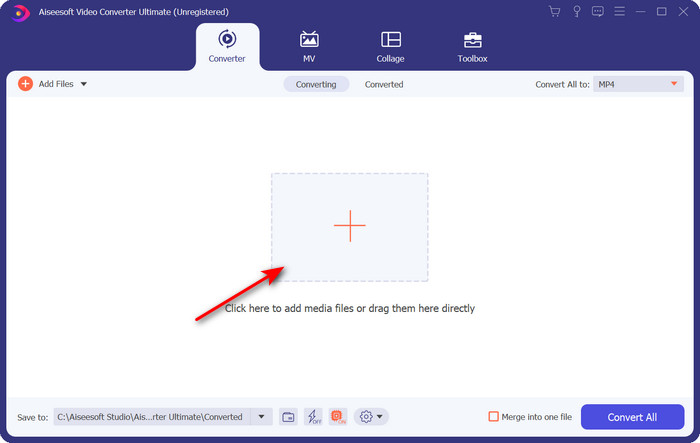
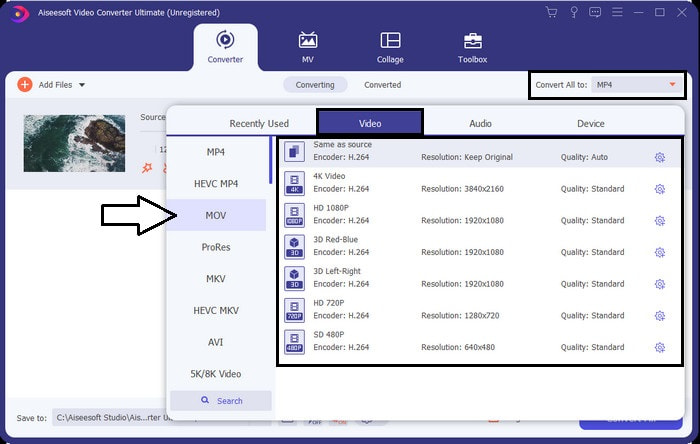
Korak 3. Kliknite gumb drop‑down u gornjem desnom kutu sučelja i na popisu pronađite MOV format.
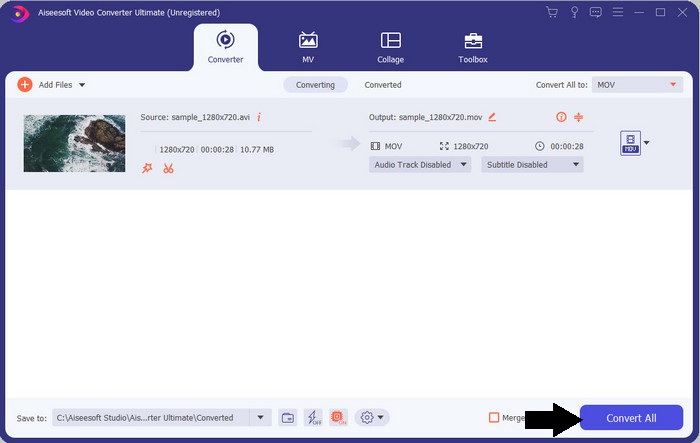
Korak 4. Započnimo pretvaranje vaših XviD datoteka u MOV klikom na Convert All.
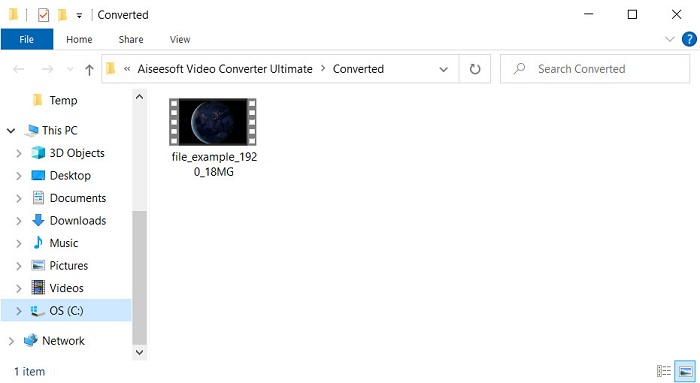
Korak 5. Pričekajte nekoliko sekundi da se proces završi. Na ekranu će se pojaviti mapa s .mov datotekom; kliknite na datoteku da biste je reproducirali u lokalnom medijskom reproduktoru i uživali.
Dio 3. Najbolji online konverter za pretvaranje Xvida u MOV
FVC besplatni video pretvarač na mreži
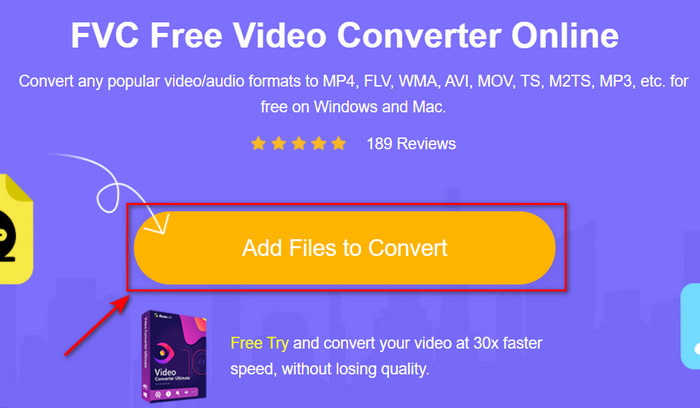
Ne želite se zamarati preuzimanjem softvera na disk jer vam je spremište puno, a želite pretvoriti samo jednu datoteku online? FVC Free Video Converter Online dostupan je u svim web‑preglednicima. Konverzija XviD datoteke uz pomoć ovog alata bit će dovršena za manje od minute. Također, ovaj alat ne traži da otvorite račun za pristup niti prikazuje oglase u sučelju. Ovo je najuredniji online konverter kojem možete pristupiti na webu. Ipak, ne možete mu pristupiti ako nemate internetsku vezu, jer ovaj alat ovisi o mreži. Osim toga, alat podržava srednje širok raspon formata koje možete odabrati i koristiti. Štoviše, ako ne želite preuzimati konverter, trebali biste koristiti ovaj XviD u MOV online konverter.
Koraci kako online pretvoriti XviD datoteke u MOV format uz pomoć FVC Free Video Converter Online alata:
Korak 1. Kako biste došli na glavnu web‑stranicu online konvertera, morate kliknuti ovaj link.
Korak 2. Pritisnite Add Files to Convert da biste pokrenuli alat, zatim će se pojaviti mapa u kojoj možete pronaći XviD datoteku koju želite pretvoriti i kliknite Open za nastavak.
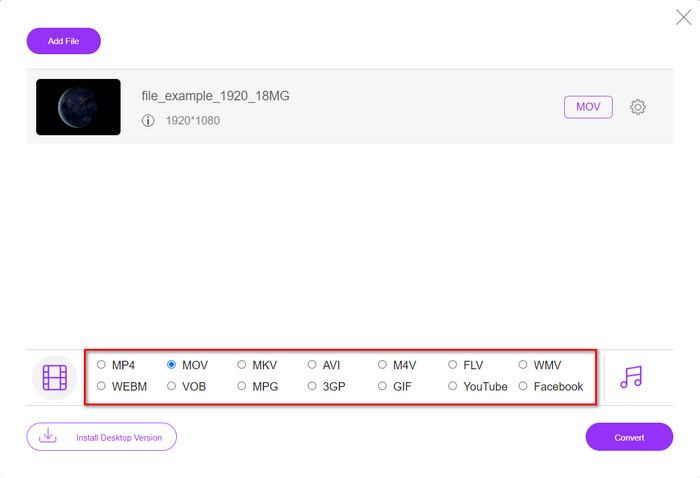
Korak 3. Novi prikaz će se pojaviti nakon što umetnete XviD datoteku, odaberite MOV format ili neki drugi format koji želite ispod.
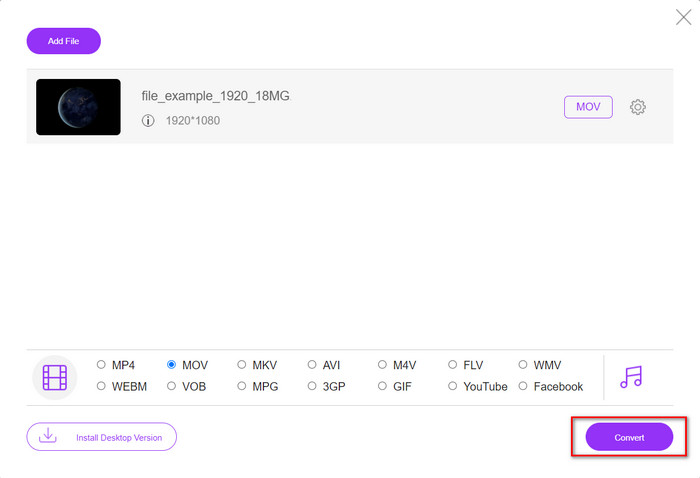
Korak 4. Da biste započeli promjenu formata, kliknite Convert.
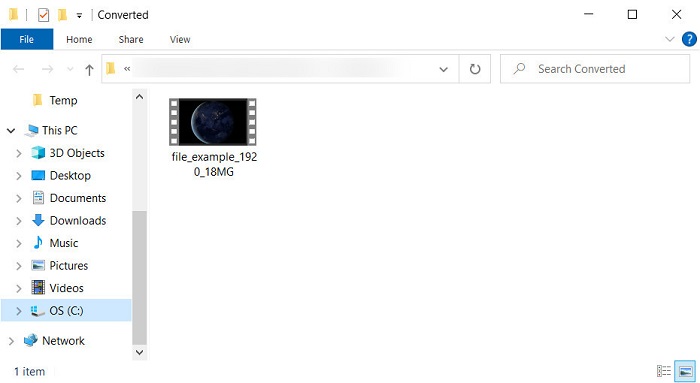
Korak 5. Pretvorba datoteke oduzet će vam manje vremena nego kod drugih online konvertera; nakon toga će se otvoriti mapa s pretvorenom datotekom koju ste izradili.
Dio 4. Često postavljana pitanja o pretvorbi XviD u MOV
Gdje mogu gledati XviD videozapise?
Za reprodukciju XviD datoteka možete koristiti VLC Media Player. Ako ga ne želite preuzimati, koristite Windows Media Player koji je dostupan na svim Windows sustavima. Za korisnike Maca tu je QuickTime. Ali ako želite gledati visokokvalitetni XviD video, pročitajte ovaj članak u kojem smo prikupili sve moguće XviD reproduktore koje možete koristiti za gledanje XviD datoteka.
Je li XviD besplatan ili ne?
XviD je besplatan i dostupan je svima koji žele koristiti i komprimirati svoju datoteku za brzi prijenos preko weba ili uštedjeti prostor. Sve je to zahvaljujući GPL licenci za besplatni softver, tako da je napravljen da bude besplatan.
Zašto ne mogu uređivati XviD videozapise?
Jedan od glavnih razloga zašto ne možete uređivati videozapise pod ovom vrstom kodeka je taj što nije podržan. U tom slučaju minimalni video uređivači podržavaju samo ovu vrstu kodeka zbog njegove složenosti. Dakle, pretpostavimo da želite uređivati videozapis u ovom formatu, prvo morate razmisliti o pretvaranju. U tom slučaju, potrebno je imati višenamjenski pretvarač koji može pretvoriti XviD datoteke u MP4, AVI, MOV ili slično. Zatim nakon pretvorbe datoteke, učitajte je u uređivač kako biste izvršili uređivanje koje želite.
Zaključak
Nakon čitanja ovog članka naše se znanje o XviD‑u proširilo i sada možemo vidjeti različite perspektive XviD‑a. Dakle, ako želite spremiti ili reproducirati video na svom iOS uređaju, prvo morate pretvoriti datoteku u MOV. Kao što je ranije objašnjeno, ova dva spomenuta konvertera izvrsno obavljaju posao pretvaranja datoteke u MOV format. Iako oba alata izgledaju savršeno, brzina i performanse alata FVC Video Converter Ultimate nenadmašne su i bolje od bilo kojeg dostupnog desktop ili web alata. No ako želite besplatnu i sigurnu online konverziju, odaberite FVC Free Video Converter Online.
-
 Kako pretvoriti AVI u MOV pomoću jednostavnih koraka i alata
 Želite li znati kako pretvoriti AVI u MOV koji se može igrati? Morate slijediti ovaj članak da biste znali kako to učiniti i savjete za uspješnu pretvorbu.
-
 Uvezite i pretvorite AVI u podržani format iMovie [2021]
 Imate problem jer ne možete uvesti svoju AVI datoteku na iMovie? Ako ste pročitali ovaj članak, onda ste već odabrali pravi lijek za ovaj problem.
-
 Kako pretvoriti TS u AVI / MKV / MOV / WMV na mreži i besplatno na Win / Mac
 Želite brzo pretvoriti TS datoteke u AVI / MKV / MOV / WMV? Ovaj članak prikazuje mrežne i izvanmrežne video pretvarače s potpunim vodičem. Možda ovdje možete dobiti najbolji besplatni TS pretvarač.
