


 Video Converter Ultimate
 Snimač zaslona
 Video popravak
MPG u MP3: Opsežan vodič za pretvaranje i poboljšavanje audio datoteka
MPG video format često se koristi za pohranu filmova i drugih oblika video sadržaja. U određenim situacijama poželjno je izdvojiti zvučnu komponentu iz MPG datoteke i zatim je spremiti u obliku MP3 datoteke. U tom je kontekstu koristan alat pretvarač MPG u MP3.
Korištenjem iskusnog pretvarača, možete bez napora pretvoriti svoje MPG datoteke u MP3 format, omogućujući im da uživaju u željenom audio sadržaju na različitim uređajima. Postoji više pretvarača, besplatnih i plaćenih, koji mogu pomoći u izvršavanju ovog zadatka. Programi su kategorizirani prema korisnicima na temelju njihovih preferencija za online ili offline pristup. Molimo pronađite ih na popisu ispod za svoju referencu.

Dio 1. Pretvorite MPG u MP3 ili MP3 u MPG pomoću programa Video Converter Ultimate
Pretvaranje iz MPG u MP3 samo je jedan od mnogih video formata koje je moguće konvertirati pomoću programa Video Converter Ultimate. Osim toga, program može pretvarati videozapise visoke razlučivosti u svega nekoliko sekundi bez žrtvovanja kvalitete, a nudi i grupnu konverziju, upravljanje poviješću te prilagodbu parametara. Kada je riječ o pretvaranju videozapisa u druge formate, FVC Video Converter Ultimate najbolja je dostupna opcija.
Korak 1. Nabavite program
Preuzmite FVC Video Converter Ultimate i instalirajte ga na svoje računalo. Jednostavno pritisnite gumb Free Download u nastavku. Pokrenite aplikaciju, a zatim uvezite MPG datoteku pomoću gumba Add Files.
Besplatno preuzimanjeZa Windows 7 ili novijiSigurno preuzimanje
Besplatno preuzimanjeZa MacOS 10.7 ili novijiSigurno preuzimanje
Korak 2. Odaberite izlazni format
U padajućem izborniku opcije Profile odaberite MP3 kao željeni izlazni format. Po želji možete prilagoditi postavke audio datoteke.
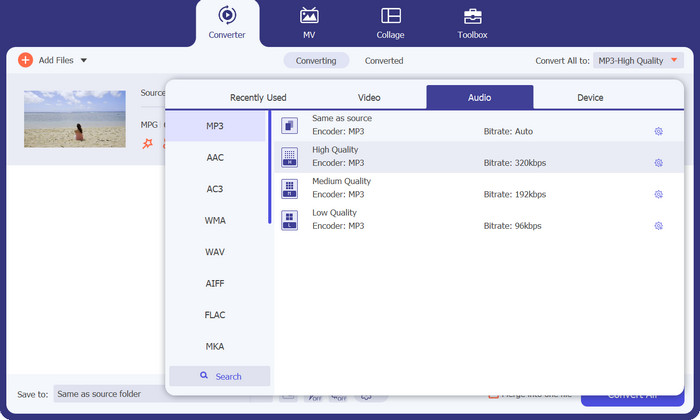
Korak 3. Pretvorite u MP3
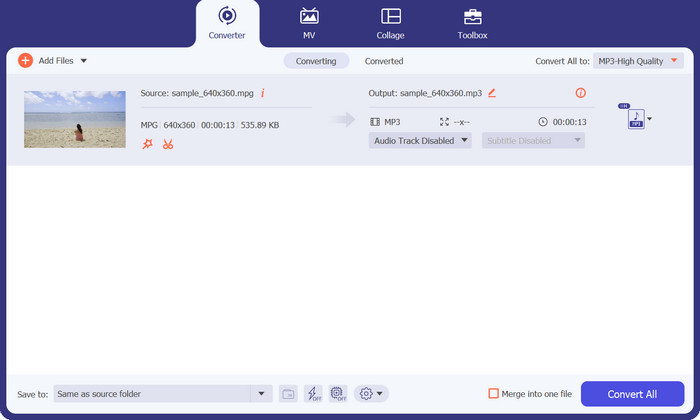
Odredite mjesto na računalu na koje želite spremiti pretvorenu datoteku. Započnite proces konverzije. Sada kliknite na gumb Convert All. Pričekajte da se pretvorba dovrši.
Pros
- Brza brzina pretvorbe uz zadržavanje kvalitete.
- Izrežite, obrežite, dodajte titlove i još mnogo toga.
- Podržava skupnu pretvorbu.
Protiv
- Za pristup svim njegovim značajkama potrebna je plaćena pretplata.
Dio 2. Pretvorite MPG u MP3 ili MP3 u MPG pomoću besplatnog MP3 pretvarača na mreži
Još jedna aplikacija za pretvaranje MPG u MP3 ili MP3 u MPG je Free MP3 Converter Online. Aplikacija je potpuno besplatna i bez ikakvih ograničenja. Alat korisnicima omogućuje pretvaranje audio datoteka u poznate audio formate poput MP3, AAC, AC3, WMA, WAV i druge, bez skrivenih naknada ili troškova. Alat također pruža izlaz bez vodenog žiga u mnogim varijantama audio formata, a može biti brz koliko dopuštaju vaša brzina učitavanja i preuzimanja na internetu. Da biste besplatno pretvorili MPG u MP3 online, slijedite ove korake:
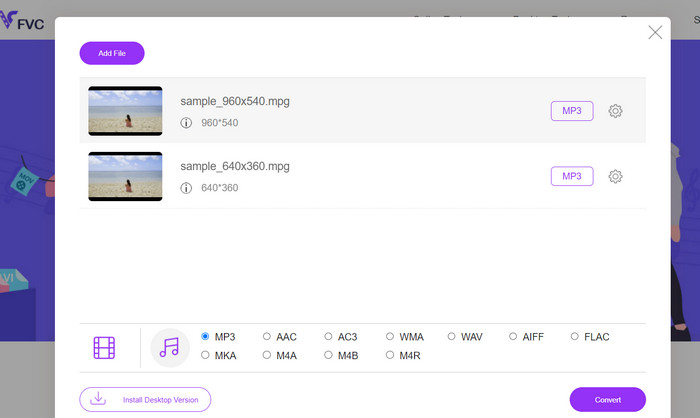
Korak 1. Otvorite službenu stranicu Free MP3 Converter Online u bilo kojem pregledniku na svom računalu. Za dodavanje glazbene datoteke kliknite gumb Add Files to Convert i odaberite željenu glazbenu datoteku.
Korak 2. Nakon učitavanja glazbene datoteke vidjet ćete sve dostupne audio formate. Odaberite MP3 u izborniku profila.
Korak 3. Za pokretanje procesa pretvorbe pritisnite gumb Convert. Pričekajte dok se promjena ne dovrši.
Pros
- Podržava podešavanje parametara.
- Prekodirajte zvuk visoke kvalitete bez gubitka kvalitete.
- Bez skrivenih naknada ili naknada.
Protiv
- Zahtijeva dobru internetsku vezu.
- Sporiji prijenos u velikim audio datotekama.
Dio 3. Pretvorite MPG u MP3 pomoću VLC-a
VLC Media Player je besplatan media player otvorenog koda koji može otvoriti gotovo sve audio i video datoteke koje postoje. Također je prilično svestran. S druge strane, ne samo da je izvrstan u reprodukciji medijskih datoteka, već ima i ugrađenu funkciju koja korisnicima omogućuje pretvaranje medijskih datoteka iz jednog formata u drugi.
Prilikom pretvaranja datoteke pomoću VLC-a, korisnici imaju mogućnost mijenjanja brojnih postavki, kao što su brzina prijenosa, kanali i brzina uzorkovanja, kako bi se postigla najbolja moguća kvaliteta zvuka. Zbog ove svestranosti, moguće je skrojiti izlaz MP3 datoteke tako da se može koristiti u različitim kontekstima.
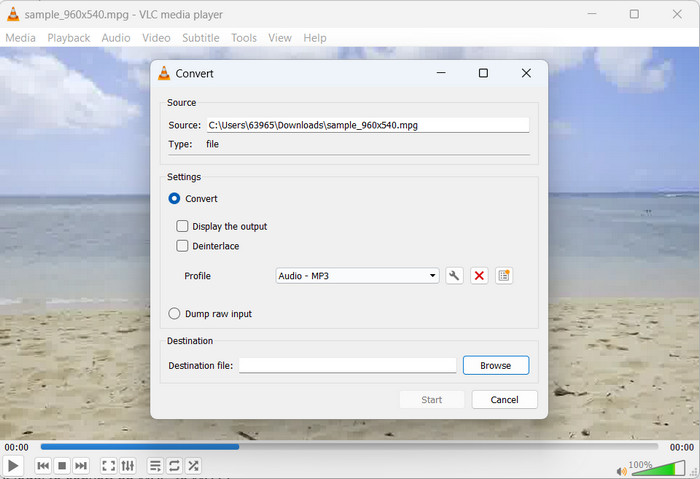
Korak 1. Najprije pokrenite VLC media player i kliknite na Media u gornjem lijevom kutu.
Korak 2. Zatim iz padajućeg izbornika odaberite Convert/Save. Potom kliknite Add i odaberite MPG datoteku koju želite pretvoriti.
Korak 3. Označite Convert/Save na dnu stranice. Odaberite Audio-MP3 iz padajućeg izbornika u odjeljku Profile. Na kraju odaberite mjesto na koje želite spremiti pretvorenu datoteku i kliknite Start. Tako se pomoću VLC‑a iz MPG datoteke izdvaja MP3.
Pros
- Dostupan je za više platformi.
- Koristi napredne audio i video kodeke.
- Omogućuje prilagođene postavke.
Protiv
- Podržava samo nekoliko izlaznih formata.
- Ograničene mogućnosti uređivanja.
Daljnje čitanje:
3 najbolja načina za brzo pretvaranje MPG u MP4
Savjeti i trikovi kako pretvoriti MKV datoteke u MP3 [2023]
Dio 4. Često postavljana pitanja o pretvaranju MP3 i MPG
Je li legalno pretvoriti MPG u MP3?
Da odgovorim na vaše pitanje, pretvaranje MPG datoteke u MP3 je zakonito za nekomercijalnu upotrebu. Međutim, ako želite dijeliti ili prodavati konvertirani zvuk, trebat će vam odgovarajuće dozvole ili licence.
Koji čimbenici utječu na kvalitetu zvuka izlazne MP3 datoteke?
Slušna vjernost rezultirajuće MP3 datoteke ovisi o nekoliko čimbenika, uključujući ali ne ograničavajući se na brzinu prijenosa, frekvenciju uzorkovanja i način rada kanala. Poboljšanje kvalitete zvuka izlazne datoteke može se postići podizanjem frekvencije uzorkovanja i brzine prijenosa.
Kako mogu odabrati pravu brzinu prijenosa za svoju konvertiranu MP3 datoteku?
Kvaliteta zvuka i veličina datoteke MP3 datoteke određena je brzinom prijenosa koja se obično izražava u kilobitima po sekundi (kbps). Povećana brzina prijenosa u bitovima pozitivno je povezana s poboljšanom vjernošću zvuka, iako nauštrb veće veličine datoteke.
Zaključak
Pretvorba MPG u MP3 nudi praktično rješenje za poboljšanje kompatibilnosti zvuka i postizanje neprekinute reprodukcije na raznim uređajima. Pridržavajući se tehnika opisanih u ovom priručniku, korisnik može bez poteškoća pretvoriti svoje MPG datoteke u široko prihvaćeni MP3 format.
-
 3 jednostavna načina kako pretvoriti MPG u MOV na vašem Macu/Windows/Online
 Želite pretvoriti svoje MPG datoteke i kasnije ih prenijeti na svoj iOS, iPod, iPad ili Mac? Ovaj će vam članak pomoći da shvatite kako pretvoriti MPG u MOV s koracima.
-
 Kako spojiti nekoliko MPG video datoteka u jedno na sustavu Windows i Mac
 Spajanje nekoliko MPG isječaka u jednu datoteku mogao bi vam predstavljati problem. U ovom članku možete saznati više o spajanju MPG videozapisa na računalu.
-
 5 MP3 rezača za jednostavno rezanje bilo kojeg zvuka [Ažurirano 2023.]
 Trebate li MP3 rezač za obrezivanje zvuka? U tom slučaju pročitajte ovaj članak jer nudimo alate na koje se možete osloniti i koji omogućuju jednostavno rezanje zvuka.
