


 Video Converter Ultimate
 Snimač zaslona
 Video popravak
7 besplatnih alata za popravak videozapisa: najbolji odabiri za oporavak video datoteka
Jesu li vaši dragocjeni videozapisi puni smetnji, problema s reprodukcijom ili oštećenja? Ne brinite, postoji rješenje koje vas neće stajati ni lipe. Upoznajte svijet besplatnih alata za popravak videa – vaš ključ za oporavak i vraćanje oštećenih video datoteka. Zaronit ćemo u čuda ovih softverskih dragulja i pokazati vam kako bez napora spasiti svoje dragocjene uspomene. Dobijte ekskluzivan pristup do 7 najboljih besplatnih programa za popravak videa na internetu danas. Nemojte samo prelistavati; pročitajte sve do kraja.

Dio 1. Najbolja 3 besplatna softvera za popravak videozapisa (Windows/Mac)
1. MiniTool Video Repair
Nikad ne reci manje, kao što ime govori. MiniTool Video Repair može riješiti jedan od vaših najvećih problema s videom. Nikada niste spremili svoj video dok ste istovremeno štedjeli prostor. Dizajniran za popravak i oporavak oštećenih ili neispravnih video datoteka.
◆ Dizajnirano za slobodoumne osobe. Ovo korisnički jednostavno rješenje omogućuje vam da bez ikakvih troškova lako stvarate, montirate i poboljšavate svoje videozapise. Oslobodite svoju kreativnost i oživite svoje video-ideje uz ovaj neprocjenjivi resurs.
◆ Popravak videa s bilo kojeg uređaja. Od računala do SD kartice, s naprednim značajkama poput dodavanja uzornog videa koji softver analizira i koristi njegove podatke za popravak oštećenog videa.
◆ Popravite više videa odjednom. Štedi vam dragocjeno vrijeme i pojednostavljuje proces popravka.
Korak 1. Instalirajte softver s web-mjesta Minitool.
Korak 2. Pokrenite softver na računalu i kliknite Add Video(s).
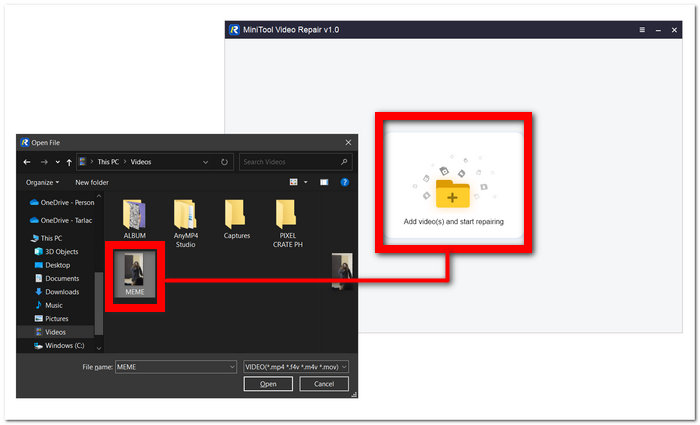
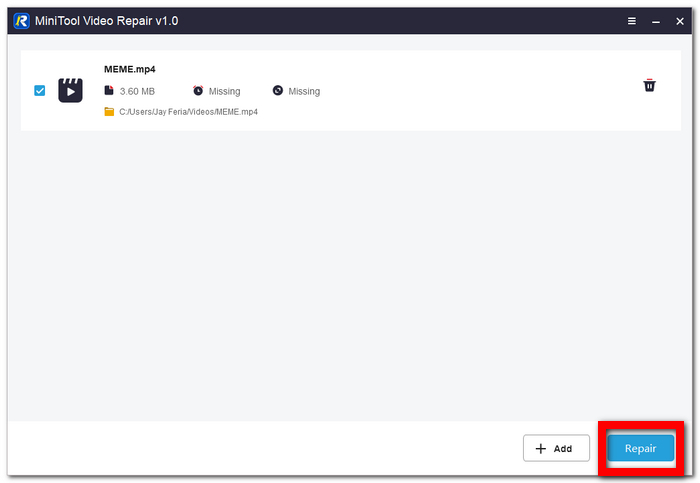
Korak 3. Učitajte svoj video u softver i kliknite Repair.
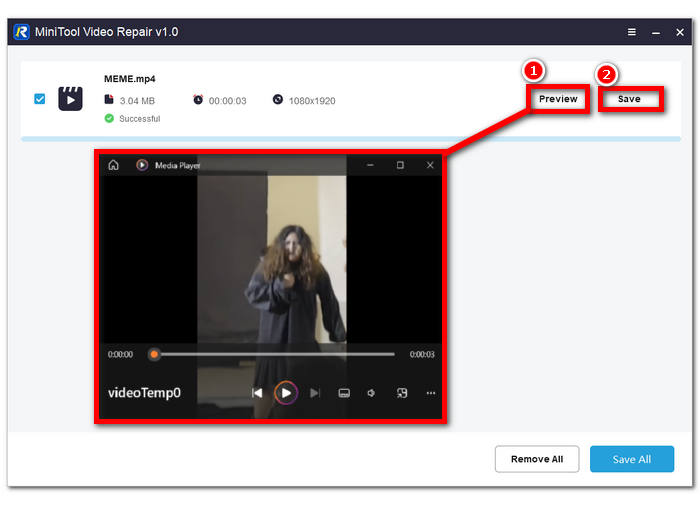
Korak 4. Nakon popravka možete kliknuti Preview kako biste provjerili je li kvaliteta u redu, a zatim Save kako biste spremili popravljenu video datoteku na računalo.
2. Aiseesoft Video Repair
Popravak oštećenog upravo je ono u čemu je Aiseesoft Video Repair dobar. Nikada više nemojte doživjeti emotivni slom kada otkrijete da su vam videozapisi oštećeni i da se ne mogu reproducirati. Koristi i primjenjuje vrhunske metode restauracije, što ga čini jednim od programa na mreži na koji svakako trebate obratiti pozornost, i to s dobrim razlogom.
◆ Zbogom satima frustracije. Iskusite čaroliju besprijekorne restauracije videa već danas. Vratite svoje vrijeme i uspomene bez napora obnavljajući oštećene videozapise našim softverom prilagođenim korisniku.
◆ Čarolija restauracije uzornog videa. Najsuvremenija tehnologija osigurava da vaše dragocjene uspomene ili profesionalni projekti izgledaju jednako zadivljujuće kao referentni video, čuvajući svaki detalj i jasnoću za vaše uživanje ili prezentaciju.
◆ Snažne sigurnosne mjere. Primjenjujemo vrhunsku enkripciju, kontrolu pristupa i robusne autentifikacijske protokole kako bismo zaštitili vaše podatke. Možete biti sigurni da je vaša data zaštićena tijekom procesa restauracije, pružajući vam mir i povjerenje u naše usluge.
Korak 1. Preuzmite i instalirajte softver na svoje računalo. Nakon instalacije otvorite softver.
Besplatno preuzimanjeZa Windows 7 ili novijiSigurno preuzimanje
Besplatno preuzimanjeZa macOS 10.7 ili novijiSigurno preuzimanje
Korak 2. Na glavnom sučelju kliknite gumb + na lijevom dijelu sučelja softvera kako biste dodali svoju oštećenu video datoteku. Zatim dodajte uzorni video – jednostavno kliknite gumb + na desnom dijelu sučelja softvera.
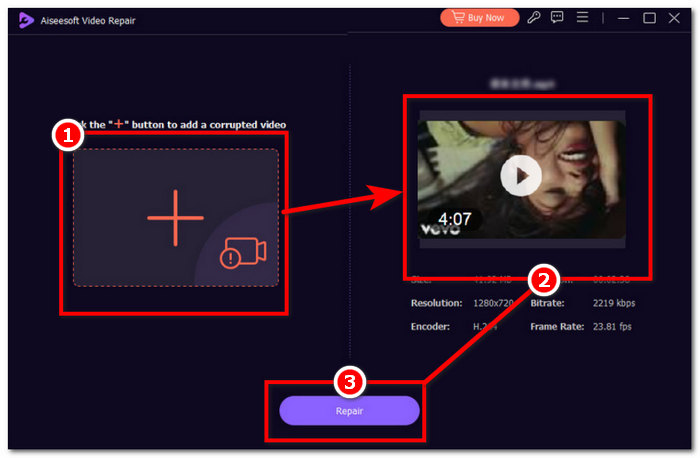
Korak 3. Kliknite Repair kako biste pokrenuli proces popravka, a kada softver završi s popravkom vaše oštećene video datoteke, možete kliknuti Preview kako biste sami provjerili kvalitetu.
Korak 4. Kada ste zadovoljni rezultatom, kliknite Save kako biste spremili video na svoje računalo.
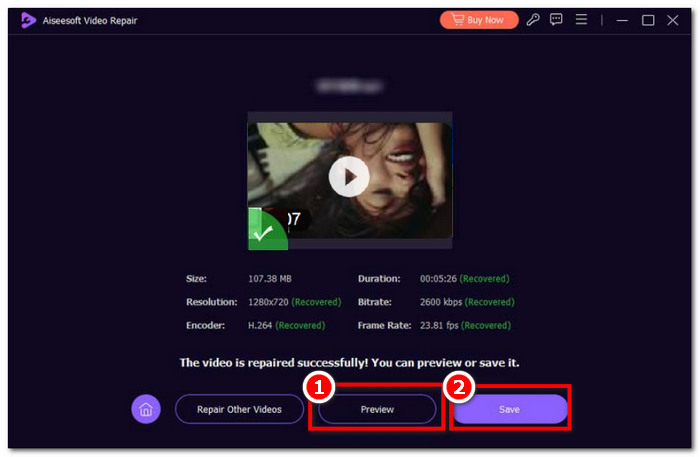
Velika brzina, tipke prečaca, jaka sigurnost i pregled neke su od ključnih značajki Aiseesoft Video Repair. Intuitivni softver za brzo radno opterećenje, čime ste u prednosti u kvaliteti.
3. Alat za popravak videa Stellar Phoenix
Vjerujte da bi alat za popravak videa Stellar Phoenix, kada se koristi, mogao cijeli vaš posao učiniti jednostavnijim. Besplatni softver za popravak video datoteka s alatima integriranim AI, najkvalitetnijim, jednostavnim dizajnom.
◆ Alat integriran s AI-em. Profesionalni oporavak izgubljenih, oštećenih podataka zahtijeva profesionalni softver koji koristi stalno napredujuće AI algoritme kako bi postigao potpuno dorađen i piksel-savršen popravak.
◆ Najviša kvaliteta u svom najboljem izdanju. Očekujte visoku stopu uspješnosti popravka uz funkciju pregleda za provjeru besprijekorne restauracije u najvišoj kvaliteti, brzini sličica i bitrateu koji podržavaju vama poznate video formate.
◆ Elegantno i jednostavno. Nikada više nemojte ulagati velik trud u korištenje nekakvog kvazi-softvera koji ne ispunjava očekivanja; umjesto toga, popravite videozapise već danas s različitih uređaja uz njegovo jednostavno i pregledno sučelje.
Korak 1. Posjetite web-mjesto Stellar Phoenix Video Repair Tool te preuzmite i instalirajte softver.
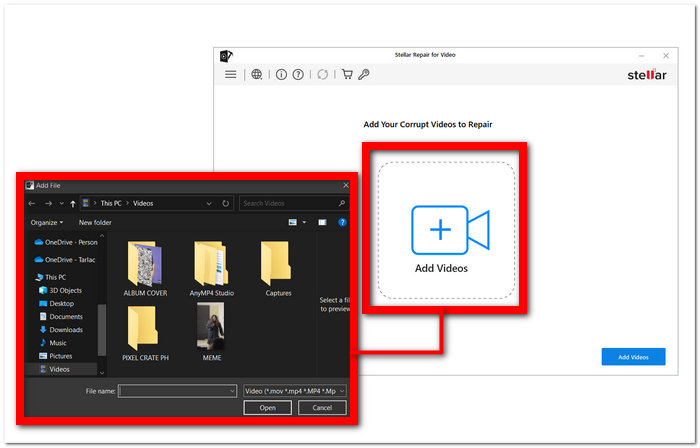
Korak 2. Nakon instalacije softvera, otvorite ga i kliknite dio Add Videos.
Korak 3. Odaberite oštećene videozapise koje želite obnoviti.
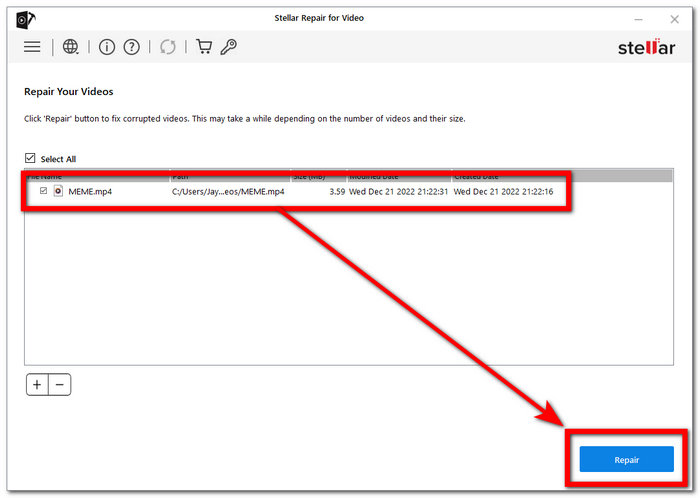
Korak 4. Kliknite Repair kako biste konačno započeli popravak svojih videa.
Sve je profesionalno osmišljeno kako bi se maksimizirao i istaknuo profesionalac u vama u zahtjevima tako jeftinog sustava. Specijaliziran za popravak videa, u svojoj srži, s FVC Video Repair, više nema problema s korupcijom.
Dio 2. Dva najbolja besplatna alata za popravak videa na mreži
1. EaseUS RepairVideo
Popravak oštećenih videozapisa s našim je softverom jednostavan, bez obzira na to je li do problema došlo tijekom snimanja, uređivanja, prijenosa ili bilo kojeg drugog procesa. RepairVideo može rukovati raznim video formatima, uključujući MP4, MOV, M2TS, MKV, MTS, 3GP, AVI, FLV, M4V i druge.
◆ 19 godina iskustva. Uspješno smo popravili nebrojene videozapise, od kućnih uradaka do profesionalnih snimki, osiguravajući da naši klijenti mogu ponovno proživjeti svoje dragocjene trenutke bez opterećenja smetnjama ili oštećenjima. Vjerujte našem bogatom znanju i predanosti da vratimo vaše videozapise u život, bez obzira na izazove koje predstavljaju.
◆ Popravak s raznih uređaja. Vrhunski brendovi kamera poput Canona, Nikona, Sonyja, GoProa, DJI-a itd. Bilo da je riječ o snimci s vašeg mobitela ili drugih video uređaja, naš je alat osmišljen tako da bez napora obnovi vaš dragocjeni video sadržaj, osiguravajući da nikada ne izgubite te važne uspomene.
◆ Brzo i jednostavno. S više od 120 milijuna popravljanih videa jamčimo vam brzu uslugu.
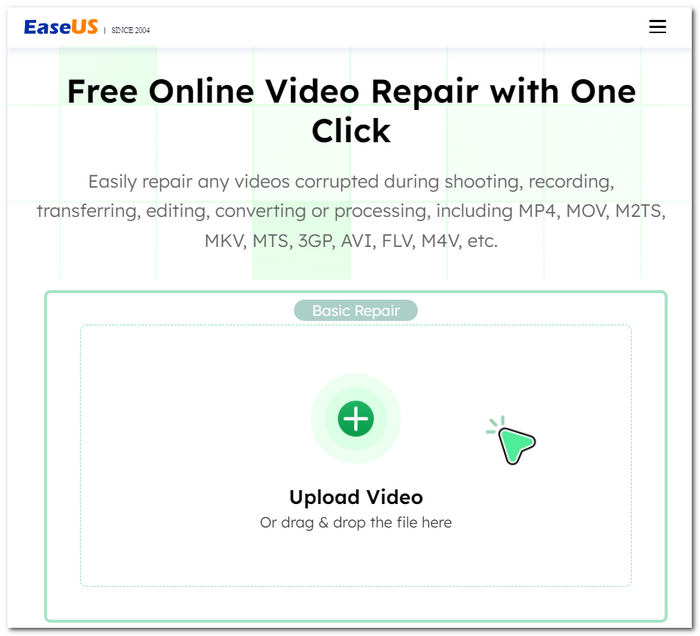
Recite zbogom frustrirajućim video smetnjama i problemima s reprodukcijom; naše rješenje je tu da vaše videozapise vrati na izvornu kvalitetu. Bez obzira na to kako se vaši videozapisi oštećuju, pruža učinkovit način za njihov oporavak i popravak. Uživajte u svojim dragocjenim uspomenama bez smetnji – vjerujte našem alatu kako bi vaši videozapisi bili kao novi.
2. iSkysoft Repairit Online
Podržava razne oštećene formate video datoteka, uključujući MP4, MOV, 3GP i druge. Bez obzira na to jesu li vaši videozapisi na mobilnim telefonima, kamerama, memorijskim karticama ili računalima, naš ih alat može učinkovito i s lakoćom popraviti.
◆ Profesionalni alat za restauraciju. Nastojimo sačuvati svaki detalj i jasnoću. Uz naš softver možete ponovno proživjeti svoje dragocjene trenutke bez kompromisa u vizualnom i zvučnom doživljaju, bez obzira na to koliko su datoteke oštećene. Vaši videozapisi, vaše uspomene, savršeno vraćeni.
◆ Bez kompromisa u video podacima. Vaše dragocjene uspomene i sadržaj ostaju netaknuti, uz očuvanu kvalitetu tijekom cijelog procesa popravka. Vjerujte nam da ćemo vratiti vaše videozapise bez narušavanja njihove izvorne privlačnosti i jasnoće.
◆ Popravak s velikog broja uređaja. Od mobitela i kamera do memorijskih kartica i računala. Uz naš softver prilagođen korisniku možete bez muke oporaviti i gledati svoje videozapise, neovisno o uređaju na kojem su snimljeni.
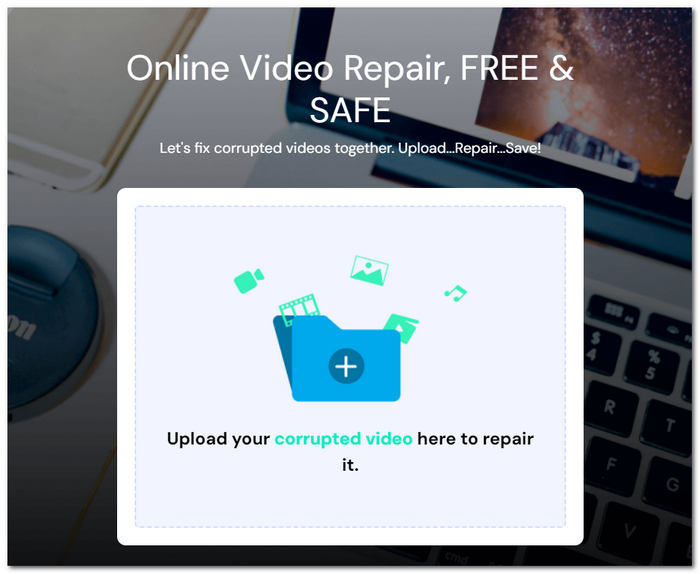
Proces popravka je bez muke; jednostavno prenesite svoje oštećene videodatoteke i za nekoliko minuta možete preuzeti potpuno obnovljene verzije. Možete vjerovati sigurnosti svojih podataka jer je vaš prijenos datoteka zaštićen 2048-bitnom šifriranom vezom, čime se osigurava vaša privatnost i zaštita.
Dio 3. Najbolje aplikacije za popravak videozapisa za popravak videozapisa na iOS Androidu
1. Spajanje
Predstavljamo moćnu i korisniku jednostavnu aplikaciju za poboljšanje i uređivanje videozapisa kompatibilnu s Android i iOS uređajima.
◆ Jednostavno, pregledno sučelje. Zbog čega je iznimno lako korisnicima podići svoje videozapise na profesionalnu razinu.
◆ Intuitivni alati. Možete bez napora skraćivati i rezati isječke, podešavati brzinu reprodukcije, poboljšavati kvalitetu slike i još mnogo toga, osiguravajući da vaši videozapisi izgledaju i zvuče najbolje moguće.
◆ Velika knjižnica glazbe bez autorskih naknada. omogućuje vam dodavanje savršene glazbene podloge, ne samo popravljajući kvalitetu videa nego ih čineći još privlačnijima i zanimljivijima.
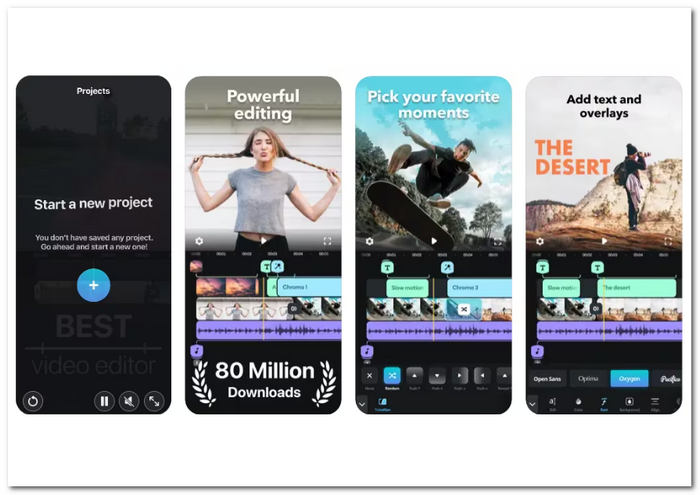
Bilo da ste kreator sadržaja, vloger ili netko tko želi poboljšati svoje drage uspomene, Splice nudi svestrano rješenje za sve vaše potrebe za uređivanjem videozapisa. Preuzmite sada u svojoj trgovini aplikacija i otključajte puni potencijal svojih video kreacija.
2. KinemasterBackup
Vrlo hvaljena aplikacija alata za poboljšanje videa za Android i iOS uređaje. Ova aplikacija jednostavna za korištenje nudi niz alata za uređivanje koji vam omogućuju transformaciju vaših videozapisa.
◆ Cijeli paket značajki. Usmjerenih na poboljšanje kvalitete vaših videozapisa. Možete prilagođavati svjetlinu, kontrast, zasićenje, osvjetljenje i još mnogo toga, stvarajući video sadržaj profesionalnog izgleda.
◆ Obrada 4K videa. Osiguravajući da vaš sadržaj ostane vrhunske rezolucije.
◆ Laka integracija s raznim platformama. Omogućujući korisnicima učitavanje videa s YouTubea, Instagrama i drugih popularnih društvenih mreža.
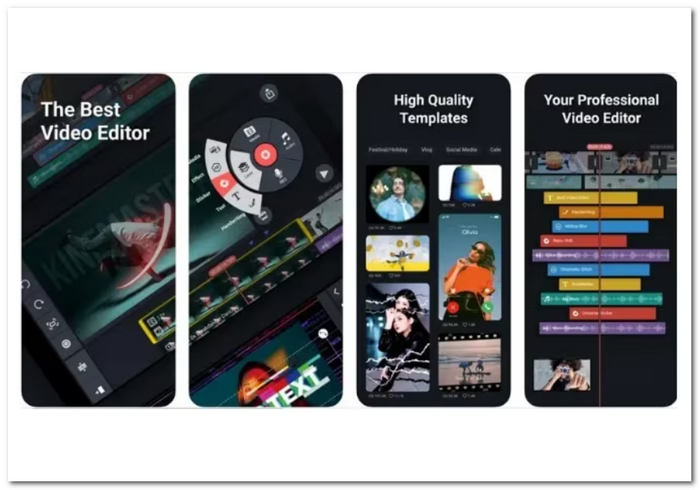
Od obrezivanja do dodavanja efekata, filtara, preklapanja, pa čak i rezova okvir po okvir, KineMaster vam omogućuje da poboljšate svoj video sadržaj. Aplikacija omogućuje slojevitost videozapisa, dajući vam kreativnu slobodu da besprijekorno stapate više elemenata.
Dio 4. Često postavljana pitanja o Top Free Video Repair
Je li Wondershare Video Repair besplatan?
Program Wondershare Video Repair nije besplatan. Obično možete isprobati njegove mogućnosti s besplatnom probnom verzijom, ali možda ćete trebati licencu ili pretplatu da biste dobili puni pristup i mogućnosti.
Postoji li neka besplatna aplikacija za popravak videa?
Da, dostupne su besplatne aplikacije i alati za popravak videozapisa. Neke opcije besplatnog softvera za popravak videozapisa uključuju Splice i KinemasterBackup, kao što je ranije spomenuto. Dostupni su za besplatno preuzimanje na Android i iOS uređajima, uz pretplatu za dodatne premium značajke.
Djeluju li besplatni alati za popravak videozapisa doista?
Za neke probleme s videom, besplatni programi za popravak videa mogu biti od velike pomoći. Vrlo su korisni za uobičajene poteškoće, uključujući manje smetnje u reprodukciji, probleme sa sinkronizacijom i oštećene datoteke. Unatoč tome, stupanj uništenja video datoteke može odrediti njezinu učinkovitost. Profesionalne usluge popravka videa ili kupljeni softver sa sofisticiranom funkcionalnošću mogu biti potrebni za kompliciranije i ozbiljnije probleme. Prije nego pogledate premium izbore, uvijek je dobra ideja testirati besplatni alat da biste vidjeli može li riješiti vaše probleme s videozapisima.
Zaključak
Besplatni alati za popravak videa pravo su spasonosno rješenje za svakoga tko ima oštećene ili korumpirane video datoteke. Pružaju isplativ način da povratite svoje dragocjene uspomene bez stručne pomoći. Uz raznolikost aplikacija i alata koji su dostupni, možete odabrati onaj koji najbolje odgovara vašim potrebama i preferencijama.
Ne dopustite da problemi s reprodukcijom videa unište vaš doživljaj gledanja. Isprobajte jedan od ovih besplatnih alata za popravak videa već danas i uživajte u svojim videima onako kako je i zamišljeno – besprijekornima i nezaboravnima.
-
 Kako jednostavno riješiti problem s pogreškom 5 za reprodukciju videozapisa
 Jeste li iskusili reprodukciju jednog od svojih preuzetih videozapisa, ali vas je poremetila poruka pogreške 5 o nemogućnosti reprodukcije videozapisa? Ovdje je sve što trebate znati.
-
 Moji se videozapisi ne reproduciraju, što trebam učiniti da ih popravim
 Zapeli ste s videozapisima koji se ne reproduciraju, a ne znate kako ih popraviti? Na pravom ste putu da riješite svoj problem. Ovdje je sve što trebate znati.
-
 5 100% radna rješenja za popravljanje videozapisa koji se ne reproduciraju na iPadu
 Vaši se videozapisi ne reproduciraju na iPadu? Evo pet rješenja koja će vam pomoći da se riješite ovog problema, a zatim ćete lako moći uživati u svojim omiljenim videozapisima na slušalici.
