


 Video Converter Ultimate
 Snimač zaslona
 Video popravak
M4A u odnosu na MP3 Detaljan pregled i usporedba dva audio formata
Zbog širenja digitalne glazbe, odabir odgovarajućeg audio formata sada je važniji nego ikad. Iako se M4A i MP3 široko koriste, postoje važne razlike između njih dvoje. Dok je MP3 de facto standard za glazbene datoteke, M4A se često koristi za vrhunsku kvalitetu zvuka.
U usporedbi M4A vs. MP3 razmotrit ćemo nijanse između formata datoteka M4A i MP3 kako biste mogli donijeti informiranu odluku. Također ćemo prikazati sveobuhvatnu analizu razlika i sličnosti između ove dvije vrste datoteka u pogledu kvalitete zvuka, kompatibilnosti, veličine datoteke i još mnogo toga. Ako ste zaljubljenik u glazbu ili profesionalni glazbenik, svakako nastavite čitati kako biste otkrili koji je format idealan za vas.

Dio 1. M4A protiv MP3
Ovdje je jednostavna tablica usporedbe ovih formata u različitim važnim aspektima za informiranu odluku. Pogledajte tablicu u nastavku.
| M4A | MP3 | |
| Kvaliteta zvuka | visoko | Dobro |
| Veličina datoteke | Veliki | Mali |
| Kompatibilnost | ograničeno | Široko kompatibilan |
| Metapodaci | Podržani | ograničeno |
| DRM zaštita | Da | Ne |
| Popularne namjene | Glazba, audio knjige, podcasti | Glazba, podcasti, melodije zvona |
Dio 2. M4A i MP3 Uvod
Dosta s bitkom MP3 protiv M4A. Zastanimo nakratko i saznajmo više o ovim formatima kroz kratak uvod u svaki od njih.
Uvod u M4A
Appleov vlasnički digitalni audio format je MPEG-4 Audio (ili skraćeno M4A). To je izvrstan audioformat za glazbu, audioknjige i podcaste jer može prihvatiti mnoge brzine prijenosa i brzine uzorkovanja. M4A datoteke mogu se otvoriti u iTunes, QuickTime i drugim medijskim playerima, što ih čini idealnim za Apple uređaje.
Uvod u MP3
MP3, što je skraćenica za 'MPEG-1 Audio Layer 3', digitalni je audio format koji je postao standard za komprimirani zvuk zbog širokog prihvaćanja i niske brzine kompresije. MP3 datoteke izvrsne su za glazbu, podcastove i melodije zvona zbog svoje kompaktne veličine u usporedbi s drugim audio formatima. Mogu se igrati na mnogo različitih uređaja i brzo i jednostavno preuzeti s interneta. MP3 datoteke, s druge strane, često imaju lošiju kvalitetu zvuka od alternativnih formata poput M4A.
Dio 3. Je li M4A bolji od MP3?
M4A i MP3 imaju različite snage i slabosti. M4A je poznat po svojoj vrhunskoj kvaliteti zvuka i preferiraju ga glazbeni entuzijasti i profesionalci. MP3, s druge strane, ima manju veličinu datoteke i široko je kompatibilan s raznim uređajima i medijskim playerima.
Odabir između M4A i MP3 ovisi o tome što vam je važnije: visoka kvaliteta zvuka ili manja veličina datoteke i kompatibilnost.
Dio 4. Razlika između MP3 i M4A
Popularni digitalni glazbeni formati MP3 i M4A imaju različite značajke. Slijedi detaljno objašnjenje razlika između MP3 i M4A:
Kvaliteta zvuka: Poznato je da M4A pruža bolju kvalitetu zvuka u usporedbi s MP3 formatom. M4A koristi napredniji algoritam kompresije i podržava širi raspon bitrateova i uzoraka (sample rate). M4A također podržava bezgubitnu (lossless) kompresiju, koja očuva izvornu kvalitetu zvuka, dok MP3 koristi kompresiju s gubicima (lossy), koja smanjuje veličinu datoteke, ali istodobno smanjuje i kvalitetu zvuka.
Veličina datoteke: MP3 datoteke su manje veličine u usporedbi s M4A datotekama. To je zato što MP3 koristi učinkovitiji algoritam kompresije koji smanjuje veličinu datoteke bez značajnog utjecaja na kvalitetu zvuka. M4A, s druge strane, koristi manje učinkovit algoritam kompresije koji rezultira većim datotekama, ali i boljom kvalitetom zvuka.
Kompatibilnost: MP3 je široko prepoznat kao industrijski standard za digitalni audio i kompatibilan je s velikim brojem uređaja i medijskih reproduktora, uključujući pametne telefone, tablete i računala. M4A, nasuprot tome, ima užu kompatibilnost i ponajprije se koristi na Apple uređajima i u Appleovom softveru, poput iTunesa i QuickTimea.
Metapodaci: M4A podržava širi raspon metapodataka u odnosu na MP3. To znači da M4A datoteke mogu pohraniti više informacija o zvuku, poput omota albuma, stihova (lyrics) i podataka o pjesmi.
DRM zaštita: M4A podržava zaštitu Digital Rights Management (DRM), koja vlasnicima autorskih prava omogućuje kontrolu upotrebe i distribucije njihovih audio datoteka. MP3, s druge strane, ne podržava DRM zaštitu.
Dio 5. Kako pretvoriti M4A u MP3 ili MP3 u M4A
Više od usporedbe i pregleda ova dva audio formata, također je važno naučiti kako pretvoriti iz M4A u MP3 ili obrnuto. Ovdje su neki od programa koje možete koristiti:
Bez obzira jeste li online ili offline, Video Converter Ultimate odličan je alat koji možete koristiti za pretvaranje između M4A i MP3 formata. Ovaj program dolazi s mnogo funkcija koje možete iskoristiti. Alat omogućuje pretvaranje više datoteka u serijama, što znači da možete odjednom obraditi čitavu kolekciju glazbenih datoteka. Zanimljivo je i to što vam omogućuje pristup izlaznim postavkama vaših audio datoteka. Otkrijte kako alat radi tako da proučite korake u nastavku.
Korak 1. Započnite preuzimanje klikom na jedan od gumba Free Download, a zatim slijedite upute na zaslonu. Sljedeći je korak pokretanje aplikacije i upoznavanje s njezinim jednostavnim sučeljem.
Besplatno preuzimanjeZa Windows 7 ili novijiSigurno preuzimanje
Free DownloadZa macOS 10.7 ili novijiSigurno preuzimanje
Korak 2. Kliknite gumb add na glavnom zaslonu, zatim pronađite audio datoteku koju želite pretvoriti. Pregled učitane datoteke uskoro će se prikazati u sučelju nakon prijenosa. Možete istodobno pretvoriti više M4A datoteka u MP3 tako da učitate čitavu mapu.
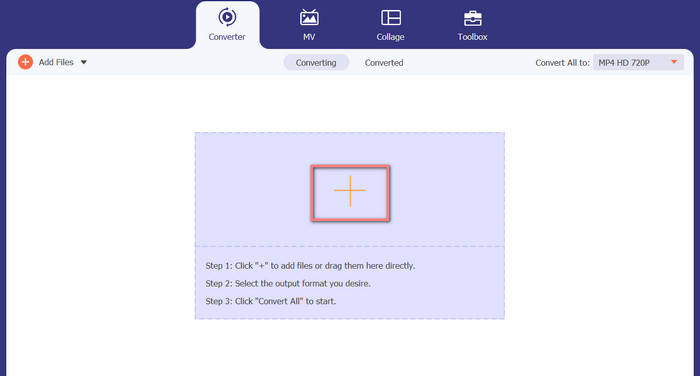
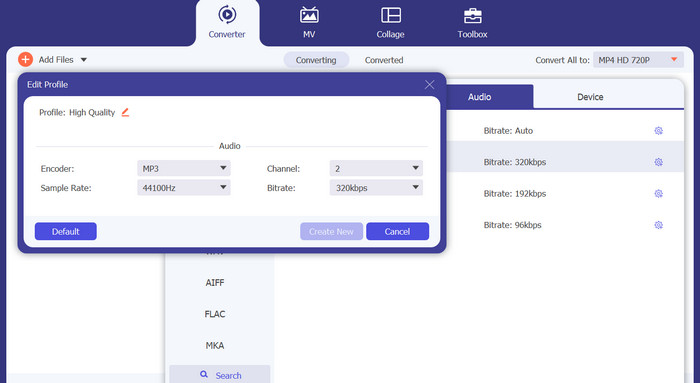
Korak 3. Kako biste promijenili izlazni format alata, otvorite izbornik Profile i karticu Audio (nalazi se u gornjem desnom kutu alata). Možete pretvoriti M4A datoteku u MP3 datoteku i obrnuto.
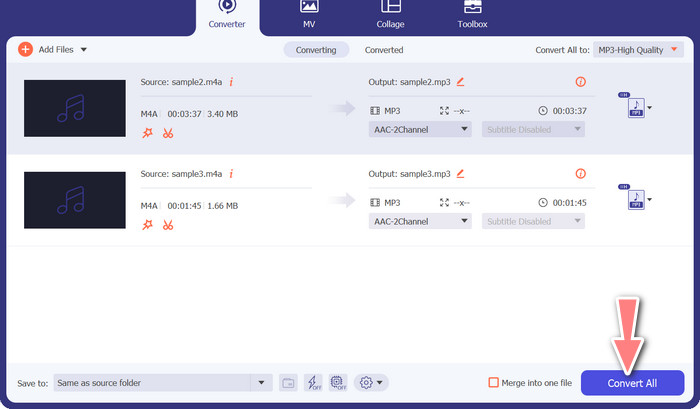
Korak 4. Odaberite željenu lokaciju pri samom dnu zaslona. Kako biste pokrenuli pretvorbu, odaberite Convert All.
Besplatni video pretvarač na mreži (na mreži)
Nema mjesta za instalaciju još jednog programa? Dobra vijest je da upotrebom web-konvertera u potpunosti možete izbjeći preuzimanje softvera. Web-alat Free Video Converter Online omogućuje pretvaranje izravno u pregledniku. Također podržava širok raspon glazbenih i video formata. Osim toga, ovaj web-alat podržava serijsko pretvaranje. Korisnik dodatno može prilagoditi postavke završne audio datoteke. U nastavku pogledajte kako online pretvoriti MP3 u M4A.
Korak 1. Najprije pokrenite svoj omiljeni web-preglednik i otvorite stranicu Free Video Converter Online.
Korak 2. Kliknite opciju Add Files to Convert, zatim pronađite M4A datoteku koju želite pretvoriti i odaberite je.
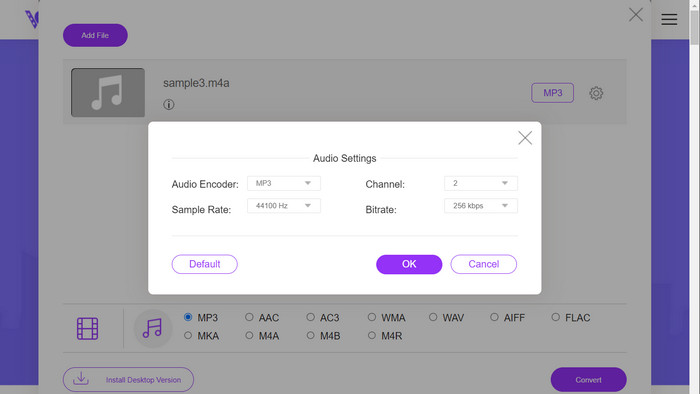
Korak 3. Odaberite MP3 kao izlazni format iz izbornika Audio. Također je moguće podesiti bitrate, odnosno izlaznu kvalitetu MP3 datoteke.
Korak 4. Za pokretanje procesa pretvaranja kliknite gumb Convert. To je postupak pretvaranja M4A u MP3 putem weba.
Daljnje čitanje:
Upute za pretvaranje M4A u WAV [PC i Mac]
Najbolji alati za serijsko pretvaranje MP3 datoteka u M4R
Dio 6. Često postavljana pitanja o M4A i MP3
Što je MP3 naspram M4A u smislu metapodataka?
M4A podržava širi raspon metapodataka od MP3, što znači da M4A datoteke mogu pohraniti više informacija o zvuku.
Mogu li uređivati MP3 ili M4A datoteke?
MP3 i M4A datoteke možete uređivati pomoću različitih softvera za uređivanje zvuka.
Koji je bolji za podcaste, MP3 ili M4A?
MP3 je bolji za podcaste zbog svoje manje veličine datoteke i veće kompatibilnosti.
Zaključak
Razumijevanje usporedbe MP3 vs. M4A može vam pomoći da odaberete najbolji digitalni audio format. Bilo da glazbu streamate ili je producirate, odabir pravog formata ključan je za postizanje najbolje moguće kvalitete zvuka i kompatibilnosti.
-
 MP3 VS MP4: Koja je razlika između MP3 i MP4
 MP3 ili MP4, što je bolje? Koja je razlika između MP3 i MP4? Ovaj će članak usporediti MP3 i MP4 sa svih aspekata koje možete zamisliti.
-
 M4A Player - 5 najboljih M4A uređaja za Android i računalo
 Kako reproducirati M4A datoteke na Android telefonu? Koji igrač može igrati M4A? Ovaj post dijeli 5 najboljih besplatnih M4A playera za Android, Mac i PC.
-
 4 najbolja metoda za popravak i uređivanje MP3 metapodataka na Windows i Mac
 Želite znati tajne jednostavnog uređivanja MP3 metapodataka? Ovaj blog će vas naučiti različitim tehnikama s različitim alatima kojima lako pristupate.
