


 Video Converter Ultimate
 Snimač zaslona
 Video popravak
Što je M4A i kako ga pretvoriti u MP3 ili WAV za veću pristupačnost
Jeste li ikada preuzeli pjesme ili glazbu koje se nisu mogle reproducirati na vašem glazbenom uređaju? Razlog bi mogao biti to što su u M4A formatu. Zapravo je riječ o popularnom formatu zbog dobre kvalitete zvuka i male veličine datoteke. Međutim, kao i kod ostalih vrsta audio formata, postoje i ograničenja s kojima ćete se susresti kada radite s M4A datotekama. No ne brinite, jer je ovaj vodič tu da vam pomogne! Razložit ćemo što je M4A, kako biste vidjeli njegove prednosti i nedostatke, kao i druge korisne informacije, te vam pokazati kako te datoteke lako pretvoriti u formate koji rade na bilo kojem uređaju. Znamo da vas to zanima, pa bez daljnjeg odugovlačenja, počnimo s učenjem čitajući sadržaj u nastavku.

Dio 1. Što je M4A
Format M4A, koji se naziva i MPEG-4 Audio, digitalni je audio format koji se široko koristi za pohranu komprimiranih audio podataka. Poznato je da nudi zvuk visoke kvalitete u maloj veličini datoteke. Nadalje, M4A datoteke povezane su s Apple uređajima i iTunesom te također sadrže metapodatke, poput informacija o izvođaču i albumu, osim komprimiranog zvuka. Zbog toga su u iTunes Storeu preuzimanja pjesama obično u M4A formatu, dok se pjesme zaštićene od kopiranja spremaju s ekstenzijom M4P. Još jedna stvar koju morate znati o kompresijskom M4A je da podržava različite audio kodeke, osiguravajući kompatibilnost s različitim medijskim playerima i uređajima. Često se kodira naprednim audio kodiranjem s gubicima ili AAC kodekom kako bi se smanjila veličina datoteke, a datoteke M4A također mogu koristiti Apple Lossless Audio Codec bez gubitaka ili ALAC.
Kako bismo vam pružili jasniji uvid u M4A, napravljena je tabela u nastavku.
| Aspekti M4A | |
| Ekstenzija datoteke | .m4a |
| Format spremnika | MPEG-4 |
| Audio kodeci | • Napredno audio kodiranje (AAC) • Apple Lossless Audio Codec (ALAC) |
| Uobičajena upotreba | • Preuzimanja glazbe iz iTunes Storea. • Audioknjige. • Podcasti. • Dijeljenje digitalnog zvuka zbog manje veličine datoteke. |
Dio 2. Za i protiv M4A
Pros
- Kvaliteta M4a je obično visoka. To ih čini izvrsnim za glazbene i druge audio snimke.
- M4A datoteke koriste napredne algoritme kompresije. Omogućuje vam uštedu značajnog prostora na vašem uređaju čak i bez žrtvovanja mnogo kvalitete zvuka.
- Datoteka je široko podržana na raznim platformama i uređajima. Uglavnom Apple uređaji, iTunes i mnogi drugi media playeri.
- Audio datoteka podržava metapodatke koji vam omogućuju ugradnju informacija. Stoga možete ugraditi pojedinosti poput imena izvođača, pojedinosti o pjesmi i naslova albuma izravno u datoteku.
Protiv
- Neke M4A datoteke mogu biti zaštićene DRM-om ili upravljanjem digitalnim pravima. To ograničava vašu mogućnost da ih slobodno mijenjate ili dijelite.
- I dalje mogu biti veći od drugih audioformata poput MP3. To posebno vrijedi za audio snimke visoke kvalitete.
- Ponekad uređivanje M4A datoteke može dovesti do gubitka kvalitete zvuka. To je osobito istinito ako opetovano mijenjate ili ponovno kodirate datoteku.
Dio 3. Kako pretvoriti M4A u WAV i MP3
Ako imate hrpu M4A datoteka, ali vam je praktičnije pretvoriti M4A u MP3 ili WAV, možda ćete poželjeti prijeći na te formate. Ako vaša situacija traži da konverziju obavite online i treba vam nešto snažnije od osnovnog konvertera, upoznajte FVC Free Audio Converter Online. To je praktičan online alat koji vam pomaže pretvoriti audio datoteke iz jednog formata u drugi. S ovim izvrsnim konverterom možete bez puno muke prebacivati svoju glazbu između formata kao što su M4A, MP3, WAV, WMA, AIFF, AAC, AC3, FLAC i drugi.
Ono što je stvarno super u vezi s ovim FVC besplatnim audio konverterom je to što radi izvrsno kako bi vaš zvuk zvučao izvrsno. Neće vam dopustiti da se brinete jer neće izgubiti nikakvu kvalitetu u procesu pretvorbe, pa će vaš zvuk i dalje zvučati izvrsno. Sada možete slušati svoje omiljene pjesme u M4A formatu na bilo kojem uređaju ili ih dijeliti sa svojim prijateljima bez ikakve brige o nekompatibilnosti ako promijenite M4A u WAV ili MP3. Osim toga, čak vam omogućuje preuzimanje konvertiranih datoteka izravno na vaše računalo bez ikakvog dodatnog napora. Kako? Samo slijedite nekoliko jednostavnih koraka i spremni ste.
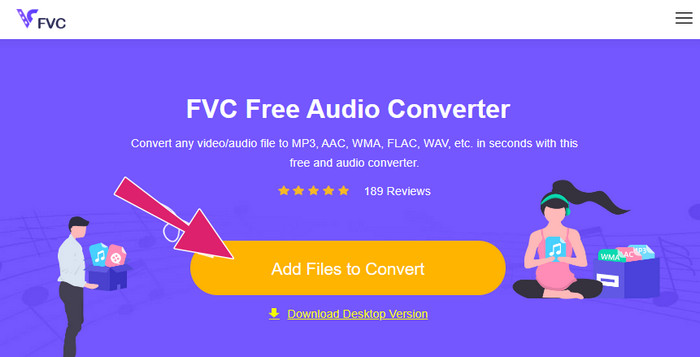
Korak 1. Za početak preuzmite njegov snažan pokretač kako biste iskusili sigurnost i učinkovitost ovog konvertera. Samo kliknite gumb Add Files to Convert, a zatim na prikazani gumb Download.
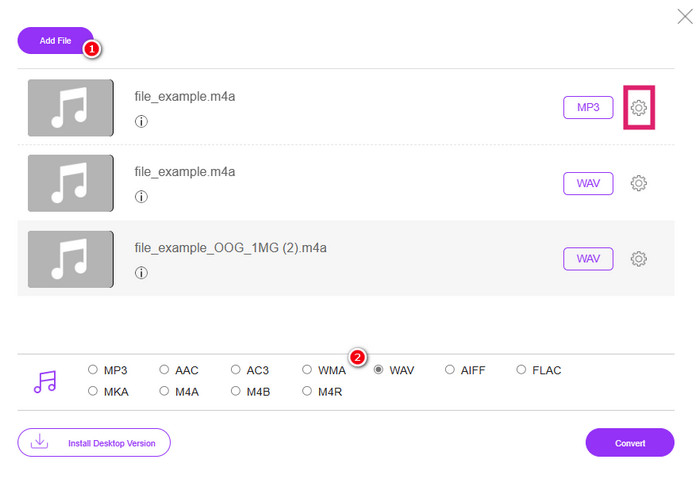
Korak 2. Nakon nekoliko sekundi, alat će vam već omogućiti učitavanje M4A datoteka koje želite pretvoriti. Ako vam je pri prvom uvozu bilo omogućeno učitati samo jednu datoteku, kliknite karticu Add File u glavnom sučelju da biste učitali još M4A datoteka.
Korak 3. Nakon uvoza, alat će vam ponuditi više mogućnosti izlaznog formata koje ćete vidjeti na dnu sučelja. Odatle možete odabrati ili WAV ili MP3 za svoje M4A datoteke.
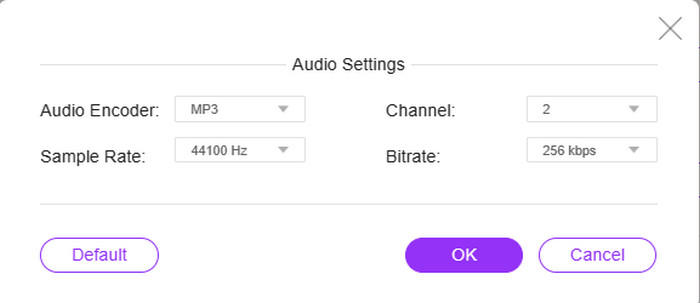
Korak 4. Ovaj korak je opcionalan, kao dio postavki. Ako kliknete gumb Setting za svaku datoteku, dobit ćete priliku pristupiti i podesiti njezin audio koder, frekvenciju uzorkovanja (sample rate), kanal i bitrate.
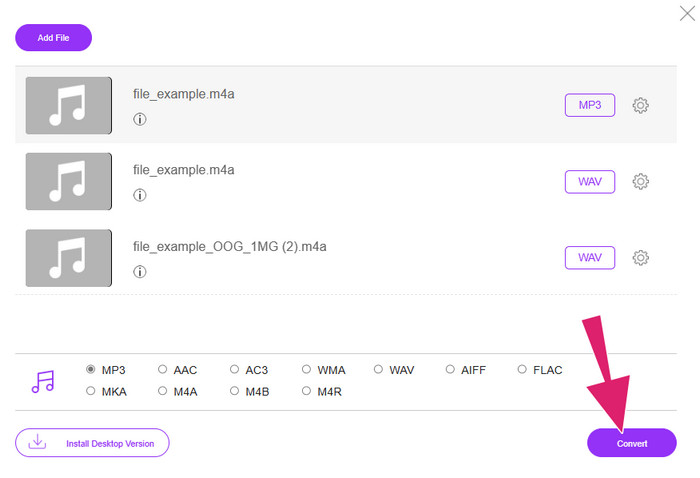
Korak 5. U protivnom, ako želite odmah prijeći na proces konverzije, jednostavno kliknite gumb Convert.
Dio 4. Često postavljana pitanja o M4A
Kako se M4A i MP3 razlikuju jedan od drugog?
Što se tiče usporedbe M4A vs MP3, M4A datoteke obično nude višu kvalitetu zvuka od MP3 datoteka, čak i kada imaju isti bitrate. M4A također podržava značajke poput naslovnice albuma i označavanja metapodataka. Ipak, MP3 je mnogo šire podržan na raznim platformama i uređajima.
Mogu li pretvoriti M4A datoteku u video format?
Da, moguće je pretvoriti M4A audio datoteke u video datoteke, na primjer M4A u MP4. To se radi tako da ih se kombinira sa statičnom slikom ili video isječkom pomoću softvera za uređivanje videa.
Koja je najbolja brzina prijenosa koju M4A datoteka mora imati?
Najbolja brzina prijenosa za M4A datoteke ovisi o vašim preferencijama. Morate uzeti u obzir kvalitetu zvuka i veličinu datoteke koju želite. Veće brzine prijenosa općenito rezultiraju boljom kvalitetom zvuka, ali većom veličinom datoteke. U međuvremenu, uobičajene ili standardne brzine prijenosa za M4A datoteke kreću se od 128 kbps do 256 kbps i 320 kbps za zvuk visoke kvalitete.
Zaključak
Eto, to je to! Ovaj je članak ponudio odgovore na vaše pitanje o tome što je M4A. Saznali ste da M4A pruža visok doživljaj slušanja zahvaljujući svojoj vrhunskoj kvaliteti. Da, može se reproducirati u raznim medijskim reproduktorima, ali morate imati na umu da još uvijek postoje oni koji ga ne podržavaju. Zato imate mogućnost pretvoriti ga u druge audio formate poput MP3 i WAV.
-
 Što je MP4: Opis, prednosti i više
 Prije nego pretvorite MP4 u druge formate, prvo morate znati nešto o njemu. Ovaj post otkriva sve što trebate znati o MP4 i njegovim alternativama.
-
 Zašto se MP4 video ne prikazuje u Premiere Pro [Riješeno]
 MP4 videozapisi ne prikazuju se u programu Premiere Pro, što može biti zato što su datoteke oštećene ili zagubljene. Ovdje provjerite sve moguće razloge i rješenja!
-
 Koje su razlike između M4V i MP4
 Zbunjuju vas razlike između video formata M4V i MP4? Naučite ih ovdje i uputit ćemo vas kako se ova dva razlikuju i kako ih jednostavno pretvoriti.
