


 Video Converter Ultimate
 Snimač zaslona
 Video popravak
Pretvorite DIVX u 3GP s najučinkovitijim postupcima
Ne možete reproducirati svoj DIVX videozapis na uređaju jer nije podržan? Većina ljudi ima isti problem. No imate sreće jer ćemo raspraviti najučinkovitiju i najlakšu metodu kako pretvoriti DIVX u 3GP. Ne propustite ovu priliku i saznajte više o pretvaranju različitih datoteka pomoću raznih provjerenih i pouzdanih aplikacija koje ćemo predstaviti.

Dio 1: Najbolji softver za pretvaranje DIVX u 3GP
Želite li pretvoriti DIVX u 3GP na svojim uređajima, poput računala sa sustavom Windows i Mac? Onda je vaš problem već riješen. Za pretvorbu DIVX datoteke možete koristiti Video Converter Ultimate. Već iz samog naziva alata jasno je da je riječ o vrhunskoj aplikaciji pomoću koje možete pretvoriti više od 1000 video formata, uključujući DIVX, 3GP, MP4, MOV, MTS, WEBM i druge. Također možete istovremeno pretvoriti dvije ili više datoteka jer ovaj alat nudi grupnu (batch) konverziju. Osim toga, Video Converter Ultimate ima brz proces pretvorbe, što je izvrsno ako planirate pretvoriti velik broj datoteka.
Nadalje, još uvijek možete koristiti ovu izvanmrežnu aplikaciju ako ste zainteresirani za uređivanje svoje DIVX datoteke prije nego što je pretvorite. Pod pretpostavkom da želite ispraviti boju svog videozapisa, možete nastaviti na ploču Toolbox i odabrati alat za ispravljanje boja kako biste prilagodili svjetlinu, kontrast i zasićenost vašeg videa. Štoviše, pretpostavimo da želite sinkronizirati zvuk u svojoj DIVX video datoteci prije nego što je pretvorite. U tom slučaju to možete učiniti jer nudi funkciju audio sinkronizacije, pa vam je sinkronizacija zvuka s videom laka.
Značajke:
◆ Pretvorite formate video datoteka, uključujući MP4, M4V, FLV, AVI itd.
◆ Može stvarati glazbene videozapise s različitim temama.
◆ Toolbox sadrži pojačivač videa, sredstvo za uklanjanje vodenog žiga, kompresor i još mnogo toga.
◆ Sposobnost izrade kolaža.
Pros
- Podržava različite formate datoteka, kao što su MP4, AVI, FLV, MOV, MTS, DIVX, 3GP, itd.
- Ima prijateljsko korisničko sučelje koje je pogodno za početnike.
- Ima 30x brži proces pretvorbe
- Dostupno na Windows i Mac.
- Može pretvoriti više videozapisa odjednom.
Protiv
- Kupite Video Converter Ultimate kako biste uživali u više jedinstvenih značajki.
Kako biste lako pretvorili DIVX u 3GP, morate slijediti ove jednostavne upute u nastavku.
Korak 1: Prvo morate preuzeti Video Converter Ultimate na svoje uređaje, kao što su računala sa sustavom Windows ili Mac. Zatim prođite kroz instalacijski postupak i otvorite aplikaciju.
Besplatno preuzimanjeZa Windows 7 ili novijiSigurno preuzimanje
Besplatno preuzimanjeZa MacOS 10.7 ili novijiSigurno preuzimanje
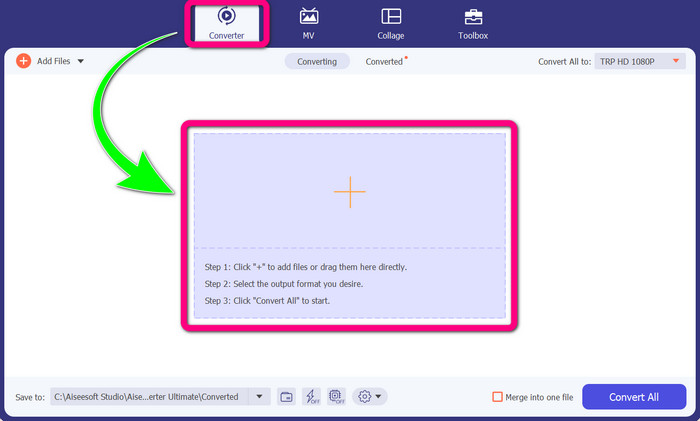
Korak 2: Kada otvorite Video Converter Ultimate na svom uređaju, odaberite karticu Converter. Zatim kliknite ikonu + kako biste dodali svoj DIVX videozapis.
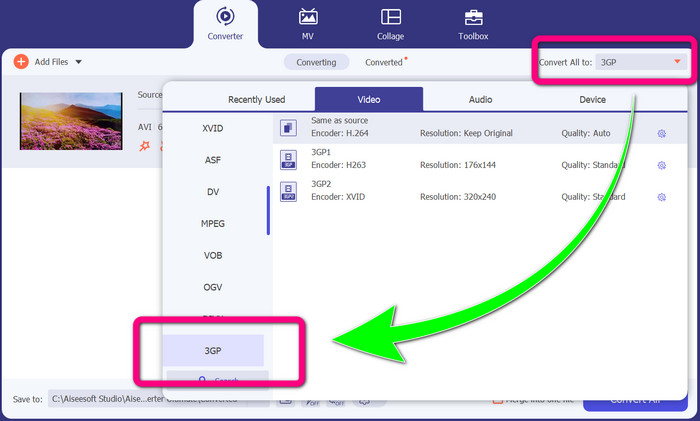
Korak 3: Nakon što dodate svoj videozapis, kliknite opciju Convert all to, potražite format 3GP i odaberite ga.
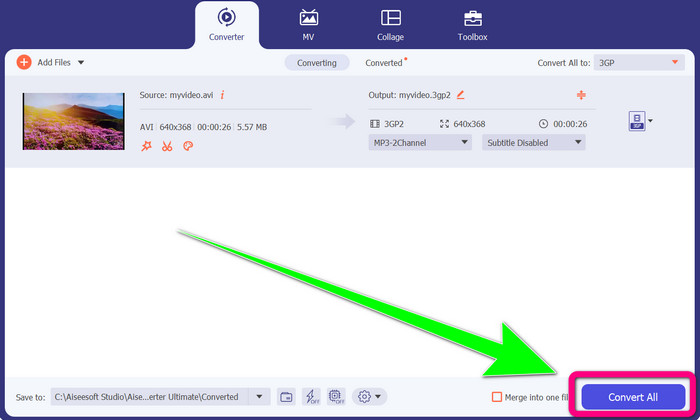
Korak 4: Kada završite s odabirom formata 3GP, kliknite gumb Convert All. Pričekajte da se proces pretvorbe dovrši i spremite konačni videozapis na svoj uređaj.
Dio 2: Izvrsni mrežni pretvarači za pretvaranje DIVX-a u 3GP
Korištenje FVC besplatnog video pretvarača na mreži
Jedan od najboljih online alata za pretvaranje DIVX u 3GP je FVC Free Video Converter Online. Ovaj vam alat može pomoći pretvoriti različite formate datoteka u samo nekoliko klikova. Podržava gotovo sve uobičajene video i audio formate u MP4, MOV, MKV, FLV, VOB, MP3, AAC i druge. FVC Free Video Converter Online je jednostavan i lagan za korištenje. Čak ga i početnici mogu bez problema koristiti. Također, bilo da ste korisnik Windowsa ili Maca, možete se osloniti na ovaj alat jer je dostupan i na Windows i na Mac platformi. Slijedite jednostavne metode u nastavku kako biste pretvorili DIVX u 3GP.
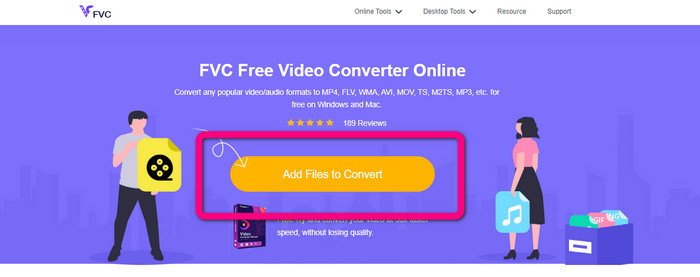
Korak 1: Posjetite stranicu FVC Free Video Converter Online. Zatim odaberite gumb Add Files to Convert kako biste uvezli DIVX datoteku koju želite pretvoriti.
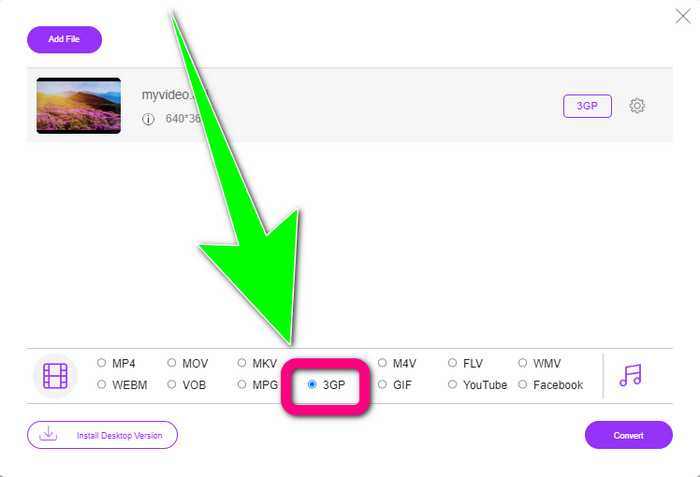
Korak 2: Nakon dodavanja DIVX datoteke, kliknite format 3GP među ponuđenim formatima ispod.
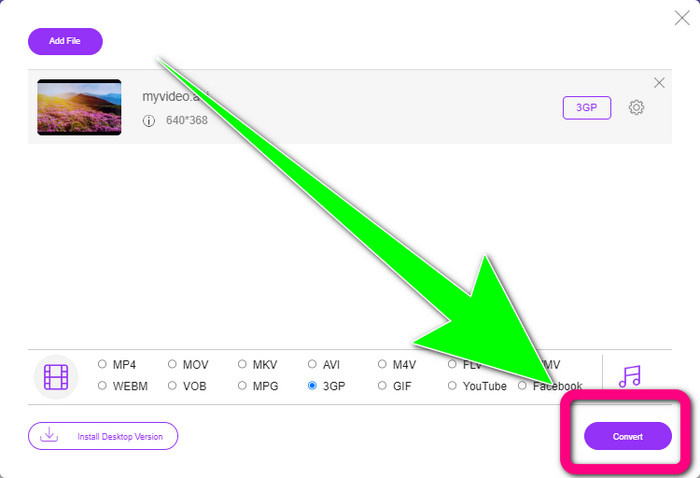
Korak 3: Nastavite klikom na gumb Convert. Pričekajte da se pretvorba dovrši i spremite svoj konvertirani videozapis.
Korištenje Convertio
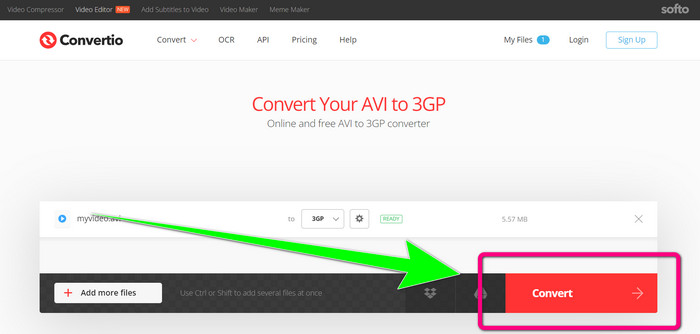
Ako želite pretvoriti DIVX u 3GP online, Convertio je jedan od alata koje možete koristiti. Podržava mnoge formate, poput 3GP, DIVX, XVID, AVID, MP4, M4V, ASF, HEVC i drugih. Osim pretvorbe videozapisa, možete pretvarati i slike, zvuk, dokumente, arhive i druge vrste datoteka. Convertio je također jednostavan alat jer možete izvršiti pretvorbu u nekoliko koraka, tako da se nećete previše mučiti pri pretvaranju svoje DIVX datoteke u 3GP. Međutim, kao i kod drugih online alata, ne možete raditi s ovim softverom ako nemate pristup internetu. Također, postoje situacije u kojima ovaj online alat ne radi baš najbolje. Besplatna verzija Convertia ima ograničenje. Možete pretvarati samo datoteke maksimalne veličine od 100 MB. Morate kupiti softver kako biste povećali maksimalnu veličinu datoteke i postigli bolju izvedbu. Slijedite korake u nastavku da biste pretvorili DIVX datoteku u 3GP format.
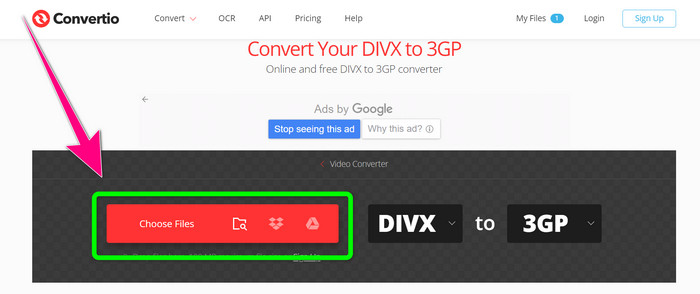
Korak 1: Idite na web-stranicu Convertio. Kliknite gumb Choose Files i dodajte svoj video u DIVX formatu.
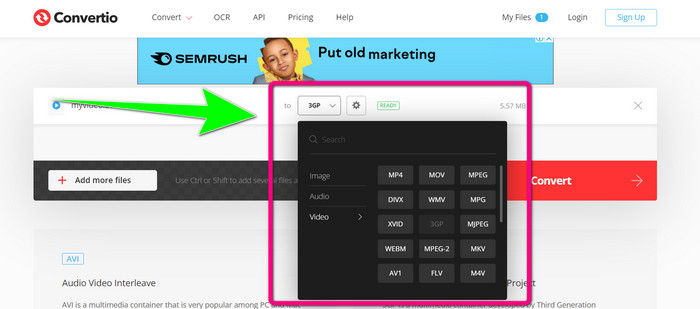
Korak 2: Nakon dodavanja videozapisa, otiđite na opcije formata i odaberite format 3GP.
Korak 3: Kada odaberete format 3GP, kliknite gumb Convert, pričekajte da se pretvorba dovrši i spremite svoju 3GP video datoteku.
Dio 3: Pregled DIVX i 3GP formata datoteka
DIVX
DIVX je softver za kompresiju videozapisa koji može komprimirati video datoteke na do jedne dvanaestine izvorne veličine uz minimalan gubitak kvalitete. Ovaj video format uobičajen je u velikim filmskim kompanijama poput Disneyja, Dreamworks SKG, Universala i Paramouta.
3GP
3GP je multimedijski kontejner. Razvio ga je Third Generation Partnership Project 1998. godine za telefone temeljene na GSM-u (Global System for Mobile Communications). Kontejner 3GP zahtijeva malo prostora za pohranu, podatkovnog prometa i male kapacitete propusnosti, što je izvrsno za mobilne telefone.
Daljnje čitanje
Jednostavno pretvorite MTV u MKV pomoću ovih vrhunskih konvertera
Kako pretvoriti TRP u MKV bez gubitka kvalitete
Dio 4: Često postavljana pitanja o pretvaranju DIVX-a u 3GP
Što je DIVX pretvarač?
To je odličan alat koji može pretvarati različite vrste datoteka u brojne druge formate. To uključuje AVI, MP4, MPEG, MOV, FLV i druge. Kada završite s pretvorbom, svoj video možete reproducirati u bilo kojem drugom medijskom reproduktoru koji podržava određeni format. FVC Free Video Converter Online jedan je od najboljih pretvarača koje možete koristiti.
Je li DIVX format datoteke isti kao AVI?
Format datoteke DIVX temelji se na AVI spremniku, ali može sadržavati izvrsne značajke poput poglavlja i titlova. Osim toga, formati datoteka AVI i DIVX mogu se reproducirati na uređajima s DIVX certifikatom.
Mogu li pretvoriti DIVX datoteku u 3GP bez gubitka kvalitete?
Da, naravno da možete. Pomoću Video Converter Ultimate možete pretvoriti DIVX datoteku u 3GP, a da se ne morate brinuti hoće li se kvaliteta promijeniti. Ovaj izvrstan pretvarač može konvertirati različite datoteke bez gubitka kvalitete vašeg videozapisa.
Zaključak
Kao što vidite, postoji više učinkovitih metoda kako pretvoriti DIVX u 3GP pomoću offline i online alata. No ponekad su neki online alati nezgodni, osobito ako imate lošu internetsku vezu, pa možete koristiti aplikaciju koju preuzmete na računalo. Ako tražite izvanredan offline alat, možete isprobati Video Converter Ultimate.
-
 4 najbolja MKV u 3GP pretvarača za Windows i Mac
 Ako tražite pretvarače MKV u 3GP koji su jednostavni za korištenje, imate sreće! Pronašli smo najbolje i besplatne MKV u 3GP pretvarače koje morate isprobati.
-
 5 najboljih Ultimate MOV u 3GP pretvarača koje ne smijete propustiti
 Ako tražite najbolje online i offline MOV u 3GP pretvarače, onda ste na pravom putu. Pročitajte ovaj članak da biste pretvorili svoj MOV u 3GP datoteku.
-
 3 načina za pretvaranje MPG u 3GP na Windows i Mac [besplatno]
 Ako tražite načine za pretvaranje MPG u 3GP, pročitajte ovaj članak da biste saznali najbolje načine za pretvaranje MPG u 3GP na Windows i Mac.
