


 Video Converter Ultimate
 Snimač zaslona
 Video popravak
Pretvorite GIF u MKV pomoću najjednostavnije metode
GIF je jedan od najčešćih formata datoteka koje možete koristiti na svom uređaju, ali postoje situacije u kojima ga možda želite pretvoriti u drugi video format, poput MKV-a. Međutim, pronalazak odgovarajuće aplikacije može biti prilično zahtjevan. Mnogi konverteri imaju problema u procesu pretvorbe. Također, neke aplikacije ne rade ispravno. Osim toga, izazov je pronaći alat koji podržava različite video formate. No u ovom ćete članku pronaći najbolje rješenje koje tražite. Otkrit ćete izvrstan način za pretvaranje GIF-a u MKV pomoću pouzdane aplikacije koju možete koristiti i na Windows i na Mac računalu.

1. dio: Uvod u GIF i MKV
Prije pretvaranja prvo ćete naučiti informacije o ova dva formata. Pogledajte bitne detalje u tablici u nastavku.
| Format | GIF | MKV |
| Ime | Format razmjene grafike | Matroska multimedijski spremnik |
| Ekstenzija datoteke | .gif | .mkv |
| Opis | Format za razmjenu slika je GIF. To je široko korišten grafički format koji pohranjuje komprimirane podatke u formatu bez kvalitete i ne koristi više od 256 boja. CompuServe je 1987. stvorio GIF format za razmjenu rasterskih slika preko mreže (GIF87a). Format datoteke promijenjen je 1989. (GIF89a), dodajući mogućnost animacije i transparentnosti. GIF je moguće postaviti na Twitter i Facebook. Nemoguće je uploadati GIF-ove na YouTube ili Instagram jer oni nisu videozapisi. GIF-ovi se također ne mogu reproducirati na medijskim playerima. Format grafičke razmjene naziva se GIF. Treba li se GIF izgovarati "jiff" ili "gif", s "g" koji se izgovara kao "g" u "goat", žestoko se raspravljalo. Također je moguće pohraniti više datoteka u jednu GIF datoteku. | MKV je spremnik otvorenog koda koji može sadržavati medijski materijal komprimiran pomoću različitih kodeka. Ima mnoge prednosti u odnosu na tradicionalni AVI spremnik, uključujući mogućnost uključivanja audio zapisa i titlova na mnogim jezicima koji se mogu mijenjati bez pauziranja reprodukcije i brzog traženja datoteke i premotavanja unatrag. Osim toga, format je jednostavno mijenjati, što olakšava izdvajanje audio i video podataka. |
| Razvijen od | CompuServe | Matroska |
| Kategorija | Formati slikovnih datoteka | Formati video datoteka |
| Vrsta MIME | slika/gif | video/x-matroska |
Dio 2: Detaljni koraci za pretvaranje GIF-a u MKV
Video Converter Ultimate je aplikacija koju tražite ako želite brzo i jednostavno pretvoriti GIF u MKV format datoteke. Uz pomoć ovog softvera možete pretvarati svoje GIF datoteke bez gubitka kvalitete. Osim toga, ovaj konverter nudi ultra-brz proces pretvorbe, i do 30x brži od drugih konvertera. Također vam omogućuje istodobnu pretvorbu više GIF datoteka u jedan MKV format, jer ova aplikacija podržava skupnu konverziju. Na taj način možete biti sigurni da je pretvaranje vaših datoteka u drugi format jednostavno i brzo. Štoviše, Video Converter Ultimate nudi intuitivno sučelje, što ga čini savršenim za svakoga. Što se tiče dostupnosti, korisnici sustava Windows i Mac mogu koristiti ovaj konverter, što im je vrlo praktično.
Nadalje, postoji više funkcija s kojima se možete susresti. Pretpostavimo da želite stvoriti nevjerojatan glazbeni video za reprodukciju na rođendanskim zabavama, vjenčanjima, božićnim zabavama itd. I dalje se možete osloniti na ovu aplikaciju jer nudi Creator glazbenog videa. Ovaj kreator ima besplatne teme koje vaš videozapis čine kreativnijim i jedinstvenijim. Još jedna značajka koju može ponuditi je alat za korekciju boja. Pomoću klizne trake ovaj vam alat omogućuje jednostavno podešavanje svjetline, kontrasta, zasićenosti i nijanse vašeg videozapisa. Na taj će način vaš video biti ugodniji za gledanje. Postoji više značajki koje možete iskusiti u ovoj aplikaciji za preuzimanje. Da biste saznali više o ovom alatu, pogledajte dodatne pojedinosti u nastavku.
Značajke
◆ Pretvorite širok raspon video formata, uključujući MP4, MKV, M4V, MOV, AVI, FLV, WMV, VOB, SWF i više od 100 drugih.
◆ Pretvorite mnogo datoteka odjednom.
◆ Nudi brz proces pretvorbe.
◆ Nudi funkciju poboljšanja videa za poboljšanje videa.
Pros
- Ima sučelje jednostavno za korištenje s detaljnim vodičima.
- Prikladno za početnike.
- Besplatno preuzimanje.
- Dostupno na Windows i Mac.
- Može pretvoriti neograničen broj video/slikovnih datoteka.
Protiv
- Nabavite plaćenu verziju da biste iskusili još ljepših značajki.
Slijedite detaljne postupke u nastavku kako biste trenutno pretvorili GIF u MKV pomoću programa Video Converter Ultimate na svom Windows ili Mac računalu.
Korak 1: Ako želite jednostavno preuzeti Video Converter Ultimate, kliknite gumb Download u nastavku. Zatim ga pokrenite nakon instalacije.
Besplatno preuzimanjeZa Windows 7 ili novijiSigurno preuzimanje
Besplatno preuzimanjeZa MacOS 10.7 ili novijiSigurno preuzimanje
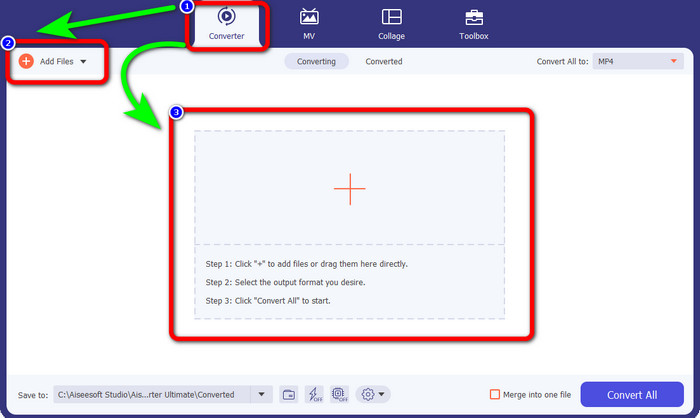
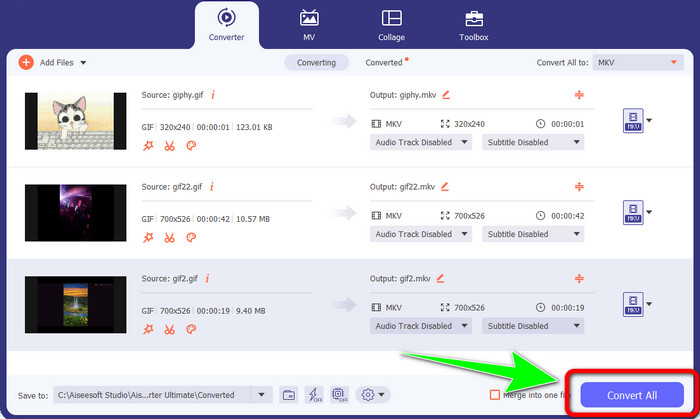
Korak 2: Kada se sučelje pojavi na vašem zaslonu, idite na karticu Converter. Zatim kliknite gumb Add Files kako biste umetnuli GIF datoteku. Također možete kliknuti znak Plus na sredini sučelja kako biste dodali datoteku.
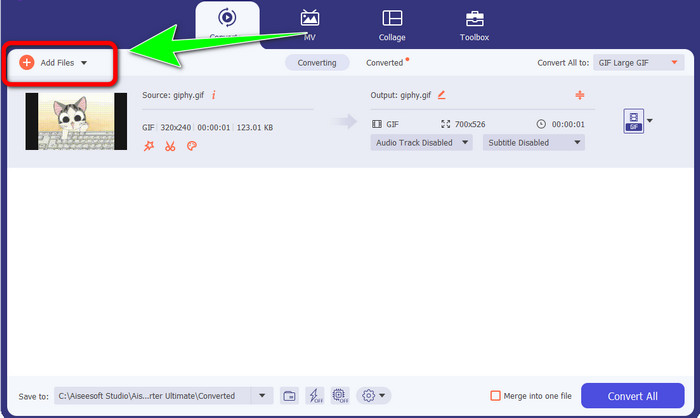
Korak 3: Ako želite izvršiti skupnu konverziju, kliknite gumb Add Files.
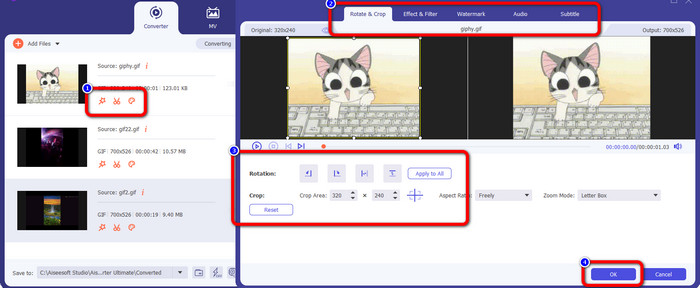
Korak 4: Ako želite urediti svoj video prije pretvorbe, kliknite ikone alata za Editing. Ovaj vam alat omogućuje dodavanje filtera i efekata u vaše videozapise. Također možete rotirati i obrezivati svoje videozapise. Nakon toga kliknite gumb OK.
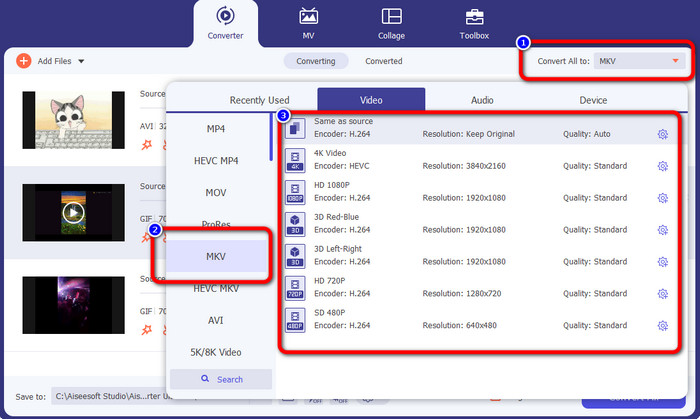
Korak 5: Zatim idite na gumb Convert All to kako biste pretvorili sve datoteke. Odaberite MKV datoteku među opcijama formata i izaberite željenu kvalitetu videozapisa od 480p do 4K.
Korak 6: Za završni korak kliknite gumb Convert All u donjem desnom kutu sučelja. Pričekajte da se proces pretvorbe dovrši i spremite svoj MKV videozapis na radnu površinu. Ovaj vam softver također može pomoći pretvoriti GIF u M4V.
Dio 3: Često postavljana pitanja o pretvaranju GIF-a u MKV
1. Koji je najbolji format datoteke za MKV za pretvaranje?
Najbolji format u koji možete pretvoriti MKV je MP4 format. MP4 je najčešće korišten format u ovom modernom dobu. Što se tiče kompatibilnosti, izvrstan je jer možete reproducirati MP4 datoteku na svim programima i uređajima. Kliknite ovdje da biste saznali kako pretvoriti MKV u MP4.
2. Je li MKV kvalitetniji od MP4?
Da. Iako je MP4 datoteka kompatibilna sa svim uređajima, MKV datoteka ima bolju kvalitetu od MP4 datoteke. To je zato što su zbog podrške za dodatne značajke, višestruke zvučne zapise i titlove, MKV datoteke obično veće od MP4 videa. MKV datoteka također podržava razne datoteke titlova koje možete koristiti na različitim jezicima.
3. Koje su prednosti i nedostaci GIF datoteka?
Prednost GIF datoteka je mala veličina datoteke, kratko vrijeme učitavanja, moguća animacija i kompresija bez gubitaka. Zatim, nedostatak ove datoteke je što ima ograničen izbor boja, slika je samo ravna i nije savršena za fotografije sa širokim rasponom boja.
4. Zašto ponekad MKV datoteka kasni?
Jedan od razloga je taj što računalo možda nema dovoljno memorije i procesorske snage za obradu visokokvalitetnog ili UHD MKV videa. Ovaj format datoteke ipak ima veliku veličinu datoteke.
5. Koji video playeri podržavaju MKV datoteke?
Svoju MKV datoteku možete reproducirati na VLC Media Playeru, Media Playeru Classic, 5KPlayeru, Real Playeru, KMPlayeru, Pot Playeru itd. S ovim programima definitivno možete reproducirati svoju MKV video datoteku.
Zaključak
Ovom metodom možete lako i brzo pretvoriti GIF u MKV. A Video Converter Ultimate pravi je izbor za izvrstan izvanmrežni konverter. Pa što još čekate? Isprobajte ovu aplikaciju i uživajte u brojnim značajkama koje nudi!
-
 Kako pretvoriti TRP u MKV bez gubitka kvalitete
 Imate li problema s pronalaženjem kako pretvoriti TRP u MKV? Onda ste na pravom mjestu. Ponudit ćemo vam najbolje načine za jednostavno pretvaranje TRP u MKV.
-
 Top 4 najbolja rješenja za pretvaranje MXF u MKV [Riješeno]
 Upoznajte ove četiri izvrsne metode za jednostavno pretvaranje MXF u MKV online i offline. Aplikacije uključene u ovaj post mogu vam pomoći pretvoriti datoteke bez muke.
-
 Zapanjujući načini za učinkovito i jednostavno pretvaranje OGV u MKV
 Ova smjernica pružit će vam postupak bez muke za pretvaranje OGV u MKV bez gubitaka. Isprobajte ove najpouzdanije pretvarače i doživite njihovu sjajnu funkciju
