


 Video Converter Ultimate
 Snimač zaslona
 Video popravak
Brzi trikovi za jednostavno pretvaranje M4V u 3GP
Želite li pretvoriti M4V u 3GP? M4V je formati spremnika za video namijenjen isključivo Appleovim proizvodima. Dakle, ako imate svoju M4V video datoteku i želite je reproducirati na uređajima s podrškom za 3G, najbolje rješenje je pretvorba. Ovaj će vam članak pokazati jednostavan postupak brze i lagane pretvorbe M4V datoteke u 3GP format pomoću vaših uređaja. Pročitajte članak i usvojite sve informacije.

Dio 1: Izvrstan softver za pretvaranje M4V u 3GP
Najbolji izvanmrežni pretvarač za vas je Video Converter Ultimate. Ova korisna aplikacija omogućuje vam da jednostavno i trenutačno pretvorite M4V u 3GP. Podržava više od 1000 formata, kao što su MP4, FLV, MTS, DIVX, XVID, VOB, MOV, MKV itd. Uz pomoć ovog izvanmrežnog softvera možete pretvarati datoteke 30x brže nego s drugim pretvaračima. Osim toga, ima jednostavno sučelje i lagane postupke za pretvaranje M4V u 3GP, što je praktično za sve korisnike.
Štoviše, Video Converter Ultimate dostupan je na gotovo svim medijskim platformama, poput Windowsa i Maca. Nadalje, ima još jednu značajku u kojoj možete uživati. Možete odabrati značajke Toolboxa ako želite poboljšati svoj M4V video prije ili nakon pretvaranja. Može poboljšati vaš video na mnogo načina. Ako želite promijeniti brzinu svog videa, tada možete kliknuti funkciju kontrolera brzine videa. Ako ste zainteresirani za ispravljanje boje vašeg videa, tada možete koristiti funkciju Color Correction.
Značajke
◆ Pretvorite različite formate video datoteka, kao što su M4V, MP4, FLV, AVI, TS, SWF itd.
◆ Izvrsno stvara glazbeni video i nudi brojne teme.
◆ Nudi Toolbox za poboljšanje videa.
◆ Dostupna je izrada kolaža.
◆ Pretvorite slikovne formate kao što su JPG, PNG, WEBP, BMP, TIF i drugi.
◆ Kombinirajte brojne video isječke u jedan dio.
◆ Mogućnost podešavanja brzine videa.
Pros
- Dostupno svim korisnicima.
- Pouzdan u personaliziranju 3D videa iz 2D.
- Dostupno na gotovo svim medijskim platformama, kao što su Mac i Windows.
- Brzina pretvorbe je 30x brža.
- Poboljšajte video na nekoliko načina.
- Podržava više od 1000 formata datoteka.
Protiv
- Da biste uživali u još izvrsnih značajki, kupite pretplatu.
Slijedite ove jednostavne korake u nastavku za trenutačnu konverziju M4V u 3GP.
Korak 1: Preuzmite Video Converter Ultimate na svoje Windows ili Mac računalo. Zatim prijeđite na postupak instalacije i pokrenite aplikaciju.
Besplatno preuzimanjeZa Windows 7 ili novijiSigurno preuzimanje
Besplatno preuzimanjeZa MacOS 10.7 ili novijiSigurno preuzimanje
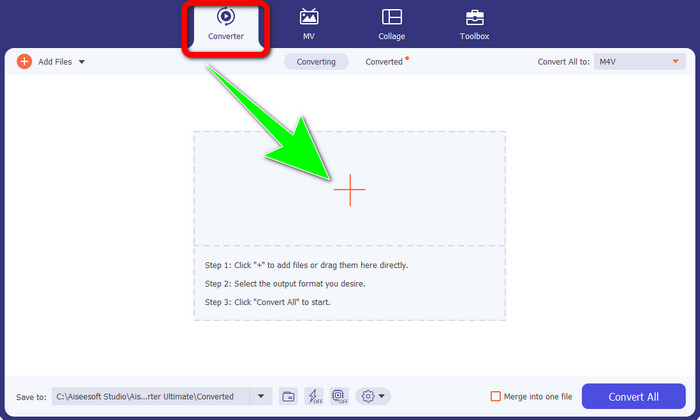
Korak 2: Nakon što pokrenete softver na sustavu Windows ili Mac, odaberite karticu Converter i kliknite ikonu + kako biste umetnuli M4V datoteku koju želite pretvoriti.
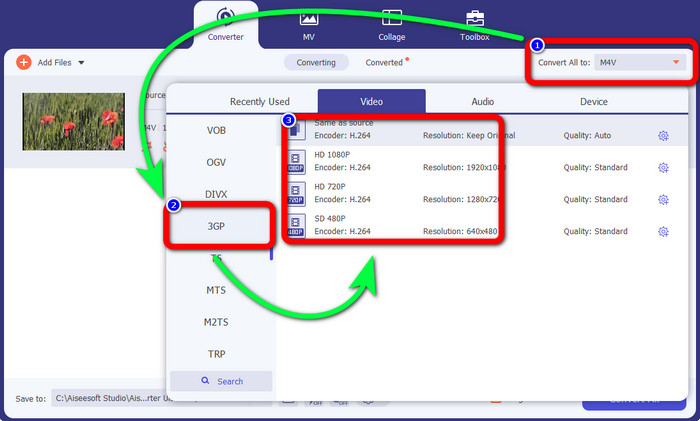
Korak 3: Kada umetnete svoju M4V datoteku, kliknite gumb Convert all to. Pojavit će se opcije formata te odaberite 3GP format datoteke. Također možete odabrati željenu rezoluciju.
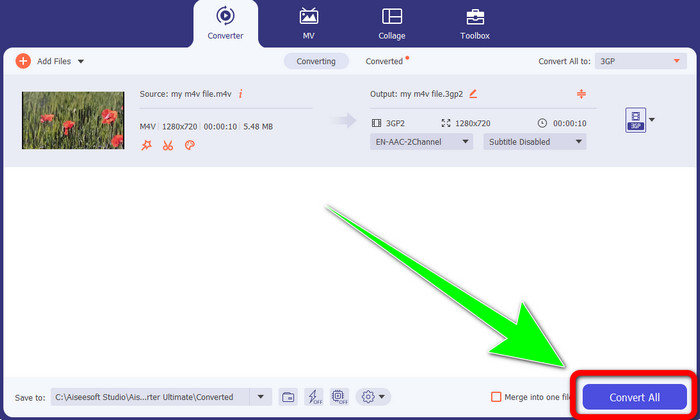
Korak 4: Na kraju, kada završite s odabirom 3GP formata datoteke, kliknite gumb Convert All i spremite svoj konačni izlaz. Ova aplikacija nudi skupnu (batch) pretvorbu, tako da možete dodati još datoteka i pretvoriti ih odjednom.
Dio 2: Online alat za pretvaranje M4V u 3GP
Nakon što ste upoznali najbolji izvanmrežni pretvarač, možemo prijeći na najbolji mrežni pretvarač za vas. Ova mrežna aplikacija je FVC Free Video Converter Online. Ova aplikacija omogućuje vam da bez napora pretvorite M4V u 3GP u samo nekoliko klikova. Također podržava razne video/audio formate, kao što su MP4, WMA, MOV, FLV, TS, MP3 itd. Osim toga, ovaj mrežni alat je besplatan i možete ga koristiti i na Windows i na Mac sustavu. Ako želite pretvoriti svoju M4V datoteku u 3GP format, slijedite detaljne upute u nastavku.
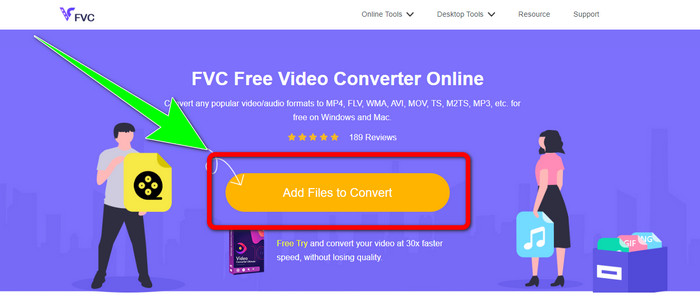
Korak 1: Posjetite web-stranicu FVC Free Video Converter Online. Kliknite gumb Add Files to Convert i uvezite svoju M4V datoteku.
Korak 2: Kliknite format datoteke 3GP među opcijama formata.
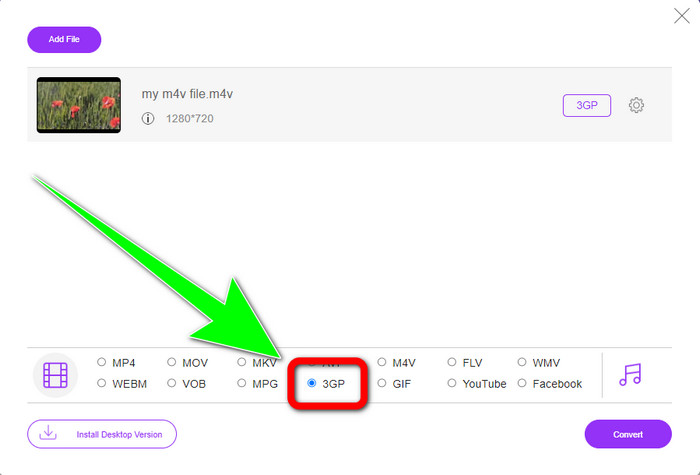
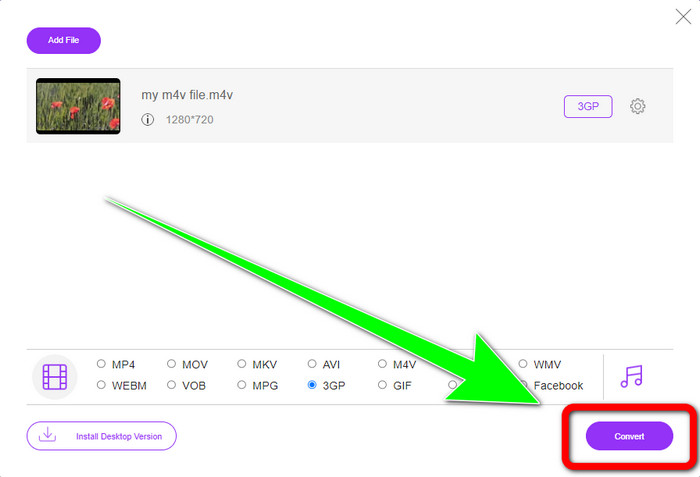
Korak 3: Nakon što odaberete 3GP format datoteke, možete već kliknuti gumb Convert kako biste pretvorili svoju M4V datoteku u 3GP format. Zatim pričekajte postupak pretvorbe i spremite svoj videozapis.
Dio 3: Koji pretvarač M4V u 3GP odabrati
Želite li znati koja je aplikacija najbolja od ove dvije? Iskreno, obje su izvrsne. Ako planirate preuzeti vrhunski video pretvarač, najpreporučljivija aplikacija koju možete koristiti je Video Converter Ultimate. Ima postupak skupne pretvorbe koji vam omogućuje da pretvorite više datoteka u jednom procesu. Također nudi intuitivno sučelje pogodno za neprofesionalne korisnike. Osim pretvaranja, ima još značajki u kojima možete uživati, kao što su uređivanje videa, izrada kolaža, glazbenih videozapisa i još mnogo toga. S druge strane, ako više volite koristiti mrežni pretvarač, upotrijebite FVC Free Video Converter Online. Ovaj softver također može ponuditi skupnu pretvorbu. Također je savršen za početnike. Ne morate ništa plaćati jer je ovaj pretvarač 100% besplatan. S obzirom na sve navedeno, možemo reći da su oba pretvarača izvrsna i pouzdana.
Dio 4: Tablica usporedbe između M4V i 3GP
| M4V | 3GP | |
| Vrsta datoteke | MPEG4-Video | 3GP multimedijski format |
| Opis | M4V je vrsta video spremnika koji se koristi za pohranu audio i video informacija za iTunes datoteke. Apple FairPlay DRM može se koristiti za zaštitu datoteka ove vrste od neovlaštenog gledanja i kopiranja; u ovom slučaju, audio ili video datoteke treba kupiti u trgovini iTunes. Budući da se format temelji na MPEG-4 strukturi, trenutni igrači gotovo uvijek mogu vidjeti nezaštićene datoteke. | Multimedijski spremnik poznat kao 3GP stvoren je 1998. za telefone temeljene na GSM-u (Globalni sustav za mobilne komunikacije). Najbolji je za mobilne telefone jer spremnik koristi malo podataka, propusnosti i pohrane. Za datoteke poslane putem MMS-a služi kao standardni spremnik. |
| Razvijen od | Apple Inc. | Partnerski projekt treće generacije |
| Pros | Pričvršćen na Appleovu zaštitu. | Kompatibilan s gotovo uređajima, |
| Protiv | Kompatibilan samo s gotovo Apple uređajima i programima | Pohranjuje video u niskoj razlučivosti. |
Dio 5: Često postavljana pitanja o pretvaranju M4V u 3GP
Kako pretvoriti M4V u 3GP bez gubitka kvalitete?
Ako želite pretvoriti svoju M4V datoteku u 3GP format bez gubitka kvalitete, tada morate koristiti Video Converter Ultimate. Ova aplikacija će osigurati da se kvaliteta vaših videozapisa neće promijeniti. Ovaj alat možete koristiti i za pretvaranje M4V u DIVX.
Jesu li M4V datoteke kompatibilne s drugim uređajima/sustavima?
Apsolutno, da. Možete upotrijebiti niz M4V reproduktora za reprodukciju ove vrste videa na različitim uređajima. M4V reproduktori pružaju velike prednosti, poput kompatibilnosti s više sustava kao što su Android, Linux, iOS, Windows i Mac.
Je li M4V manji od MP4?
Veličina ovisi o tome što je unutra. Kao audio i video kodek, broj sličica u sekundi, razlučivost itd.
Zaključak
Ovo su metode za pretvaranje M4V u 3GP pomoću izvanmrežnih i mrežnih alata. Ako želite pretvarati različite formate datoteka na Windowsu ili Macu, možete koristiti Video Converter Ultimate. Također, ako tražite izvrstan mrežni alat, tada je FVC Free Video Converter Online najbolji izbor.
-
 Kako pretvoriti DIVX u 3GP na Windows, Mac i na mreži
 Kako pretvoriti DIVX u 3GP? Ako tražite odgovor, pročitajte ovaj članak. Pokazat ćemo vam sjajne postupke uz pomoć različitih pretvarača.
-
 4 najbolja načina za pretvaranje SWF u 3GP na Windows, Mac i na mreži
 Ovdje su najkorisnije metode za trenutno pretvaranje SWF u 3GP. Također, ovaj će vam post pokazati neke učinkovite Windows i online alate koje možete koristiti.
-
 Pronađite najbolje i jednostavne metode za pretvaranje TS-a u 3GP
 Ovaj će članak ponuditi nevjerojatan pretvarač TS u 3GP besplatno preuzimanje koje možete isprobati na svom uređaju. Pročitajte ovaj članak kako biste saznali više bitnih pojedinosti koje su vam potrebne.
