


 Video Converter Ultimate
 Snimač zaslona
 Video popravak


2 jednostavna načina za pretvaranje M4V u WMV bez napora i gubitaka
Neke tvrtke imaju formate video kompresije. Apple i Microsoft razvili su video datoteke ekskluzivno za svoje media playere. Dakle, kada ste preuzeli ili kupili M4V datoteke iz Apple iTunes Store i poželjeli ih podijeliti s prijateljima ili obitelji s računalima, konverzija M4V u WMV bi mogla biti najbolja za napraviti prije nego to učinite. Stoga vam nudimo jedinstveni pretvarač koji ovaj posao obavlja brzo, učinkovito i iznimno bez problema.

Dio 1. Kako jednostavno pretvoriti M4V u WMV na Macu i Windowsu
Free Video Converter Ultimate jednostavan je, ali učinkovit video pretvarač studija FVC. Na vašem Windows ili Mac računalu omogućuje pretvaranje video i audio datoteka. Nadalje, formati videa koje ovaj pretvarač podržava raznoliki su i uključuju one najraširenije – podržava popularne MP4, FLV, M4V, WMV, TS, M2TS, datoteke za iPhone/Android. Ovaj softver koristi HEVC tehnologiju, tako da ne morate brinuti o kvaliteti pri visokokvalitetnom pretvaranju. Što se tiče kvalitete, podržava i 4K UHD. Za korištenje slijedite ove jednostavne korake:
Korak 1: Preuzmite .exe datoteku klikom na gumb Free Download u nastavku, odgovarajuću vašem operativnom sustavu, za Windows ili Mac. Kada završite preuzimanje, otvorite datoteku i započnite instalaciju softvera. Nakon toga pokrenite softver.
Besplatno preuzimanjeZa Windows 7 ili novijiSigurno preuzimanje
Besplatno preuzimanjeZa MacOS 10.7 ili novijiSigurno preuzimanje
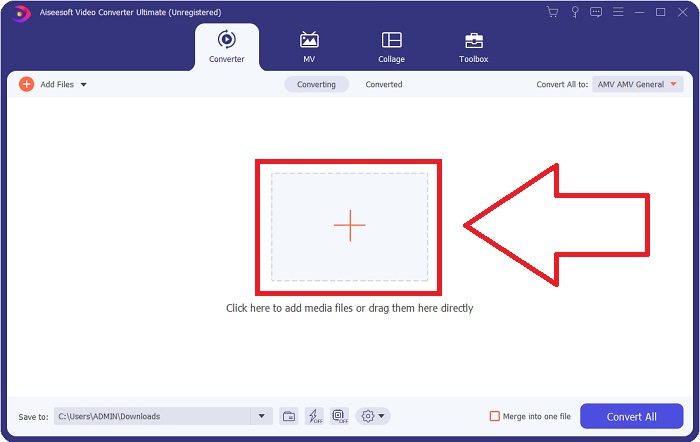
Korak 2: Otvorit će se prozor s sučeljem na kojem se u sredini nalazi gumb +. Kliknite na njega kako biste uvezli video datoteku koju želite pretvoriti. Ili jednostavno povucite i ispustite datoteku.
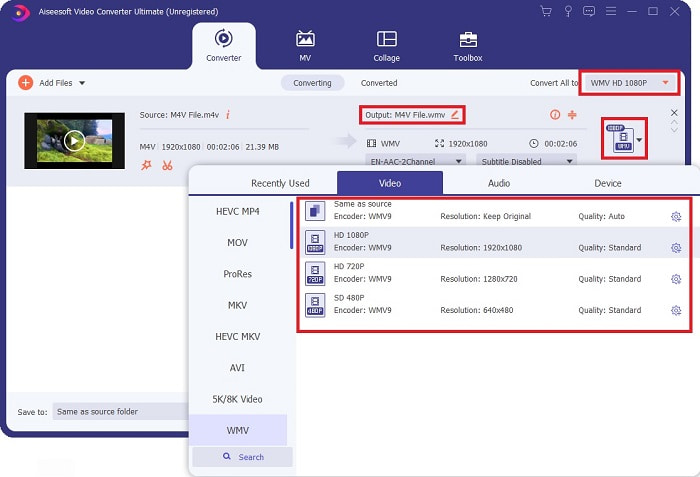
Korak 3: Datoteku koju ste uvezli vidjet ćete u sučelju. S desne strane prikazuje se trenutačni format videa. Kliknite na njega i prikazat će se svi raspoloživi formati između kojih možete birati. U ovom slučaju, scrollajte prema dolje i pronađite WMV ili ga jednostavno upišite u traku za pretraživanje radi bržeg pristupa. Štoviše, s desne strane kartice dostupne su sve kvalitete videa. Možete odabrati onu koju preferirate.
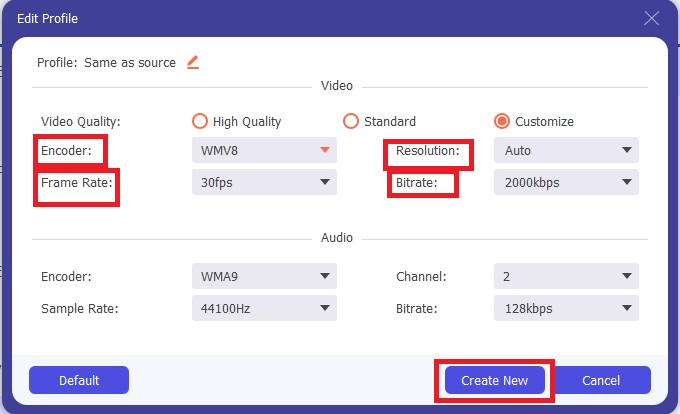
Korak 4: Osim spomenutog odabira kvalitete, možete dodatno urediti izlaz svog videa klikom na ikonu zupčanika s desne strane kvalitete videa koju ste odabrali. Prikazat će vam se sve moguće prilagodbe, uključujući framerate, rezoluciju, bitrate, sample rate, enkoder i još mnogo toga. Samo kliknite gumb Create New kako biste spremili napravljene promjene.
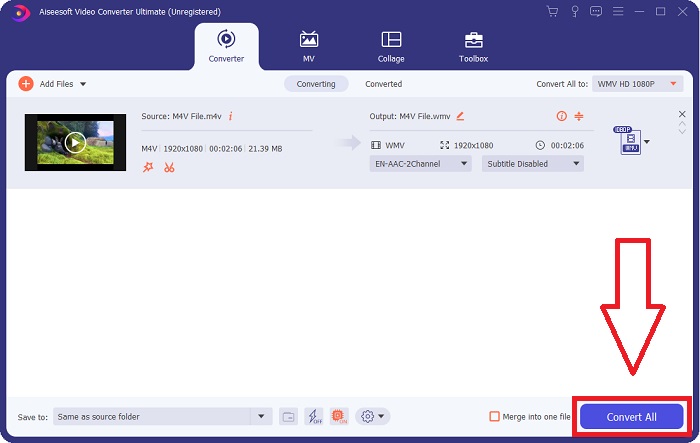
Korak 5: Da biste završili postupak pretvaranja, kliknite gumb Convert All koji se nalazi u donjem desnom kutu kartice, pričekajte da završi i zatim ćete dobiti svoju pretvorenu datoteku.
Dio 2. Kako pretvoriti M4V u WMV pomoću ručne kočnice
Handbrake je popularan besplatni program za pretvaranje koji radi na Windows, Mac i Linux platformama. Korisnici mogu prenijeti videozapise u bilo kojem formatu s DVD i Blu-ray izvora na ovaj transkoder otvorenog koda za konverziju u WMV. Postupak pretvaranja je brz i jednostavan zahvaljujući korisničkom sučelju. Slijedite ove jednostavne upute za pretvaranje M4V u WMV pomoću ručne kočnice.
Korak 1: Pokrenite aplikaciju Handbrake na svom računalu. Kliknite gumb Open Source na glavnom zaslonu da biste potražili i dodali pretvorene WMV datoteke. Također ih možete jednostavno povući i ispustiti u sučelje.
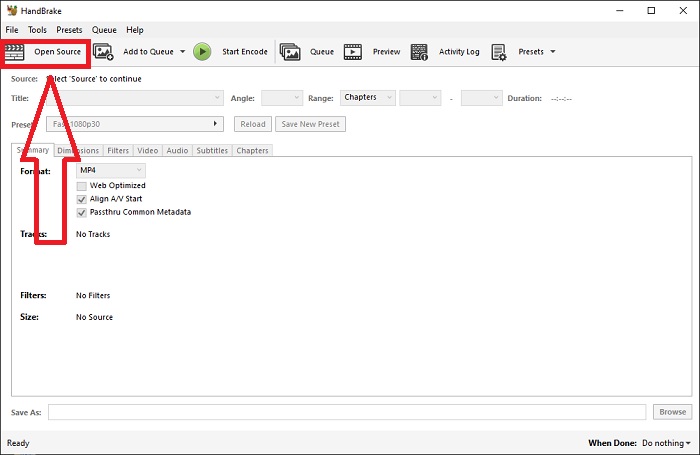
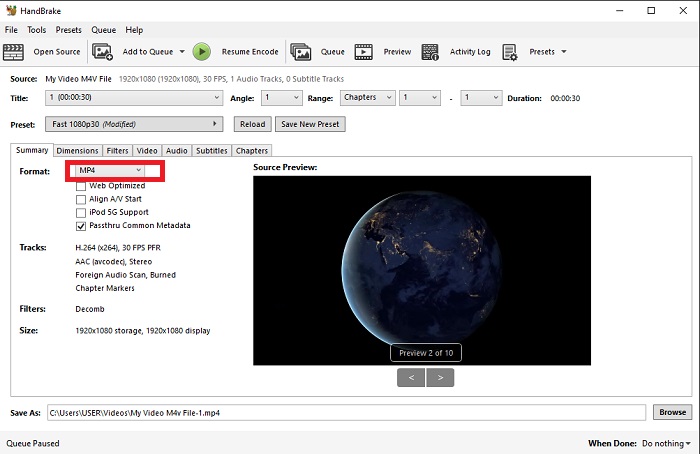
Korak 2: Novo umetnuta datoteka prikazat će se u području Source. Zatim odaberite WMV kao željeni izlazni format iz padajućeg izbornika Format na kartici Summary. Po potrebi se mogu prilagoditi filtri, video kodeci i ostala svojstva datoteke.
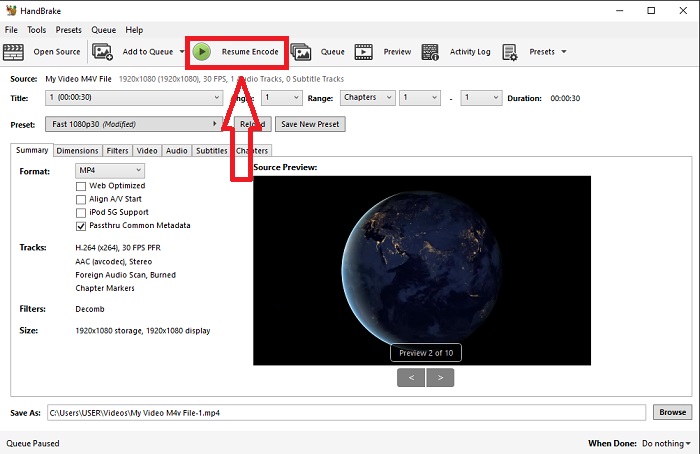
Korak 3: U odjeljku Destination odaberite naziv izlazne datoteke i mjesto na računalu. Na kraju kliknite gumb Start Encode kako biste pretvorili M4V datoteku u WMV.
Dio 3. Još jedan koristan alat za pretvaranje M4V u WMV online
Kao besplatni internetski alat, FVC Free Video Converter je zgodan. MP4, MOV, MKV, AVI, M4V, FLV, WMV, WEBM, VOB, MPG, 3GP, GIF i video formati koje su odobrili YouTube i Facebook su među vrstama koje podržava. Nadalje, ovaj besplatni online video konverter također može pretvoriti audio datoteke, omogućujući vam da pretvorite vaš video ili glazbu u MP3, AAC, AC3, WMA, WAF, FLAC i druge formate. FVC Free Video Converter također vam omogućuje da odredite datoteke prije nego što počnete pretvarati. Možete promijeniti razlučivost videozapisa, brzinu kadrova i bitrate videa, kao i audio kanal, brzinu uzorkovanja i bitrate.
Korak 1: Kliknite ovu poveznicu kako biste otvorili sam online alat. Prvo trebate brzo preuzeti pokretač. To možete učiniti klikom na gumb Add Files to Convert u sredini stranice. Ovaj korak omogućit će vam uvoz datoteka.
Korak 2: Ponovno kliknite navedeni gumb kako biste konačno učitali video. Znate da je učitavanje uspjelo kada se svi ponuđeni formati pojave u sučelju. Ondje među njima odaberite WMV.
Korak 3: S desne strane možete pronaći ikonu zupčanika za dodatne opcije u softveru. Kliknite na nju i moći ćete unijeti promjene u postavke videa i zvuka u pogledu rezolucije, frameratea i sličnog. Kada završite, kliknite OK, a zatim gumb Convert kako biste dovršili proces pretvaranja.
Povezano:
Dio 4. Prošireno znanje o M4V i WMV
Za dodatne informacije koje biste možda željeli o ova dva formata, možete pročitati ono što smo dali u nastavku:
M4V je format datoteke koji je kreirao Apple. Izuzetno je sličan formatu MP4 datoteke, osim što M4V datoteke mogu imati Appleovu Fairplay DRM zaštitu. Format M4V možete pronaći u video materijalu nabavljenom u iTunes trgovini. Ako datoteka M4V ima DRM omogućen, iTunes račun koji se koristi za kupnju datoteke mora biti autoriziran na uređaju koji je reproducira.
S druge strane, WMV datoteke su video datoteke koje je izradio Microsoft i općenito uključuje audio. I na Mac i na PC platformama, korisnici mogu reproducirati ove datoteke s nekoliko video playera. Zaštita upravljanja digitalnim pravima (DRM) može biti uključena u određene WMV datoteke, sprječavajući korisnike da naprave ilegalne kopije datoteka kupljenih od online trgovaca.
| M4V | WMV | |
| Ekstenzija datoteke | .m4v | .wmv |
| Programer | Apple Inc. | Microsoft |
| Programi podrške | ◆ Media Player Classic ◆ VLC Media Player ◆ KMPlayer ◆ Zoom Player | ◆ VLC Media Player ◆ MPlayer ◆ Media Player Classic ◆ Windows Media Player |
Dio 5. Često postavljana pitanja o pretvaranju M4V i WMV
Je li M4V kvalitetniji od MP4?
Sada znamo da nema temeljne razlike između MP4 i M4V nakon usporedbe M4V MP4. Nakon uklanjanja DRM zaštite s M4V video datoteke, MP4 i M4V video datoteke su identične.
Uklanja li ručna kočnica DRM?
To je knjižnica za gledanje DVD-ova kriptiranih Content Scramble System (CSS), metodom koju uvelike koristi besplatni softver za reprodukciju za dešifriranje zaštićenih diskova. Kompatibilan je sa Windows, macOS, Linux i raznim operativnim sustavima. HandBrake je sposoban učinkovito ukloniti DRM s DVD-a i kopirati ih.
Koja je najbolja upotreba WMV-a?
Microsoft je stvorio WMV video format koji se intenzivno koristi u Windows media playerima. WMV datoteke su manje i komprimirane od MP4 datoteka. Zato je popularan za streaming internet videa.
Zaključak
Postoji nedvojbeno mnogo načina za pretvaranje M4V u WMV, ali samo neki to mogu učiniti dok dodatno prilagođavaju nekoliko specifikacija. Zato preporučamo Video Converter Ultimate jer će biti uz vas kad god vam zatreba konverter. Ako vrijeme ne dopušta instalaciju softvera, njegov online pandan uvijek je dostupan za korištenje. Dakle, pomozite nam da vam pomognemo pružiti najbolje iskustvo uređivanja videozapisa pomoću FVC Video Converter Ultimate.
-
 Besplatno | 3 najbolje metode za pretvaranje MP4 u WMV bez gubitka kvalitete
 Ovaj post dijeli kako pretvoriti MP4 video u WMV format na Macu ili Windowsu. Također ćemo vam ponuditi nekoliko opcija, uključujući softver za stolna računala i mrežne pretvarače putem weba. Jeste li spremni znati najbolje alate za pretvorbu MP4 u WMV?
-
 Top 3 načina za pretvaranje FLV u WMV na Windowsima i Macima
 Tražite li najbolji način za pretvorbu FLV-a u WMV bez gubitka kvalitete na računalu ili Macu? Imate sreće jer ovdje dijelimo tri metode za lagano obavljanje posla.
-
 Jednostavan vodič o tome kako svoj GIF pretvoriti u WMV na Windows/Mac
 Želite li znati kako pretvoriti GIF u WMV format? Zatim slijedite ovaj članak jer prikazuje različita rješenja koja možete odabrati.

