


 Video Converter Ultimate
 Snimač zaslona
 Video popravak
Najjednostavniji načini pretvaranja MPG u MKV pomoću najboljih pretvarača [besplatno]
Nažalost, MPG datoteke ne sadrže titl zapise; međutim, možete pretvoriti svoju datoteku u format koji pohranjuje brojne titl zapise na različitim jezicima. A ako tražite način kako lako pretvoriti svoju MPG datoteku u MKV, u nastavku donosimo jednostavne korake kako pretvoriti MPG u MKV online i offline; pročitajte ovaj članak do kraja.

Dio 1. Zašto pretvoriti MPG u MKV
MPG format datoteke jedan je od najčešće korištenih formata datoteka na webu. Ovaj format datoteke razvili su MPEG ili Moving Pictures Expert Groups. Osim toga, ova vrsta datoteke može pohranjivati video, audio i metapodatke. Štoviše, gotovo svi media playeri široko podržavaju ove vrste datoteka. Nasuprot tome, MKV ili Matroska datoteke su spremnik medijskih datoteka koji pohranjuje video, audio zapise i zapise titlova u jednu datoteku. Ova vrsta datoteke također je poznata među filmskim entuzijastima jer može rukovati audio zapisima na različitim jezicima.
Dio 2. Najbrži način za pretvaranje MPG u MKV izvan mreže
Na tržištu postoji mnogo konvertera koji mogu pretvoriti MPG u MKV. Međutim, ako želite konverter koji može obaviti iznimno brzu konverziju, FVC Video Converter Ultimate je najbolji alat. A ako želite ukloniti vodeni žig s vaših videa, ovaj konverter ima funkciju i za to. Štoviše, može obaviti i skupnu konverziju kako bi spojio više formata datoteka u jednu. Želite znati prednosti korištenja ovog MPG u MKV konvertera? Zatim pročitajte detalje u nastavku.

FVC Video Converter Ultimate
5.689.200+ preuzimanja- Eksplicitno uredite i poboljšajte svoj video.
- U ovom pretvaraču dostupan je iznimno brz proces pretvaranja.
- Može pretvoriti MPG datoteke u MKV, WMV, AVI, MP4 i druge 1000+ formata datoteka.
- Dostupno na svim operativnim sustavima kao što su Windows i macOS.
Besplatno preuzimanjeZa Windows 7 ili novijiSigurno preuzimanje
Besplatno preuzimanjeZa MacOS 10.7 ili novijiSigurno preuzimanje
Slijedite korake u nastavku kako biste svoju MPG datoteku pretvorili u MKV.
Korak 1. Preuzmite FVC Converter Ultimate klikom na gumb Download u nastavku za Windows ili macOS. Zatim slijedite postupak instalacije i pokrenite aplikaciju.
Besplatno preuzimanjeZa Windows 7 ili novijiSigurno preuzimanje
Besplatno preuzimanjeZa MacOS 10.7 ili novijiSigurno preuzimanje
Korak 2. Za sljedeći korak kliknite gumb Add Files ili znak + kako biste učitali svoju MPG datoteku u glavno sučelje softvera.
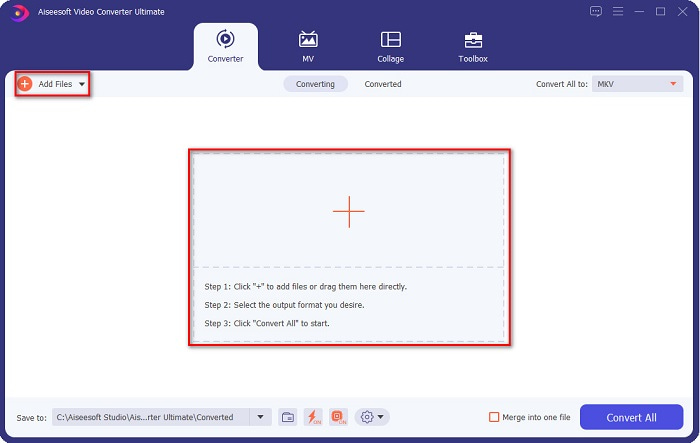
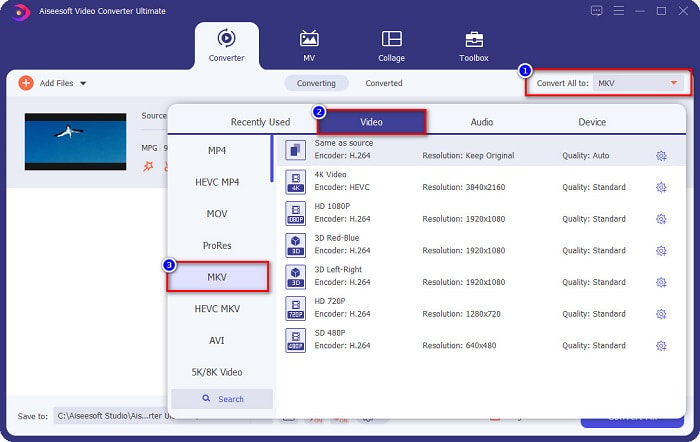
Korak 3. Nakon učitavanja MPG datoteke, odaberite izlazni format klikom na gumb Convert All to. U vašem slučaju odaberite format datoteke MKV.
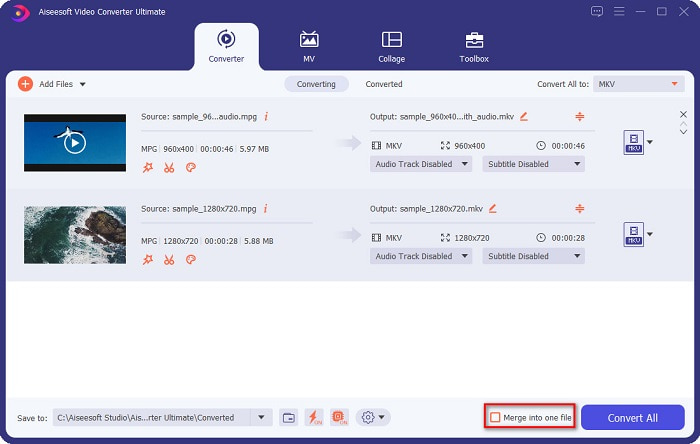
Neobavezno. Ako želite pretvoriti više MPG datoteka u jednu, označite kućicu Merge into one file. Ako ne, prijeđite na sljedeći korak.
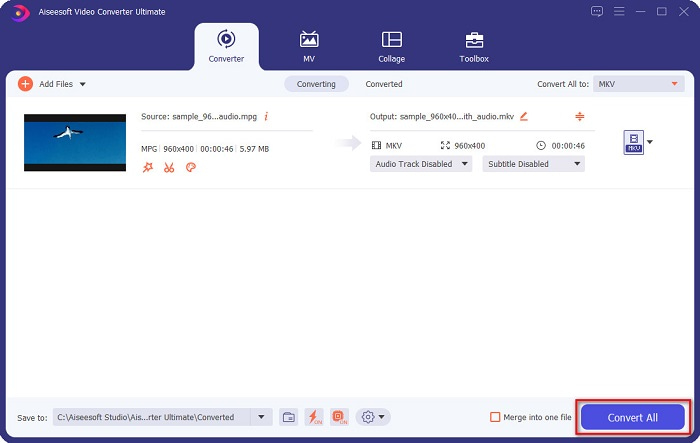
Korak 4. Za završetak kliknite gumb Convert All kako biste pretvorili svoju MPG datoteku u MKV datoteku. Pričekajte nekoliko sekundi i to je to! Tako jednostavno možete pretvoriti MPG u MKV.
Dio 3. Pretvorite MPG u MKV pomoću besplatnog alata
Pitate se koji je najbolji besplatni alat za pretvaranje MPG u MKV? Uočili smo da mnogi korisnici koriste HandBrake kao prvi izbor. Ovaj besplatni program može pretvoriti MPG u MKV, WebM i MP4 datoteke. Osim toga, ima jednostavno sučelje, što je odlično ako ste početnik. Međutim, može pretvarati samo ograničen broj formata datoteka. Unatoč tome, i dalje je učinkovit alat za pretvaranje MPG u MKV.
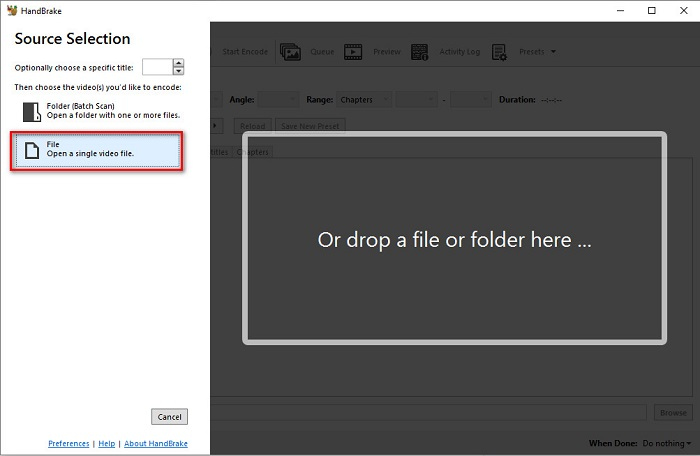
Korak 1. Preuzmite HandBrake na svoj uređaj, a zatim pokrenite aplikaciju. Nakon što otvorite aplikaciju, kliknite opciju File na desnoj strani sučelja softvera. Kada se pojave datoteke na računalu, odaberite svoju MPG datoteku.
Korak 2. Zatim na drop-down gumbu pored Format odaberite željeni izlazni format datoteke. Zatim klikom na gumb Browse odaberite gdje će se spremiti vaša datoteka.
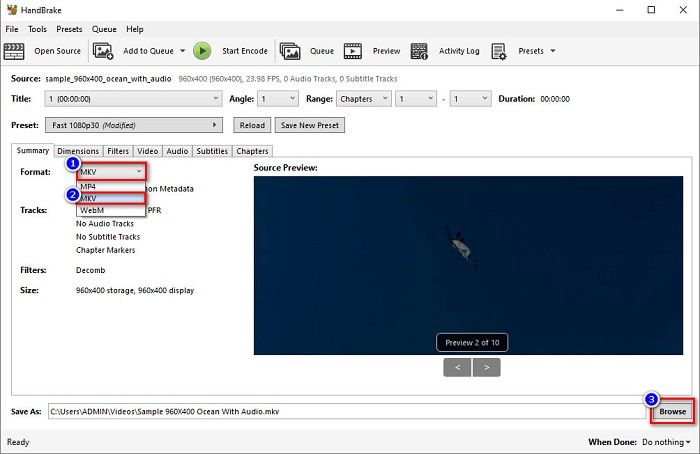
Korak 3. Na kraju kliknite gumb Start Encode kako biste pretvorili svoju MPG datoteku u MKV format datoteke.
Možete pretvoriti MPG u MKV pomoću besplatnog pretvarača slijedeći jednostavne korake iznad.
Dio 4. 2 metode za pretvaranje MPG u MKV online
Pretvorba putem mrežnih pretvarača mogla bi biti najprikladnija opcija. Štoviše, nećete morati ništa preuzimati kada koristite mrežne pretvarače. No umjesto toga, možete izravno pretvoriti online. Međutim, vaša brzina pretvorbe ovisit će o brzini vaše internetske veze. Unatoč tome, u nastavku smo naveli dvije najbolje metode za pretvaranje vaše MPG datoteke u MKV.
Metoda 1. Koristite FVC besplatni online video konverter
FVC Free Online Video Converter je besplatni online konverter koji praktično pretvara različite formate datoteka. Podržava formate kao što su MPG u MKV, AVI, MP4, MOV, MP3 i druge. Također je prikladan za početnike jer ima jednostavno grafičko sučelje. Osim toga, ima funkciju koja vam omogućuje promjenu video i audio bitratea vaše datoteke. Dakle, ako vas zanima ovaj online MPG u MKV konverter, slijedite korake u nastavku.
Korak 1. U svom pregledniku potražite FVC Free Online Video Converter ili izravno otvorite web-stranicu klikom na ovu poveznicu. Zatim pokrenite aplikaciju.
Korak 2. Nakon pokretanja aplikacije kliknite gumb Add Files to Convert. Pojavit će se datoteke s vašeg računala, a zatim odaberite svoju MPG datoteku.
Preuzmite desktop verziju za skupno pretvaranje datoteka.
Korak 3. Zatim odaberite MKV kao izlazni format.
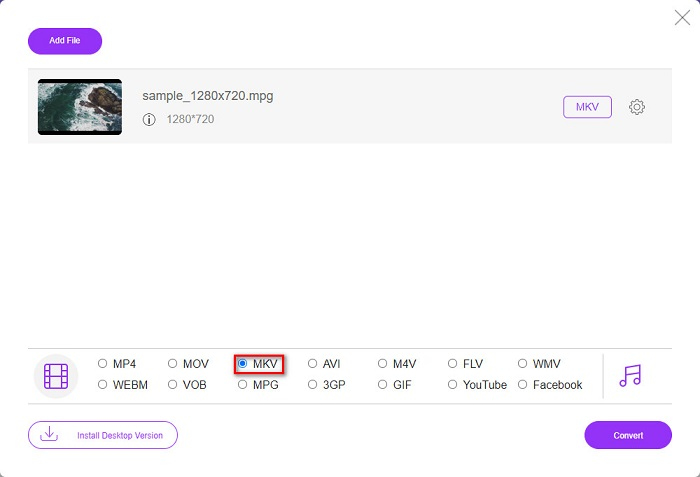
Korak 4. Za posljednji korak kliknite gumb Convert. Zatim će započeti vaša MPG u MKV konverzija.
Metoda 2. Koristite CloudConvert
Još jedan online konverter koji možete koristiti je CloudConvert. Ovaj konverter je vrlo učinkovit za korištenje zbog jednostavnog sučelja. Osim toga, pri korištenju možete i komprimirati svoje datoteke. Međutim, podržava samo ograničen broj formata datoteka. Unatoč tome, mnogi i dalje koriste ovaj konverter zbog praktičnosti.
Korak 1. U pregledniku potražite CloudConvert. Kada već budete na web-stranici, kliknite gumb Select Files. Zatim, kada se pojave datoteke s vašeg računala, odaberite svoju MPG datoteku.
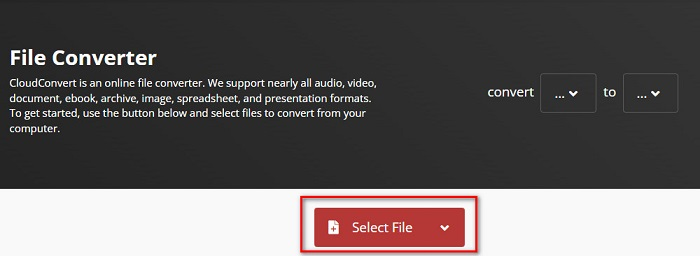
Korak 2. Zatim na drop-down gumbu odaberite MKV datoteku kao izlazni format.
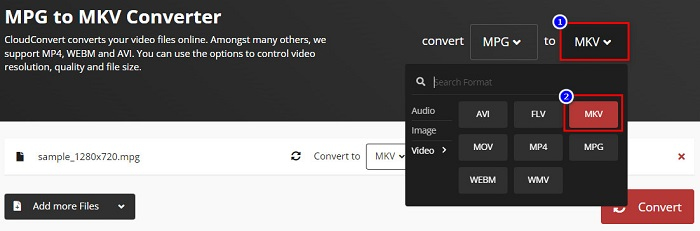
Korak 3. Na kraju kliknite gumb Convert. Zatim pričekajte da se vaša datoteka pretvori i voilà! Uz ta tri jednostavna koraka možete promijeniti MPG u MKV.
MPG u odnosu na MKV
Izradila ga je Moving Picture Experts Group (MPEG), MPG je uobičajeni digitalni video format za pohranjivanje video, audio i metapodataka. Vrlo je koristan pri stvaranju filmova za dijeljenje na internetu. Te datoteke u MPG-u obično sadrže MPEG-1 ili MPEG-2 video/audio kompresiju.
Format multimedijskog spremnika Matroska, objavljen 2002., je format otvorenog koda koji može uključivati brojne video, audio, slike i titlove. Dakle, možete ga koristiti za jednostavno pohranjivanje kratkih videoisječaka, TV emisija i filmova. Prilično je popularan za obožavatelje animea.
Dio 5. Često postavljana pitanja o pretvaranju MPG u MKV
Utječe li pretvaranje MPG-a u MKV na veličinu datoteke?
Da, iako to ne utječe toliko kada pretvorite MPG u MKV datoteku, veličina datoteke se povećava.
Koji ima veću veličinu datoteke?
MKV datoteke imaju veću veličinu datoteke u usporedbi s MPG datotekama jer MKV datoteke sadrže video, audio i više zapisa titlova u jednoj datoteci.
Možete li komprimirati MKV datoteke?
MKV datoteke možete komprimirati pomoću alata za komprimiranje datoteka. FVC Video Converter Ultimate ima funkciju koja vam omogućuje da komprimirate svoje velike video datoteke.
Zaključak
Ovaj vam članak pomaže ako tražite najbolje načine za pretvaranje MPG u MKV datoteke. Svi gore predstavljeni pretvarači pokazuju obećavajuće performanse prilikom pretvaranja datoteka. Ali ako tražite pretvarač s mnogo izvrsnih značajki, možda biste trebali isprobati FVC Video Converter Ultimate kao svoju prvu liniju izbora. Ako još niste uvjereni, preuzmite ga i isprobajte najbolji pretvarač koji možete koristiti.
-
 3 jednostavna načina kako pretvoriti MPG u MOV na vašem Macu/Windows/Online
 Želite pretvoriti svoje MPG datoteke i kasnije ih prenijeti na svoj iOS, iPod, iPad ili Mac? Ovaj će vam članak pomoći da shvatite kako pretvoriti MPG u MOV s koracima.
-
 Kako pretvoriti MPG u FLV bez gubitka kvalitete [Dokazano]
 Morate gledati svoj omiljeni film na ovom media playeru, ali on ne podržava MPG. Pokušajte pretvoriti svoju MPG datoteku u FLV pomoću ovih pretvarača koje vam ovaj članak predstavlja.
-
 2 Ultimate MPG pretvarača za pretvaranje MPG u WMV besplatno
 Želite li besplatno pretvoriti MPG u WMV? U tom slučaju imate sreće jer smo otkrili da postoje dva alata pomoću kojih možete pretvoriti svoje MPG datoteke.

