


 Video Converter Ultimate
 Snimač zaslona
 Video popravak
Najbrža metoda za pretvaranje MXF u M4V na stolnom računalu i na mreži
Datoteka MXF je industrijski standardni format za zvuk i video. Međutim, ovaj format datoteke ne podržava Apple QuickTime Player, pa je nemoguće reproducirati vašu MXF datoteku pomoću tog programa. Ako ne možete reproducirati MXF datoteku u Apple QuickTime Playeru, morate je pretvoriti u neki drugi format, poput M4V. Sretni ste jer za vas imamo najbolje rješenje. U ovom ćemo vam članku predstaviti najučinkovitije i najkorisnije metode za pretvaranje MXF u M4V pomoću pouzdanih pretvarača izvan mreže i na mreži. Osim toga, pomoći ćemo vam steći ideju o tome kako svoje videozapise učiniti privlačnijima jednostavnim uređivanjem. Pročitajte ovaj članak odmah i dobit ćete potrebne informacije.

Dio 1: Sjajna metoda za pretvaranje MXF u M4V na mreži
Jedan od najboljih mrežnih pretvarača koje možete iskoristiti za pretvaranje MXF u M4V je FVC Free Video Converter Online. Ovaj mrežni softver može pretvarati razne video datoteke, kao što su MOV, MKV, AVI, FLV, MP4, WEBM, VOB i druge. Također, možete pretvoriti mnoge datoteke u jednom postupku jer ovaj pretvarač podržava skupnu konverziju. Osim toga, prije pretvaranja videozapisa možete urediti njihovu rezoluciju, bitrate i broj sličica u sekundi prema vlastitim željama. Ima i korisničko sučelje prilagođeno korisnicima te jednostavan način pretvaranja datoteka. Na taj način svatko može koristiti ovaj mrežni pretvarač, i napredni i neprofesionalni korisnici. Štoviše, ovaj mrežni pretvarač dostupan je u svim preglednicima, poput Google Chromea, Mozilla Firefoxa, Microsoft Edgea i drugih, što ga čini lako dostupnim korisnicima.
Nadalje, osim pretvaranja videa, također možete pretvoriti brojne audio formate, uključujući AAC, MP3, M4A, M4B, FLAC i druge. Također ima audio postavku koja vam omogućuje podešavanje njihove brzine uzorkovanja i prijenosa. S ovim značajkama možete reći da je FVC Free Video Converter Online pouzdan.
Značajke
◆ Pretvorite različite video formate, kao što su MP4, AVI, M4V, MXF, MOV, WMV, MKV, FLV i drugi.
◆ Sposobnost uređivanja razlučivosti, brzine prijenosa i brzine prijenosa u sekundi.
◆ Nudi proces skupne konverzije.
◆ Pretvorite audio datoteke kao što su MP3, AAC, AC3, M4B, FLAC itd.
◆ Može uređivati brzinu uzorkovanja i brzinu prijenosa zvuka.
Pogledajte korake u nastavku da biste saznali više o pretvaranju MXF datoteke u M4V format pomoću FVC Free Video Converter Ultimate.
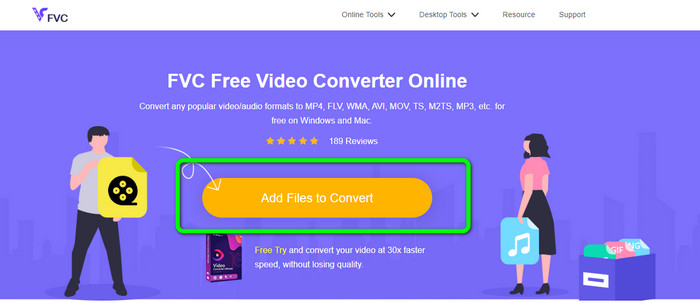
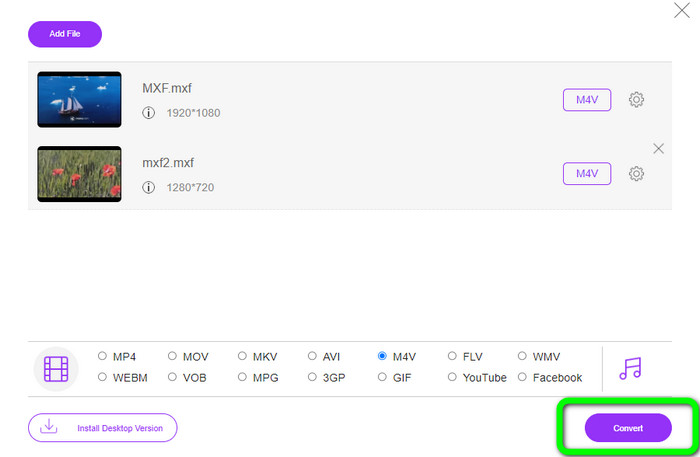
Korak 1: Otvorite preglednik i posjetite web-stranicu FVC Free Video Converter Online. Kada dođete na početnu stranicu, kliknite Add Files to Convert za učitavanje MXF video datoteke koju želite pretvoriti.
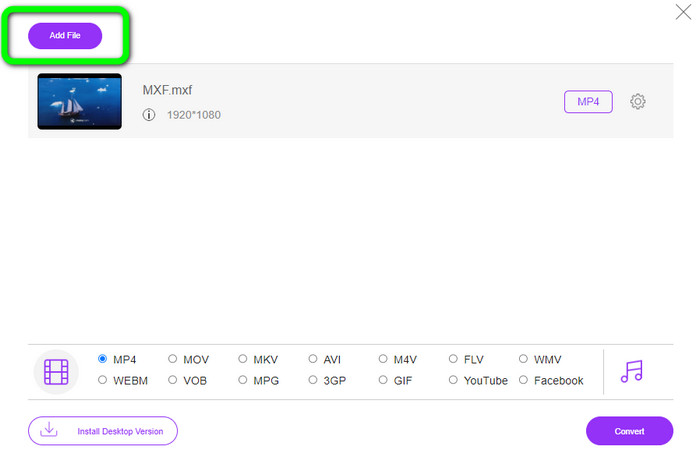
Korak 2: Ovaj pretvarač nudi skupni postupak konverzije. Dakle, ako želite učitati još MXF datoteka, kliknite gumb Add File.
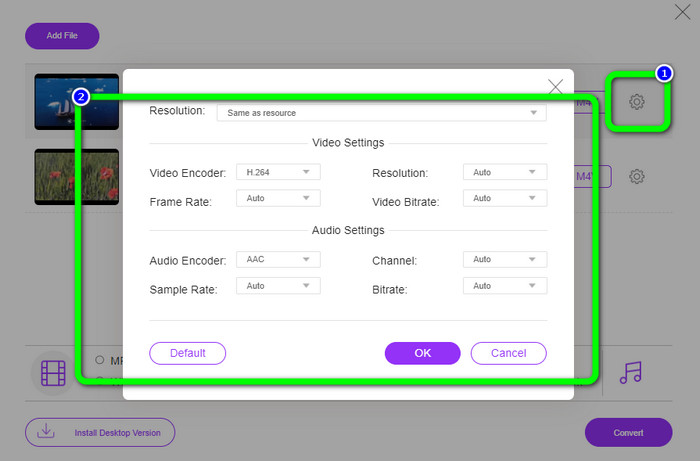
Korak 3: U ovom dijelu možete urediti svoj video klikom na ikonu Setting. Nakon što kliknete tu ikonu, možete urediti broj sličica u sekundi, rezoluciju i bitrate videa. Također možete promijeniti frekvenciju uzorkovanja i bitrate zvuka. Zatim kliknite gumb OK.
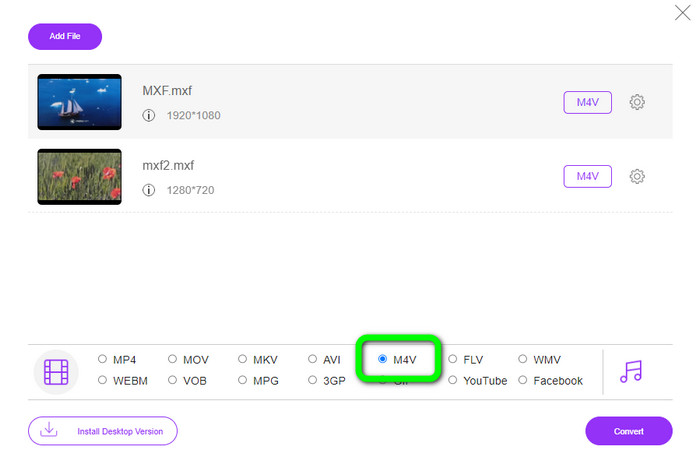
Korak 4: Nakon uređivanja videozapisa možete promijeniti izlazni format tako da kliknete format M4V među opcijama formata u donjem dijelu sučelja.
Korak 4: Za posljednji korak pritisnite gumb Convert. Pričekajte da se proces pretvaranja završi i spremite video na željenu lokaciju.
Dio 2: Najbrži način za pretvaranje MXF u M4V bez gubitaka
Ako želite program koji se preuzima za besgubičnu konverziju MXF u M4V, Video Converter Ultimate je najbolji izbor. Ovaj napredni pretvarač može brzo pretvarati razne datoteke jer ima brz proces konverzije, ne 10x, ne 20x, već 30x brži od prosječne brzine pretvaranja. Osim toga, ima još jednu odličnu značajku u kojoj možete uživati. Možete pretvarati više datoteka istovremeno jer ovaj pretvarač nudi skupnu konverziju. Također, osim MXF i M4V, ovaj alat podržava razne video formate, uključujući MP4, FLV, AVI, MKV, MOV, WMV, VOB i druge. Štoviše, Video Converter Ultimate dostupan je i na Windows i na Mac sustavima, što je odlično i za Mac i za Windows korisnike.
Nadalje, ova aplikacija za preuzimanje ima više sjajnih značajki osim pretvaranja videozapisa. Ako želite stvoriti glazbeni video za svog partnera, obitelj, prijatelje itd., možete koristiti ovaj alat. Video Converter Ultimate nudi kreator glazbenog videa u kojem možete snimati prekrasne filmove s glazbom. Također nudi besplatne teme, kao što su vesele, šik, jednostavne, snježne noći, romantične i još mnogo toga. Također, ako imate video s velikom veličinom datoteke, možete ga komprimirati pomoću video kompresora. Uz pomoć ovog alata možete jednostavno promijeniti veličinu svog videozapisa.
Značajke
◆ Pretvorite više od 100 formata video datoteka, uključujući M4V, MXF, FLV, AVI, MP4, XVID, VOB, MOV, SWF, MKV i još mnogo toga.
◆ Pretvorite više datoteka istovremeno.
◆ Nudi alat za izradu glazbenih videozapisa.
◆ Napravite fantastičan kolaž.
◆ Ponudite alate za uređivanje videa, kao što su trimer za video, kompresor, pojačivač, korekcija boja itd.
◆ Pretvorite formate slikovnih datoteka kao što su BMP, PNG, JPG i drugi.
Slijedite detaljne korake u nastavku za pretvaranje MXF u M4V bez gubitaka pomoću FVC Video Converter Ultimate.
Korak 1: Preuzmite Video Converter Ultimate na svoj uređaj klikom na gumb Download. Ispod se nalaze dva gumba za preuzimanje. Ako ste Windows korisnik, kliknite verziju za Windows. A kliknite Mac verziju ako ste Mac korisnik. Zatim pokrenite aplikaciju.
Besplatno preuzimanjeZa Windows 7 ili novijiSigurno preuzimanje
Besplatno preuzimanjeZa MacOS 10.7 ili novijiSigurno preuzimanje
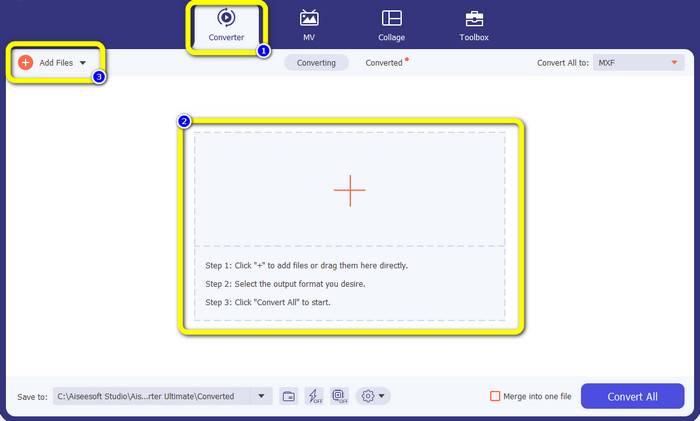
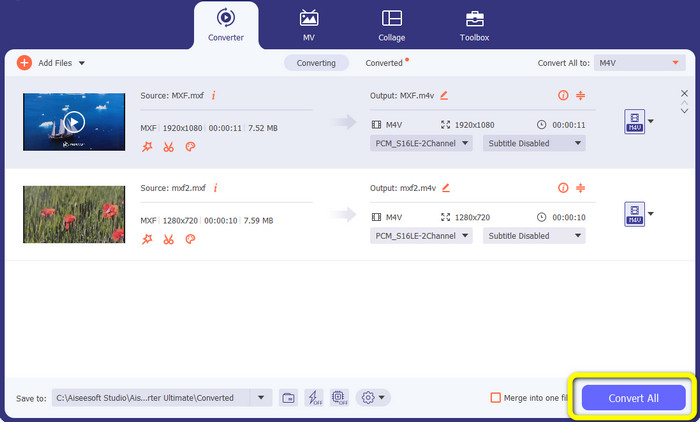
Korak 2: Nakon toga odaberite karticu Converter. Kliknite ikonu + ili gumb Add File za uvoz MXF video datoteke.
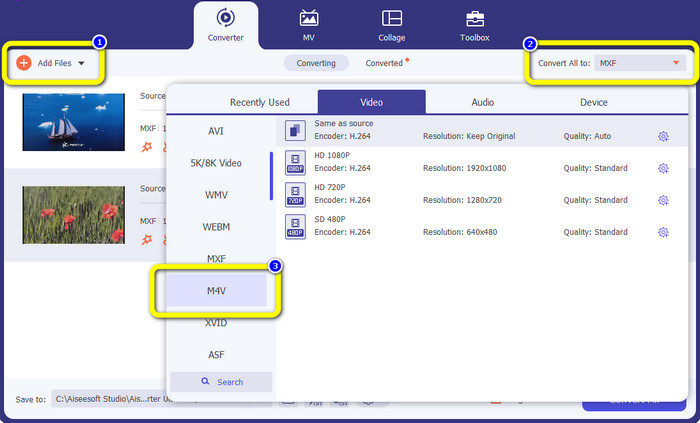
Korak 3: Ako želite istodobno pretvoriti više datoteka, kliknite gumb Add File. Zatim kliknite gumb Convert All i odaberite format datoteke M4V. Također možete odabrati željenu rezoluciju za svoj video.
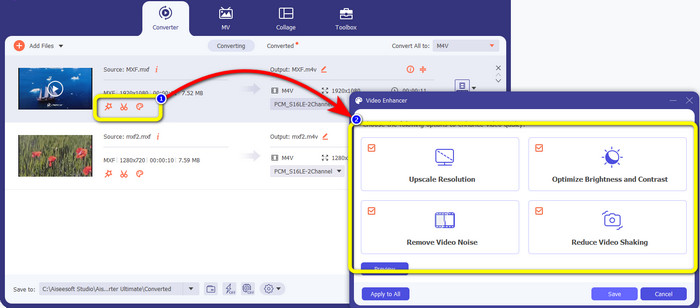
Korak 4: Ako želite urediti svoje videozapise prije pretvaranja, to možete učiniti. Kliknite alate za uređivanje u prvom okviru. Zatim odaberite ikonu video enhance. Nakon toga označite sve okvire kako biste poboljšali rezoluciju, optimizirali svjetlinu i kontrast te smanjili šum i podrhtavanje videa.
Korak 5: Kada završite s uređivanjem i promjenom izlaznog formata videa, kliknite gumb Convert All i spremite video na svoj uređaj.
Dio 3: Što je MXF?
Udruga SMPTE stvorila je MXF medijski spremnik za poslovnu upotrebu. MXF implementira dio sheme podataka Advanced Authoring Format (AAF) i nedavno se pojavio kao industrijski standard za nelinearno profesionalno uređivanje videa. MXF datoteke mogu se jednostavno pretvoriti u bilo koji uobičajeni video format i komprimirati korištenjem gotovo bilo kojeg kodeka. Važno je napomenuti da je implementacija ovog formata od strane Sony-a, Panasonica i Canona imala brojne nekompatibilnosti, što je glavna slabost ovog spremnika. Revizija standarda iz 2009. bavi se ovim problemima.
Dio 4: Što je M4V?
M4V je vrsta video spremnika koji iTunes datoteke koriste za pohranjivanje audio i video podataka. Najbolje je kupiti audio ili video datoteke u trgovini iTunes ako su zaštićene Apple FairPlay DRM-om od neovlaštenog gledanja i kopiranja. Budući da se format temelji na MPEG-4 strukturi, praktički svaki suvremeni player može prikazati nezaštićene datoteke.
Daljnje čitanje:
Najbolji MXF u WMV pretvarači za besplatno pretvaranje MXF u WMV
Top 4 najbolja rješenja za pretvaranje MXF u MKV [Riješeno]
Dio 5: Često postavljana pitanja o pretvaranju MXF u M4V
Koliko je velika MXF datoteka?
MXF podržava veličine datoteka do 2 gigabajta. Osim toga, MXF podržava duže datoteke. Maksimalno vrijeme snimanja medijske datoteke za OMF format je tri sata. MXF može podnijeti 12 sati zvuka na dva kanala na 48 kHz.
Tko koristi MXF datoteke?
Koristilo ga je nekoliko proizvodnih reklama, uključujući SONY MSW 2000 seriju IMX videorekordera. Također, Avid oprema za uređivanje podržava određenu varijantu MXF.
Kako mogu pretvoriti MXF u MOV?
Možete koristiti FVC Free Video Converter Online. Učitajte svoju MXF datoteku, odaberite MOV format među opcijama formata i kliknite gumb Convert. Na taj način možete trenutno pretvoriti MXF u MOV.
Zaključak
Postoji mnogo načina za pretvaranje MXF u M4V. Ali ako želite najbolje i najisplativije pretvarače, možete koristiti gore spomenute aplikacije: Video Converter Ultimate i FVC Free Video Converter Online. Ova dva pretvarača mogu pretvarati datoteke brže od drugih pretvarača, a možete ih koristiti besplatno.
-
 Razne metode kako promijeniti MOV u M4V format datoteke
 Želite li učinkovit način pretvoriti MOV datoteku u M4V format? Tada će vam ovaj članak ispuniti želju. Ovdje su najbolji pretvarači koje možete koristiti.
-
 Izvrsne tehnike za trenutno pretvaranje GIF-a u M4V
 Ovaj vodič pruža vam najučinkovitije strategije za pretvaranje GIF-a u M4V. Osim toga, predstavit ćemo vam dva najbolja pretvarača koja možete isprobati.
-
 Top 2 izuzetna načina kako pretvoriti M2TS u M4V
 Mislite li da je moguće pretvoriti datoteku M2TS u drugi format? Pokazat ćemo vam kako pretvoriti M2TS u M4V format datoteke ako želite najbolje rješenje.
