


 Video Converter Ultimate
 Snimač zaslona
 Video popravak
2 preporučena pretvarača MXF u WMV dostupna online i offline
Mnogi korisnici pitaju kako pretvoriti MXF u WMV jer žele videozapis prenositi putem interneta. Za razliku od MXF datoteka, WMV se češće koristi za distribuciju video sadržaja i pohranu na HD DVD ili Blu-ray. Umjesto da čitate na tisuće članaka o MXF pretvaračima, zašto jednostavno ne nastavite prvo čitati ovo? Kako biste saznali kako pretvoriti svoje MXF datoteke bez gubitka kvalitete uz pomoć dviju donjih opcija.

Dio 1. Kratak uvod u MXF i WMV
Prije nego što nastavimo s pretvaranjem MXF u WMV, zavirimo u ova dva formata i saznajmo razlog za pretvaranje formata.
Material eXchange Format, poznat kao MXF, medijski je format koji sadrži alternativnu videovrpcu. Ali umjesto toga, na vrpci, sada je digitaliziran. Ovaj format najbolje funkcionira uključivanjem metapodataka i vremenskog koda o video i audio detaljima. Najčešće se koristi za prijenos oglasa na TV postajama ili arhiviranje emitiranih TV programa.
Dok WMV ili Windows Media Video datoteka ima istovjetnost s ASF formatom jer obavija bitstream medijske datoteke. Ovaj je format nedvojbeno manji od MXF jer koristi kompresiju bez gubitaka za komprimiranje veličine datoteke. Ipak, to neće utjecati na kvalitetu. Štoviše, WMV je prvotno napravljen za online streaming, ali s novom verzijom, WMV9, prilagođen je za HD DVD i Blu-ray diskove.
Morate pretvoriti svoju MXF datoteku jer je puno lakše reproducirati videozapise u formatu WMV, posebno u sustavu Windows, nego u MXF. Za online distribuciju, WMV je bolji od MXF datoteke. Ali ako želite imati vremenski kod i zapis metapodataka, tada će vam MXF pružiti tu opciju.
Dio 2. Pretvorite MXF u WMV pomoću Amazingly Ultimate Converter na Windows i Macu
FVC Video Converter Ultimate pruža najbolji proces pretvorbe vaših MXF datoteka u WMV bez gubitka kvalitete. Osim toga, možete kodirati MXF u AVI, MOV, MKV, MP4 i druge formate bez narušavanja kvalitete izvorne MXF datoteke. Ovaj alat je više od običnog pretvarača, jer ovdje možete raditi mnogo sjajnih stvari, poput uređivanja itd. Također je kompatibilan sa svim desktop programima kao što su Windows i Mac, uz iste funkcije. Dakle, sada, želite li saznati kako koristiti ovaj izvanredni pretvarač? Ako da, morate slijediti korake u nastavku i naučiti kako pretvoriti.
Koraci za pretvorbu MXF u WMV pomoću FVC Video Converter Ultimate:
Korak 1. Prije svega, morate preuzeti softver na svoje računalo klikom na gumb za preuzimanje. Slijedite upute za instalaciju i pokrenite program.
Besplatno preuzimanjeZa Windows 7 ili novijiSigurno preuzimanje
Besplatno preuzimanjeZa MacOS 10.7 ili novijiSigurno preuzimanje
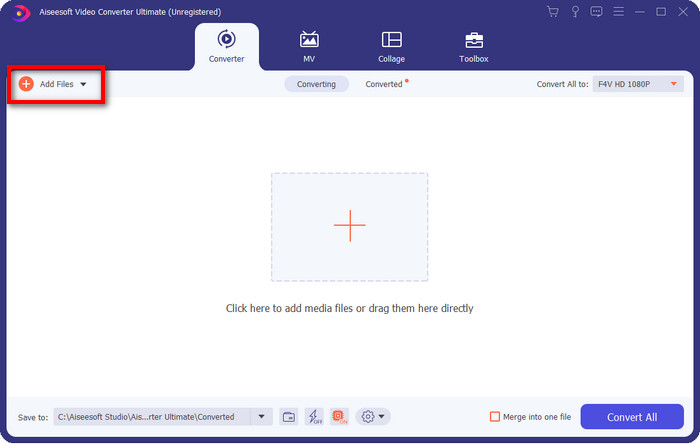
Korak 2. Učitajte datoteku klikom na Add Files; u prozoru mape odaberite MXF datoteku koju želite pretvoriti i pritisnite Open.
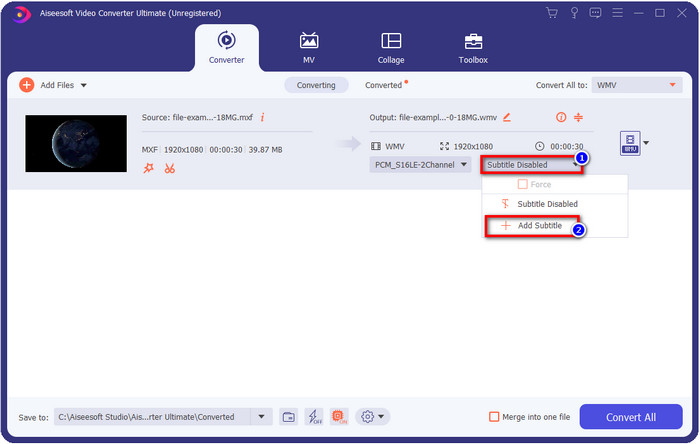
Želite li dodati titlove svom videu? Ako da, kliknite gumb drop-down i pritisnite Add Subtitle. Pronađite datoteku s titlovima u mapi na računalu i pritisnite Open.
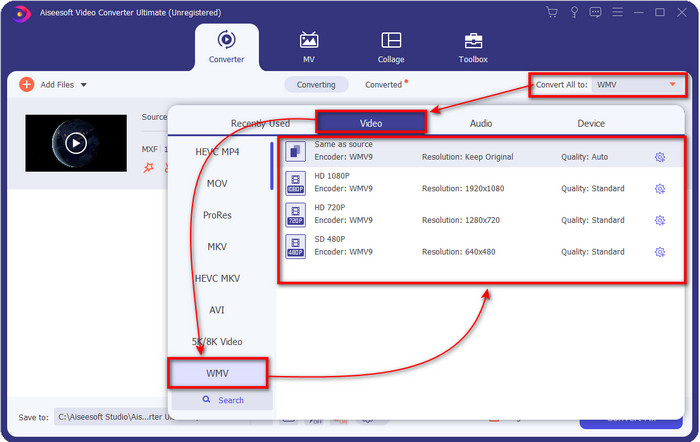
Korak 3. Promijenimo format u WMV klikom na Convert All to.
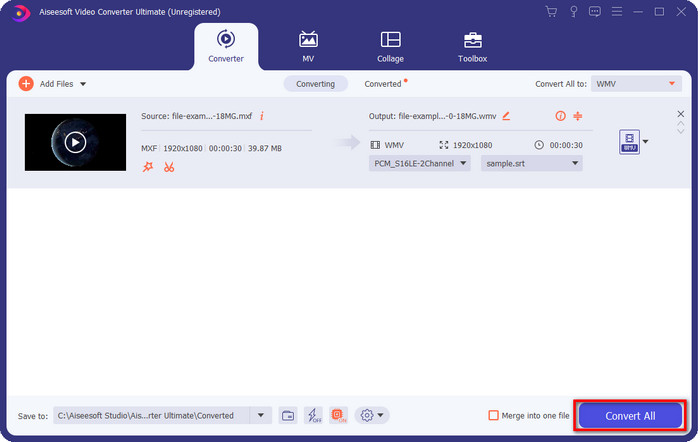
Korak 4. Nakon svih koraka, vrijeme je da pretvorite datoteku u WMV klikom na Convert All.
Pros
- Podržava veliki format za pretvaranje MXF u WMV, FLV, MKV, AVI, MOV i više.
- Dostupan u svim operativnim sustavima za preuzimanje na Windows i Mac.
- Podržava jedinstvene značajke uređivanja kako bi vaš video bio jedinstven i privlačniji od drugih.
- Doživite najbrži i fenomenalan proces pretvaranja s FVC Video Converter Ultimate.
Protiv
- Potrebna je kupnja softvera.
- Preuzmite softver na svoju radnu površinu prije nego što ga možete koristiti.
Dio 3. Najbrže i najlakše pretvoriti MXF u WMV s online uslugom
FVC Free Online Video Converter je vrhunski video pretvarač kojem možete lako pristupiti putem interneta. Ovdje možete učitati pristojan broj formata poput MP4, MOV, MKV, FLV, AVI i drugih video formata. Za razliku od drugih online pretvarača, nema ograničenja u broju ni u veličini datoteka koje želite pretvoriti. Međutim, ovdje ne možete izvesti skupnu (batch) pretvorbu jer nije podržana. Primijenimo sljedeće korake u nastavku kako bismo pretvorili MXF u WMV.
Koraci za pretvorbu MXF u WMV pomoću FVC Free Video Converter Online:
Korak 1. Kliknite ovu poveznicu da biste otvorili glavnu stranicu web-mjesta.
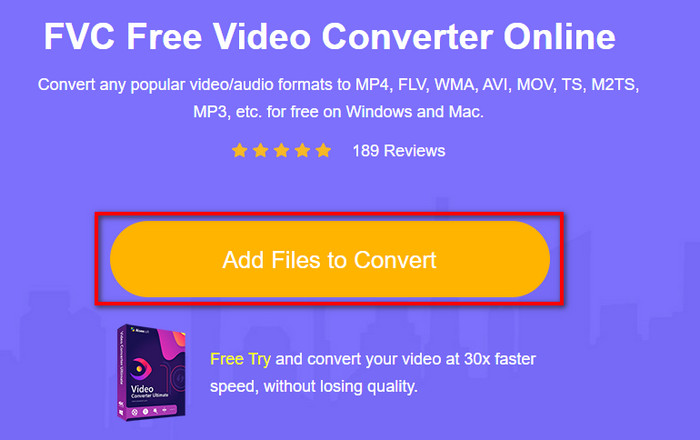
Korak 2. Pritisnite Add Files to Convert kako biste otvorili mapu u kojoj se nalazi vaša MXF datoteka. Kliknite na datoteku i pritisnite Open.
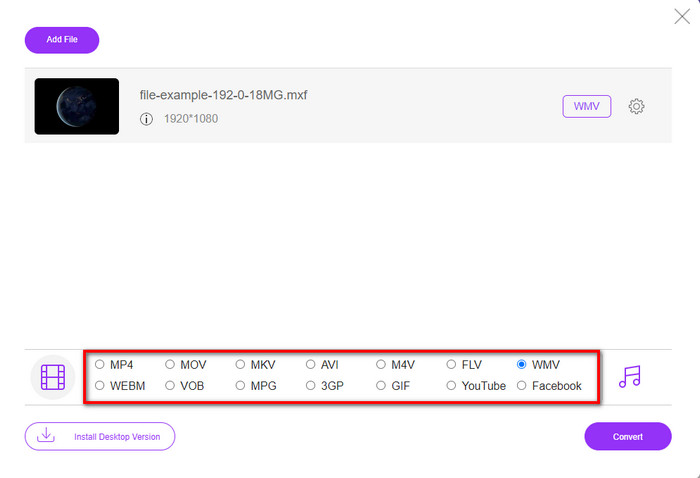
Korak 3. Odaberite format u koji želite pretvoriti pod popisom na novom web sučelju ili kliknite WMV.
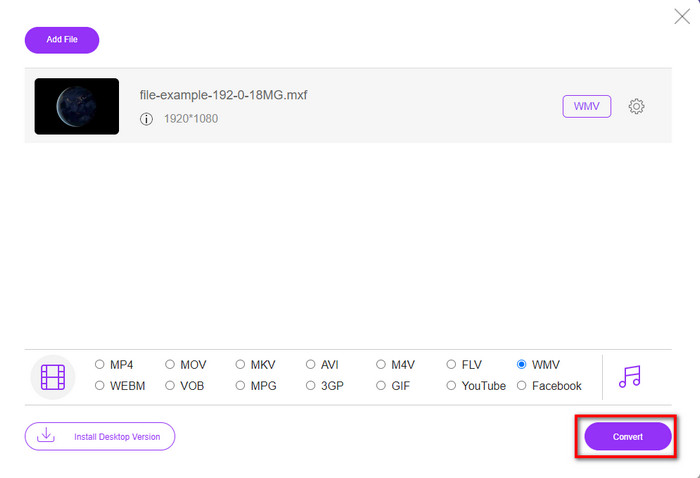
Korak 4. Započnite pretvorbu formata klikom na Convert i proces će započeti.
Pros
- To je jedan od najsigurnijih načina za pretvaranje MXF u WMV, AVI, MOV, MP4 i druge poznate formate.
- Pristupite mu u svom omiljenom pregledniku bilo kada i bilo gdje.
- Besplatno i lagano je.
Protiv
- Za korištenje će vam trebati internetska veza.
- Ne podržava skupnu i brzu pretvorbu
Dio 4. Često postavljana pitanja o pretvorbi MXF u WMV
Zašto su MXF datoteke prevelike?
Jedan od razloga zašto su MXF datoteke velike je metapodaci koje sadrže, a koji povećavaju njihovu veličinu. No, možete komprimirati datoteku kako biste je smanjili čitajući ovaj članak i naučivši kako komprimirati MXF datoteke.
Traje li dugo pretvaranje MXF datoteka?
Ovisi o pretvaraču koji koristite. Na primjer, ako trenutno koristite web alat, brzina će ovisiti o vašoj internetskoj vezi. Korištenje online MXF pretvarača traje puno više vremena od korištenja desktop pretvarača koji možete preuzeti na svoje računalo ili Mac. Dakle, ako želite doživjeti munjevito brzu pretvorbu, morate koristiti FVC Video Converter Ultimate.
Jesu li MOV i MXF formati isti?
Ako bismo govorili o tome što sadrže, MXF i MOV imaju gotovo iste elemente. Primjerice, video, audio i metapodatke, ali MXF pruža puno detaljnije informacije o datoteci nego MOV, posebno što se tiče metapodataka i vremenskog koda. Međutim, MOV je mnogo jednostavniji za upotrebu od MXF-a. U mnogim slučajevima, mnogi korisnici pitaju mogu li pretvoriti svoj MXF u MOV. Dakle, ako ste jedan od njih, morate kliknuti ovu poveznicu i pročitati sve detalje o MXF u MOV pretvaračima.
Zaključak
Za kraj, sada nam je lakše upoznati pretvarače, bilo web‑temeljene ili desktop, za pretvorbu MXF u WMV. Budući da vam oba pretvarača pružaju izvanredan izlaz, ali ako želite profesionalniji rezultat, trebate odabrati FVC Video Converter Ultimate. Nema sumnje da će vam ovaj alat pomoći u svim vašim problemima s pretvorbom. A ako ikada trebate preokrenuti videozapis, spojiti, poboljšati i još mnogo toga, ovo je vaše jedino rješenje za sve navedene probleme.
-
 4 besplatna načina za pretvaranje videokamere MXF u MP4 za univerzalnu reprodukciju
 Ovaj je post detaljan vodič za pretvaranje MXF u MP4 na računalu. Jednostavnim koracima možete dobiti 4 besplatna pretvarača MXF u MP4 za pretkodiranje videokamere MXF u MP4.
-
 4 najbolja MXF pretvarača za pretvaranje MXF u AVI [besplatno i plaćeno]
 Što je MXF datoteka? Kako pretvoriti MXF u AVI? Ovo je nekoliko pitanja na koja odgovaramo. Dakle, ako imate isto pitanje, pročitajte ovaj članak.
-
 Kako pretvoriti MXF u FLV pomoću različitih metoda [provjereno]
 Jeste li pokušali pretvoriti MXF u FLV na nekom čudnom pretvaraču dostupnom na internetu. Ipak, ne možete postići kvalitetu koju želite na svom videu? Preporučujemo da pročitate ovaj članak kako biste saznali više o pretvorbi iz MXF u FLV.
