


 Video Converter Ultimate
 Snimač zaslona
 Video popravak
Izvrsne metode za pretvorbu TRP-a u AVI [2021.]
Videozapisi visoke rezolucije pohranjeni u MPEG-2 Part 1 transportnom formatu poznati su kao TRP datoteke. Ovim se softverom obavlja multipleksiranje digitalnih video i audio tokova i njihova sinkronizirana reprodukcija. Također uključuje funkcije ispravljanja pogrešaka. TRP je pojam koji se često čuje u digitalnom televizijskom emitiranju. TRP datoteke često sadrže video i audio podatke u formatima H.264 i AC3. Mogu se gledati i reproducirati pomoću različitih aplikacija za video reprodukciju. S ovim novim video formatom, koji nekim korisnicima može zvučati neobično, možda se pitate kako pretvoriti ovu novu datoteku u drugi format, poput TRP u AVI? Nastavite čitati ovaj članak jer ćemo predstaviti moguće rješenje koje bi moglo otkloniti problem s kojim se suočavate.
Dio 1. Uvod u pojedinosti o TRP i AVI video formatima
TRP format datoteke je vrsta digitalne video datoteke koja je u skladu sa zahtjevima MPEG-2 video kodiranja. Datotečni nastavak .trp koristi se za TRP datoteke. Alternativno, ove TRP datoteke nazivaju se MPEG-2 video datotekama visoke razlučivosti. Osim toga, TRP datoteka sadrži digitalni zvuk kodiran A3C. Ove .trp datoteke uključuju prijenosne protokole visoke rezolucije za DVD (digitalno video emitiranje) tokove. Određeni set-top televizijski uređaji i digitalni videorekorderi koriste ove TRP datoteke za emitiranje DVD sadržaja. Ove .trp datoteke mogu se vidjeti i reproducirati uz pomoć video playera i multimedijskih alata kao što je VLC media player Video LAN Project Teama. Dodatni digitalni video pretvarači i alati za uređivanje mogu stvarati, otvarati, uređivati i pretvarati TRP datoteke u druge standardne digitalne video formate.
Međutim, Audio and Video Interleaved (AVI) podaci mogu se digitalno pohraniti u AVI formatu datoteke za reprodukciju. Sve Microsoftove Windows platforme imaju ugrađenu podršku za AVI format. Prijedlog .avi koristi se za označavanje AVI datoteka. AVI format podržavaju svi glavni operacijski sustavi, ne samo Windows. Video i audio datoteke izrađene pomoću različitih kodeka, kao što su DivX ili XviD, mogu se pohraniti u AVI spremnik datoteka. Ovdje smo raspravili prednosti i nedostatke AVI formata datoteka, zajedno s kratkom poviješću, strukturom i načinima pretvorbe ovog formata.
Dio 2. Kako pretvoriti TRP u AVI izvan mreže
Počevši s pretvaranjem TRP u AVI izvan mreže, ovaj najbolji alat pouzdan je u obradi širokog raspona formata. Video Converter Ultimate može pretvoriti TRP u AVI na najbrži mogući način. Osim toga, možete promijeniti izlaznu kvalitetu videa prije nego što učitate datoteku. Ovaj pretvarač također ima različite alate koji vam mogu pomoći da svoju video datoteku podignete na višu razinu. Budući da podržava mnoge video formate, nećete se morati brinuti o pretvaranju nepoznatih video formata u željeni format. Sada kada ste saznali za ovaj najbolji pretvarač, možete naučiti postupke dane u nastavku:
Korak 1. Za početak kliknite gumb Free Download u nastavku kako biste započeli postupak preuzimanja. Imate mogućnost preuzimanja softvera za Windows ili Mac, ako želite, kada se preuzimanje dovrši. Prije nego što jednostavno pokrenete program, morate ga instalirati na radnu površinu računala i kliknuti Start Now da biste započeli.
Besplatno preuzimanjeZa Windows 7 ili novijiSigurno preuzimanje
Besplatno preuzimanjeZa MacOS 10.7 ili novijiSigurno preuzimanje
Korak 2. Pokrenite preuzetu aplikaciju. Kada prvi put pokrenete program, pojavit će se prozor sa sučeljem Converter. Ovdje ćete unijeti svoju video datoteku i započeti pretvorbu.
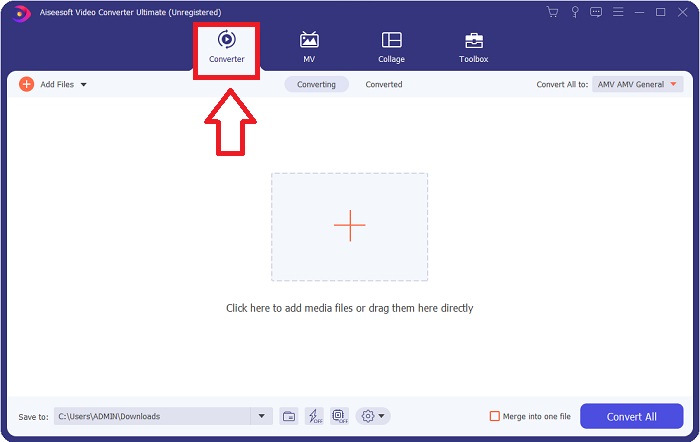
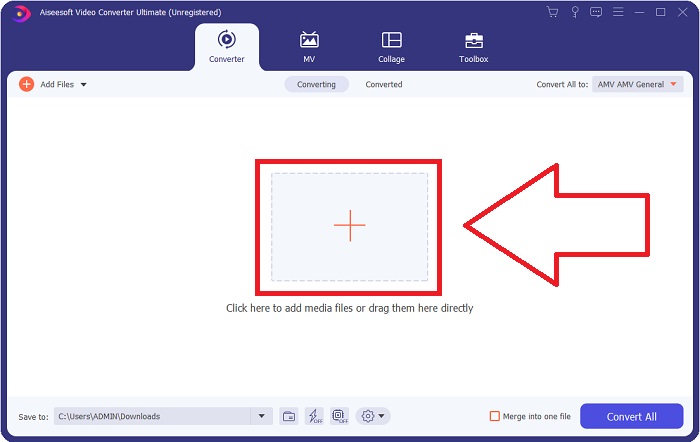
Korak 3. Uvezite svoje datoteke u softver povlačenjem video datoteke ili klikom na ikonu +.
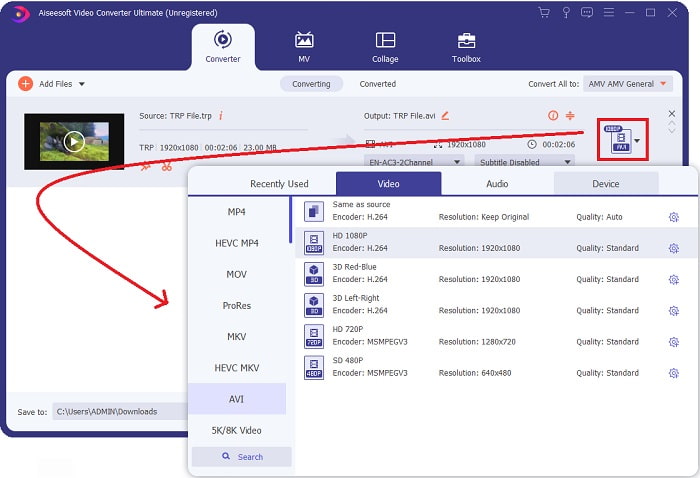
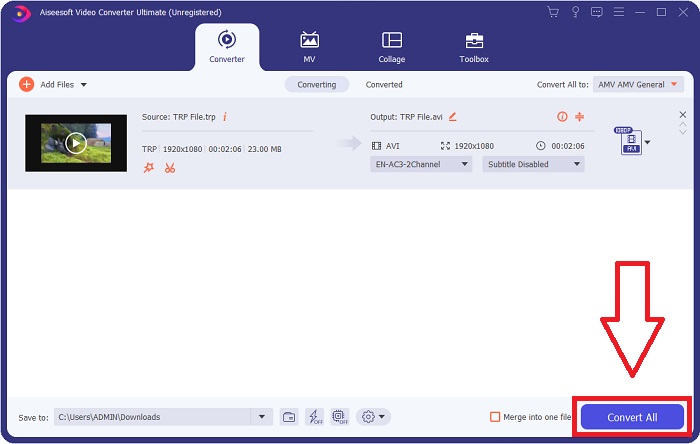
Korak 4: U gornjem desnom kutu kliknite ikonu strelice prema dolje pored opcije Convert All to kako biste otvorili ploču. Zatim idite na popis kategorija Video i odaberite video format AVI. Međutim, ako vaš željeni video izlaz nije naveden, možete promijeniti postavke kvalitete kako bi odgovarale vašim potrebama. Možete promijeniti razlučivost prikaza, broj sličica u sekundi, pa čak i kvalitetu zvuka klikom na ikonu zupčanika. Da biste spremili svoje promjene, kliknite gumb Create New.
Korak 5. Kada završite s uređivanjem videa i spreman je za pretvorbu, kliknite Convert All da biste započeli postupak prijenosa na svoje računalo.
Dio 3. Kako pretvoriti TRP u AVI online
Ako nemate vremena preuzeti Video Converter Ultimate, možete koristiti i ovu mrežnu verziju softvera. Free Video Converter Online najbolji je mrežni alat kojem možete pristupiti na internetu, a koji može brzo pretvoriti različite formate. Za razliku od nekih drugih mrežnih pretvarača, ovaj pretvarač ne ograničava formate koje može podržati; zato se preporučuje nekim početnicima. Da biste saznali više o ovom mrežnom alatu, u nastavku su dani postupci:.
Korak 1. Idite na glavnu web-stranicu FVC pretvarača klikom na ovu poveznicu.
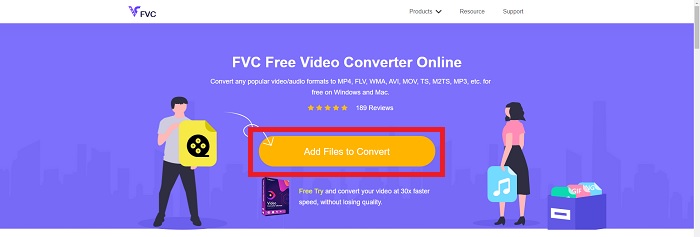
Korak 2. Ako ga koristite prvi put, kliknite gumb Add Files to Convert da biste preuzeli pokretač za svoje računalo. Nakon što se ponovno preuzme, automatski će se pokrenuti. Odaberite datoteku iz svoje mape i kliknite Open nakon što je ponovno preuzeta.
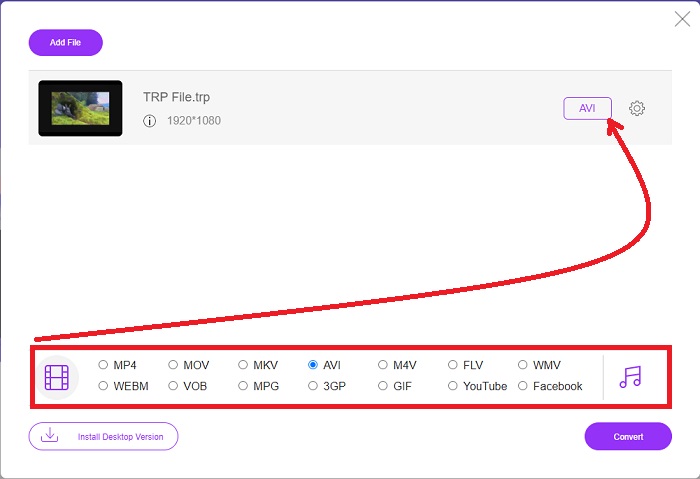
Korak 3. Prije nego što započne postupak pretvorbe, odaberite AVI format iz padajućeg izbornika ispod tako da kliknete na njega.
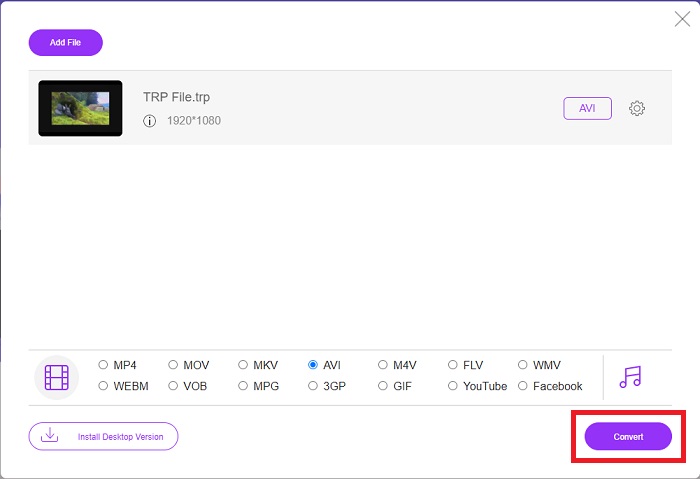
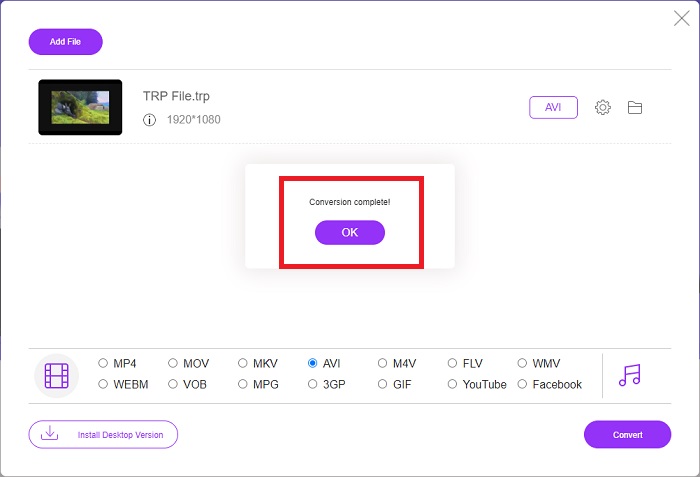
Korak 4. Nakon odabira formata, kliknite Convert kako biste započeli postupak pretvaranja formata u drugi.
Korak 5. Nakon nekoliko minuta pojavit će se mappa s pretvorenom datotekom; jednostavno kliknite na nju kako biste započeli s gledanjem.
Dio 4. Usporedba između TRP i AVI
| Značajka/e od | FVC Video Converter Ultimate | FVC besplatni video pretvarač |
| Skupna konverzija |  |  |
| Hardver i ubrzanje pretvorbe | | |
| Internetska povezanost | | |
| Poboljšanje ili uređivanje videozapisa | | |
| Program podržan | Web-bazirani alat | Alat za radnu površinu |
Dio 5. Često postavljana pitanja o pretvorbi TRP u AVI
Čemu služi AVI?
AVI je akronim za Audio Video Interleaved. AVI je format video i audio datoteka koji se koristi za digitalno pohranjivanje zvučnih i video informacija radi reprodukcije. Također se koristi za pohranjivanje video informacija. AVI format je prema zadanim postavkama podržan u svim verzijama Microsoftova operacijskog sustava Windows. Prijedlog datoteka za AVI datoteke je .avi.
Koji su nedostaci AVI-a?
Slaba kompresija i gubitak omjera stranica kada se prozor medijskog playera poveća najčešće su poteškoće s kojima se susreću korisnici AVI formata datoteka. Moguće je pretvoriti AVI datotekeku u MP4 datoteku. Stoga, ako radite s AVI datotekama, trebali biste znati važnost takve pretvorbe.
Koja je korist od TRP-a?
Popularnost TRP-a kanala omogućuje tvrtkama ciljanje publike na temelju njihove popularnosti i mjerenje povrata ulaganja. Koristeći ovu metodu, radiodifuzne korporacije mogu oglašivačima naplaćivati bolje cijene kada su popularnije emisije u eteru.
Zaključak
Uzimajući sve to u obzir, naučili smo da je Video Converter Ultimate najbolji pretvarač koji biste trebali razmotriti za korištenje među ostalim mrežnim alatima. Budući da ima brz proces pretvorbe i podržava razne formate, smatra se preporučenim alatom ili softverom za pretvaranje nepoznatih video formata poput TRP-a.
-
 Kako pretvoriti TS u AVI / MKV / MOV / WMV na mreži i besplatno na Win / Mac
 Želite brzo pretvoriti TS datoteke u AVI / MKV / MOV / WMV? Ovaj članak prikazuje mrežne i izvanmrežne video pretvarače s potpunim vodičem. Možda ovdje možete dobiti najbolji besplatni TS pretvarač.
-
 [Besplatno i na mreži] 7 načina za pretvaranje MTS-a u AVI na Mac/Windows računalu
 Kako s lakoćom pretvoriti MTS u AVI? U ovom ćete vodiču pronaći 7 besplatnih i jednostavnih načina za pretvorbu MTS datoteka u AVI na sustavu Windows ili Mac bez gubitka kvalitete.
-
 Vodič za pretvaranje MP4 u AVI datoteke sa 7 besplatnih video pretvarača
 Želite li dobiti sve besplatne načine za pretvaranje AVI u MP4 video? Ne biste trebali propustiti ovaj članak. Evo 7 načina za besplatno pretvaranje AVI datoteka u MP4 na Windows, Mac, iPhone, Android i na mreži.
