


 Video Converter Ultimate
 Snimač zaslona
 Video popravak
Naučite 3 načina kako pretvoriti VOB u AVI online i offline
VOB datoteke koriste se za pohranu privatnih tokova i koriste video kompresiju s gubitkom poput MPEG-2. Također, imaju gotovo istu strukturu ako ih uspoređujemo. Međutim, .vob datoteke imaju ograničenje i specifikaciju prije nego što ih uopće možete koristiti. I zbog toga ne možete lako reproducirati VOB datoteku na vašem lokalnom media playeru. Sada, kako biste uštedjeli vaše vrijeme na traženju kako ga otvoriti, predlažemo da ga morate pretvoriti odabirom pretvarača u nastavku. U tom slučaju, predstavljamo vam najbolji pretvarač koji možemo smisliti i naučite kako pretvoriti VOB u AVI online ili offline pomoću alata koji su na popisu.
Dio 1. Kako pretvoriti VOB u AVI online
Ako ste na ograničenom budžetu, predlažemo da koristite besplatan alat. Pretražujući internet, otkrili smo da postoji alat koji se smatra najboljim internetskim pretvaračem – to je FVC Free Video Converter. Osim toga, ovaj alat pruža jednostavnost svakom korisniku koji ga je već koristio, a svi su impresionirani time koliko dobro radi. Stoga, ako i vi želite biti impresionirani koliko je ovaj pretvarač dobar, pokušajte pretvoriti VOB datoteku u AVI format prateći korake u nastavku.
Korak 1. Da biste odmah otvorili web-stranicu pretvarača, kliknite ovu poveznicu.
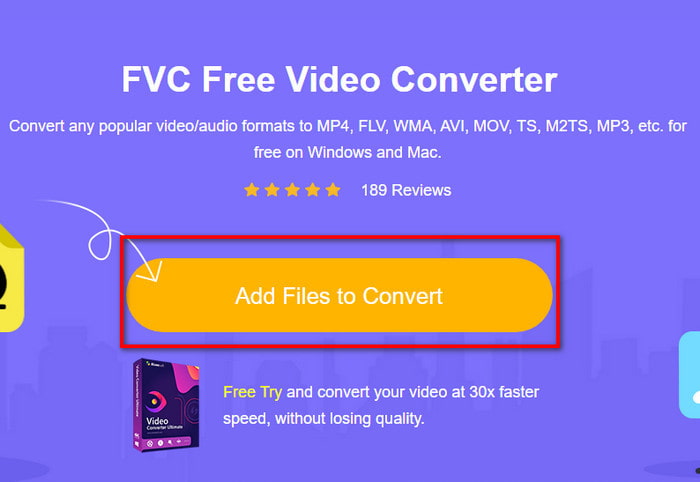
Korak 2. Na web-stranici kliknite Add Files to Convert kako biste preuzeli instalacijsku datoteku. Ne morate brinuti jer zauzima samo nekoliko kilobajta. Zatim kliknite ponovno da biste pokrenuli alat i pronašli datoteku u mapi; kada je pronađete, kliknite Open za nastavak.
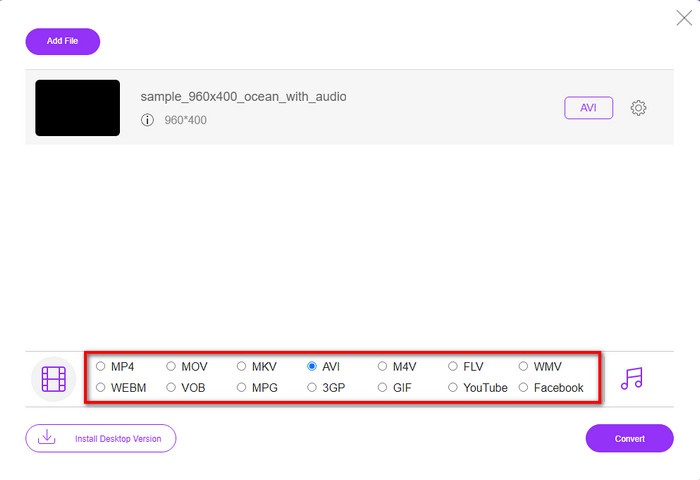
Korak 3. Novo sučelje FVC alata pojavit će se na vašem zaslonu. Na popisu ispod odaberite AVI format ili bilo koji drugi format u koji želite pretvoriti datoteku.
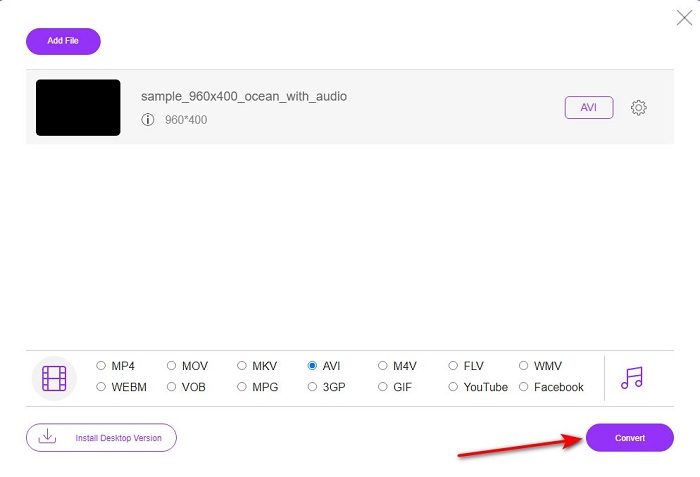
Korak 4. Kada završite s odabirom formata, započnite pretvaranje datoteke klikom na Convert.
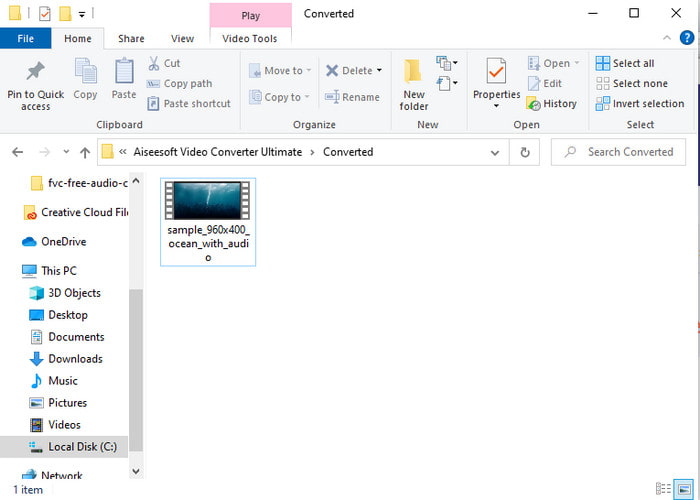
Korak 5. Proces bi trebao trajati manje od minute; kada je pretvaranje završeno, otvorit će se mapa s novo pretvorenom datotekom.
Dio 2. Kako pretvoriti VOB u AVI na Windows i Mac
Koristite fenomenalan pretvarač: FVC Video Converter Ultimate
Ako želite preuzeti pretvarač VOB u AVI, ovo mora biti najbolji od najboljih izbora koje biste voljeli napraviti. FVC Video Converter Ultimate uvijek opravdava svoje ime kao ultimativni alat koji rješava svaku ultimativnu situaciju s kojom se možete susresti, posebno kod pretvaranja. Ovaj softver je daleko drugačiji od dva spomenuta alata. Možda razmišljate zašto, a to je samo zato što savršeno pristaje svakome, bilo da ste profesionalac ili početnik. Sveukupna izvedba koju doživljavamo kada isprobamo ovaj alat već je nevjerojatna i impresionirani smo koliko se brzo može izvršiti konverzija. A sada, ako želite doživjeti fenomenalnu pretvorbu o kojoj govorimo, slijedite dolje navedene korake.
Korak 1. Prije nego što ga možete koristiti, najprije ga morate preuzeti. Nakon što se preuzimanje završi, instalirajte alat, obavite početno podešavanje i kliknite Start Now.
Besplatno preuzimanjeZa Windows 7 ili novijiSigurno preuzimanje
Besplatno preuzimanjeZa MacOS 10.7 ili novijiSigurno preuzimanje
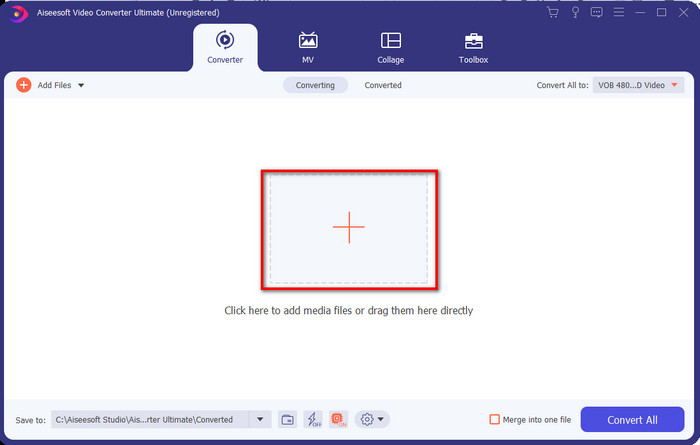
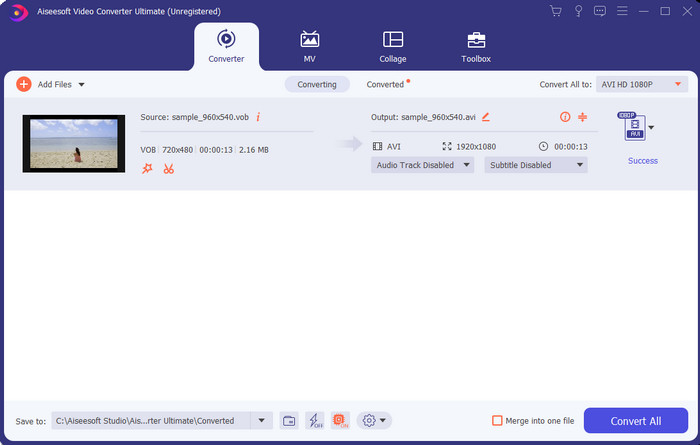
Korak 2. Kada je instalacija završena, zatim otvorite softver. Na srednjem dijelu sučelja kliknite gumb + i na zaslonu će se pojaviti mapa. Kliknite Open kako biste prešli na sljedeći korak postupka.
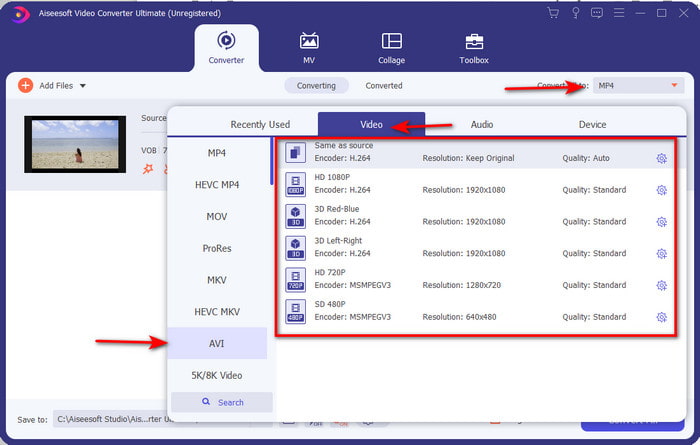
Korak 3. Kliknite gumb Convert All u gornjem lijevom dijelu sučelja i odaberite AVI format s popisa video kategorija.
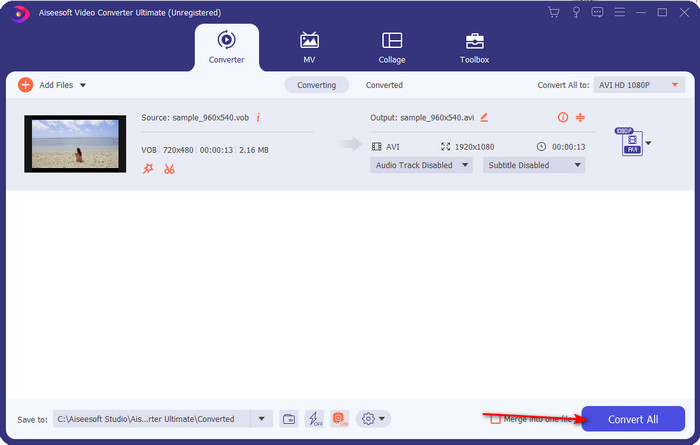
Korak 4. Kada završite s odabirom formata, pritisnite Convert All kako biste započeli pretvorbu.
Korak 5. Ne trebate brinuti da ćete dugo čekati jer se pretvorba može obaviti za nekoliko sekundi. Zatim će se na vašem zaslonu automatski otvoriti mapa s medijskom datotekom koju ste upravo konvertirali. Kliknite je kako biste pogledali i uživali u novoj verziji svoje .vob datoteke.
Koristite besplatni alat: HandBrake
Ako tražite besplatan alat, tada će vam HandBrake u tome pomoći, a nije potrebna internetska veza za njegov rad, baš kao ni za FVC Video Converter Ultimate. Također, besplatan je za preuzimanje i korištenje za svakoga tko ima stolno računalo kod kuće, na poslu ili bilo gdje drugdje. Međutim, ako preuzmete ovaj alat, morat ćete dodatno preuzeti zasebnu datoteku poznatu kao .NET 5.0 prije nego što ga uopće možete koristiti. Neki korisnici to smatraju pomalo iritantnim jer nakon preuzimanja samog alata moraju ponovno preuzimati još jednu datoteku. No, ako želite učinkovit i besplatan postupak pretvorbe, pokušajte koristiti HandBrake za pretvaranje VOB u AVI i pratite korake u nastavku.
Korak 1. Najprije instalirajte alat na tvrdi disk računala.
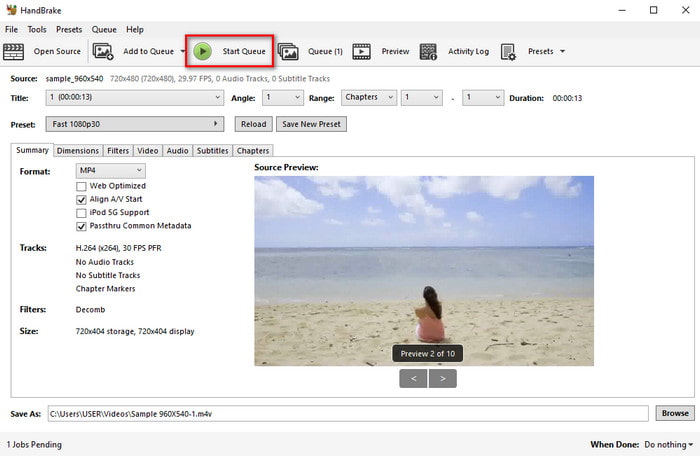
Korak 2. Kliknite File i pronađite .vob datoteku u svojoj mapi.
Korak 3. Kliknite Format i odaberite neki od dostupnih formata, zatim kliknite Start Queue.
Dio 3. Koji je najbolji pretvarač koji se koristi za pretvaranje VOB datoteka u AVI format
| Značajka/e | FVC besplatni video pretvarač | FVC Video Converter Ultimate | Ručna kočnica |
| Pretvaranje formata |  | | |
| Hardver i ubrzanje pretvorbe |  | | |
| Internetska povezanost | | | |
| Video Enhancer ili montaža | | | |
| Program podržan | Web-bazirani alat | Alat za radnu površinu | Alat za radnu površinu |
Dio 4. Često postavljana pitanja o VOB i AVI
Koje druge datoteke VOB mogu sadržavati?
VOB je multi-plex DVD format i zbog toga može sadržavati ne samo video i audio već i titlove, navigacijski sadržaj i izbornik.
Zašto ne mogu reproducirati VOB datoteke na svom media playeru?
Jedan od razloga zašto VOB ne možete reproducirati u svom medijskom playeru jest taj što ovaj format ima samo ograničenu podršku u većini playera. Ovdje možete kliknuti kako biste preuzeli dostupne VOB reproduktore. Ako i dalje imate ovaj problem, jedno izvedivo rješenje jest pretvoriti datoteku pomoću nekog od gore navedenih pretvarača.
Zašto su VOB datoteke prevelike?
Jedini razlog zašto je ovaj format tako velik je taj što sadrži različite podatke koje bi DVD trebao imati. Također, ne možemo izostaviti ni mogućnost dužine videa. Ili kliknite ovdje da biste saznali kako komprimirati VOB datoteke.
Zaključak
Sada, ako želite pretvoriti VOB datoteku, to možete lako učiniti uz pomoć gore navedenih alata. Osim toga, FVC Video Converter Ultimate je pretvarač koji se zaista ističe među ostalim spomenutim online i offline alatima. Zato što možete lako pretvoriti VOB u AVI u Windowsima, pa čak i na Macu. Ako još uvijek nemate nikakvu ideju što biste koristili, preporučujemo da preuzmete fenomenalan alat kako biste iskusili eksplicitne rezultate i bili zadivljeni.
-
 VOB u MP4 - 3 načina za besplatno pretvaranje VOB datoteka u MP4 besplatno
 Ovaj članak predstavlja 3 besplatna pretvarača VOB u MP4 i srodne vodiče. Možete besplatno pretvoriti VOB u MP4 datoteke na Windowsima / Mac / mrežama s lakoćom.
-
 Najbolji načini za pretvaranje VOB-a u FLV [besplatno i online uključeno]
 Želite li pretvoriti VOB datoteku u FLV datoteku? Zadatak možete jednostavno izvršiti bilo putem stolnih računala ili putem mrežnih pretvarača. Pročitajte ovaj vodič i naučite kako lako i brzo transformirati VOB u FLV.
-
 Što je VOB datoteka i kako pretvoriti VOB datoteku u GIF besplatno
 Želite li saznati više o VOB datotekama i kako ih podijeliti nakon kopiranja? ili Zašto trebate pretvoriti VOB u GIF? Zatim pažljivo pročitajte ovaj članak.
