


 Video Converter Ultimate
 Snimač zaslona
 Video popravak
Kako besplatno pretvoriti VOB u MKV pomoću ova 3 pretvarača [Najbolji alati]
VOB or Video Object is a file format that DVDs usually use. This file is commonly kept in the VIDEO_TS folder, which is at the root of the DVD. However, a lot of media files are now available on the internet. And the use of DVDs is not common nowadays and is not supported by many devices. Therefore, you need a file format that is supported by a lot of devices. MKV is a file format that is widely supported by numerous devices. Below are the best ways to convert VOB to MKV for free.

Dio 1. Pretvorite VOB u MKV bez gubitaka
To convert your VOB files to MKV, you need a converter that is well suited for that job. FVC Video Converter Ultimate is a converter that is popular in the market nowadays. This converter has many special features where you can edit, enhance, compress, and do batch conversion of your VOB file. Moreover, this tool also supports ultra-fast conversion so that you can convert your VOB file to MKV real quick, without losing its quality.

FVC Video Converter Ultimate
5.689.200+ preuzimanja- Nudi skupnu konverziju za spajanje više datoteka u jednu.
- Ima GUI jednostavan za korištenje, koji je prilagođen početnicima.
- Ima značajku za stvaranje GIF-ova i izradu 3D videa.
- Omogućuje vam brzu konverziju zbog ugrađenog ultra-brzog procesa konverzije.
- Dostupno na raznim platformama, uključujući Windows i Mac.
Besplatno preuzimanjeZa Windows 7 ili novijiSigurno preuzimanje
Besplatno preuzimanjeZa MacOS 10.7 ili novijiSigurno preuzimanje
Evo koraka kako pretvoriti VOB u MKV koristeći FVC Video Converter Ultimate:
Step 1. Download this application by clicking the Download button below for Windows or Mac. Follow the installation process, then proceed to the next step.
Besplatno preuzimanjeZa Windows 7 ili novijiSigurno preuzimanje
Besplatno preuzimanjeZa MacOS 10.7 ili novijiSigurno preuzimanje
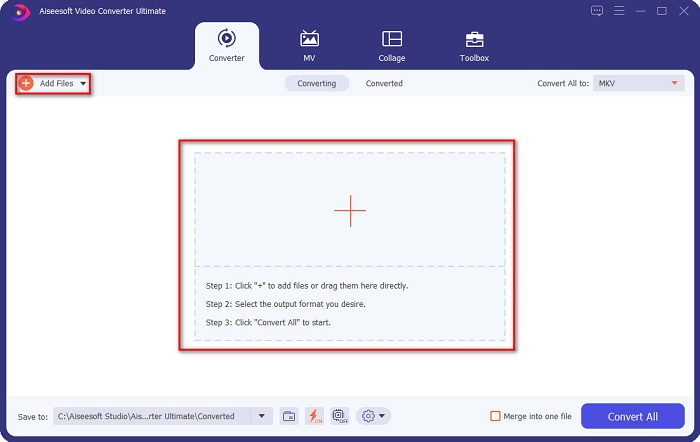
Step 2. After downloading the converter, click the Add Files button or the + button to upload your VOB file in the queue.
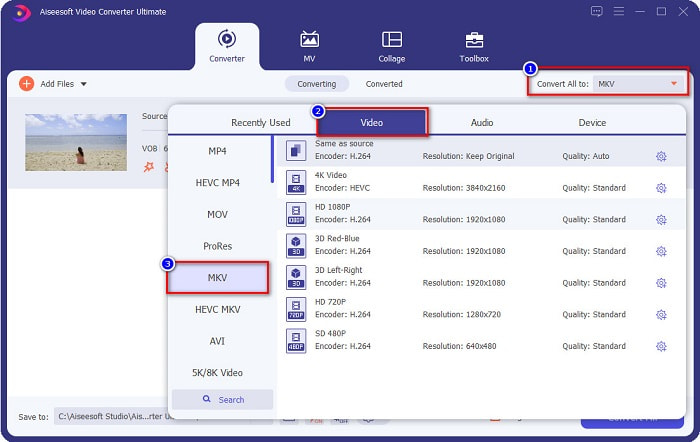
Step 3. And then click the Convert All to button located at the upper right corner of the software’s interface. A list of file formats will appear, then choose your desired file output.
Step 4. After selecting MKV as your output file, click the Convert All button to convert your VOB to the MKV file. Then wait for a few seconds for your conversion to finish.
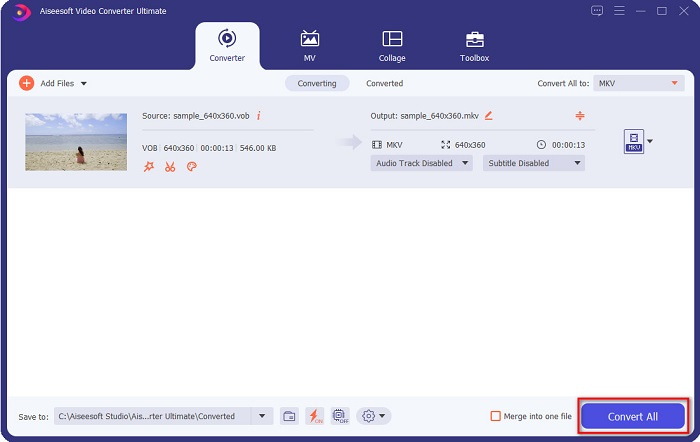
Slijedeći ove jednostavne korake, možete pretvoriti VOB u MKV bez gubitaka.
Dio 2. Pretvorite VOB u MKV pomoću besplatnih pretvarača
Također možete pretvoriti VOB u MKV koristeći besplatni softver. Korištenje besplatnog softvera kao pretvarača moglo bi vam uštedjeti mnogo vremena jer vam neće trebati internetska veza da biste ga koristili. A kada je riječ o preuzimanju besplatnih pretvarača, ne morate ništa kupiti. Ovdje su najbolji besplatni pretvarači koje možete isprobati.
VLC Media Player
Kada birate najbolji besplatni pretvarač, nema sumnje da će to biti VLC Media Player. Mnogi ljudi koriste ovaj besplatni pretvarač zbog njegove pogodnosti za korištenje. Ovaj media player vrlo je poznat među korisnicima Windowsa i pokazao se izvrsnim načinom za pretvaranje datoteka.
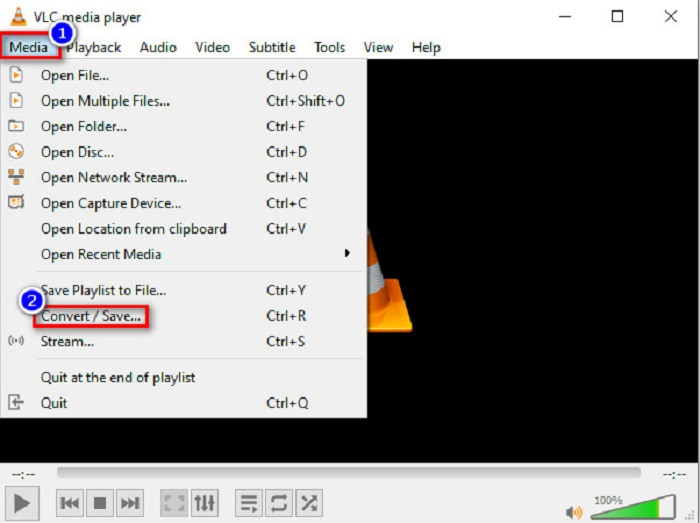
Step 1. First, if you do not have VLC Media Player on your device, download it by searching it in your browser. After downloading it, open the application. After opening the app, click the Media button, then select the Convert/Save button. Then you will be led to another interface.
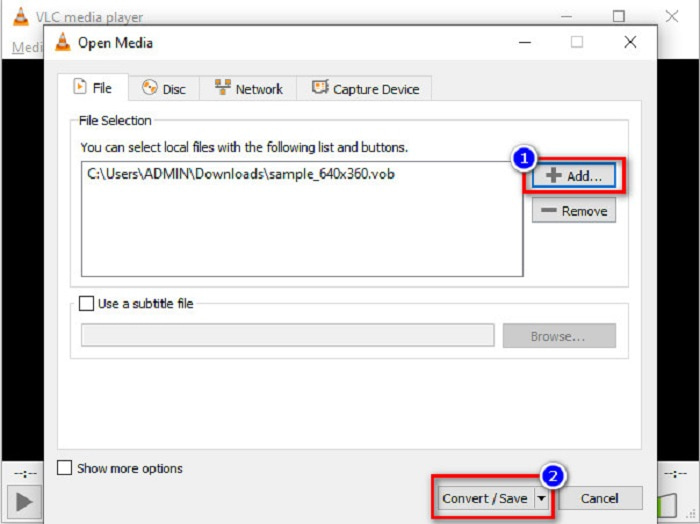
Step 2. And then, click the + Add button to upload your VOB file. Then, click the Convert/Save button. Then proceed to the next step.
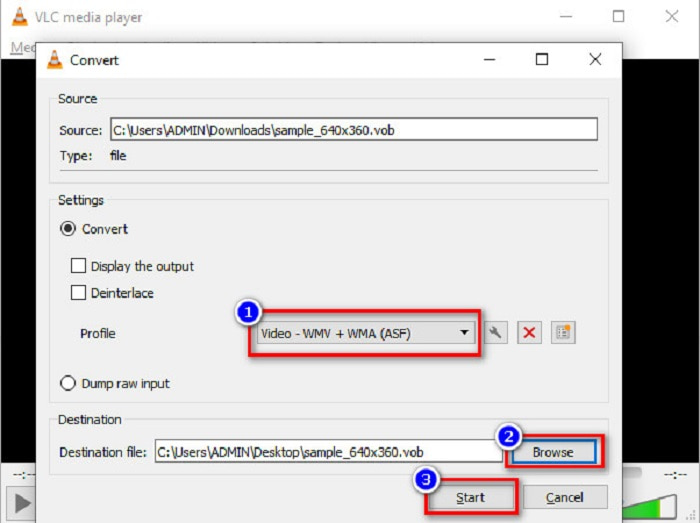
Step 3. Lastly, by clicking the drop-down button beside the Profile, select the MKV file as your output format. To choose your file destination, click the Browse button. And finally, tick the Start button to begin your conversion.
Ručna kočnica
Another freeware converter that you can use to convert DVD VOB to MKV files is by using HandBrake. This converter is free when downloading. It also supports varieties of formats that are available on the web. However, its interface is complicated to understand for beginners. Still, this converter offers you distinct features that help convert your VOB file to MKV.
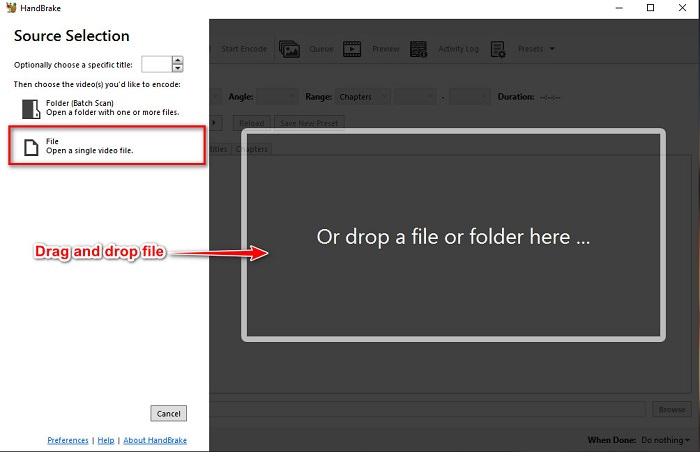
Step 1. Download the app by searching HandBrake in the browser that you use. After downloading, open the application. Then, click File, or drop your VOB file in the rectangular box in the middle of the software’s interface to upload it.
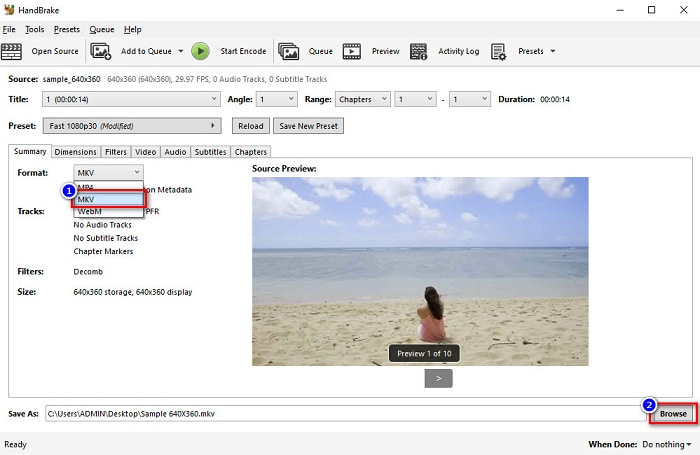
Step 2. After uploading your VOB file, choose MKV as your output file format by clicking the drop-down button beside Format. And for you to change the destination of your file on your computer files, click the Browse button.
Step 3. For the last step, click on the Start Encode button to convert your VOB to MKV using HandBrake.
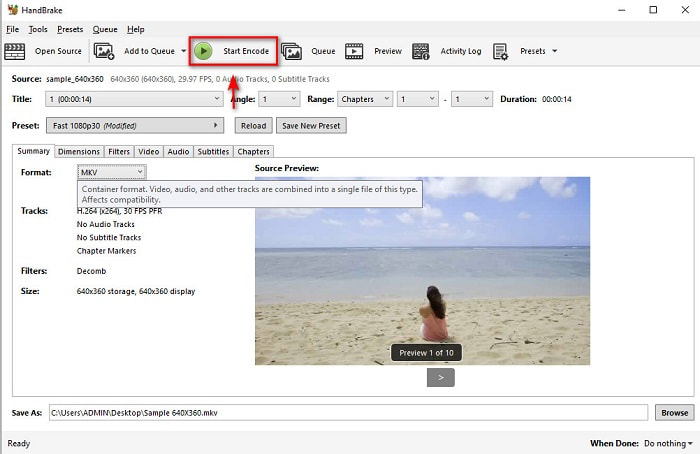
I to je način na koji pretvarate VOB u MKV koristeći besplatni softver.
Dio 3. Pretvorite VOB datoteku u MKV datoteku pomoću mrežnog alata
Online converters are more convenient because you do not need to download anything. While there are many free online converters available on the web, Onlinefreeconvert.com is what we know as one of the best. This online converter is easy to use and free. Although you may experience slow conversion because it is web-based, many still use it for its convenience in using.
Koraci za pretvaranje vaše VOB datoteke u MKV datoteku na mreži:
Step 1. To convert a VOB file to MKV file format, search Onlinefreeconvert.com on your browser, then you will be directed to the converter’s website.
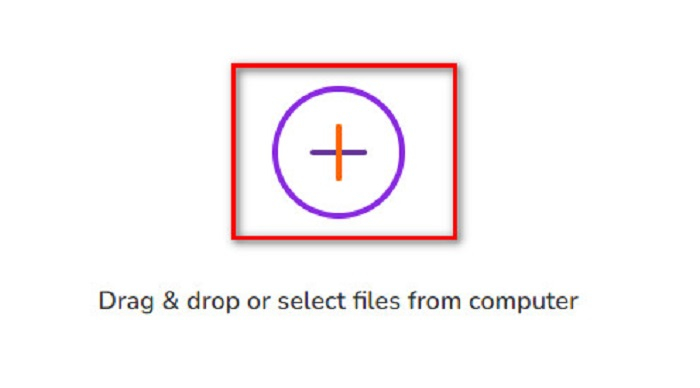
Step 2. Drag and drop your VOB file or select files from your computer by clicking the + button.
Step 3. Then beside the Output Format, click the drop-down button to select MKV as your output file format. Lastly, click the Start Now button to convert your VOB file to MKV.
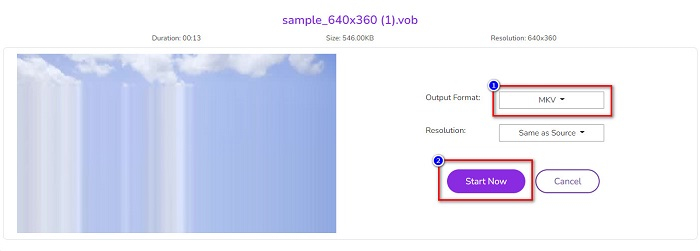
I to je način na koji pretvarate VOB u MKV online pomoću online pretvarača.
Dio 4. Više znanja o VOB i MKV
VOB ili Video Object je format datoteke koji reproduciraju DVD video zapisi. Sadrži podatke koji uključuju audio, video i titlove. Ova vrsta formata datoteke ima zaštitu autorskih prava koja ih štiti od izravnog kopiranja. Nasuprot tome, MKV datoteke ili Matroska je format datoteke koji se obično koristi za pohranu kratkih video zapisa i filmova. Također je podržan brojnim video i audio kodecima. Štoviše, to je datoteka otporna na budućnost; stoga je napravljen da ne zastarijeva u budućnosti.
Dio 5. Često postavljana pitanja o pretvaranju VOB u MKV
Što ima veću datoteku, VOB ili MKV?
MKV datoteke imaju veće veličine datoteka u usporedbi s VOB. Iako nema velike razlike, MKV je malo veći.
Možete li reproducirati VOB video datoteke na Macu?
macOS does not support VOB files; therefore, you cannot play it directly on Mac. However, you can use a converter to convert your VOB file to a file supported by macOS. MOV file is a file format that is widely supported by it. Moreover, read this article to know more about converting VOB to MOV.
Hoće li to utjecati na veličinu datoteke prilikom pretvaranja VOB u MKV?
Not necessarily. When converting VOB to MKV, the file size will not be affected, especially if you use FVC Video Converter Ultimate as your tool to convert.
Zaključak
Svi gore prikazani mrežni, besplatni i izvanmrežni pretvarači pokazuju obećavajuće performanse. Iako imaju različite značajke jedna naspram druge, još uvijek su učinkovit i djelotvoran alat za pretvaranje VOB-a u MKV-free. Ali ako želite isprobati ultrabrzi konverter s mnogo izvanrednih značajki, FVC Video Converter Ultimate najbolji je alat za to. Dakle, ako ste zainteresirani isprobati ovaj pretvarač, preuzmite ga sada!
-
 Najbolji načini za pretvaranje VOB-a u FLV [besplatno i online uključeno]
 Želite li pretvoriti VOB datoteku u FLV datoteku? Zadatak možete jednostavno izvršiti bilo putem stolnih računala ili putem mrežnih pretvarača. Pročitajte ovaj vodič i naučite kako lako i brzo transformirati VOB u FLV.
-
 Što je VOB datoteka i kako pretvoriti VOB datoteku u GIF besplatno
 Želite li saznati više o VOB datotekama i kako ih podijeliti nakon kopiranja? ili Zašto trebate pretvoriti VOB u GIF? Zatim pažljivo pročitajte ovaj članak.
-
 Dostupna su 3 praktična pretvarača za promjenu VOB datoteke u AVI format [2021.]
 Imate li problema jer VOB datoteke nisu podržane za reprodukciju? Zatim ga pokušajmo pretvoriti na 3 načina prikazana u nastavku s detaljnim koracima za svaki pretvarač.
