


 Video Converter Ultimate
 Snimač zaslona
 Video popravak
Kratka rasprava o tome kako kao profesionalac dodati sliku u Tiktok video objavu
Tiktok has already received more than one billion downloads worldwide, and it is still growing up to date. Users became delighted to use this app because it allows us to film videos for 3 minutes or less and watch other people in the entire world. As it pursues to become better, there are many features you can use to make your Tiktok video unique; one of them is to add an image on a video. However, adding images while filming on Tiktok could be a little bit tricky for some users. Luckily, we found a way to teach you how to add a picture to a Tiktok video with the three methods and learn from it.

Dio 1. Kako staviti fotografiju na TikTok video pomoću dvije ugrađene Tiktok značajke
Prije nego što počnemo, želimo vas obavijestiti da su dva načina koja smo dodali u ovom članku već u Tiktoku. Dakle, sada ljubazno odaberite koji način vam najviše odgovara i uživajte u snimanju svog videa s njegovom slikom.
1. način. Kako koristiti fotografiju kao pozadinu na Tiktok videu
Pretpostavimo da želite koristiti sliku koju imate kao pozadinu; pa, pokrili smo vas. Pročitajte detaljne korake koje smo naveli u nastavku i naučite kako spojiti videozapise i slike na Tiktok.
Step 1. Download the Tiktok app from the Play Store or App Store, then open it next.
Step 2. After that, click the + button, and go to the Effects.
Step 3. Slide the menu to see the options, look for the Green Screen and click it. Hit the choose one in the options, then choose the image you want to use as a background.
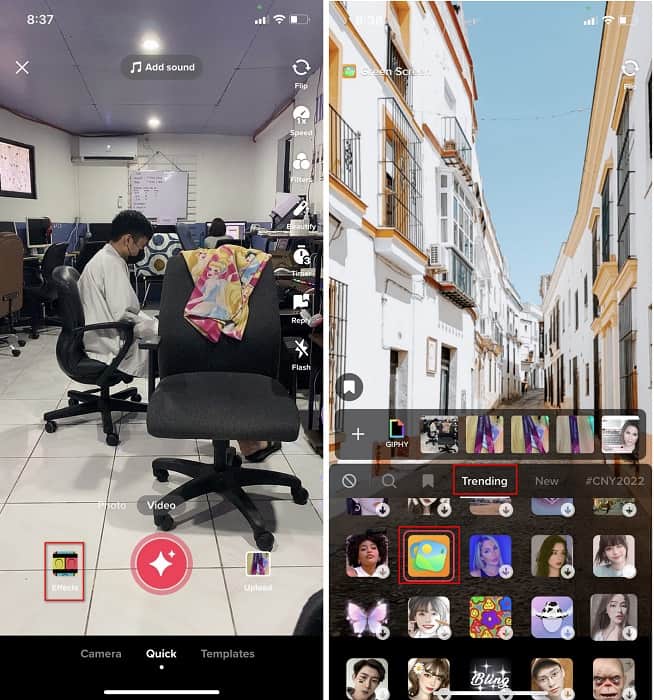
Step 4. Click the round REC button to record the video with the image background, re-click it to stop, click Next, then Drafts to save it on your accounts folder.
2. način. Kako dodati sliku na Tiktok dok snimate video
Ovaj način je moderan jer većina korisnika koristi ovu dodanu sliku svog omiljenog umjetnika, prijatelja, obitelji, gadgeta itd. Možda već imate ideju, a sada da vas naučim kako dodati fotografije u TikTok video, slijedite korake u nastavku.
Step 1. On your Play Store or App Store, download the Tiktok, and after that, open it to follow the following steps.
Step 2. Press the + button and click the Effects next.
Step 3. Click the Trending and look for this image icon and click it. Next, please select the image you want and place it where you desire on the screen.
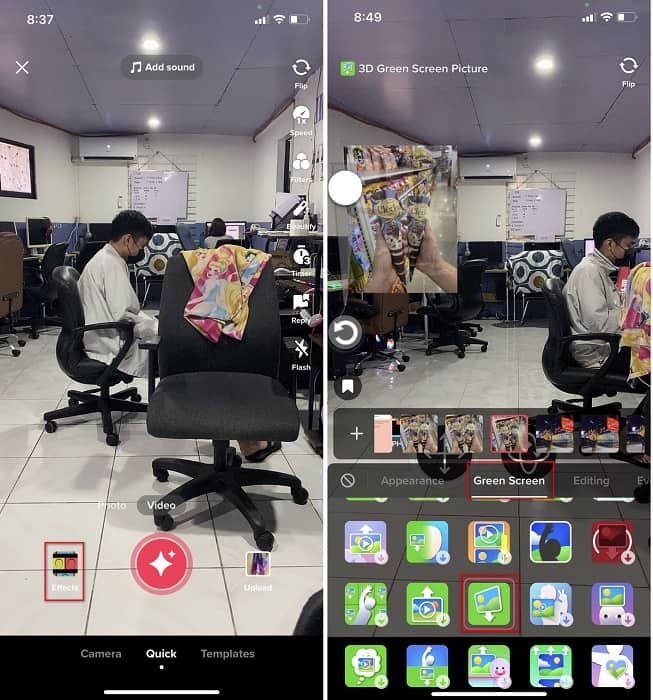
Step 4. Tap the red button to start the recording; if you've done recording, click the same button again to stop it. Press Next then Drafts to not post it yet on your TikTok account.
Dio 2. Kako dodati sliku TikTok videu na najbolji način na Windows i Macu
Want to know the secret and learn how to put a picture in a TikTok video? Not satisfied with the built-in editor Tiktok provides? In that case, you must use the Video Converter Ultimate. If you enjoy doing editing, you can use this tool to add images, effects, filters, and more to your Tiktok videos before posting them on Tiktok.
Pomoću ovog alata možete napraviti impresivan video kako biste impresionirali druge korisnike konačnim rezultatom. Međutim, ne možete preuzeti alat na svoj telefon jer nije podržan. Ali možete učiniti više ako imate radnu površinu i ovaj alat. Želite li dodati sliku svojim Tiktok video zapisima? Slijedite upute u nastavku kako biste saznali kako dodati sliku u Tiktok video.
Step 1. You can now directly download the ultimate on your Windows and Mac by clicking the download button below. Next, install it promptly, then run the tool on your system by opening the tool. Before we proceed to the following steps, you'll need to get familiarized with the tool interface first. If you've already gotten familiarized, move to the next step.
Besplatno preuzimanjeZa Windows 7 ili novijiSigurno preuzimanje
Besplatno preuzimanjeZa MacOS 10.7 ili novijiSigurno preuzimanje
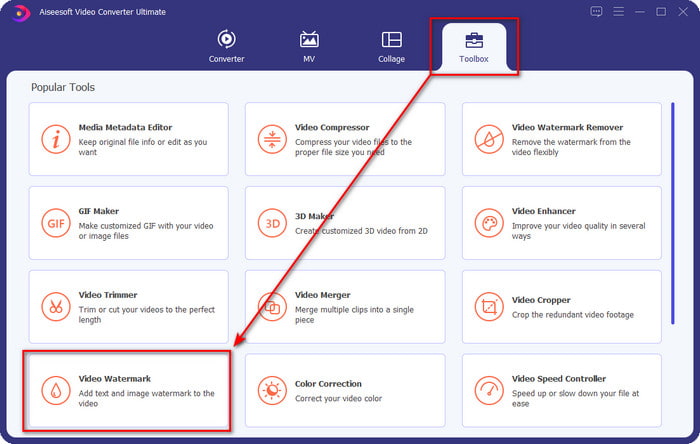
Step 2. Click the Toolbox part and find the Video Watermark.
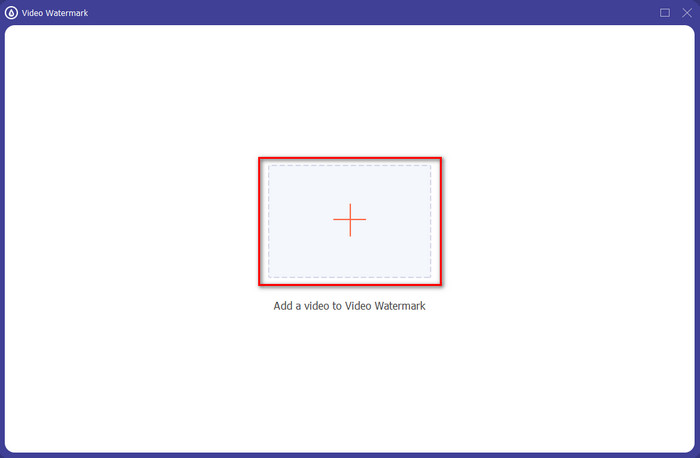
Step 3. Add the video file by clicking the + sign, locate the file on the folder that will show on your screen, click it, and press Open to upload the file.
Step 4. On the new window, click the Image Watermark. Another computer folder will show on your screen; find the image you've wanted to add and press Open.
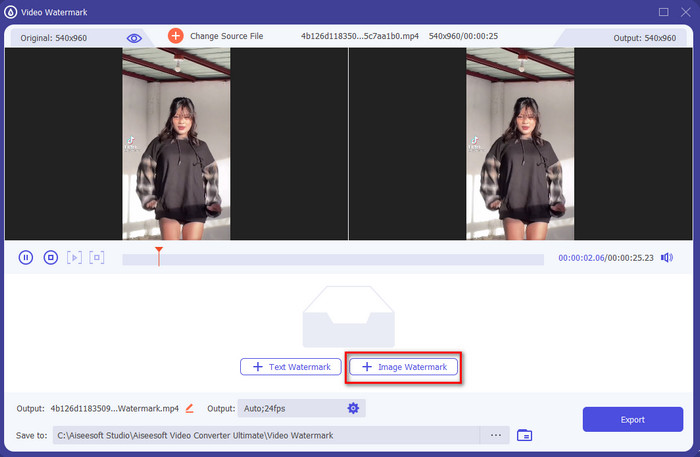
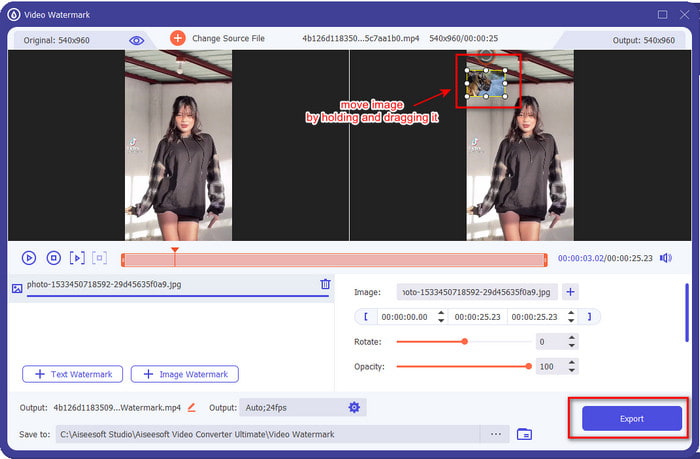
Step 5. Adjust the image size by dragging the frame ratio of the image. Hold and move the image and place it where you want it to be. After all, click the Export button to save the TikTok video with the picture included.
Dio 3. Često postavljana pitanja o tome kako dodati fotografije na TikTok videozapise
Kako mogu ukloniti Tiktok vodeni žig?
To learn how to remove the watermark of the Tiktok, you can click and read this article to know the method on how to do it. The details in this post will provide an effective way of removing the watermark of the TikTok on the exported video; no need to worry because it is easy to follow and understand.
Je li sigurno koristiti TikTok?
Sigurno je koristiti TikTok. Međutim, neki videozapisi izazivaju druge korisnike da izvode smrtonosne vratolomije koje nisu sigurne za bilo koju dob. Također, aplikacija nema end-to-end enkripciju, tako da komunikacija između primatelja i pošiljatelja nije kriptirana ili jednostavno zaštićena. Uz to, neki dokazi govore da je TikTok prikupio biometrijske podatke korisnika; točnije, krade glasovne otiske i lica. Dakle, ne zaboravite koristiti aplikaciju mudro i nikada ne dodajte previše važnih informacija o sebi.
Zašto je Tiktok postao toksičan?
Kultura koju su korisnici Tiktoka stvorili u ovoj generaciji postala je toksična, a neki korisnici vide aplikaciju za dijeljenje videa kao nezdravu, posebno za malu djecu. Postalo je neizbježno vidjeti neprimjerene sadržaje kao što su predrasude o nacionalnosti osobe, seksizam, standard ljepote za sve i maltretiranje. Iako je to neizbježno, još uvijek postoji sadržaj koji dokazuje da nisu svi korisnici TikToka otrovni. I još uvijek vjerujemo da postoji šansa da promijenimo ovu toksičnost i pretvorimo je u miroljubivu zajednicu punu ljubavi.
Zaključak
Now that we know how to add a picture to a Tiktok video, it is time to share your Tiktok videos with images to bring good vibes or unique videos to everyone. However, filming with the picture will limit your movements because the image becomes a blockage on the screen. But wait, don't be sad, because you can film first, transfer it to your computer, and use the Video Converter Ultimate to add the image later. With it, you can do more on your Tiktok videos and make them look outstanding than the other videos. So, what are you waiting for? Download it now on your desktop to start making the ultimate and most impressive Tiktok video ever!
-
 Najbolji način kako dodati vodeni žig videu u Photoshopu na Windows i Mac
 Želite li znati kako dodati vodeni žig videu u Photoshopu? U tom slučaju, ovaj će vam članak pružiti nešto što trebate znati.
-
 3 najbolja rješenja o tome kako jednostavno ukloniti vodeni žig s videozapisa
 Želite ukloniti dosadni vodeni žig na videu? Uz ovaj blog možete naučiti različite ideje o uklanjanju vodenog žiga na videozapisu.
-
 4 najbolja načina kako brzo dodati vodeni žig na bilo koji videozapis
 Naučimo kako dodati vodeni žig na bilo koji videozapis na Windows, Mac, Online, iOS i Android s detaljnim koracima ako pročitate ovaj članak.
