


 Video Converter Ultimate
 Snimač zaslona
 Video popravak
Smjernica o tome kako urediti WebM metapodatke za Windows i Mac
Potrebno je uključiti oznaku (tag) za dodavanje dodatnih informacija o sadržaju WebM‑a, što je jedan od razloga zašto trebamo uređivati metapodatke navedenog formata. Ponekad ih je potrebno odmah ispraviti kako bi bili vidljivi korisnicima, sustavu i aplikaciji – ponajprije da bi se utvrdilo koji točno sadržaj datoteka ima. Stoga je, prije nego što prenesete podatke na internet, ključno znati kako urediti WebM metapodatke. Informirajte se i naučite kako to učiniti čitanjem članka u nastavku.

Dio 1. Najbrži način za uređivanje WebM metapodataka na Windows i Mac [jednostavna verzija]
FVC Video Converter Ultimate omogućuje bezbrižno uređivanje metapodataka za jednostavan proces korisnicima i klijentima koji ga koriste. S ovim uređivačem metapodataka možete brzo prilagoditi ili ukloniti oznake na svojim WebM, MOV, TS, RMVB i više od 1000 drugih formata koje ovaj alat podržava, kao pravi profesionalac. Alat opravdava svoje ime i očekivanja korisnika, pa ako želite softver koji je savršen i za početnike i za stručnjake, trebali biste odabrati upravo njega. Za razliku od drugog softvera, ovdje možete ažurirati metapodatke svog WebM‑a točnim informacijama dodajući ih ručno.
Želite više? Ovaj alat se ističe u uređivanju metapodataka i drugim poljima rješavanja problema s videom i zvukom. Poput rezanja, obrezivanja, uređivanja, izrade GIF-ova, ubrzavanja videozapisa i učinite više s alatom za manje od minute. I da vam dokažem da je softver vrhunski po imenu i izvedbi. Pisana demonstracija u nastavku će vas naučiti kako urediti WebM metapodatke bez previše napora na ovom problemu.
Koraci o tome kako urediti WebM oznake s FVC Video Converter Ultimate:
Korak 1. Kako biste dobili ultimativni softver, kliknite gumb za preuzimanje u nastavku i odaberite operacijski sustav koji trenutno koristite. Slijedite postupak instalacije nakon klika na preuzetu datoteku, a zatim otvorite alat klikom na Start Now.
Besplatno preuzimanjeZa Windows 7 ili novijiSigurno preuzimanje
Besplatno preuzimanjeZa MacOS 10.7 ili novijiSigurno preuzimanje
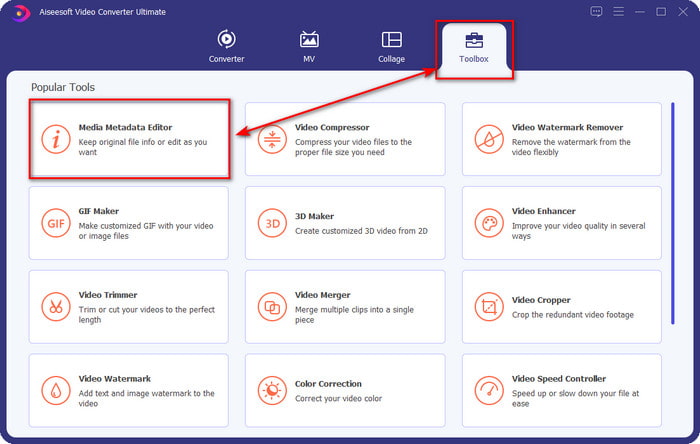
Korak 2. Otvorite odjeljak Toolbox i pronađite Media Metadata Editor na popisu alata koji će se prikazati ispod.
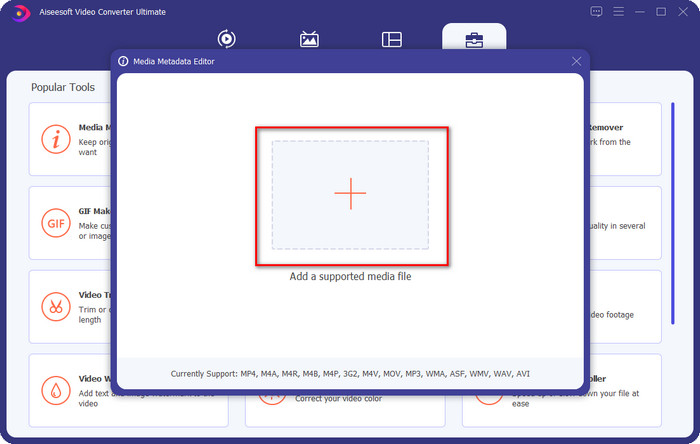
Korak 3. Dodajte WebM datoteku klikom na gumb +, pronađite je u upravitelju mapa i kliknite Open za nastavak.
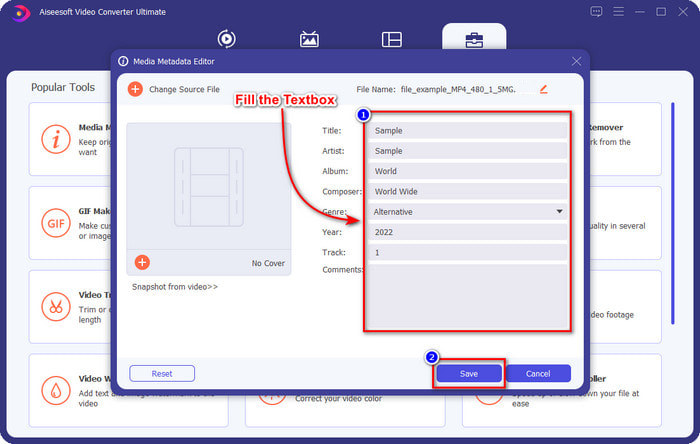
Korak 4. Upišite sve informacije koje želite dodati kao oznake (tagove) na svoj WebM u svaki textbox. Kada završite s dodavanjem svih informacija kao oznaka, kliknite Save. Lako, zar ne? Tako se dodaju metapodaci na vaš WebM uz pomoć ultimativnog rješenja koje možete koristiti na Windows i Mac sustavima.
Dio 2. Kako urediti WEBM metapodatke pomoću softvera naredbenog retka na radnoj površini
FFmpeg
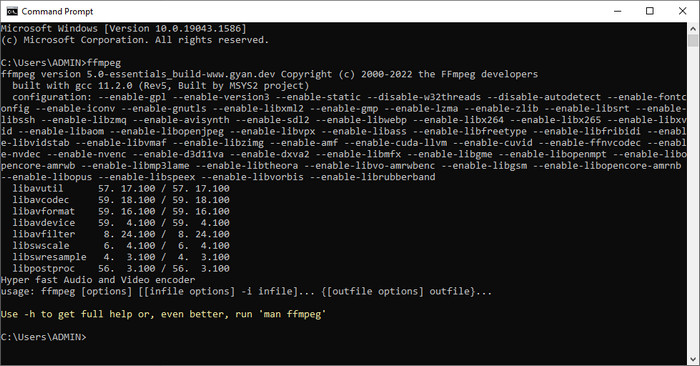
FFmpeg je poznato rješenje za svaki problem povezan s medijima, poput ispravljanja metapodataka. Za razliku od prvog alata, ovdje trebate koristiti određeni kôd kao naredbu kako biste obavili određeni zadatak, primjerice naložili programu da ručno uredi metapodatke navedene datoteke. Iako ovaj open‑source softver koristi tehničke postupke koje neki korisnici ne mogu lako shvatiti, i dalje je impresivno što nam mogućnosti ovog uređivača omogućuju. Nastavite čitati kako biste saznali kako urediti WebM metapodatke koristeći jedan od naredbenih alata s popisa.
Koraci za uređivanje WebM oznaka pomoću Ffmpeg‑a:
Korak 1. Preuzmite i instalirajte softver na svoje računalo. Pronađite lokaciju WebM datoteke i kopirajte njezin naziv.
Korak 2. Kliknite na Windows, u pretragu upišite command prompt i kliknite ga da se otvori. Zatim kopirajte ovaj kôd ffmpeg -i fileexample.webm -metadata title='samplemetadata' -c copy fileexample.webm i zalijepite ga u naredbeni redak.
Napomena: filexample.webm naziv je webm datoteke koju koristimo za ovaj zadatak. Dodajte naziv datoteke prema točnom nazivu vaše datoteke.
Korak 3. Pritisnite Enter da pokrenete proces i dopustite softveru da prepiše izvorni file.
EXIF alat
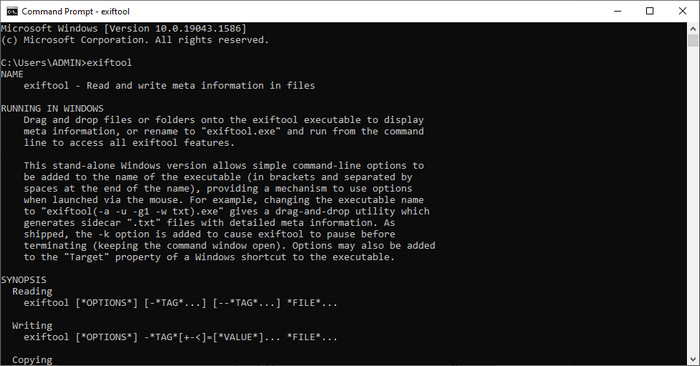
Isto kao i FFmpeg, EXIF Tool je besplatan naredbeni (command‑line) softver koji možete preuzeti na gotovo svaki desktop operacijski sustav. S ovim softverom možete čitati, uređivati i stvarati metapodatke u postojećoj datoteci, što vam drugi medijski alati ne mogu u potpunosti ponuditi. Softver može uređivati oznake u video, audio, slikovnim i PDF datotekama kako bi one bile potpuno točne. Ranije smo rekli da je sličan FFmpeg‑u, i to je istina, ali njihovi se kodovi razlikuju, pa ako želite koristiti ovaj alat, morat ćete naučiti novi skup kodova koji nisu povezani s FFmpeg‑om. Je li to teško? Srećom, dodali smo jednostavne korake za razumijevanje kako urediti WebM metapodatke uz pomoć ovog alata.
Koraci za uređivanje WebM oznaka pomoću EXIF Tool‑a:
Korak 1. Preuzmite softver s njegove službene web‑stranice, zatim ga instalirajte kako biste mogli prijeći na sljedeći korak.
Korak 2. Otvorite upravitelja datoteka, odaberite datoteku i kopirajte njezin naziv. Zatim otvorite CMD i upišite ovaj kôd exiftool –common fileexample.webm da biste vidjeli osnovne informacije o svojoj WebM datoteci.
Napomena: CMD je isti kao naredbeni redak; možete ih locirati na prozorima i upisati CDM.
Korak 3. Dodajte ovaj kôd u naredbeni redak kako biste promijenili datoteku exiftool -filename='metadtasample' fileexample.mkv i pritisnite Enter da biste pokrenuli proces dodavanja metapodataka.
Dio 3. Često postavljana pitanja o WebM uređivaču metapodataka
Zašto je WebM format popularan na HTML 5 web stranicama?
WebM format jedan je od najbrže rastućih alternativnih formata tantijema koji sadrži HTML 5 video i audio elemente. Ovaj format koristi dva različita kodeka, VP8 i VP9, koje je razvio WebM Project.
Mogu li spojiti WebM datoteke?
Možete spojiti niz WebM datoteka prije nego što im dodate metapodatke. Ako želite znati kako jednostavno spojiti više WebM datoteka, kliknite ovu poveznicu za više informacija.
Koje je bolje? WebM ili MP4?
Oba formata izvrsna su za pohranu videozapisa na svoj način, no njihova je svrha međusobno različita. Iako je WebM jedan od najboljih formata za online dijeljenje, još uvijek postoje nedoumice oko njegove kompatibilnosti s drugim uređajima. Ako imate sličan problem s WebM datotekom, preporučujemo da format pretvorite u MP4. Kako biste imali alat nadohvat ruke, možete pročitati sadržaj u ovom članku klikom na ovu poveznicu.
Zaključak
Sada kada imamo sve potrebne informacije i naučili smo kako urediti WebM metapodatke, vrijeme je da odaberete odgovarajući način. Ako želite isprobati naredbeni alat, tada su FFmpeg i EXIF Tool najbolje rješenje za ispravljanje metapodataka vaše WebM datoteke. Slijedeći vodič koji smo za njih pripremili, zadatak možete brzo obaviti. No ako želite jednostavniju varijantu uređivanja metapodataka na svom WebM‑u, tada je FVC Video Converter Ultimate alat koji morate imati. Ako i dalje dvojite, preporučujemo da preuzmete softver na svoje računalo i odmah ga isprobate!
-
 4 najbolja izmjenjivača datuma datoteka za Windows PC i Mac [Ažurirano 2022.]
 Imate li problema s promjenom oznaka vremena i datuma u datoteci? Ako želite znati kako to učiniti, možete nastaviti čitati ovaj članak da biste saznali.
-
 Jednostavni savjeti i trikovi o tome kako jednostavno dodati oznake u datoteku
 Želite li jednostavno dodati oznake datotekama? Zatim vam ovaj članak nudi najbolji i najjednostavniji način na koji se možete brzo osloniti na ovaj zadatak.
-
 3 najbolja uređivača FLAC metapodataka za Mac i Windows [Ažurirano 2022.]
 Želite li promijeniti FLAC metapodatke? U tom slučaju morate pročitati ovaj članak jer pružamo dovoljno znanja o najnovijem uređivaču metapodataka FLAC koji možete koristiti.
