


 Video Converter Ultimate
 Snimač zaslona
 Video popravak
3 učinkovita pomagala koja će vam pomoći da izađete iz situacije kašnjenja zvuka
Nowadays, to not get bored in this current situation we do love watching videos to kill time.Whatever the genre is on we still watch it to not be bored in our home. In fact, most of us already experience un-sync audio and video which could be very irritating, isn't it? But today we will promise to you that you will never encounter it again. Because in this article we provide solutions on how to fix audio delay on your video and determine what is the reason behind it.

Dio 1. Što je odgoda zvuka
Audio delay really happens in different situations whether it is online or offline. There are a lot of different factors why delay happens with your audio. Also, a great example is on this list below. Read it thoroughly to know what could be the reason.
◆ Videozapis prije prijenosa na web stranicu ili platformu već je oštećen što će uzrokovati nesinkronizaciju zvuka i videa.
◆ Proces preuzimanja datoteke je prekinut ili nepotpun, što bi dovelo do gubitka ili odgode audio i video datoteke.
◆ Neispravnost softvera za uređivanje. To bi mogao biti razlog ako audio i video snimate odvojeno i kombinirate ih zajedno.
Drugi mogući razlozi zbog kojih se kašnjenje događa u ovoj situaciji:
◆ Ako dođe do kašnjenja tijekom gledanja TV-a, očekujte da je to zbog loše mrežne mreže između vašeg kabela, satelita ili antene.
◆ Kašnjenja se događaju na mreži, osobito ako je vaš video postavljen na 4k ili 1080 px jer će za ovu kvalitetu trebati dosta vremena za učitavanje u usporedbi sa audio ili obrnuto.
A sada kada znamo koji su razlozi, sada to možemo popraviti čitanjem teksta u nastavku. Međutim, druga 2 razloga ne može se riješiti softverom u nastavku. Ali možemo predložiti ako video i audio nisu sinkronizirani na mreži, onda moramo sniziti kvalitetu da bismo bolje učitavali ili jednostavno pronaći drugi bolji internet. A ako je vaš problem na TV-u, morate se obratiti svom davatelju kanala kako biste ga odmah provjerili i riješili. Dakle, prijeđimo na prva 3 rješenja u nastavku.
Dio 2. Top 3 rješenja o tome kako popraviti kašnjenje zvuka
1. Koristite Video Converter Ultimate
If you're looking for the best solution then this must be the first in our list. As this software can easily sync your audio and video easily within 3 minutes, Video Converter Ultimate. This software is cross platforms basically even if you are using a Mac or PC you can download it. Also, the best thing about this tool is that all of the advanced editing features on PC are available on Mac or vise-versa. Its performance already gave the user a wow-factor and it became the most popular choice for beginner and pro. Not only that, this tool supports a fast process so there will be no time wasted. In that being said, let's proceed on how to fix audio delay effectively by following the steps below.
Steps on How to Fix the Delay on Video Converter Ultimate:
Step 1. If this is your first time to use this tool then it is a must to download it first. After the downloading process, install it, set it up and click Start Now to proceed.
Besplatno preuzimanjeZa Windows 7 ili novijiSigurno preuzimanje
Besplatno preuzimanjeZa MacOS 10.7 ili novijiSigurno preuzimanje
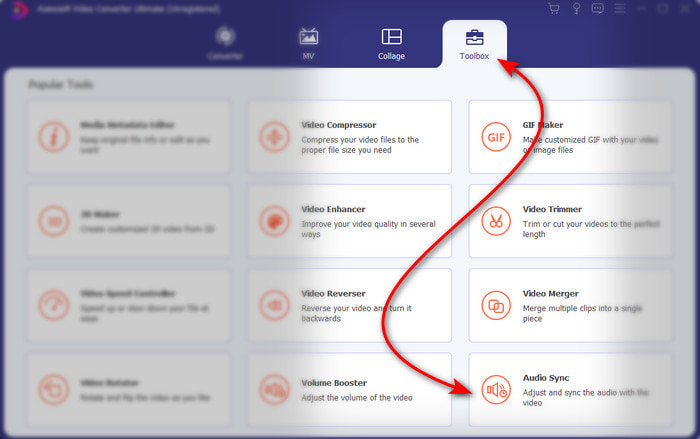
Step 2. After the software has already been launched, go to the Toolbox and under it is the Audio Sync then press it.
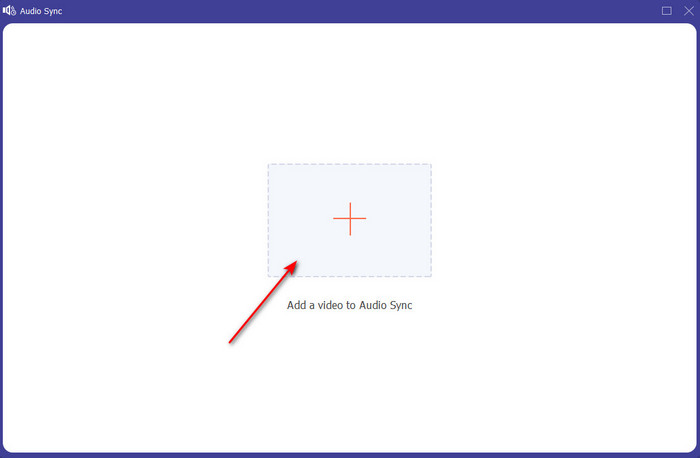
Step 3. Press the + button to add the file you want to sync and a folder will show next. If you already locate the video click Open next.
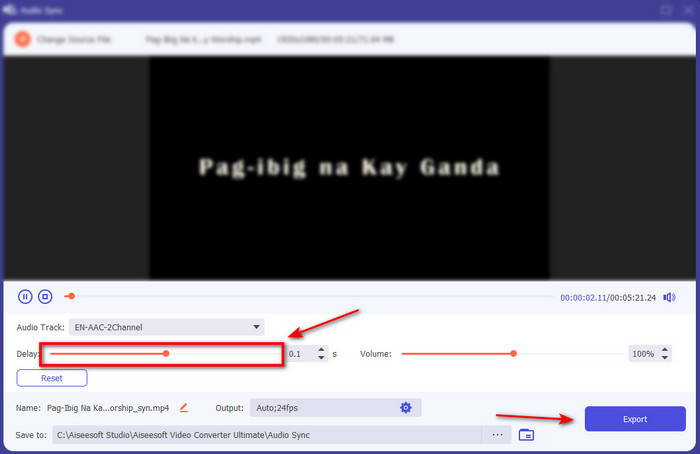
Step 4. An interface like this will show and now is the right time to move the delay slider to make it sync. If the audio and video are now in sync click Export to save the file.
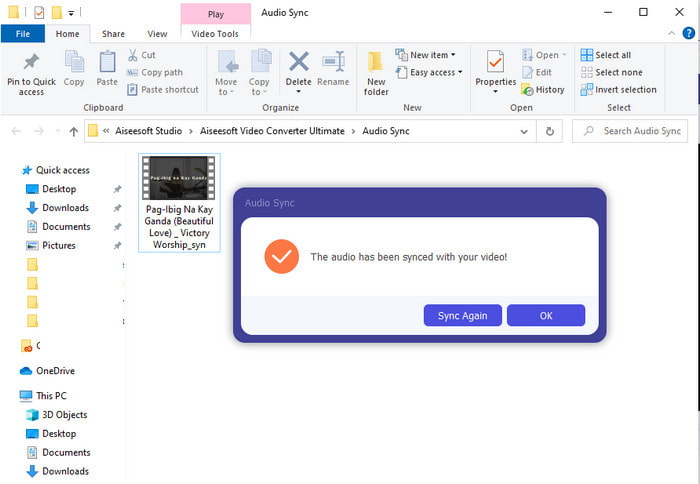
Step 5. After the process is done a file explorer will show next with the file. Click the file to watch and enjoy the magic you've made earlier with this software.
2. Koristite Avidemux
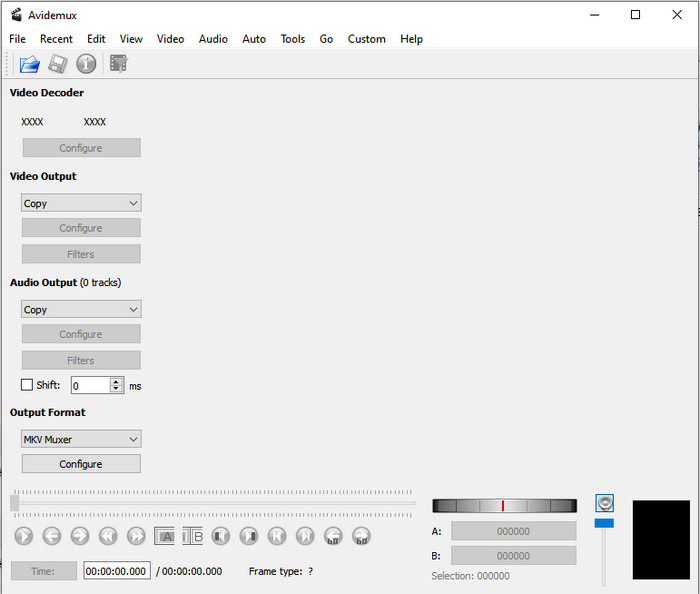
This software can help you to fix the audio delay you've encountered. Also, it is available in all different platforms you are currently using. So, if you use this tool on PC and transfer to Mac you can still use this as your personal editor. However, some of the features on PC are not available on Mac or Linux. Also, if you were about to use this then expect some difficulties. Because other features in this tool are somehow might confuse you. So now, if you want to try and fix the delay you experience on your video then follow the steps as we simplified it. To make the users like you to follow it easily.
How to Sync Audio and Video on Avidemux:
Step 1. Download the software to the main website first. Launch it, then click the File and next is the Open to select a video on the folder.
Step 2. Click the box of the Shift to make the shift apply automatically. Then add the value of ms you want. We suggest that start from - or + 200 first and if the audio and video is still unsync then change the number.
Step 3. And now the video and audio is in right sync it is now the right time to export it by clicking the Save button.
3. Koristite Online Converter
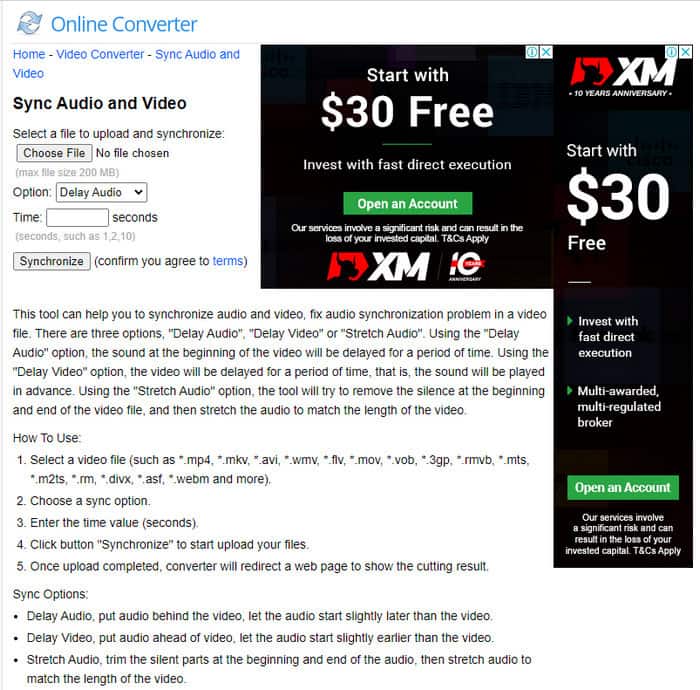
If you don't want to download a software then it is a must to try and use this Online Converter available on the web. As its interface is very simple to understand and easy to use by anyone who has a stable internet. However, this tool is not the best choice if you don't have an internet connection because it is dependent on it. So now, if you want to learn on how to fix audio delay with the Online Converter then follow these steps indicated.
How to Fix Audio and Video Delay with Online Converter:
Step 1. Look for the official webpage of the Online Converter. After opening the website click the Choose File to insert the video and audio file delay.
Step 2. On the Option you can choose whether to fix the delay on your audio or video. Then set the Time on the box.
Step 3. Click Synchronize and wait for the process to be finished then click Download Now to save the synchronized video you've made.
Dio 3. Često postavljana pitanja o popravljanju kašnjenja zvuka
Mogu li koristiti Premiere pro da popravim kašnjenje zvuka?
Absolutely Yes, you can use the most renowned editor Adobe developed. So, if you don't have any idea on how to do it then click this link to open a new website to fix the audio delay on premiere pro.
Kako pravilno spojiti audio i video kako biste izbjegli kašnjenje?
Looking for a proper software to make your merging properly might be a bit hard. However, we can make your searching easier as we accumulate 4 different ways to add any audio track to a video easily.
Može li komprimiranje videozapisa dovesti do kašnjenja zvuka?
As for now, if you try to compress a video it will never have an effect on your audio or have a delay. Because compressing is the way to make the media file size smaller and not destroying it. So, if you're looking for a video compressor that is safe and secured then click this link to know what are the 7 ways to compress videos.
Zaključak
And now that we know what are the different reasons for the audio delay it is now the time to fix it with the tool provided above. Although all of the tools have the same function still there is one tool that stands out among the rest of the 3 presented and that is Video Converter Ultimate. This phenomenal tool has already been used by a million of users and has already helped them. And now if you want to experience the relief to your problem download this tool now.
-
 [Besplatno i uz plaćanje] Mjenjač brzine GIF-ova: Popularni odabiri 2025
 Jeste li nezadovoljni GIF-om koji ste napravili na mreži jer je zamoran i spor? Ovo će biti vaš sretan dan jer vam predstavljamo članak o mijenjanju brzine GIF-a i detaljima koji vam pomažu da ga koristite i savladate.
-
 4 najbolja video playera s kontrolerom brzine u 2025
 Zar niste primijetili brzinu reprodukcije svakog media playera kad god reproducirate video? Ovaj je članak prikladan za vas da naučite sve o video playerima s kontrolom brzine.
-
 3 načina za ubrzanje videa na iPhoneu [Dokazano]
 Imate problema s podešavanjem brzine reprodukcije videozapisa jer koristite iPhone? Ovo je izvrstan članak koji će vam pomoći u rješavanju vašeg problema.
