


 Video Converter Ultimate
 Snimač zaslona
 Video popravak
[Kompletan pregled] 5 najnovijih MP3 rezača dostupnih na Windows/Mac/online
Često želimo izrezati dio zvuka koji slušamo i postaviti ga kao melodiju zvona, istaknuti ključni dio ili skratiti nepotrebne detalje u snimci. Iako na svim platformama postoji mnogo rezača koje možete koristiti, neki ipak nisu pouzdani. Zato ćemo vam danas predstaviti rezače koje smo pronašli na tržištu, a kojima možete vjerovati jer smo sve te alate sami isprobali kako bismo bili sigurni da su bez zlonamjernog softvera i pouzdani. Prije nego što smo ih izdvojili, slijedili smo stroge, visoke standarde za korisnike kojima je potreban pouzdan rezač. Kako bismo vam omogućili da internet pretražujete punom brzinom, u nastavku predstavljamo pet MP3 rezača koje smo pronašli i koji su spremni preuzeti zadatak rezanja bilo kojeg audio formata.

Dio 1. 2 Offline softveri za MP3 rezač Windows i Mac
1. Video Converter Ultimate – najbolji MP3 rezač [vrlo preporučeno]
Najbolji audio MP3 rezač na ovom popisu je Video Converter Ultimate, koji korisnicima omogućuje da bez napora izrežu bilo koji zvuk. Uz pomoć ovog ultimativnog alata možete skratiti zvuk kako biste uklonili neželjene dijelove, čak spojiti više izrezanih audio datoteka u jednu, kao i pojačati zvuk ako vam se čini da je pretih. Štoviše, ovaj softver nudi ultrabrzu obradu i pritom čuva izvornu kvalitetu zvuka.
Za razliku od bilo kojeg rezača, ovaj alat podržava širok spektar formata, ne samo MP3 nego i FLAC, M4R, M4A, OGG, MKA, WAV, WMA i više, i doista je vaša audio datoteka podržana ovdje za izrezivanje. Možda trenutno ne znate kako izrezati svoju audio datoteku i koristiti je za svoje potrebe. Danas je vaš sretan dan jer ćemo vas naučiti kako besplatno koristiti MP3 rezač i izrađivač zvona prateći donji vodič.
Korak 1. Preuzmite audio rezač na svoje računalo klikom na gumb za preuzimanje u nastavku. Odaberite koristite li Windows ili Mac, brzo instalirajte softver i pokrenite ga. Imajte na umu da se trebate upoznati sa sučeljem alata kako bi vam bilo lakše pratiti sljedeće korake.
Besplatno preuzimanjeZa Windows 7 ili novijiSigurno preuzimanje
Besplatno preuzimanjeZa MacOS 10.7 ili novijiSigurno preuzimanje
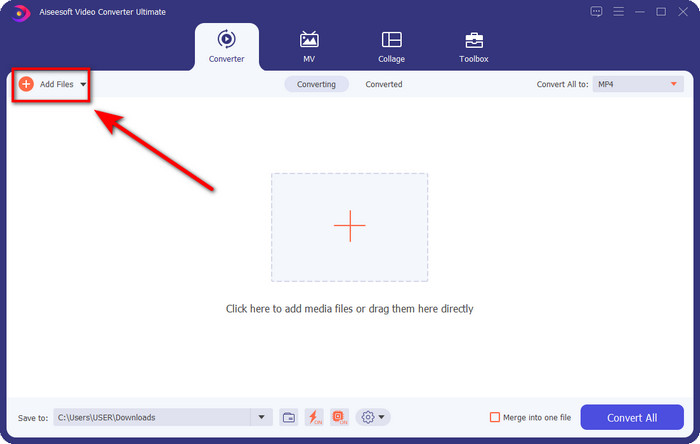
Korak 2. Povucite audio datoteku koju želite izrezati na sučelje ili kliknite Add Files i pronađite zvuk u mapi na računalu koja će se pojaviti. Pritisnite Open kako biste prešli na sljedeći korak.
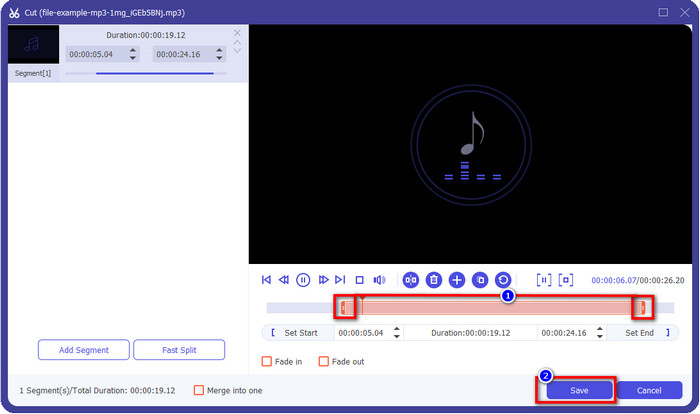
Korak 3. Nakon umetanja audio datoteke, vrijeme je da kliknete gumb u obliku škare. Povucite oznake play in i play out na željenu duljinu zvuka. Imajte na umu da je označeni dio zvuka između točaka play in i play out jedini koji će biti zadržan. Zatim pritisnite Save kako biste izrezali zvuk.
Neobavezno. Trebate pojačati zvuk? Ako je tako, kliknite gumb s čarobnim štapićem, prilagodite klizač glasnoće povlačenjem prema gore i pritisnite OK za spremanje.
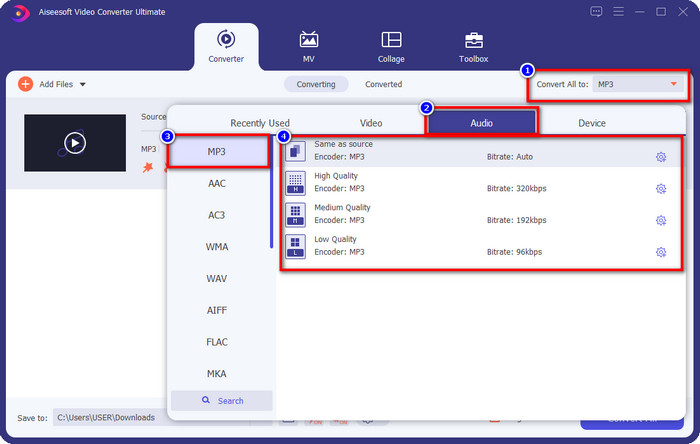
Korak 4. Idite na Convert All to, Audio i postavite format na MP3. Iako zapravo ne pretvarate datoteku, provjerite da naziv ispod Convert All to glasi MP3, a ne neki drugi format, kako biste izbjegli promjenu u drugi format.
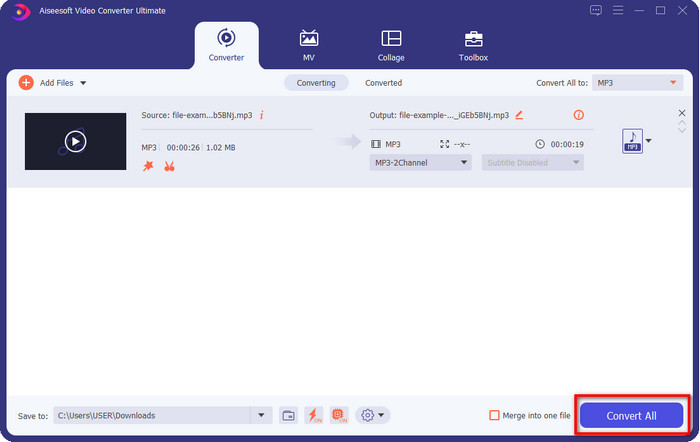
Korak 5. Klikom na Convert All započet će spremanje izrezanog zvuka. Time ste dobili izrezani zvuk uz pomoć najboljeg besplatnog MP3 rezača – tako jednostavno.
Pros
- Može izrezati vaš zvuk što je brže moguće i obraditi ga za manje od sekunde.
- Dostupne su napredne značajke za povećanje snage glasnoće.
- Podržava sve operativne sustave kao što su Windows ili Mac.
- Spajanje više audio datoteka moguće je spajanjem zvuka ovog alata.
Protiv
- Potrebna je kupnja alata.
2. Odvažnost
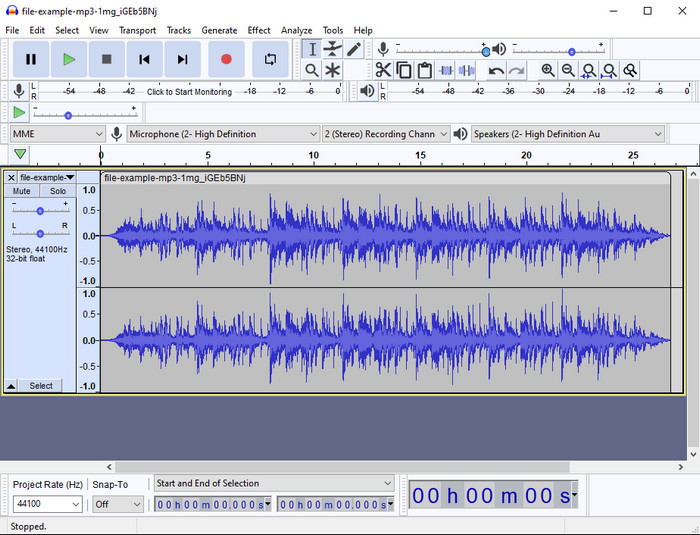
Audacity godinama nudi profesionalne funkcije uređivanja zvuka. Aplikacija je besplatna za preuzimanje i korisnicima omogućuje višekanalno miksanje. Poznata je po tome što je koriste podcasteri za jednostavno uređivanje i snimanje podcasta. Ipak, neke je njezine funkcije teško razumjeti, osobito ako niste navikli na specijalizirani softver poput ovog.
Iako još uvijek možete naučiti kako ga koristiti, trebat će vremena da iskoristite puni potencijal ovog MP3 audio trimera, a za rezanje zvuka, pošteno je reći da se reže odmah i bez napora ako vam zatreba.
Pros
- Besplatno preuzimanje u svim programima kao što su Windows i Mac.
- Dostupni su napredni i profesionalni audio uređivači kako bi vaš zvuk bio sjajan.
- Najbolji je za snimanje podcasta i još mnogo toga.
Protiv
- Mnogi konkurenti pružaju korisničko sučelje koje je jednostavno za korištenje.
- Nije najbolji izbor za početnike za neposredan rezultat rezanja i druge svrhe uređivanja.
- Neka izvješća pokazuju da se vaši podaci prikupljaju ako koristite ovaj alat, ali još nema čvrstih dokaza.
Dio 2. 3 Dostupni online MP3 Cutters na webu
1. mp3cut.net
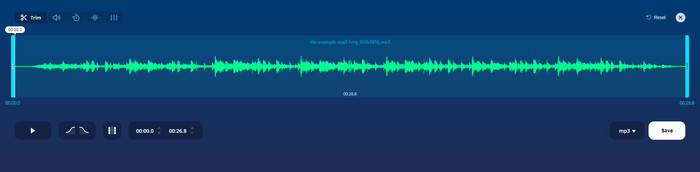
Možete koristiti mp3cut.net ako vam je potreban online MP3 rezač za posao. Nakon prijenosa datoteke u ovaj mrežni rezač, sada možete ukloniti zvuk koji želite nacrtati na svojoj audio datoteci. Štoviše, alat također ima neke manje značajke uređivanja za promjenu brzine i visine zvuka ako je potrebno.
Iako ima ovu vrstu sposobnosti, alat se većinu vremena ruši i ne može reproducirati zvuk za slušanje ako ga pravilno izrežete. Dakle, da biste ga ponovno koristili, morat ćete osvježiti svoj preglednik i ponoviti prilagodbu koju ste učinili iznova.
Pros
- Jednostavan za korisnika i dostupan putem interneta.
- U stvari, značajke koje će vam pomoći da izrežete zvuk.
- Dostupne su osnovne značajke uređivanja.
Protiv
- Ima oglase na web sučelju.
- Ponekad se ruši i potrebno ga je ponovno učitati da biste ga koristili.
2. audiotrimmer.com
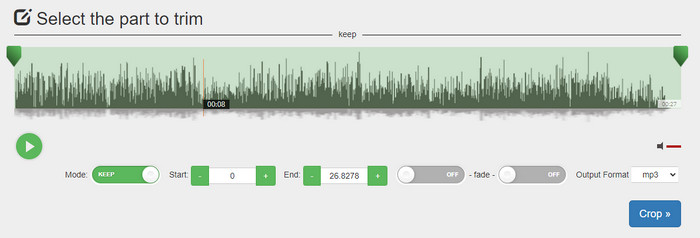
Još jedan besplatan mrežni mp3 rezač je audiotrimmer.com. Ovaj alat nudi lako razumljive i vrlo jednostavne funkcije za skraćivanje; sve funkcije rade upravo ono što treba. Uz njega možete odabrati želite li dio zvuka zadržati ili ukloniti. Također ima fade-in i fade-out efekt, baš kao i drugi ovdje spomenuti rezači. Međutim, kada smo pokušali koristiti fade-in i fade-out efekt, nije radio; našem zvuku se nije dodao nikakav efekt. No, ako trebate jednostavno rezanje, ovo je web alat koji svakako vrijedi isprobati.
Pros
- Besplatno i dostupno u svim preglednicima za pristup.
- Jednostavan za korištenje za rezanje zvuka.
- Ima efekte zatamnjenja i izlaska.
Protiv
- Fade-in i out ne rade dobro.
- Mnogo je dosadnih oglasa ako im pristupite. Stoga pazite da ih ne kliknete.
3. Clideo

Jedan od najboljih mrežnih MP3 rezača i spajatelja koji možete koristiti je Clideo. Većina korisnika uživa u ovom alatu i preferira ga zbog njegovih mogućnosti uređivanja. Osim toga, možete dodati fade-in i fade-out efekt na svoju audio datoteku ako vam je potreban. No nakon izvoza i preslušavanja, u našoj audio datoteci nije bilo dodanog fade-in ni fade-out efekta. S ovim smo alatom naišli na još jedan manji problem: prijenos pri učitavanju i preuzimanju datoteke. Za razliku od prvog spomenutog alata, učitavanje zvuka u njegov rezač traje dulje, a ponekad uopće nismo uspjeli učitati audio datoteku iz nepoznatih razloga.
Iako nailazimo na neke probleme, i dalje je najbolji rezač online, a također je siguran za korištenje.
Pros
- Najbolji online rezač online.
- Profesionalno korisničko sučelje.
- Jednostavan za korištenje.
Protiv
- Proces učitavanja i preuzimanja oduzet će vam previše vremena.
- Fade in and out radi, ali nije dobro.
Dio 3. Često postavljana pitanja o MP3 rezačima
Koji je najbolji MP3 trimer na Macu?
FVC Video Converter Ultimate dostupan je i za Mac. Dakle, ako trebate skratiti zvuk na Macu, svakako preuzmite ovaj ultimativni alat kako biste pravilno obradili svoju audio datoteku. Ultimativni alat nije samo izvrstan za rezanje zvuka, nego vam omogućuje i poboljšanje zvuka njegovim pojačavanjem. Štoviše, ako trebate pomoć pri pretvaranju, spajanju, sinkroniziranju zvuka itd., ovaj alat uskače u pomoć. Ako želite saznati više o ovom ultimativnom alatu, bolje je da pročitate gore navedene detalje.
Smanjuje li obrezivanje zvuka njegovu veličinu?
Veličina datoteke zvuka se smanjuje nakon što ga obrežete. Dok smo uspoređivali izvornu audio datoteku s izrezanom datotekom, vidjeli smo neke promjene u nadmorskoj visini. Dakle, to znači da što je audio datoteka kraća, to je manja njezina veličina, ali ako je vaša audio datoteka vrlo duga, očekujte da je i veličina značajna.
Mogu li koristiti Audacity za spajanje više audiozapisa?
Da, možete; Audacity podržava spajanje više audio zapisa u jednu datoteku. Ipak, to je teško, osobito ako nemate odgovarajući vodič koji biste slijedili. Dakle, ako trebate spojiti zvuk u Audacityju, možete kliknuti ovu poveznicu i naučiti kako.
Zaključak
MP3 rezači prikazani ovdje već su prošli standarde koje smo postavili kako bismo vam ponudili samo najbolje rezače. Ovaj članak pokazuje koliko je važno odabrati pravi i odgovarajući rezač prema vašim potrebama. Iako svi ovdje navedeni rezači obavljaju istu funkciju, FVC Video Converter Ultimate nudi znatno učinkovitije rezanje zvuka. Prema našem istraživanju, ovaj ultimativni alat nadmašuje sve standarde koje smo postavili. Dakle, ako želite imati vrhunski rezač pri ruci, ovo je najbolji izbor među svim ostalim rezačima dostupnima na tržištu. Predobro da bi bilo istinito? Onda je najbolje da preuzmete alat i sami ga isprobate.
-
 Kako izrezati i spojiti pjesme na mreži - 4 najbolja načina koja biste trebali znati
 Kada želite izrezati i spojiti pjesme na mreži kako biste stvorili glazbeno djelo, iz članka možete saznati više o 4 najbolja mrežna alata za isjecanje pjesama i kombiniranje datoteka.
-
 Otkrijte najbolji MP4 trimer s postupcima i informacijama
 Želite li naučiti rezati videozapise poput vlogera koje gledate? Zatim nastavite čitati ovaj post da biste saznali koje MP4 trimere možete koristiti.
-
 Preuzimanje MP3 playera – 10 najboljih besplatnih MP3 glazbenih playera 2025
 Koji je najbolji MP3 glazbeni uređaj? Kako mogu staviti glazbu na MP3 uređaj? Kako natjerati MP3 glazbeni uređaj za preuzimanje? Ovaj vam post daje detaljan pregled 10 najboljih besplatnih MP3 playera za Windows PC i Mac.
