


 Video Converter Ultimate
 Snimač zaslona
 Video popravak
Saznajte kojih je 7 popularnih uređivača glazbenih oznaka dostupnih na Reachu
Multimedijski reproduktor ima ugrađeni uređivač metapodataka za uređivanje ili dodavanje glazbenih oznaka tako da popunite ime izvođača, naslov i žanr. Međutim, većina ih ograničava ono što može ponuditi kako bi korisnicima pomogla dodati oznake ili metapodatke. Nije li to frustrirajuće? Srećom, najbolji način za uređivanje metapodataka jest korištenje uređivača metapodataka na telefonu. No pitanje je: koju biste aplikaciju trebali koristiti? Koja je aplikacija prikladna za vaše potrebe kada je riječ o uređivanju metapodataka? Ako si postavljate isto pitanje, nema potrebe za brigom. Jer danas recenziramo šest najboljih aplikacija koje možete koristiti za uređivanje na svojim uređajima, pa ih pažljivo pročitajte kako biste saznali više o aplikacijama za uređivanje glazbenih metapodataka koje možete preuzeti i koristiti.

Dio 1. Ultimate Music Tag Editor dostupan za korištenje na Windows i Mac
Ako imate Windows ili Mac za uređivanje metapodataka, koji biste alat trebali koristiti? Tada vam predlažemo da se oslonite na FVC Video Converter Ultimate. Za razliku od uređivača oznaka, ovaj alat nadopunjuje sve što želite imati ili dodati u svoje metapodatke u nekoliko klikova. Zamislite ovo: sve aplikacije koje možete ponuditi nalaze se unutar ovog alata, osim automatskih oznaka. Još važnije, možete urediti, ukloniti i ažurirati sve oznake na svojoj audio datoteci slijedeći korake u nastavku. Dakle, za uređivanje glazbenih oznaka na Windows 10/11 ili Macu, vodič u nastavku pomoći će vam da to učinite.
Korak 1. Da biste preuzeli uređivač metapodataka na svoj Windows ili Mac, pritisnite odgovarajuću tipku u nastavku. Kada se preuzimanje završi, kliknite datoteku da biste instalirali aplikaciju, slijedite postupak, a zatim otvorite alat.
Besplatno preuzimanjeZa Windows 7 ili novijiSigurno preuzimanje
Besplatno preuzimanjeZa MacOS 10.7 ili novijiSigurno preuzimanje
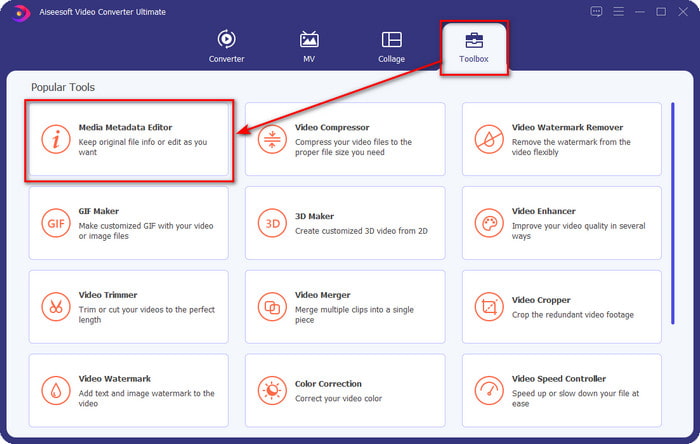
Korak 2. Pritisnite odjeljak Toolbox, pronađite i kliknite Media Metadata Editor na popisu koji će se prikazati.
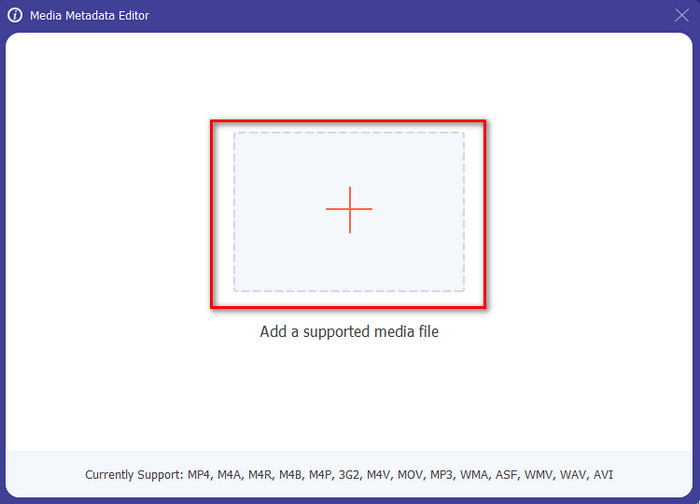
Korak 3. Pritiskom na ikonu + mapa će se pojaviti na zaslonu; pronađite audio datoteku koju želite urediti i pritisnite Open kako biste prešli na sljedeći korak.
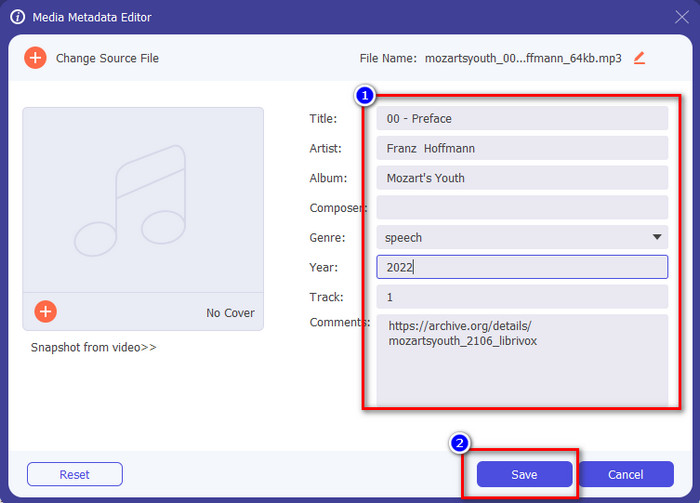
Korak 4. Ažurirajte oznake audio datoteke tako da ih upišete u tekstualni okvir. Nakon toga morate kliknuti Spremi i sve oznake koje ste promijenili bit će ažurirane. Čak i ako prenesete datoteku na svoj mobitel, oznake će i dalje ostati na audio datoteci.
Povezano:
Najbolji preglednik metapodataka
Dio 2. 6 najboljih aplikacija za uređivanje glazbenih oznaka na Android i iOS uređajima
Automatski uređivač oznaka
Podržani uređaj: Android
Zvjezdice na Playstoreu: 4,4 zvjezdice
Recenzije ili ocjene: 81 332 osobe
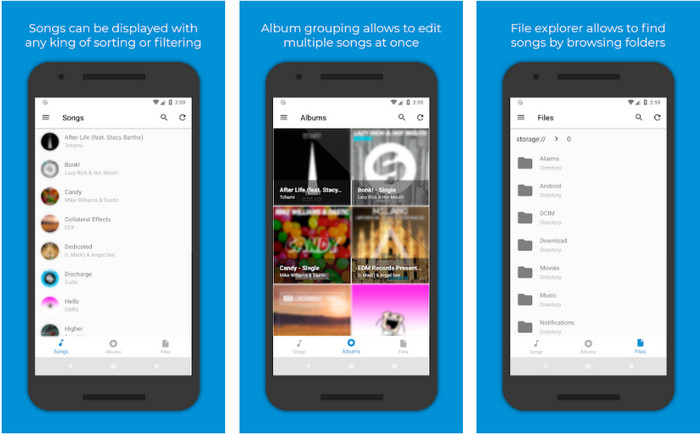
Možete koristiti Automatic Tag Editor, najbolji uređivač glazbenih metapodataka ako ste korisnik Androida. Ova aplikacija savršena je za uređivanje oznaka na vašim audio datotekama za manje od minute. Još jedna dobra stvar u vezi s ovom aplikacijom je to što ima automatski uređivač metapodataka za popunjavanje ili ažuriranje podataka u vašim datotekama, osobito ako ste kupili digitalnu kopiju. Podržava više vrsta oznaka koje može popuniti, poput naslova, žanra, godine i mnogih drugih, kako bi vam pomogao bolje prepoznati datoteku. U nedavnoj nadogradnji mnogi korisnici uočili su da se javljaju određeni kvarovi i bugovi tijekom korištenja aplikacije na Androidu. Također, podržava uobičajene glazbene formate koje možete učitati, poput MP3, M4A, OGG, FLAC, WMA i WAV.
Star Music Tag Editor
Podržani uređaj: Android
Zvjezdice na Playstoreu: 4,0 zvjezdice
Recenzije ili ocjene: 293 598 osoba
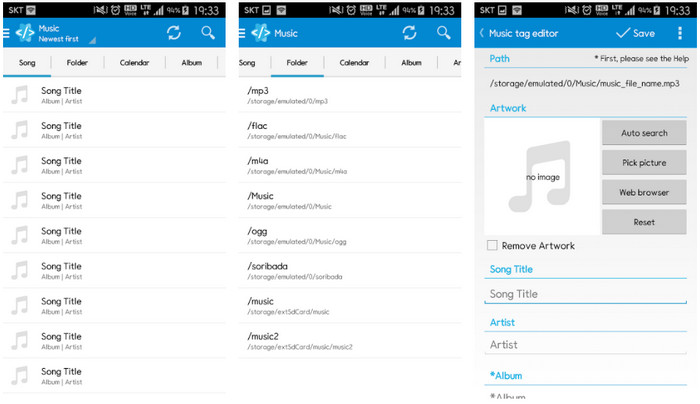
Star Music Tag Editor još je jedan uređivač glazbenih oznaka koji možete preuzeti na Playstoreu. Ova je aplikacija izvrsna jer pruža jednostavno grafičko sučelje (GUI) kako biste je lakše razumjeli nego druge aplikacije. Kao i prvi alat, podržava automatsko pretraživanje koje učinkovito popunjava vaše glazbene oznake. Iako je aplikacija jednostavna za korištenje i nudi mnogo toga, u nekim slučajevima nije toliko učinkovita kako drugi tvrde. Kada smo pokušali urediti metapodatke u ovoj aplikaciji, ponekad ih nije spremila. Također, ako ćete spremiti metapodatke, na zaslonu će se pojaviti skočni tekst s porukom invalid audio frame exception uz novu glazbu zbog oštećene datoteke. No neki korisnici nemaju takav problem pri korištenju aplikacije, pa ako je želite koristiti, možete je preuzeti na Playstoreu.
Uređivač glazbenih oznaka - Mp3 Tagger | Besplatni uređivač glazbe
Podržani uređaj: Android
Zvjezdice na Playstoreu: 3,8 zvjezdica
Recenzije ili ocjene: 11 378 osoba
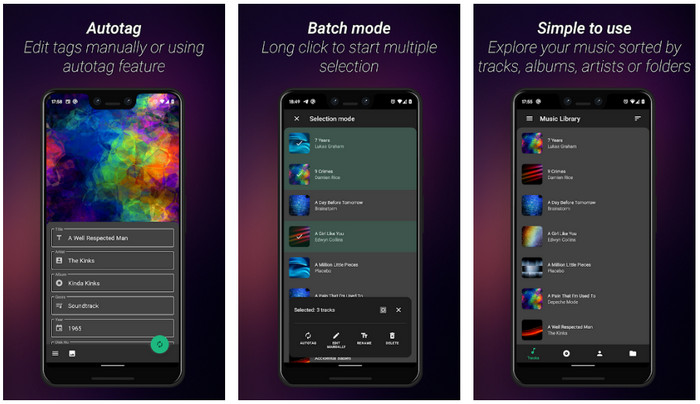
Ako imate problem s pogrešnim oznakama, upotrijebite Music Tag Editor - Mp3 Tagger | Free Music Editor da brzo popravite glazbene metapodatke. Ovaj alat može popuniti ostale podatke ako najprije umetnete naziv pjesme i izvođača kako bi ispravno potražio odgovarajuće oznake. Uz ovu aplikaciju lako možete dodavati oznake na više audio datoteka odjednom. Međutim, automatsko pretraživanje oznaka koje nudi treba dosta vremena da prikupi informacije i ponekad uključuje nepovezane oznake. Također, kada ćete dodati sliku na audio zapis, ona se neće pridružiti tom zapisu koji ste uredili.
Ever Tag: uređivač glazbenih oznaka 4+
Podržani uređaj: iOS
Zvjezdice na Playstoreu: 4,7 zvjezdica
Recenzije ili ocjene: 1,1 tisuća osoba
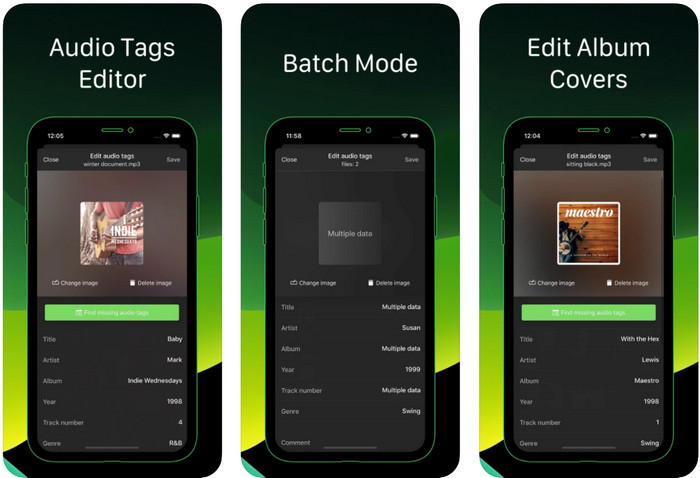
Naučite kako uređivati glazbene oznake na iPhoneu uz pomoć aplikacije Ever Tag: Music Tag Editor 4+. Ova aplikacija na iOS‑u podržava više audio formata, pa je učitavanje metapodataka lakše nego ikad; isto vrijedi i za uređivanje podataka. Štoviše, ova vam aplikacija nudi različite skupove oznaka metapodataka koje možete dodati u svoju audio datoteku popunjavanjem svake zasebno, počevši od naslova pa sve do ocjena. Nedostatak korištenja ove aplikacije jest to što ne može automatski popuniti oznake automatskim pretraživanjem kao što to mogu neki Android alati. Iako aplikacija navodi da omogućuje skupnu obradu za uređivanje metapodataka, u stvarnosti to ne možete učiniti. No ako želite isprobati i koristiti ovu aplikaciju, preuzmite je sada iz App Storea.
Generator glazbenih oznaka
Podržani uređaj: iOS
Zvjezdice na Playstoreu: 4,5 zvjezdica
Recenzije ili ocjene: 55 osoba
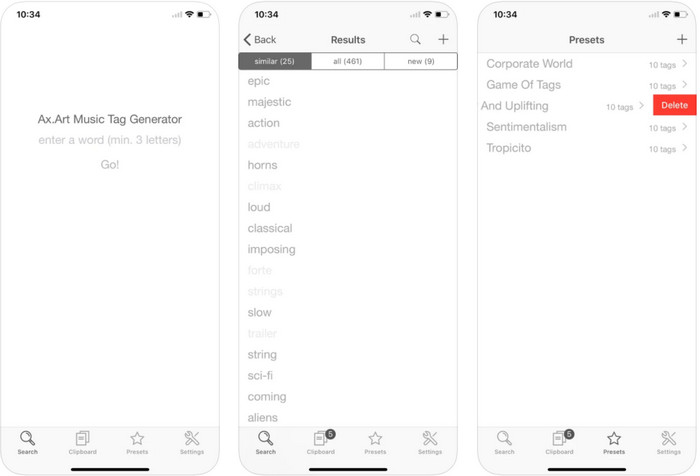
Iako popularnost aplikacije Music Tag Generator nije velika kao kod ostalih uređivača, njome i dalje možete vidjeti i urediti što je oznaka u glazbi. Ovaj alat je vaša mala uslužna aplikacija za pronalaženje i razvrstavanje glazbenih zapisa prema oznakama. Osim razvrstavanja oznaka, ovom aplikacijom možete mijenjati metapodatke prema svojim potrebama i organizirati ih. Iako vam aplikacija može pomoći pri uređivanju, još uvijek nije dobra kao drugi uređivači u ovom članku. Ima jednostavno sučelje, ali mu značajke nisu toliko sveobuhvatne kao što biste možda očekivali.
iTunes
Podržani uređaj: iOS
Zvjezdice na Playstoreu: 4,9 zvjezdica
Recenzije ili ocjene: 1,4 tisuće osoba
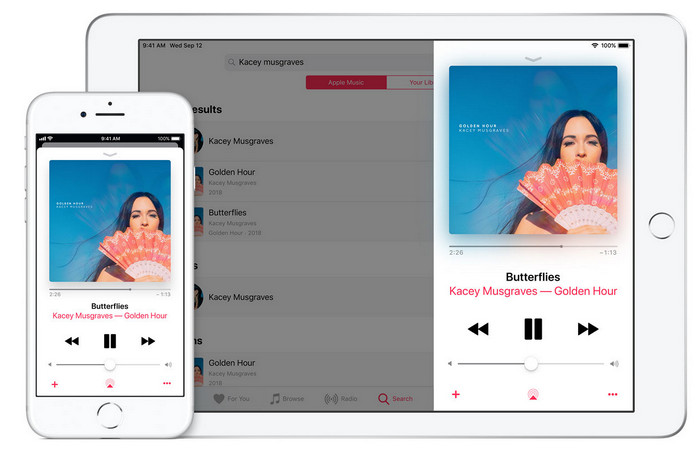
Ova aplikacija ima ugrađenu glazbenu biblioteku koju možete kupiti, preuzeti i koristiti. iTunes nije tipična aplikacija za uređivanje metapodataka koju možete koristiti na svom iOS-u jer je ova aplikacija poznata po pohranjivanju glazbe poput onoga što Spotify može ponuditi. Iako glazba koju možete pronaći u ovoj aplikaciji ima metapodatke i oznake, svejedno možete promijeniti ili ažurirati oznake prema svojim željama. Međutim, ne možete jednostavno uređivati ili ažurirati oznake s ovom aplikacijom jer postoji zahtjev koji ćete trebati prije nego naučite kako označavati glazbu u iTunesu.
Većina ovdje spomenutih aplikacija ima automatsku oznaku, koja vam može pomoći da automatski dodate oznake ili metapodatke u audio datoteku koju imate. Međutim, ova značajka ima nedostataka, za razliku od ručnog dodavanja nepovezanih oznaka u datoteku. Ako želite izbjeći ove pogreške, nastavimo s najboljim uređivačem glazbenih oznaka na računalu čitajući 2. dio.
Dio 3. Često postavljana pitanja o uređivaču glazbenih oznaka
Što je ID3 oznaka?
Ove ID3 oznake često možete vidjeti na glazbi jer sadrže podatke o medijskoj datoteci, posebno audio. Dodavanjem ID3 oznaka vašoj audio datoteci, možete rasporediti datoteku na temelju medija playera koji koristite.
Ima li snimanje zvuka na telefone oznake?
Da, ima oznake i metapodatke. Međutim, oznake nisu sveobuhvatne kao druge medijske datoteke.
Zašto se moja audio datoteka oštećuje nakon dodavanja metapodataka?
Razlog zašto je vaš zvuk oštećen nije u metapodacima koje dodajete ili uklanjate, već u alatu koji ste koristili za uređivanje oznaka svoje datoteke. Dakle, ako želite izbjeći ovu okolnost, morate odabrati savršen alat koji će vam pomoći da jednostavno dodate ili uklonite metapodatke. I zapamtite, ako proces započne, pazite da nećete otkazati proces uređivanja metapodataka,
Zaključak
Sada morate odabrati koju aplikaciju možete koristiti za uređivanje svojih glazbenih metapodataka. Obavezno odaberite aplikaciju koja je dostupna na vašoj platformi kako biste je lako preuzeli s Play Storea ili App Storea. Ali ako smatrate da vam je potreban alat koji pruža najbolje performanse, tada morate koristiti ultimativni alat na računalu. FVC Video Converter Ultimate pruža najbolji način za jednostavno dodavanje oznaka vašoj glazbi. No prije nego što možete koristiti ovaj alat, morat ćete ga preuzeti i slijediti upute koje smo naveli u 2. dijelu. Za više informacija, pažljivo pročitajte.
-
 5 najjednostavnijih načina za uklanjanje metapodataka iz bilo koje medijske datoteke
 Kako ukloniti metapodatke? Je li teško to učiniti? Trebam li kupiti ili koristiti besplatni alat za uklanjanje oznaka? Sva ova pitanja imaju odgovore u ovom članku.
-
 5 najboljih alata za izvlačenje metapodataka dostupnih online i izvan mreže [2022.]
 Na tržištu možete pronaći više alata za izvlačenje metapodataka, ali danas biramo samo pet najodabranijih alata za izvlačenje oznaka prema publici.
-
 5 najboljih uređivača metapodataka videozapisa za 2022. [nepristran pregled]
 Želite li vidjeti metapodatke svog videozapisa? Ako je tako, pročitajte detalje u nastavku kako biste u potpunosti shvatili temu i znali koji vam alat najbolje odgovara.
