


 Video Converter Ultimate
 Snimač zaslona
 Video popravak
Kako se besplatno riješiti Power Director vodenog žiga [100% radi]
Ako želite odabrati cjeloviti uređivač i izrađivač videozapisa, ne možete pogriješiti ako na svoj uređaj instalirate PowerDirector. Možete očekivati odličan rezultat kada ga koristite za uređivanje videa za prezentacije, vlogove, tutorijale, demonstracije i još mnogo toga. Također, trebate znati da ovaj program dodaje vodeni žig na montirane videozapise ako trenutačno koristite besplatnu verziju. Neki su korisnici frustrirani jer je na videozapis, na kojem su naporno radili, dodan vodeni žig. Umjesto da budete frustrirani, zašto ne biste pokušali pročitati ovaj članak? Naučimo zajedno kako se besplatno riješiti PowerDirector vodenog žiga i jednom zauvijek riješiti taj problem.

Dio 1. Kako se besplatno riješiti Power Director vodenog žiga s najboljim rješenjima na tržištu
FVC Video Converter Ultimate
Ažurirana verzija programa FVC Video Converter Ultimate ima alat za uklanjanje vodenog žiga s videozapisa koji možete upotrijebiti za postavljanje videozapisa na PowerDirector za PC bez vodenog žiga. Ovaj alat postao je kompletan alat koji može obavljati višenamjenski zadatak istovremeno i to profesionalno uz brzu obradu. Ono što nas zadivljuje kod ovog alata je koliko je jednostavan za korištenje. Ako ovo koristite, ne morate postati profesionalac da biste uklonili vodeni žig na svom videozapisu. Za korisnike koji traže najbolji alat za uklanjanje vodenog žiga, nećete pogriješiti ako besplatno preuzmete ovaj softver na svoje stolno računalo. Još uvijek niste uvjereni? Jedini način da vas uvjerimo da ima ultimativnu izvedbu je kopiranjem vodiča koji smo dodali da ga slijedite.
Korak 1. Ovaj softver možete besplatno preuzeti na Windows ili macOS klikom na gumb za preuzimanje u nastavku. Nakon što odaberete verziju koju želite preuzeti, odmah instalirajte softver, a zatim ga otvorite.
Besplatno preuzimanjeZa Windows 7 ili novijiSigurno preuzimanje
Besplatno preuzimanjeZa MacOS 10.7 ili novijiSigurno preuzimanje
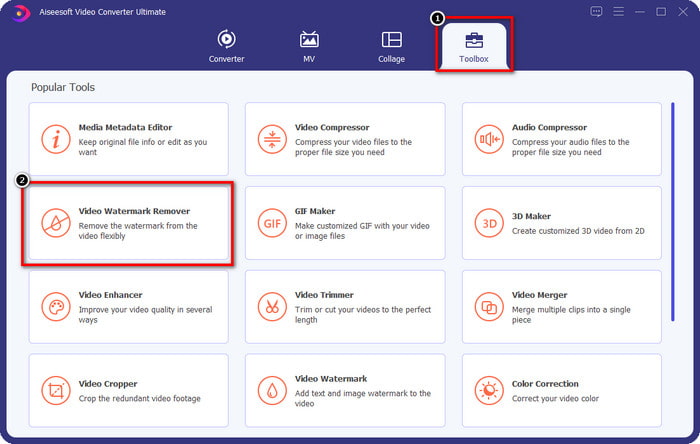
Korak 2. Kada program već radi na sustavu, idite na Toolbox i među funkcijama potražite Video Watermark Remover.
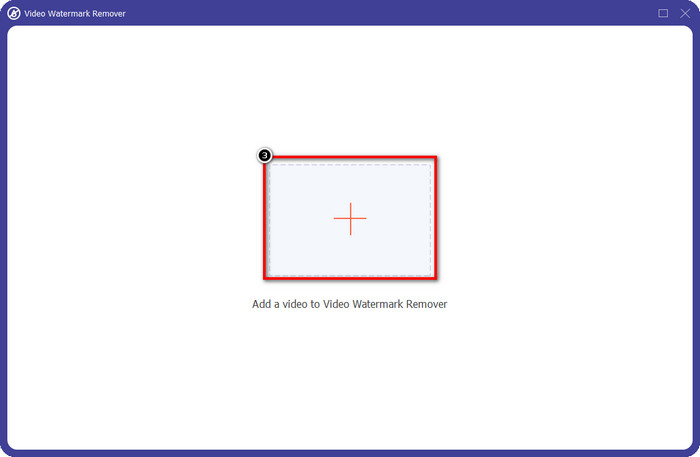
Korak 3. Zatim kliknite ikonu + da biste učitali videozapis s kojim imate problem.
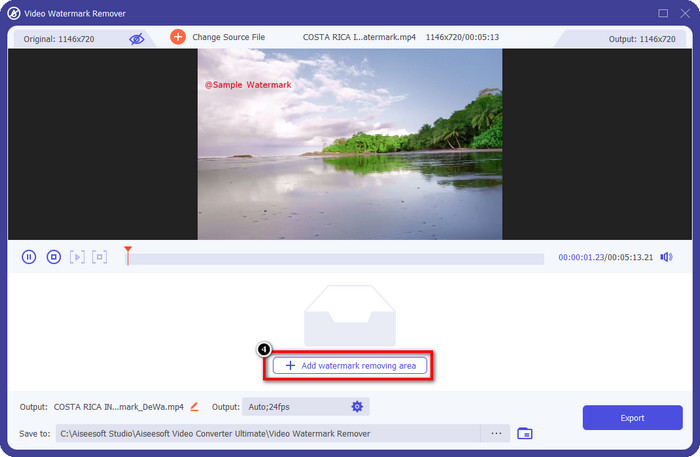
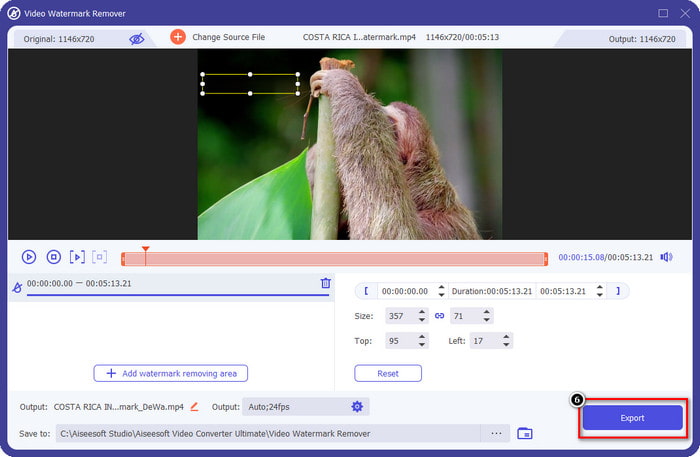
Korak 4. Pritisnite Add Watermark Removing Area da biste počeli koristiti ovaj alat u sklopu softvera.
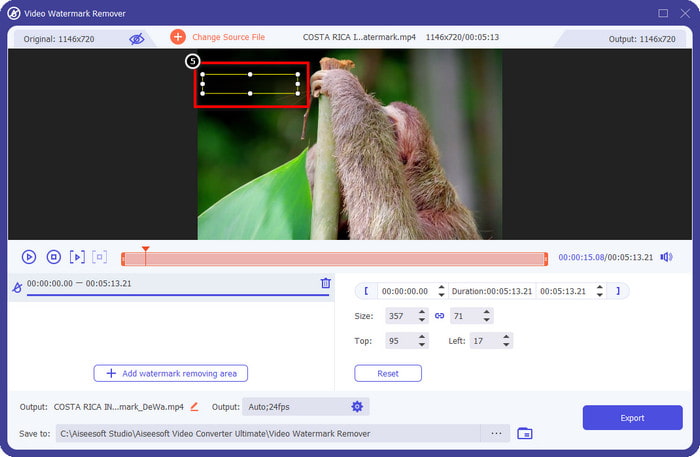
Korak 5. Mišem povucite pravokutni oblik preko područja s vodenim žigom, a zatim ga otpustite. Možete prilagoditi veličinu pravokutnika kako biste točno obuhvatili vodeni žig.
Korak 6. Kliknite gumb Export da biste pokrenuli postupak uklanjanja vodenog žiga. Kada završi, na zaslonu će se pojaviti skočna mapa; kliknite datoteku da biste pogledali videozapis bez vodenog žiga.
VLC Media Player
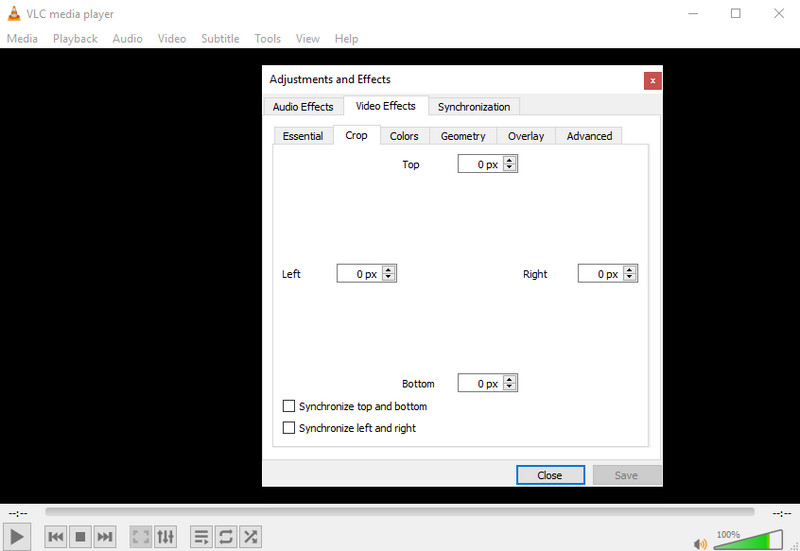
VLC Media Player nije namjenski alat za uklanjanje vodenih žigova. Ipak, može obaviti posao tako da izrežete dio videa na kojem se nalazi vodeni žig. Ovaj alat nije samo reproduktor i rezač videa; ovaj popularni media player nudi i druge mogućnosti. No nemojte očekivati da će ovaj alat biti prikladan za profesionalno uređivanje i jednostavan za upotrebu, jer to nije. Prilikom izrezivanja videa morat ćete unijeti točne mjere kako biste odrezali vodeni žig s videa. Dakle, ako znate točne x i y koordinatne vrijednosti videa, možete slijediti postupak kako ukloniti vodeni žig „edited by PowerDirector” pomoću ovog media playera.
Korak 1. Nakon što preuzmete softver s VideoLAN.org, otvorite ga. Kliknite Media, zatim Open File i na lokalnom disku koji će se prikazati na zaslonu potražite videozapis koji uređujete u PowerDirectoru.
Korak 2. Video će početi s reprodukcijom, kliknite Tools, zatim Effects and Filter. Možete koristiti i tipkovnički prečac: pritisnite Control + E na Windowsu ili Command + E na Macu.
Korak 3. Idite na Video Effects, Crop i dodajte vrijednosti za izrezivanje videa tako da uklonite vodeni žig.
Korak 4. Da biste primijenili izvršene prilagodbe, kliknite Save.
Kapwing
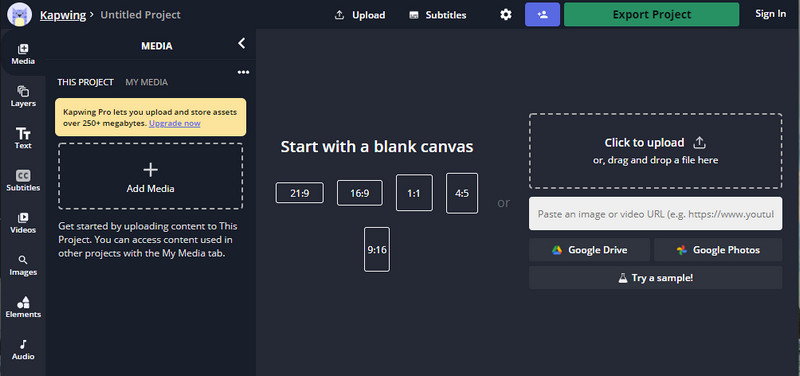
Trebate online uređivač videozapisa? Pokušajte koristiti Kapwing. To je intuitivan web alat koji možete koristiti za uređivanje videozapisa poput onoga što možete učiniti na Power Directoru. Ipak, to nije na razini Power Directora. Većina uređivanja videozapisa koja bi vam mogla trebati već je ovdje, poput rezanja vodenog žiga. Iako alat radi isti posao kao VLC na uklanjanju vodenog žiga, ovaj alat ima okno za pregled gdje možete vidjeti obrezani videozapis prije izvoza. Dakle, ako želite spremiti videozapise, uredite u Powerdirectoru bez vodenog žiga za PC; prvo ih ovdje morate izrezati.
Korak 1. Otvorite ovaj web-alat tako da ga potražite u pregledniku, zatim kliknite Add Media kako biste ovdje učitali videozapis. Nakon učitavanja slijedi postupak prijenosa pa ćete morati pričekati prije nego što budete mogli koristiti video koji ste dodali.
Korak 2. Kliknite Crop na lijevoj strani sučelja kako biste otvorili funkcije za izrezivanje.
Korak 3. Prilagodite okvir i pobrinite se da vodeni žig videa ne bude unutar tog okvira.
Neobvezno: Ako ne želite ručno mijenjati dimenzije videa, ispod su dostupne gotove opcije koje možete slobodno koristiti.
rame i provjerite da vodeni žig videozapisa nije uključen u okvir.” /]Korak 4. Kada završite, kliknite Done Cropping kako biste spremili video koji ste izrezali pomoću Kapwinga.
Povezano:
Kako ukloniti vodeni žig s Renderforest izvezenih videa
Kako ukloniti Viva Video vodeni žig s videa
Dio 2. Često postavljana pitanja o uklanjanju vodenog žiga Power Director
Je li sigurno besplatno preuzeti apk Powerdirector no watermark za Android?
Da, možete posjetiti Trgovinu Play i pretražiti njen naziv da biste preuzeli aplikaciju Power Director. Međutim, besplatna probna verzija ovog alata dodaje vodeni žig. Pretpostavimo da pokušate preuzeti aplikaciju na web-mjestima trećih strana kako biste imali punu verziju. U tom slučaju to ne smijete učiniti jer bi u datoteci nakon preuzimanja na vaš Android moglo biti zlonamjernih virusa. Za uklanjanje vodenog žiga na Powerdirectoru morate kupiti licencni ključ.
Koliko košta aplikacija Power Director na računalu?
Možete imati Power Director 365 za $ 4.08 po početnoj cijeni svakog mjeseca, možete otići na planove i pretplatu na njegovoj službenoj web stranici. Također možete vidjeti uključene značajke koje možete dobiti nakon što iskoristite plan po svom izboru.
Ima li Cyberlink PowerDirector vodeni žig?
Da, dodaje vodeni žig nakon što izvezete videozapis na besplatnu verziju aplikacije, no to se može izbjeći. Ako kupite softver bilo kojeg plana ili pretplate, ne biste morali brinuti o vodenom žigu jer vodeni žig proizvoda neće biti dodan nakon izvoza.
Zaključak
Ako želite izvesti videozapise, izradite ih u programu PowerDirector za PC bez vodenog žiga. Morate kupiti licencni ključ za ovaj program. Ali ako ne želite potrošiti ni peni, odaberite alate koje smo dodali ovom članku jer ti alati mogu učinkovito ukloniti vodeni žig na vašim uređenim videozapisima. Još uvijek niste uvjereni u alat koji smo dodali u ovom članku? Tada bi pomoglo da ih prvo isprobate, počevši od vrhunskog alata za uklanjanje vodenog žiga Power Directora.
-
 Uklonite Animoto vodeni žig na videozapisima jednostavno i učinkovito
 Kako ukloniti Animoto vodeni žig na videu? Nastavite čitati ovaj članak jer smo dali potpuni vodič o tome kako to učiniti.
-
 Kako ukloniti vodeni žig s videa pomoću programa Final Cut Pro [Kompletan vodič]
 Imate li problema s vodenim žigom na videozapisima? Ništa više, jer smo dali vodič o tome kako ukloniti vodeni žig iz videa pomoću Final Cut Pro.
-
 3 načina kako ukloniti WeVideo vodeni žig s trenutnim učinkom
 Imate li problema s rješavanjem problema s vodenim žigom koji WeVideo ostavlja? Ne brinite više, jer dodajemo informacije koje morate znati.
